HP LaserJet Pro M1536dnf Multifunction Printer Software Drivers Download for Mac Os X
Download HP LaserJet Professional Full Feature Software and Drivers for Mac
HP LaserJet Pro M1536dnf Printer Review
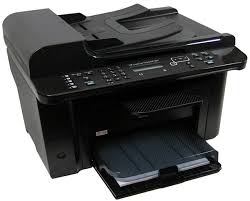
HP LaserJet Pro M1536dnf is a multifunction printer. Moreover, this printer has printing, photocopying and fax features. It also has one black cartridge. You cannot print in color with this printer. In my opinion, the lack of color output on this printer means that this printer is produced for office use. Because we definitely need color printouts in the home environment. Color printing is especially needed in homes with children.
You can print an average of 25 pages per minute. This number depends on your system features and whether your printer drivers are up to date. It also depends on the density of the page you want to print. It also prints the first page in 8.5 seconds. The recommended monthly print count is 500 to 2000 pages. This makes this printer useful in small offices. You can often see this printer in schools, insurance companies and accounting offices.
Description HP LaserJet Pro M1536dnf Drivers for Mac
Software, Driver Download for HP LaserJet Pro M1536dnf Multifunction Printer
Release details
Compatibility: Mac OS X 10.5
Released: 2011-01-07
File name: hp_M1530_MFP_v12.4.1.dmg
Version : 12.4.1
Download
File Size : 203.74M
Compatibility: Mac OS X 10.6, Mac OS X 10.7, Mac OS X 10.8
Released: 2014-01-29
File name: LaserJet-M1530-MFP-series_v12.23.0.dmg
Version : 12.23.0
Download
File Size : 247.63Mb
Compatibility: Mac OS X 10.9
Released: Oct 23, 2014
File name: HP-LaserJet-SW-OSX-Mavericks_v12.34.26.dmg
Version: 12.34
Download
File Size : 121.72Mb
HP LaserJet Pro M1536dnf Printer Key Features
You can print at 600 x 600 dpi resolution with the HP LaserJet Pro M1536dnf. It also has a two-line LCD display. Moreover, its 500Mhz processor will make your work easier. There is also one high-speed USB 2.0 port.
It also has a 10/100 Ethernet port. You can print from other computers on the network. It is not recommended to print more than 8000 pages per month. This may reduce the lifespan of your printer.
We can list the compatible operating systems as follows: Windows 11/10/8/7/Vista/Xp – Mac Os X v10.5.8, Linpus Linux, Red Hat Enterprise, SuSE, Ubuntu, Debian and Solaris are some of them. We will examine Linux drivers and their installation as another topic later.
As for the negative aspects of the HP LaserJet Pro M1536dnf printer; Unfortunately, this printer, which has 128Mb memory, does not have any memory expansion. Also there is no Internal storage. There is a power consumption of 445watts during printing.
As for the positive aspects: There is automatic double-sided printing. The input tray supports 250 sheets of A4. Additionally, the output tray has a capacity of 100 pages. Moreover, it can scan 15 pages per minute. It has fax memory of up to 400 pages. It has a sound level of 51dB(A).