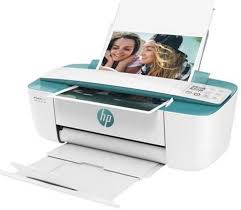
Download HP Deskjet 3762 All-in-One Inkjet Multifunction Printer Driver for Windows 11/10/8.1/8/7 (64-Bit)
HP DeskJet and Ink Advantage 3700 All-in-One Print and Scan Driver and Accessories
HP Deskjet 3762 Printer
HP Deskjet 3762 Driver for Windows
The full solution software includes everything you need to install and use your HP printer. This collection of software includes the complete set of drivers, installer and optional software.
Fix and enhancements: Updated some basic information in installation screen.
Microsoft Windows 11, Microsoft Windows 10 (32-bit), Microsoft Windows 10 (64-bit), Microsoft Windows 8.1 (32-bit), Microsoft Windows 8.1 (64-bit), Microsoft Windows 8 (32-bit), Microsoft Windows 8 (64-bit), Microsoft Windows 7 (32-bit), Microsoft Windows 7 (64-bit)
HP DeskJet Ink Advantage 3836 Driver for Macintosh (HP Easy Start)
File name: HP_Easy_Start.app.zip Released: Sep 24, 2018 Version : 2.9.0.180 Operating systems: Mac OS X 10.14, Mac OS X 10.10, Mac OS X 10.11, Mac OS X 10.12, Mac OS X 10.9, Mac OS X 10.13 Download Size : 9.12 Mb
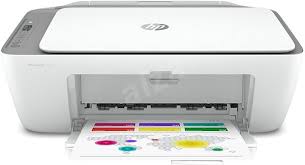
HP DeskJet 2720 All-in-One Wireless Printer Driver Download for Windows 11/10/7 32bit-64bit
You can easily download and install the HP DeskJet 2720 driver. The latest software for your printer is here. Download, installation, troubleshooting and support.
HP Easy Start Printer Setup Software – Officejet and Photosmart Full Feature Software and Drivers- HP DeskJet/Ink Advantage 2700 All-in-One Printer series All-in-One Printer series Firmware Update
Printer HP DeskJet 2720
Print, scan and copy. With HP Smart app, print and scan from virtually anywhere: Print documents, photos from the cloud, social media, scan with your smartphone camera. Get beter range and faster, more reliable connections using dual-band Wi-Fi with self-reset.
HP DeskJet 2720 Driver for Windows
The full solution software includes everything you need to install and use your HP printer. This collection of software includes the complete set of drivers, installer software, and other administrative tools.
HP Easy Start Printer Setup Software – Offline Use Only
Operating Systems : Microsoft Windows 11, Microsoft Windows 10 (32-bit), Microsoft Windows 10 (64-bit), Microsoft Microsoft Windows 7 (32-bit), Microsoft Windows 7 (64-bit)
Version: 51.4.4865 Release date: Aug 6, 2024 File name: HPEasyStart-16.2.4-DJ2700_51_4_4865_Webpack.exe
HP DeskJet/Ink Advantage 2700 All-in-One Printer series All-in-One Printer series Firmware Update
This software tool will help you update your printer to the latest firmware. After the download is complete, run the file you downloaded and follow the instructions. Also, please see the Fixes and improvements section for more details about the firmware update.
Fixes and improvements: Instant ink printing performance improvements. Additionally, improvements have been made to print quality. Also, general improvements and bug fixes. Moreover, it also includes improvement in EWS.
Version: 2349B/2349C/2349D Name: DJ2700_2349B_2349C_2349D.exe Post Date: Mar 27, 2024
Compatible Systems: Windows 11, Windows 10-10 (64-bit), Windows 8.1-8.1 (64-bit), Windows 8 -8 (64-bit),Windows 7- 7 (64-bit)
Released: 25 Aug 2014 Version : 14.8.0 Compatibility: Windows 10 (32-bit), Windows 10 (64-bit), Windows 8 (32-bit), Windows 8 (64-bit), Windows 8.1 (32-bit), Windows 8.1 (64-bit) Download File Size :113.49Mb
This document is for HP DeskJet Ink Advantage 5075, 5076, 5078, 5085, 5088 and ENVY 5010, 5012, 5014, 5020, 5030, 5032, 5034, 5052, and 5055 All-in-One printers.
This document contains steps for replacing the ink cartridges.
Replace the ink cartridges
Turn on the printer.
Load plain white paper into the input tray.
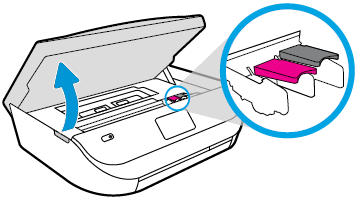
Gently grasp the handles on either side of the printer, and then raise the ink cartridge access door until it locks into place. The carriage moves slightly to the left.
Opening the ink cartridge access door
Opening the ink cartridge access door
Wait until the carriage is idle and silent before you continue
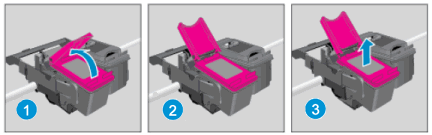
Lift up the lid on the ink cartridge slot, and then pull up on the ink cartridge to remove it from the slot.
Removing the ink cartridge
1.Lift the lid. 2.Gently push the lid back. 3.Pull up on the ink cartridge
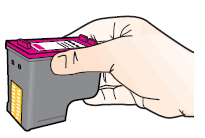
Remove the new ink cartridge from its package. Be careful to only touch the black plastic on the ink cartridge.
Holding the ink cartridge by its sides
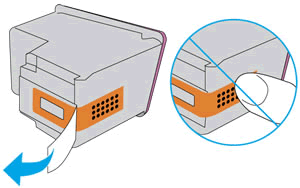
Remove the plastic tape from the ink cartridge.
NOTE : Do not touch the copper-colored contacts or the ink nozzles. Do not replace the protective tape on the contacts. Handling these parts can result in clogs, ink failure, and bad electrical connections.
Removing the plastic tape
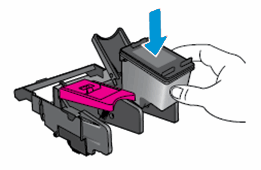
With the nozzles toward the printer, insert the ink cartridge into its slot until it snaps into place.
Note:Install the color ink cartridge on the left and the black ink cartridge on the right.
Inserting the ink cartridge
Close the lid on the ink cartridge slot to secure the ink cartridge into place.
Repeat these steps to install the other ink cartridge, if necessary.
Close the ink cartridge access door.
After you install new ink cartridges, the printer automatically prints an alignment page.
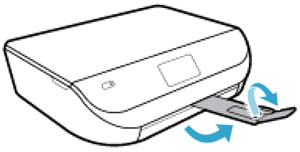
Pull out the output tray, and then lift the output tray extender.
Pulling out the output tray and lifting the output tray extender
Wait for the alignment page to fully eject from the printer.
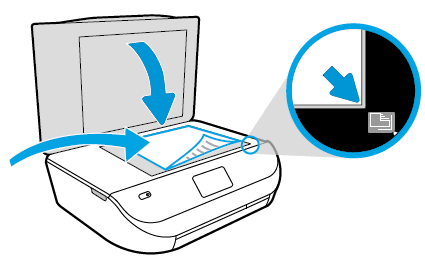
After the alignment page prints, lift the scanner lid, place the alignment page with the print side down on the scanner glass. Position it according to the engraved guides around the glass.
Placing the alignment page on the scanner glass
Close the scanner lid, and then touch OK on the printer control panel. The printer aligns the ink cartridges.
After the printer aligns the ink cartridges, touch OK on the control panel.
Download HP ENVY 5000 All-in-One Print and Scan Driver and Accessories
Fix and enhancements:
Updated end user license agreement and data collection statement. Updated localization string for Korean language.
Printer setup over BLE (Bluetooth) experience improvement. Security improvements.
Operating Systems
Microsoft Windows 10 (32-bit), Microsoft Windows 10 (64-bit), Microsoft Windows 8.1 (32-bit), Microsoft Windows 8.1 (64-bit), Microsoft Windows 8 (32-bit), Microsoft Windows 8 (64-bit), Microsoft Windows 7 (32-bit), Microsoft Windows 7 (64-bit), Microsoft Windows Vista (32-bit), Microsoft Windows XP (32-bit)
HP DeskJet Ink Advantage 5000 All-in-One Printer series Firmware Update
This software tool will help you update your printer to the latest firmware. Please refer to Fixes and enhancements for more detail about the firmware update.
Printer setup over BLE (Bluetooth) experience improvement. Security improvements.
Operating Systems
Microsoft Windows 10 (32-bit), Microsoft Windows 10 (64-bit), Microsoft Windows 8.1 (32-bit), Microsoft Windows 8.1 (64-bit), Microsoft Windows 8 (32-bit), Microsoft Windows 8 (64-bit), Microsoft Windows 7 (32-bit), Microsoft Windows 7 (64-bit), Microsoft Windows Vista (32-bit), Microsoft Windows XP (32-bit)