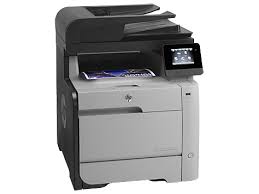
HP LaserJet MFP M476dw Printer Drivers for Windows 10/8/7/Vista/Xp
Download HP Color LaserJet Pro MFP M476 Printer Series Full Software and Drivers
HP Color LaserJet Pro MFP M476 Printer
Drivers & Software for HP Color LaserJet Pro MFP M476dw
Description
The full solution software includes everything you need to install your HP printer. This collection of software includes the complete set of drivers, installer software, and other administrative tools found on the printer’s software CD.
Release details
HP LaserJet M476dw Scanner Driver and Software
Version: 15.0.16078.631 Relase Date : Mar 5, 2021 File name: LJPro-MFP-M476-Full-Solution-16078.exe
Operating Systems:
Microsoft Windows XP, Microsoft Windows Vista, Microsoft Windows Vista (64-bit), Microsoft Windows 7 (32-bit), Microsoft Windows 7 (64-bit), Microsoft Windows 8 (32-bit), Microsoft Windows 8 (64-bit), Microsoft Windows 8.1 (32-bit), Microsoft Windows 8.1 (64-bit), Microsoft Windows 10 (32-bit), Microsoft Windows 10 (64-bit)
HP LaserJet Pro P1108 Desktop Printer Software and Driver Download for Windows 11/10/8/7Vista/Xp 32bit/64bit
Product Features and reviews
On this page you can find drivers, installation instructions, and some troubleshooting software for the HP LaserJet Pro P1108 Printer. You can also access installation instructions. We will also talk about some technical issues about the HP LaserJet Pro P1108. I hope you enjoy this short but useful information. I will also include my personal experiences.
The HP LaserJet Pro P1108 Printer uses a single black cartridge. Additionally, this printer promises 600x600x2 dpi print quality. Moreover, HP LaserJet Pro P1108 has a 266Mhz processor.
Cons: There is no HP ePrint feature. There is no wireless (wifi) feature either. For this reason, it cannot be used with mobile devices. The HP LaserJet Pro P1108 Printer has a 150-sheet input tray.
I think it’s enough. However, it is very important that the papers you put in the input tray are not damp. Otherwise it will cause paper jams. You can do double-sided printing manually.
I think the power consumption is a little high. It consumes 360watts of energy during printing. However, in the ready mode, this value drops to 1.4watts. Moreover, it has a consumption of 0.6 watts in the off state. The HP LaserJet Pro P1108 has a noise level of 51dB(A) when printing. It doesn’t bother much. It may be a bit disturbing in very quiet environments.
Download HP LaserJet Pro P1100, P1560, P1600 Series Full Feature Software and Driver (32bit/64bit)
Hp Laserjet Pro P1108 Printer
Description HP LaserJet Pro P1108 Desktop Laser Printer Driver
This full software solution is the same solution as the in-box CD that came with your printer.
Microsoft Windows 10 (32-bit)(64-bit), Microsoft Windows Vista(32-bit)(64-bit), Microsoft Windows 7 (32-bit)(64-bit), Microsoft Windows XP (x86) (x64), Microsoft Windows Server 2003, Microsoft Windows Server 2008 W32, Microsoft Windows Server 2008 x64, Microsoft Windows 8 (32-bit)(64-bit), Microsoft Windows 8.1 (32-bit)(64-bit)
Firstly, do not connect the USB cable until prompted by the installer. After that, If you are connecting to a network, make sure the network cable is connected before running the installer. Moreover, close any software programs running on your computer. After that, turn on the printer and click on the Download button on this page. Than, click the downloaded file. In this way, the files will be extracted and the installation process will automatically start. Than, follow the on-screen instructions to proceed with and complete the installation. Additionally, to install at a later date, select Save on step 4 and select a location on your hard disk. similarly, when ready to install, locate and double-click the file. This will automatically extract and start the installation process. Finally, follow the on-screen instructions to proceed with the installation.
Download Hp Laserjet Pro P1108 Printer (CE655A) Printer and Scanner Doctor for Windows 11, 10, 8, 7
The HP Print and Scan Doctor was designed by HP to provide users with troubleshooting and problem solving features needed to resolve many common problems experienced with HP print and scan products connected to Windows-based computers. Moreover, Simply run the tool and follow the on-screen instructions.
Fix and enhancements: Added Support For New Products. Moreover, PSA Queue Creation Defect. Hardware error status is not updating properly.
File name: HPPSdr.exe Released: Mar 5, 2024 Version 5.7.4.009
Operating systems: Microsoft Windows 11, Microsoft Windows 10 (32-bit)(64-bit), Microsoft Windows 8 (32-bit)(64-bit), Microsoft Windows 8.1 (32-bit)(64-bit), Microsoft Windows 7 (32-bit)(64-bit)
As a result, the Hp Laserjet Pro P1108 Printer is quite useful. Additionally, the cost of printing is quite low. Its disadvantages are that it is not colorful and does not support wifi. You can’t scan, fax or photocopy like HP’s all-in-one printers. As an alternative to this printer, you can look at the alternative Epson PM-520. I hope you like the drivers, software and our opinions about the printer we have prepared for you. Happy Days.
HP LaserJet Full Feature Software and Driver. (Updated: Jan 6, 2016)
HP LaserJet 1022nw Printer
Fix and enhancements
Windows 8 and Windows 8.1 Compatibility
Description
This full software solution is the same solution as the in-box CD that came with your printer. This is not a software upgrade. If a prior version software is currently installed, it must be uninstalled before installing this version.
HP LaserJet 1022n, 1022nw Printers – Wireless Printer Setup
HP LaserJet 1022nw printers have built-in wireless connectivity for 802.11b/g wireless networks. The HP LaserJet 1022n printer supports the 802.11b/g standard for wireless networking connectivity options through optional external accessories. Optional external HP Jetdirect 802.11b/g print servers are available for USB connections.
Release details
Released: Jan 6, 2016
File name: hp_LJ1020_Full_Solution-v2012_918_1_57980.exe
Version : v1601
Operating Systems: Microsoft Windows 8 (32-bit) (64-bit), Microsoft Windows Vista(32-bit)(64-bit), Microsoft Windows 8.1 (32-bit) (64-bit), Microsoft Windows 7 (32-bit) (64-bit), Microsoft Windows XP