HP Color LaserJet Managed Flow MFP E77825z Driver for Windows 11-10-8-7
Download HP Color LaserJet Managed MFP E77820/E77822/E77825/E77830 Printer Full Software Solution
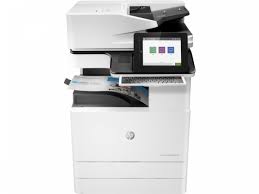
HP Color LaserJet Managed Flow MFP E77825z
Description:
The full solution software includes everything you need to install your HP printer. This collection of software includes the vomplete set of drivers, installer software, and other administrative tools found on the printer’s software CD.
Details :
Release date: Nov 11, 2021
Version: 49.10.4644
Operating systems:
Microsoft Windows 11, Microsoft Windows 10 (32-bit), Microsoft Windows 10 (64-bit), Microsoft Windows 7 (32-bit), Microsoft Windows 7 (64-bit), Microsoft Windows 8 (32-bit), Microsoft Windows 8 (64-bit) Microsoft Windows 8.1 (32-bit), Microsoft Windows 8.1 (64-bit)
HP Sprocket Photo Printers – Setting up the Printer
This document is for HP Sprocket Photo Printers, and the HP sprocket app for Android mobile and Apple iOS devices.
To set up a printer for the first time, remove the printer and all packing materials from the box, install the HP sprocket app, pair your printer and mobile device, load HP Sprocket Photo Paper, and then calibrate the printer.
Remove the printer from the box
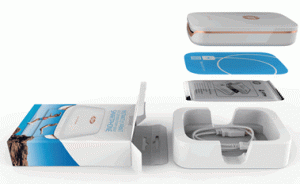
Remove the printer from the box, remove any plastic packing material from the printer, and then recycle the packing materials.
Hp Sprocket
Pair the printer and mobile device
Install the HP sprocket app on your mobile device, and then pair your mobile device to the printer using a Bluetooth connection. The app is required to connect the printer and print photos from your mobile device.
Go to the HP Sprocket (in English) homepage, and then follow the on-screen instructions to download and install the app.
After the app installs, turn on the printer.
Sprocket
On your mobile device, open the Bluetooth settings menu, and then make sure Bluetooth is enabled.
Open the HP sprocket app.
If a Welcome screen displays, tap the setup option, and then follow the on-screen instructions.
If a prompt displays to Reveal with AR, tap Enable Reveal or No, Thanks. For more information, go to Using Reveal to Relive Memories.
Tap the Menu icon , tap sprocket, and then tap Manage Printers.
A list of available Sprockets displays.
If your printer displays, the printer is connected.
If your printer does not display, tap Add New Printer, and then tap your printer.
Load HP Sprocket Photo Paper
Load 5.0 x 7.6 cm (2 x 3 in) HP Sprocket Photo Paper into the input tray.
Turn off the printer.
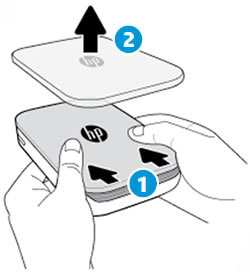
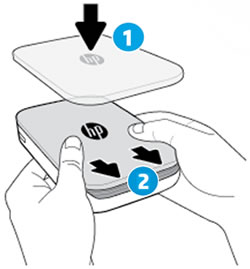
Remove the top cover by sliding it away from the output slot, and then set it aside.
HP Sprocket Printer
Slide the top cover
Remove the top cover
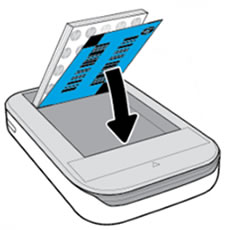
Load up to 10 sheets of HP Sprocket Photo Paper with the blue Print Quality Card (formerly Smartsheet). Make sure the blue card is on the bottom of the stack with the barcode facing down, and the photo paper with the HP logos facing down.
(Keep the blue card until you are done with all 10 sheets, and then discard it)
HP Sprocket
Align the top cover with the tracks on the outside of the printer, and then slide the top cover toward the output slot until it is firmly seated.
HP Sprocket Setting
Align the top cover
Slide the top cover
Turn on the printer.
Calibrate the printer
Send a print job with the HP sprocket app to calibrate the printer with the Print Quality Card.
HP LaserJet Pro M706 Series Driver Download Windows 11/10/8/8.1/7 (32Bit/64Bit)
Download HP Universal Print Driver for Windows PCL6 (32-bit)(64-bit)
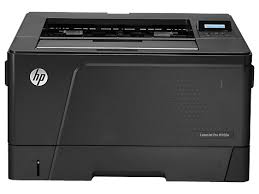
HP LaserJet Pro M706 Printer
Description HP LaserJet Pro M706 Driver
This is the most current PCL6 driver of the HP Universal Print Driver (UPD) for Windows 32 bit/64 bit systems.
The HP Universal Print Driver is a single driver that provides access to a variety of HP printing options. This driver supports many HP printer models. You do not need to install separate drivers for all of them. However, you may not be able to use all the features of your printer. If there is a driver produced for your printer, it would be better to install it. However, HP company only releases universal drivers for some of its models.
Description HP LaserJet 9050dn Driver
This is the most current PCL6 driver of the HP Universal Print Driver (UPD) for Windows 32/64 bit systems.
Release details
Version: v7.3.0.25919
Relase Date : Nov 18, 2024
Operating Systems: Microsoft Windows 10 (32-bit), Microsoft Windows 7 (32-bit), Microsoft Windows 8 (32-bit), Microsoft Windows 8.1 (32-bit), Microsoft Windows Server 2012, Microsoft Windows Server 2016, Microsoft Windows Server 2019 File name: upd-pcl6-x32-7.3.0.25919.zip
Operating Systems: Microsoft Windows 11, Microsoft Windows 10 (64-bit), Microsoft Windows 7 (64-bit), Microsoft Windows 8 (64-bit), Microsoft Windows 8.1 (64-bit), Microsoft Windows Server 2012, Microsoft Windows Server 2016, Microsoft Windows Server 2019 File name: upd-ps-x64-7.3.0.25919.zip
Released: Jan 17, 2020 File name: HP_M1130_M1210_MFP_Full_Solution-v20180815-10158769.exe Version : 20180815 Download File Size : 212.72Mb
Before you start installing the driver for your printer, you need to download the driver suitable for your operating system above to your computer. Additionally, when the driver installation is completed, you can delete the file you downloaded if you wish. Moreover, all the drivers published on our site are taken from HP’s original website. All are completely safe. Our goal is to help you find the driver you are looking for more easily and quickly. However, if you want to see more detailed drivers for your printer, you can visit HP’s original site. You can find a shortcut to the original site at the top right of our site. Also, if you need drivers for different operating systems or different printers, you can share this with us. We’d be happy to help you.