
Advertisement
HP 3303sdw driver software and downloads for
HP Color LaserJet Pro MFP 3303sdw Printer
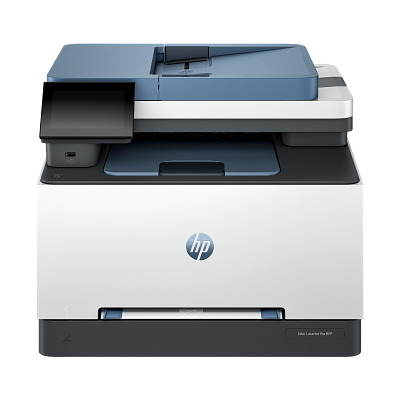
Designed for business work teams that need professional performance with fast, high-quality two-sided color printing with scanning and copying, plus award-winning reliability in a compact design.
Specifications
- Product number
- 499M6A
- Functions
- Print, copy, scan
- Print speed (ISO, black / color)
- Up to 25 ppm
- Print quality (black / color, best)
- Up to 600 x 600 dpi
- Recommended monthly volume
- 150–2,500 pages
- Faxing
- No
HP 3303sdw driver download for Windows
Recommended HP 3303sdw driver software
See full detailsWindows 11; Windows 10, 8.1 (32/64-bit); Windows Server 2022, 2025, 2019, 2016, 2012, 2012 R2
- Type:
- Driver-Universal Scan Driver
- Version:
- 63.8.6459
- Operating systems:
- Windows 11; Windows 10, 8.1 (32/64-bit); Windows Server 2022, 2025, 2019, 2016, 2012, 2012 R2
- Release date:
- Jul 5, 2026
- File name:
- Full_Webpack-63.8.6459-SJ0001_Full_Webpack.exe
(436.2 MB)
Package notes
Full webpack provides various scan functionalities. Supports OCR capabilities and Cloud Destinations.
- 1. Scan speed optimized for faster performance
- 2. IRIS Downloader Support for Supported Devices
- 3. Note: Feature availability varies depending on the device type. Some functionalities might not be accessible on certain devices. To access the latest features and updates, ensure you have installed the most recent firmware and the latest version of the HP Scan.
Alternative packages
See full detailsWindows 11; Windows 10 (32/64-bit)
- Type:
- Driver
- Version:
- 60.0.1840
- Operating systems:
- Windows 11; Windows 10 (32/64-bit)
- Release date:
- Oct 22, 2023
- File name:
- HPEasyStart-16.2.1-LJ3301-3304_UWWL_3_1_60_0_1860_2_Webpack.exe
(505.0 MB)
Package notes
The full solution software includes everything you need to install and use your HP printer. This collection of software includes the complete set of drivers, installer software, and other administrative tools.
- 1. Original Software/Drivers
HP 3303sdw setup options
See full detailsWindows 11; Windows 10 (32/64-bit)
- Type:
- Installation Software and Driver-Includes print, scan, latest features, and solutions
- Version:
- 17.6.14
- Operating systems:
- Windows 11; Windows 10 (32/64-bit)
- Release date:
- Sep 24, 2026
- File name:
- HPEasyStart_17_6_14.exe
(26.5 MB)
Package notes
HP Easy Start provides guided setup and drivers for your HP printer.
- 1. Improved user experience.
- 2. Performance optimizations.
- 3. New product introduction.
Additional software
See full detailsWindows 11; Windows 10 (32/64-bit)
- Type:
- Installation Software and Driver-Includes print, scan, latest features, and solutions
- Version:
- 17.4.18
- Operating systems:
- Windows 11; Windows 10 (32/64-bit)
- Release date:
- Apr 8, 2026
- File name:
- HPEasyStart_17_4_18.exe
(24.5 MB)
Package notes
HP Easy Start provides guided setup and drivers for your HP printer.
- 1. Improved user experience.
- 2. Performance optimizations.
- 3. New product introduction.
HP 3303sdw compatibility packages
See full detailsWindows 11; Windows 11 on ARM (64-bit)
- Type:
- Driver-Universal Scan Driver
- Version:
- 63.8.6459
- Operating systems:
- Windows 11; Windows 11 on ARM (64-bit)
- Release date:
- Aug 5, 2026
- File name:
- Full_Webpack-63.8.6459_ARM64-SJ0001_Full_Webpack.exe
(437.0 MB)
Package notes
Full webpack provides various scan functionalities. Supports OCR capabilities and Cloud Destinations.
- 1. NPI enablement of Devices
- 2. IRIS Downloader Support for Supported Devices
- 3. Note : Feature availability varies depending on the device type. Some functionalities might not be accessible on certain devices. To access the latest features and updates, ensure you have installed the most recent firmware and the latest version of the HP Scan.
More available software
See full detailsWindows 11; Windows 10 (32/64-bit); Windows Server 2022, 2019, 2016, 2012, 2012 R2
- Type:
- Driver
- Version:
- 60.0.1895
- Operating systems:
- Windows 11; Windows 10 (32/64-bit); Windows Server 2022, 2019, 2016, 2012, 2012 R2
- Release date:
- Mar 18, 2024
- File name:
- V4_DriveronlyWebpack-60.0.1895-LJ3301-3304_V4_DriveronlyWebpack.exe
(19.3 MB)
Package notes
This solution provides only the PCL 6 driver without an installer. To install the print driver use the Add Printer Wizard. The device must be setup initially with the documented installation before proceeding to use this driver.
- 1. Disassociation of HP Smart
HP 3303sdw download options
See full detailsWindows 11; Windows 10, 7 (32-bit); Windows Server 2022, 2019, 2016, 2012, 2012 R2, 2008 R2, 2008
- Type:
- Driver-Smart Universal Print Driver
- Version:
- 4.08.1.3348
- Operating systems:
- Windows 11; Windows 10, 7 (32-bit); Windows Server 2022, 2019, 2016, 2012, 2012 R2, 2008 R2, 2008
- Release date:
- Sep 17, 2026
- File name:
- SUPD-4.08.1.3348-V3-x86.zip
(25.1 MB)
Package notes
This is the most current version of the V3 HP Smart Universal Printing Driver (SUPD) for Windows 32 bit systems.
- 1. For detailed information on Enhancements/Features/Fixes and Fixes History please use the following link to refer to the Release Notes: HP Smart Universal Printing Driver – Release Notes
Other available packages
See full detailsWindows 10 (64-bit); Windows Server 2022, 2019, 2016
- Type:
- Driver-Smart Universal Print Driver
- Version:
- 6.03.1.4143
- Operating systems:
- Windows 10 (64-bit); Windows Server 2022, 2019, 2016
- Release date:
- Sep 17, 2026
- File name:
- SUPD-6.03.1.4143-V4-Win10-x64.zip
(24.5 MB)
Package notes
This is the most current version of the V4 HP Smart Universal Printing Driver (SUPD) for Windows 64 bit systems.
- 1. For detailed information on Enhancements/Features/Fixes and Fixes History please use the following link to refer to the Release Notes: HP Smart Universal Printing Driver – Release Notes
Recommended HP 3303sdw driver software
See full detailsWindows 11; Windows 10, 8.1 (64-bit); Windows Server 2022, 2025, 2019, 2016, 2012, 2012 R2
- Type:
- Driver-Universal Scan Driver
- Version:
- 63.8.6459
- Operating systems:
- Windows 11; Windows 10, 8.1 (64-bit); Windows Server 2022, 2025, 2019, 2016, 2012, 2012 R2
- Release date:
- Jul 5, 2026
- File name:
- Basic_Webpack_x64-63.8.6459-SJ0001_Basicx64_Webpack.exe
(113.9 MB)
Package notes
This is the minimum Scan Software solution which provides basic Scan functionality, WIA and Twain support.Does not include OCR capabilities and Cloud Destinations. Download Full webpack for OCR capabilities.
- 1. Scan speed optimized for faster performance
- 2. IRIS Downloader Support for Supported Devices
- 3. Note: Feature availability varies depending on the device type. Some functionalities might not be accessible on certain devices. To access the latest features and updates, ensure you have installed the most recent firmware and the latest version of the HP Scan.
Alternative packages
See full detailsWindows 11; Windows 10, 7 (64-bit); Windows Server 2019, 2016, 2012, 2012 R2, 2008 R2, 2008
- Type:
- Driver-Smart Universal Print Driver
- Version:
- 4.08.1.3348
- Operating systems:
- Windows 11; Windows 10, 7 (64-bit); Windows Server 2019, 2016, 2012, 2012 R2, 2008 R2, 2008
- Release date:
- Sep 17, 2026
- File name:
- SUPD-4.08.1.3348-V3-x64.zip
(28.4 MB)
Package notes
This is the most current version of the V3 HP Smart Universal Printing Driver (SUPD) for Windows 64 bit systems.
- 1. For detailed information on Enhancements/Features/Fixes and Fixes History please use the following link to refer to the Release Notes: HP Smart Universal Printing Driver – Release Notes
HP 3303sdw setup options
See full detailsWindows 11; Windows Server 2025
- Type:
- Driver-Smart Universal Print Driver
- Version:
- 6.03.1.4143
- Operating systems:
- Windows 11; Windows Server 2025
- Release date:
- Sep 17, 2026
- File name:
- SUPD-6.03.1.4143-V4-Win11-x64.zip
(18.4 MB)
Package notes
This is the most current version of the V4 HP Smart Universal Printing Driver (SUPD) for Windows 64 bit systems.
- 1. For detailed information on Enhancements/Features/Fixes and Fixes History please use the following link to refer to the Release Notes: HP Smart Universal Printing Driver – Release Notes
Additional software
See full detailsWindows 11; Windows 10 (64-bit); Windows 11 on ARM (64-bit); Windows 10 on ARM (64-bit)
- Type:
- Driver-Smart Universal Print Driver
- Version:
- 6.03.1.4143
- Operating systems:
- Windows 11; Windows 10 (64-bit); Windows 11 on ARM (64-bit); Windows 10 on ARM (64-bit)
- Release date:
- Sep 17, 2026
- File name:
- SUPD-6.03.1.4143-V4-ARM64.zip
(22.8 MB)
Package notes
This is the most current version of the V4 HP Smart Universal Printing Driver (SUPD) for Windows ARM64 bit systems.
- 1. For detailed information on Enhancements/Features/Fixes and Fixes History please use the following link to refer to the Release Notes: HP Smart Universal Printing Driver – Release Notes
HP 3303sdw compatibility packages
See full detailsWindows 11; Windows 11 on ARM (64-bit)
- Type:
- Driver-Universal Scan Driver
- Version:
- 63.8.6459
- Operating systems:
- Windows 11; Windows 11 on ARM (64-bit)
- Release date:
- Aug 5, 2026
- File name:
- Basic_Webpack_x64-63.8.6459_ARM64-SJ0001_Basicx64_Webpack.exe
(118.7 MB)
Package notes
This is the minimum Scan Software solution which provides basic Scan functionality, WIA and Twain support.Does not include OCR capabilities and Cloud Destinations. Download Full webpack for OCR capabilities.
- 1. NPI enablement of Devices
- 2. IRIS Downloader Support for Supported Devices
- 3. Note : Feature availability varies depending on the device type. Some functionalities might not be accessible on certain devices. To access the latest features and updates, ensure you have installed the most recent firmware and the latest version of the HP Scan.
More available software
See full detailsWindows 10 (32-bit); Windows Server 2025
- Type:
- Driver-Smart Universal Print Driver
- Version:
- 6.03.1.4143
- Operating systems:
- Windows 10 (32-bit); Windows Server 2025
- Release date:
- Sep 17, 2026
- File name:
- SUPD-6.03.1.4143-V4-Win10-x86.zip
(23.0 MB)
Package notes
This is the most current version of the V4 HP Smart Universal Printing Driver (SUPD) for Windows 32 bit systems.
- 1. For detailed information on Enhancements/Features/Fixes and Fixes History please use the following link to refer to the Release Notes: HP Smart Universal Printing Driver – Release Notes
HP 3303sdw download options
See full detailsWindows 10, 8.1 (32-bit)
- Type:
- Driver-Universal Scan Driver
- Version:
- 63.8.6459
- Operating systems:
- Windows 10, 8.1 (32-bit)
- Release date:
- Jul 5, 2026
- File name:
- Basic_Webpack_x86-63.8.6459-SJ0001_Basicx86_Webpack.exe
(86.1 MB)
Package notes
This is the minimum Scan Software solution which provides basic Scan functionality, WIA and Twain support.Does not include OCR capabilities and Cloud Destinations. Download Full webpack for OCR capabilities.
- 1. Scan speed optimized for faster performance
- 2. IRIS Downloader Support for Supported Devices
- 3. Note: Feature availability varies depending on the device type. Some functionalities might not be accessible on certain devices. To access the latest features and updates, ensure you have installed the most recent firmware and the latest version of the HP Scan.
Firmware and utilities
See full detailsWindows 11; Windows 10, 7 (32/64-bit); Windows Server 2022, 2019, 2016, 2012, 2012 R2, 2008 R2, 2008
- Type:
- Software-Smart Universal Print Driver
- Version:
- 5.06.1.604
- Operating systems:
- Windows 11; Windows 10, 7 (32/64-bit); Windows Server 2022, 2019, 2016, 2012, 2012 R2, 2008 R2, 2008
- Release date:
- Jun 24, 2025
- File name:
- HPSPARKTools-5.06.1.604.zip
(101.5 MB)
Package notes
The HP Smart Print Administrator Resource Kit (HP SmartPARK) is a collection of tools, scripts, and documents to help print administrators install, deploy, configure and manage the "HP Smart Universal Printing" driver (HP SUPD) and the associated print queues.
- 1. For detailed information on Enhancements/Features/Fixes and Fixes History please use the following link to refer to the Release Notes: HP Smart Print Administrator Resource Kit – Release Notes
More firmware and utilities
See full detailsWindows 11; Windows 10, 8.1, 7 (32/64-bit); Windows Server 2022, 2025, 2019, 2016, 2012, 2012 R2, 2008 R2, 2008; Windows 11 on ARM (64-bit)
- Type:
- Driver-Universal Fax Driver
- Version:
- 8.2.89
- Operating systems:
- Windows 11; Windows 10, 8.1, 7 (32/64-bit); Windows Server 2022, 2025, 2019, 2016, 2012, 2012 R2, 2008 R2, 2008; Windows 11 on ARM (64-bit)
- Release date:
- Sep 10, 2026
- File name:
- UFD_8.2-8.2.89-HPUFDDriver.exe
(25.2 MB)
Package notes
The HP Universal Fax Driver is a solution installed on a client PC. Note : This method is not supported for Windows Server PC. Refer HP Universal Fax Driver for Windows – Driver Only package for Server PC.
- 1. Added support for new products.
More firmware and utilities
See full detailsWindows 11; Windows 10, 8.1, 7 (32/64-bit); Windows Server 2022, 2025, 2019, 2016, 2012, 2012 R2, 2008 R2, 2008; Windows 11 on ARM (64-bit)
- Type:
- Driver-Universal Fax Driver
- Version:
- 8.2.89
- Operating systems:
- Windows 11; Windows 10, 8.1, 7 (32/64-bit); Windows Server 2022, 2025, 2019, 2016, 2012, 2012 R2, 2008 R2, 2008; Windows 11 on ARM (64-bit)
- Release date:
- Sep 10, 2026
- File name:
- UFD_8.2-8.2.89-HPUFD_Driver_Files.exe
(13.8 MB)
Package notes
The HP Universal Fax Driver works well with a broad range of networked and direct-connected HP fax enabled Enterprise Multifunction Printers (MFPs).
- 1. Added support for new products.
More firmware and utilities
See full detailsWindows 11; Windows 10 (32/64-bit); Windows Server 2019, 2016, 2012, 2012 R2, 2008 R2, 2008; Windows HPC Server
- Type:
- Printer Firmware
- Version:
- 6.28.3.30-202606111700
- Operating systems:
- Windows 11; Windows 10 (32/64-bit); Windows Server 2019, 2016, 2012, 2012 R2, 2008 R2, 2008; Windows HPC Server
- Release date:
- Jul 17, 2026
- File name:
- HP_Color_LaserJet_Pro_MFP_3301-3388_Firmware_6.28.3.30-202606111700.bdl
(267.8 MB)
Package notes
This file is for updating printer firmware via USB flash drive or fleet management utilities like HP Web Jetadmin. This firmware will only work with the models indicated on this page. The printer's current firmware version can be found on the printable Configuration Report, or on the printer control panel in Menu — Info — Printer. Reminder : Dynamic security enabled printer. This firmware includes dynamic security measures, which are used to block cartridges using a non-HP chip or modified or non-HP electronic circuitry. The printer is intended to work only with new or reused cartridges that have a new or reused HP chip or circuitry. Periodic firmware updates will maintain the effectiveness of the dynamic security measures and may block unauthorized cartridges that previously worked. More at: www.hp.com/learn/ds.
- 1. HP Color LaserJet Pro MFP 3301-3304 / 3388 Series Firmware Fixes and Enhancements for Version 6.28.3.30-202606111700
- 2. Fixes
- 3. Fix for the control panel blank screen issue when selecting color cartridge in very low behaviour settings
- 4. Fix for PCLXL error while printing from third parties application
- 5. Fix for various assert errors when printing
- 6. Fix for scan copy gray out issue
- 7. Fix for blank pages issue while printing PDF on MacOS
- 8. Fix for scan to folder issue
- 9. Fix for EWS page hang when web scan is enabled
- 10. Fix for scan to email spilt option
More firmware and utilities
See full detailsWindows 11; Windows 10 (32/64-bit); Windows Server 2019, 2016, 2012, 2012 R2, 2008 R2, 2008; Windows 11 version 21H2 (64-bit); Windows 11 version 22H2 (64-bit); Windows 10 version 21H1 (64-bit); +3 versions
- Type:
- Printer Firmware
- Version:
- 6.28.3.30-202606111700
- Operating systems:
- Windows 11; Windows 10 (32/64-bit); Windows Server 2019, 2016, 2012, 2012 R2, 2008 R2, 2008; Windows 11 version 21H2 (64-bit); Windows 11 version 22H2 (64-bit); Windows 10 version 21H1 (64-bit); +3 versions
- Release date:
- Jul 17, 2026
- File name:
- HP_Color_LaserJet_Pro_MFP_3301-3388_Firmware_6.28.3.30-202606111700.exe
(269.9 MB)
Package notes
This utility can be run on Microsoft Windows to update printer firmware over a USB or network connection. This firmware will only work with the models indicated on this page. The printer's current firmware version can be found on the printable Configuration Report, or on the printer control panel in Menu — Info — Printer. Reminder : Dynamic security enabled printer. This firmware includes dynamic security measures, which are used to block cartridges using a non-HP chip or modified or non-HP electronic circuitry. The printer is intended to work only with new or reused cartridges that have a new or reused HP chip or circuitry. Periodic firmware updates will maintain the effectiveness of the dynamic security measures and may block unauthorized cartridges that previously worked. More at: www.hp.com/learn/ds.
- 1. HP Color LaserJet Pro MFP 3301-3304 / 3388 Series Firmware Fixes and Enhancements for Version 6.28.3.30-202606111700
- 2. Fixes
- 3. Fix for the control panel blank screen issue when selecting color cartridge in very low behaviour settings
- 4. Fix for PCLXL error while printing from third parties application
- 5. Fix for various assert errors when printing
- 6. Fix for scan copy gray out issue
- 7. Fix for blank pages issue while printing PDF on MacOS
- 8. Fix for scan to folder issue
- 9. Fix for EWS page hang when web scan is enabled
- 10. Fix for scan to email spilt option
More firmware and utilities
See full detailsWindows 11; Windows 10, 8.1 (32/64-bit)
- Type:
- Update
- Version:
- 1.0.1020
- Operating systems:
- Windows 11; Windows 10, 8.1 (32/64-bit)
- Release date:
- Jan 18, 2024
- File name:
- Win7plus-1.0.1020-HPOCR_Win7plus.exe
(224.9 MB)
Package notes
HP Scan OCR Add-on Software provides OCR and OCR related functionalities and is designed to be used as a plugin for HP Scan Software. This add-on is already available as part of the HP Scan Full Webpack.
Related series packages
See full detailsWindows 11; Windows 10 (32/64-bit)
- Type:
- Driver
- Version:
- 60.0.1840
- Operating systems:
- Windows 11; Windows 10 (32/64-bit)
- Release date:
- Oct 22, 2023
- File name:
- HPEasyStart-16.2.1-LJ3301-3304_UW_4_1_60_0_1860_2_Webpack.exe
(505.0 MB)
Package notes
The full solution software includes everything you need to install and use your HP printer. This collection of software includes the complete set of drivers, installer software, and other administrative tools.
- 1. Original Software/Drivers
More related series packages
See full detailsWindows 11; Windows 10 (32/64-bit)
- Type:
- Driver
- Version:
- 60.0.1840
- Operating systems:
- Windows 11; Windows 10 (32/64-bit)
- Release date:
- Oct 22, 2023
- File name:
- HPEasyStart-16.2.1-LJ3301-3304_UWWL_4_1_60_0_1860_2_Webpack.exe
(505.0 MB)
Package notes
The full solution software includes everything you need to install and use your HP printer. This collection of software includes the complete set of drivers, installer software, and other administrative tools.
- 1. Original Software/Drivers
HP 3303sdw driver download for macOS
Recommended HP 3303sdw software
See full detailsmacOS 10.14–10.15, 11–15, 26
- Type:
- Driver-Product Installation Software
- Version:
- 2.8.0
- Operating systems:
- macOS 10.14–10.15, 11–15, 26
- Release date:
- Aug 31, 2026
- File name:
- HP_Easy_Start_Pro.pkg
(81.5 MB)
Package notes
HP Easy Start Pro for Mac
- 1. New Product Introduction
- 2. Improved user experience
- 3. Performance Optimizations
- 4. Bug Fixes
Firmware and utilities
See full detailsmacOS 10.12–10.15, 11–15; OS X 10.5–10.11
- Type:
- Printer Firmware
- Version:
- 6.28.3.30-202606111700
- Operating systems:
- macOS 10.12–10.15, 11–15; OS X 10.5–10.11
- Release date:
- Jul 17, 2026
- File name:
- HP_Color_LaserJet_Pro_MFP_3301-3388_Firmware_6.28.3.30-202606111700.bdl
(267.8 MB)
Package notes
This file is for updating printer firmware via USB flash drive or fleet management utilities like HP Web Jetadmin. This firmware will only work with the models indicated on this page. The printer's current firmware version can be found on the printable Configuration Report, or on the printer control panel in Menu — Info — Printer. Reminder : Dynamic security enabled printer. This firmware includes dynamic security measures, which are used to block cartridges using a non-HP chip or modified or non-HP electronic circuitry. The printer is intended to work only with new or reused cartridges that have a new or reused HP chip or circuitry. Periodic firmware updates will maintain the effectiveness of the dynamic security measures and may block unauthorized cartridges that previously worked. More at: www.hp.com/learn/ds.
- 1. HP Color LaserJet Pro MFP 3301-3304 / 3388 Series Firmware Fixes and Enhancements for Version 6.28.3.30-202606111700
- 2. Fixes
- 3. Fix for the control panel blank screen issue when selecting color cartridge in very low behaviour settings
- 4. Fix for PCLXL error while printing from third parties application
- 5. Fix for various assert errors when printing
- 6. Fix for scan copy gray out issue
- 7. Fix for blank pages issue while printing PDF on MacOS
- 8. Fix for scan to folder issue
- 9. Fix for EWS page hang when web scan is enabled
- 10. Fix for scan to email spilt option
HP 3303sdw Linux Support
Recommended HP 3303sdw software
See full detailsLinux
- Type:
- HP Support
- Version:
- Version not listed
- Operating systems:
- Linux
- Release date:
- Date not listed
- File name:
- HP Support
HP 3303sdw Mobile Apps
Recommended HP 3303sdw software
See full detailsAndroid
- Type:
- Mobil uygulama
- Version:
- Version not listed
- Operating systems:
- Android
- Release date:
- Date not listed
- File name:
- Google Play
Alternative packages
See full detailsiPhone / iPad
- Type:
- Mobil uygulama
- Version:
- Version not listed
- Operating systems:
- iPhone / iPad
- Release date:
- Date not listed
- File name:
- App Store
HP 3303sdw driver Installation & Support
HP 3303sdw driver installation resources:
Help for HP 3303sdw driver
Installation instructions for HP 3303sdw driver
Common setup problems for HP 3303sdw driver
Official resources for HP 3303sdw driver
Package versions for HP 3303sdw driver are listed in the download sections above.
For HP 3303sdw driver, use the matching operating-system section before downloading.
Advertisement