
hpdrivers.net is an independent website and is not affiliated with, endorsed by, or sponsored by HP Inc. Download links point to HP's official servers (ftp.hp.com). Learn more

HP DeskJet Ink Advantage Ultra 4926 Driver Download Windows

HP DeskJet Ink Advantage Ultra 4926 All-in-One Printer and Scanner Driver Software for Windows 11-10-8 32bit-64bit

Download HP Easy Start Printer Setup Software (Internet connection required for driver installation) / HP printer setup (HP Smart app)
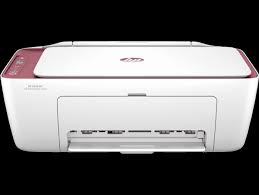
HP DeskJet Ink Advantage Ultra 4929 All-in-One Printer and Scanner

HP printer setup (HP Smart app)

Install HP Smart app to complete setup and support (Recommended)

Install HP Smart app to setup and use your Printer

  • HP Smart will help you connect your printer, install driver, offer print, scan, fax, share files and Diagnose/Fix top issues. Click here to learn how to setup your Printer successfully (Recommended).
  • Creating an HP Account and registering is mandatory for HP+/Instant-ink customers. It also helps in accessing assisted support options and more.

NOTE:

  • Disconnect from Virtual Private Network (VPN) connection before downloading.
  • Creating an account on Microsoft Store to download HP Smart app is optional.

The HP Smart app is the main software for your printer. Install it on the device you want to print from, and then use it to set up the printer connection. By installing the HP Smart app, you also install all drivers necessary to print and scan.

Install the HP Smart app

Download the HP Smart app from your app store.

Use the guided printer setup in the HP Smart app to connect your printer over USB or to the internet.

HP DeskJet Ink Advantage Ultra 4926 Easy Start Printer Setup Software Driver (Internet connection required for driver installation)

HP Easy Start provides guided setup and drivers for your HP printer. Furthermore, installation Software and Driver-Includes print, scan, latest features, and solutions.

Fix and enhancements: Improved user experience. Moreover, performance Optimizations. Additionally, added support for newest printer models.

Operating Systems : Microsoft Windows 11 All Editions, Microsoft Windows 10 (32-bit), Microsoft Windows 10 (64-bit)

Installation Software and Driver-Includes print, scan, latest features, and solutions.

Version : 16.7.5
Release date: Jul 18, 2024
File Name : HPEasyStart_16_7_5.exe

Download

File Size : 17.21Mb


Driver-Universal Scan Driver for HP ENVY 6075 Printer

HP is undoubtedly one of the largest printer and scanner producing companies. A new update has been released to the universal driver produced for HP scanner devices. Also some improvements and fixes have been made. This driver full web suite provides various scanning functions. However, it does not include OCR capabilities and Cloud targets.

HP DeskJet Ink Advantage Ultra 4926 Scan – Full Feature Software and Driver

Fix and enhancements:

Scan to computer improvements have been made in this version. However, some features may vary depending on your browser model. Additionally, the language of the Data Collection Agreement Screens has been updated.

Version: 63.4.6169

File name: Full_Webpack-63.4.6169-SJ0001_Full_Webpack.exe

Relased: Aug 29, 2024

Operating Systems

Microsoft Windows 11, Microsoft Windows 10 (32-bit), Microsoft Windows 10 (64-bit), Microsoft Windows 8.1 (32-bit), Microsoft Windows 8.1 (64-bit), Microsoft Windows Server 2022

Download

File Size: 411.21 MB

Finally, let’s make a few reminders about the installation. First, download the installation file to your computer. It will generally download to the general downloads folder. Then open the file you downloaded. The installation wizard will guide you. When the installation is finished, you can delete the file you downloaded. Or you can save it to reinstall it in case you experience problems again. If you encounter a problem, do not hesitate to contact us.


HP Universal Scan – Basic Feature Software and Driver

This driver provides the basic functionality of your scanner. It is the minimum scanning software solution that provides Wia and Twain support. It also does not include OCR capabilities and cloud targets. If you want these features, I recommend you download and install “HP Universal Scan – Full Featured Software and Driver”. However, if you are only going to do a simple scan, you do not need to install the full driver.

Version : 63.4.6169
Relase Date : Aug 29, 2024
File Name : Basic_Webpack_x64-63.4.6169-SJ0001_Basicx64_Webpack.exe

Download

File Size : 99.21 MB

In addition, some innovations have been made in the renewed simple scanning driver. For example, scan to computer has been improved. Of course, this may vary depending on your browser model.


HP Deskjet 3750 Driver for Windows

Version: 40.12
Post Date: Mar 28, 2019
File name: DJ3700_Basicx64_40.12.1161.exe
Operating Systems: Windows 10 (64-bit), Windows 7 (64-bit), Windows 8 (64-bit), Windows 8.1 (64-bit)
Download
Size: 58.21 MB
HP DeskJet Ink Advantage 2800 Drivers (DeskJet Ink Advantage 2800 All-in-One Series)

Last checked against HP’s download list: November 4, 2026 · Checked by H&G

Looking for the HP DeskJet Ink Advantage 2800 driver? This page lists HP’s official software for the whole HP DeskJet Ink Advantage 2800 All-in-One Printer series. HP lists some packages for specific models in the series, so check that the package title includes your model. For Windows 11, the package most people need is the HP DeskJet 2800 series EasyStart Printer Setup Software with PSA – Offline Use Only. For a Mac, HP lists Install HP app to complete setup and support.

Recommended downloads

Windows 11: HP DeskJet 2800 series EasyStart Printer Setup Software with PSA – Offline Use OnlyVersion 17.6.9 · Released Sep 29, 2026 · 449.8 MB
Download
macOS 26, 15, 14, 13, 11: Install HP app to complete setup and supportReleased Aug 29, 2025 · HP rating: Recommended
Download

Files download directly from HP’s official servers. hpdrivers.net does not host or modify them.

Models covered by this page

HP’s download list for this series names these models. It covers the whole DeskJet Ink Advantage 2800 All-in-One range, including model variants HP does not list by name:

  • HP DeskJet Ink Advantage 2875
  • HP DeskJet Ink Advantage 2876
  • HP DeskJet Ink Advantage 2877
  • HP DeskJet Ink Advantage 2878
  • HP DeskJet Ink Advantage 2879
  • HP DeskJet Ink Advantage 2874

Which Windows package should you choose?

HP publishes 2 kinds of Windows package for the DeskJet Ink Advantage 2800 All-in-One:

  • Firmware update (v2629A, Aug 26, 2026): updates the printer itself, not your PC.
  • Full software solution (v17.6.9, Sep 29, 2026, 456.2 MB): driver plus HP’s setup wizard and tools.

All downloads for the DeskJet Ink Advantage 2800 All-in-One

Windows

PackageWindowsVersionReleasedSize
HP DeskJet Ink Advantage 2800 All-in-One Printer series Firmware Update
File detailsFile: DJIA2800_2629A.exe
11
10 (32-bit and 64-bit)
2629AAug 26, 202614.7 MBDownload
HP DeskJet 2800 series EasyStart Printer Setup Software with PSA (ARM64) – Offline Use Only
File detailsFile: HPEasyStart-17.6.9-DJ2800_57_2_1683_ARM64_Webpack.exe
1117.6.9Sep 29, 2026456.2 MBDownload
HP DeskJet 2800 series EasyStart Printer Setup Software with PSA – Offline Use Only
File detailsFile: HPEasyStart-17.6.9-DJ2800_57_2_1683_Webpack.exe
1117.6.9Sep 29, 2026449.8 MBDownload
HP DeskJet 2800 series EasyStart Printer Setup Software – Offline Use Only
File detailsFile: HPEasyStart-17.6.9-DJ2800_57_2_1683_1_Webpack.exe
10 (32-bit and 64-bit)17.6.9Sep 29, 2026373.0 MBDownload

macOS

PackagemacOSVersionReleasedSize
HP DeskJet Ink Advantage 2800 All-in-One Printer series Firmware Update
File detailsFile: DJIA2800_2629A.dmg
14, 13, 11, 10.13, 10.12, 10.15, 10.142629AAug 26, 202617.8 MBDownload

Other HP software listed for this series

SoftwareSystemsVersion
HP Universal Scan – Full Feature Software and DriverWindows 11
Windows 10, 8.1 (32-bit and 64-bit)
63.8.6459Download
HP Universal Scan – Basic Feature Software and DriverWindows 11
Windows 10, 8.1 (32-bit and 64-bit)
63.8.6459Download
HP Universal Scan – Basic Feature Software and Driver (ARM 64)Windows 1163.8.6459Download
HP Universal Scan – Full Feature Software and Driver (ARM 64)Windows 1163.8.6459Download
HP Easy Start Printer Setup Software (Internet connection required for driver installation)Windows 11
Windows 10 (32-bit and 64-bit)
17.6.15Download
Install HP app to complete setup and supportWindows 11
Windows 10 (64-bit)
–Download
Install HP Smart app to complete setup and supportWindows 10 (32-bit)–Download
Install HP app to complete setup and supportmacOS 26, 15, 14, 13, 11–Download

Installing the DeskJet Ink Advantage 2800 All-in-One driver

For step-by-step instructions, see our guide to installing an HP printer driver.

Firmware update 2629A

The newest firmware HP lists for the DeskJet Ink Advantage 2800 All-in-One is version 2629A, released Aug 26, 2026. HP’s notes for it: Security fixes.

  • Keep the printer and the computer switched on until the update has finished.

Specifications that matter for setup

Connections1 Wi-Fi 802.11b/g/n; 1 Hi-Speed USB 2.0 (device)
Wi-FiYes, built-in Wi-Fi 802.11b/g/n, 2.4 GHz single-band only
Mobile printingHP app; Apple AirPrint; Chrome OS
Print languagesHP PCL 3 GUI; HP PCLm (HP Apps/UPD); URF (AirPrint)
FunctionsPrint, copy, scan
Recommended monthly volume50 to 100
Two-sided printingManual (driver support provided)
ScannerFlatbed
Scan resolutionUp to 1200 dpi
Document feederNo
Scan file formatsJPEG, TIFF, PDF, BMP, PNG
Ways to scanFront-panel Copy buttons, HP Smart sortware

Ink supplies HP lists for the DeskJet Ink Advantage 2800 All-in-One

HP’s specifications name these replacement supplies for the DeskJet Ink Advantage 2800 All-in-One:

  • HP 682 Tri-color Original Ink Advantage Cartridge (~150 pages

Paper handling and hardware details

Values below are HP’s published figures for the DeskJet Ink Advantage 2800 All-in-One; they help you check that this page matches your printer before you download anything.

Paper input tray60-sheet input tray
Output tray25-sheet output tray
Paper sizesLetter; legal; 4 x 6 in; 5 x 7 in; 8 x 10 in; No. 10 envelopes
Media typesPlain paper, Photo paper, Brochure paper, envelopes and other specialty inkjet paper
Paper weightLetter: 16 to 32 lb; HP envelopes: 20 to 24 lb; HP cards: up to 110 lb; HP 4 x 6 inch photo paper: up to 145 lb
Print quality (black)Black: Up to 1200 x 1200 rendered dpi Color: Up to 4800 x 1200 optimized dpi color (when printing from a computer on selected HP photo papers and 1200 input dpi
Control panelIcon LCD display
Processor1.0 GHz
Power use2.8 W (ready), 1.53 W (sleep), 0.3 W (auto-off)
Size (W x D x H)16.7 x 11.97 x 6.06 in
Weight3.42 kg 7.55 lb
USB cableAP: Yes, 1.0 (USB) cable; AMS, EMEA: No, please purchase (USB) cable separately
WarrantyOne-year limited warranty. For more info please visit us at http://support.hp.com .For full terms and conditions visit: www.hp.com/go/orderdocuments .Warranty a

HP LaserJet M2727 MFP Driver Download for Windows

HP LaserJet M2727 Multifunction Printer Series Driver for Windows 11/10/8/8.1/7 32bit-64bit

Download HP LaserJet M2727 MFP Series Full Solution AM-EMEA1

Hpdrivers.net-LaserJet M2727 printer
HP LaserJet M2727Multifunction Printer

Setup & install for HP LaserJet M2727 Multifunction Printer

Description

This full software solution provides print, fax and scan functionality. This software solution is specific to Microsoft Windows 7 only.

This is not a software upgrade for versions of the software for Microsoft Windows XP or Vista. This software solution download is specific to Microsoft Windows 7 only.

Release details

HP LaserJet M2727 MFP Series Full Solution AM-EMEA1

Version: 5.2
Relase Date : 26 Sep 2014

Microsoft Windows 7 (32-bit), Microsoft Windows 7 (64-bit), Microsoft Windows 8 (32-bit), Microsoft Windows 8 (64-bit), Microsoft Windows 8.1 (32-bit), Microsoft Windows 8.1 (64-bit), Microsoft Windows 10 (32-bit), Microsoft Windows 10 (64-bit)

File name: M2727series-win7-full-solution-v5.2-AM-EMEA1.exe

Download

File Size : 249.06 Mb

HP LaserJet M2727 Universal Print Driver for Windows PCL6 (64-bit) / (32-bit)

The HP Universal Print Driver is a single driver that provides access to a variety of HP printing options. This driver supports many HP printer models. You do not need to install separate drivers for all of them. However, you may not be able to use all the features of your printer. If there is a driver produced for your printer, it would be better to install it. However, HP company only releases universal drivers for some of its models.

This is the most current PCL6 driver of the HP Universal Print Driver (UPD) for Windows 32/64 bit systems.

Release details

Version: v7.3.0.25919

Relase Date : Nov 18, 2024

Operating Systems:
Microsoft Windows 10 (32-bit), Microsoft Windows 7 (32-bit), Microsoft Windows 8 (32-bit), Microsoft Windows 8.1 (32-bit), Microsoft Windows Server 2012, Microsoft Windows Server 2016, Microsoft Windows Server 2019
File name: upd-pcl6-x32-7.3.0.25919.zip

Download

File Size : 18.51 MB

Operating Systems:
Microsoft Windows 11, Microsoft Windows 10 (64-bit), Microsoft Windows 7 (64-bit), Microsoft Windows 8 (64-bit), Microsoft Windows 8.1 (64-bit), Microsoft Windows Server 2012, Microsoft Windows Server 2016, Microsoft Windows Server 2019
File name: upd-ps-x64-7.3.0.25919.zip

Download

File Size : 22.13Mb

Before you start installing the driver for your printer, you need to download the driver suitable for your operating system above to your computer. Additionally, when the driver installation is completed, you can delete the file you downloaded if you wish. Moreover, all the drivers published on our site are taken from HP’s original website. All are completely safe. Our goal is to help you find the driver you are looking for more easily and quickly. However, if you want to see more detailed drivers for your printer, you can visit HP’s original site. You can find a shortcut to the original site at the top right of our site. Also, if you need drivers for different operating systems or different printers, you can share this with us. We’d be happy to help you.