
hpdrivers.net is an independent website and is not affiliated with, endorsed by, or sponsored by HP Inc. Download links point to HP's official servers (ftp.hp.com). Learn more

HP DeskJet Ink Advantage Ultra 4900 Driver Download Windows

HP DeskJet Ink Advantage Ultra 4900 Series Printer and Scanner Driver Software for Windows 11-10-8 32bit-64bit

HP DeskJet 2800 series EasyStart Printer Setup Software – Offline Use Only
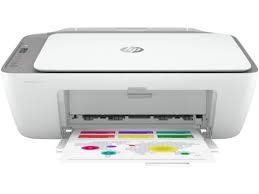
 HP DeskJet 2800e All-in-One Printer series hpdrivers.net
Printer HP DeskJet Ink Advantage 2800

HP DeskJet Ultra 4900 Easy Start Printer Setup Software Driver (Internet connection required for driver installation)

HP Easy Start provides guided setup and drivers for your HP printer. Furthermore, installation Software and Driver-Includes print, scan, latest features, and solutions.

Fix and enhancements: Improved user experience. Moreover, performance Optimizations. Additionally, added support for newest printer models.

Operating Systems : Microsoft Windows 11 All Editions, Microsoft Windows 10 (32-bit), Microsoft Windows 10 (64-bit)

Installation Software and Driver-Includes print, scan, latest features, and solutions.

Version : 16.7.5
Release date: Jul 18, 2024
File Name : HPEasyStart_16_7_5.exe

Download

File Size : 17.21Mb


Driver-Universal Scan Driver for HP DeskJet Ink Advantage Ultra 4900

HP is undoubtedly one of the largest printer and scanner producing companies. A new update has been released to the universal driver produced for HP scanner devices. Also some improvements and fixes have been made. This driver full web suite provides various scanning functions. However, it does not include OCR capabilities and Cloud targets.

HP DeskJet Ink Advantage Ultra 4900 Scan – Full Feature Software and Driver

Fix and enhancements:

Scan to computer improvements have been made in this version. However, some features may vary depending on your browser model. Additionally, the language of the Data Collection Agreement Screens has been updated.

Version: 63.4.6169

File name: Full_Webpack-63.4.6169-SJ0001_Full_Webpack.exe

Relased: Aug 29, 2024

Operating Systems

Microsoft Windows 11, Microsoft Windows 10 (32-bit), Microsoft Windows 10 (64-bit), Microsoft Windows 8.1 (32-bit), Microsoft Windows 8.1 (64-bit), Microsoft Windows Server 2022

Download

File Size: 411.21 MB

Finally, let’s make a few reminders about the installation. First, download the installation file to your computer. It will generally download to the general downloads folder. Then open the file you downloaded. The installation wizard will guide you. When the installation is finished, you can delete the file you downloaded. Or you can save it to reinstall it in case you experience problems again. If you encounter a problem, do not hesitate to contact us.


HP Universal Scan – Basic Feature Software and Driver

This driver provides the basic functionality of your scanner. It is the minimum scanning software solution that provides Wia and Twain support. It also does not include OCR capabilities and cloud targets. If you want these features, I recommend you download and install “HP Universal Scan – Full Featured Software and Driver”. However, if you are only going to do a simple scan, you do not need to install the full driver.

Version : 63.4.6169
Relase Date : Aug 29, 2024
File Name : Basic_Webpack_x64-63.4.6169-SJ0001_Basicx64_Webpack.exe

Download

File Size : 99.21 MB

In addition, some innovations have been made in the renewed simple scanning driver. For example, scan to computer has been improved. Of course, this may vary depending on your browser model.


HP Deskjet 3750 Driver for Windows

Version: 40.12
Post Date: Mar 28, 2019
File name: DJ3700_Basicx64_40.12.1161.exe
Operating Systems: Windows 10 (64-bit), Windows 7 (64-bit), Windows 8 (64-bit), Windows 8.1 (64-bit)
Download
Size: 58.21 MB
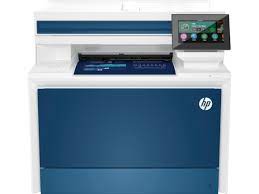
HP DeskJet 2800e Drivers (DeskJet 2800e All-in-One and DeskJet 2800 All-in-One Series)

Last checked against HP’s download list: November 1, 2026 · Checked by H&G

Looking for the HP DeskJet 2800e driver? This page lists HP’s official software for the whole HP DeskJet 2800e All-in-One Printer series. HP lists some packages for specific models in the series, so check that the package title includes your model. For Windows 11, the package most people need is the HP DeskJet 2800 series EasyStart Printer Setup Software with PSA – Offline Use Only.

Recommended downloads

Windows 11: HP DeskJet 2800 series EasyStart Printer Setup Software with PSA – Offline Use OnlyVersion 17.6.9 · Released Sep 29, 2026 · 456.2 MB

Download

Files download directly from HP’s official servers. hpdrivers.net does not host or modify them.


Models covered by this page

All 10 models share one download list at HP:

  • HP DeskJet 2810e
  • HP DeskJet 2820e
  • HP DeskJet 2821e
  • HP DeskJet 2822e
  • HP DeskJet 2823e
  • HP DeskJet 2842e
  • HP DeskJet 2852e
  • HP DeskJet 2855e
  • HP DeskJet 2825e
  • HP DeskJet 2827e

Which Windows package should you choose?

HP publishes 2 kinds of Windows package for the DeskJet 2800e All-in-One:

  • Firmware update (v2629A, Aug 26, 2026): updates the printer itself, not your PC.
  • Full software solution (v17.6.9, Sep 29, 2026, 456.2 MB): driver plus HP’s setup wizard and tools.

All downloads for the DeskJet 2800e All-in-One

Windows

Package Windows Version Released Size
HP DeskJet 2800/2800e All-in-One Printer series Firmware Update

File details

File: DJ2800_2629A.exe

11, 10 2629A Aug 26, 2026 14.7 MB Download

macOS

Package macOS Version Released Size
HP DeskJet 2800/2800e All-in-One Printer series Firmware Update

File details

File: DJ2800_2629A.dmg

26, 15, 13 2629A Aug 26, 2026 17.8 MB Download

Other HP software listed for this series

Software Systems Version
HP Universal Scan – Full Feature Software and Driver Windows 11, Windows 10 63.8.6459 Download
HP Universal Scan – Basic Feature Software and Driver Windows 11, Windows 10 63.8.6459 Download
HP Universal Scan – Basic Feature Software and Driver (ARM 64) Windows 11 63.8.6459 Download
HP Universal Scan – Full Feature Software and Driver (ARM 64) Windows 11 63.8.6459 Download
HP Easy Start Printer Setup Software (Internet connection required for driver installation) Windows 11, Windows 10 17.6.15 Download
HP DeskJet 2800 series EasyStart Printer Setup Software with PSA – Offline Use Only Windows 11 17.6.9 Download
HP DeskJet 2800 series EasyStart Printer Setup Software – Offline Use Only Windows 10 17.6.9 Download

Installing the DeskJet 2800e All-in-One driver

For step-by-step instructions, see our guide to installing an HP printer driver.

Firmware update 2629A

The newest firmware HP lists for the DeskJet 2800e All-in-One is version 2629A, released Aug 26, 2026. HP’s notes for it: Security fixes.

  • Keep the printer and the computer switched on until the update has finished.

Specifications that matter for setup

Connections 1 Hi-Speed USB 2.0 (device); 1 Wi-Fi 802.11b/g/n
Wi-Fi Yes, built-in Wi-Fi 802.11b/g/n
Mobile printing HP app; Apple AirPrint; Chrome OS; Mopria-certified
Print languages HP PCL 3 GUI; HP PCLm (HP Apps/UPD); URF (AirPrint)
Functions Print, copy, scan
Recommended monthly volume 50 to 100
Two-sided printing Manual (driver support provided)
Scan resolution Up to 1200 dpi
Document feeder No

HP DeskJet 2800 All-in-One Printer series downloads

HP lists the DeskJet 2800 All-in-One Printer series as its own series (DeskJet 2820, DeskJet 2821, DeskJet 2822, DeskJet 2823, DeskJet 2829, DeskJet 2810 and DeskJet 2828). It shares 12 of its 12 packages with the DeskJet 2800e All-in-One Printer series.

HP Color LaserJet Pro MFP 4301fdne Driver Download Windows

HP Color LaserJet Pro MFP 4301fdne Printer Driver for Windows 11/10 32Bit-64Bit

Download HP Color LaserJet Pro MFP 4301-4303dw/fdn/fdw PCL-6 V4 Printer Driver (no installer)

HP Color LaserJet Pro MFP 4301fdne Printer

Details for HP Color LaserJet Pro MFP 4301fdne Driver

This solution provides only the PCL 6 driver without an installer. To install the print driver use the Add Printer Wizard.

Fix and enhancements:

Fixed the Security Vulnerability

Relase Details

Version: 56.1.1311

Relased: Aug 23, 2023

File name: V4_DriveronlyWebpack-56.1.1311-LJ4301-4303_V4_DriveronlyWebpack.exe

HP Color LaserJet Pro M452 Printer Series PCL-6 Driver

Operating Systems : Microsoft Windows 10 (32-bit), Microsoft Windows 10 (64-bit), Microsoft Windows 11

Download

Size: 14.91Mb

HP Easy Start Printer Setup Software (Internet connection required for driver installation)

HP Easy Start provides guided setup and drivers for your HP printer. Furthermore, installation Software and Driver-Includes print, scan, latest features, and solutions.

Fix and enhancements: Improved user experience. Moreover, performance Optimizations. Additionally, added support for newest printer models.

Operating Systems : Microsoft Windows 11 All Editions, Microsoft Windows 10 (32-bit), Microsoft Windows 10 (64-bit)

Installation Software and Driver-Includes print, scan, latest features, and solutions.

Version : 16.7.5
Release date: Jul 18, 2024
File Name : HPEasyStart_16_7_5.exe

Download

File Size : 17.21Mb

Driver-Universal Scan Driver for HP Color LaserJet Pro MFP 4301fdne

HP is undoubtedly one of the largest printer and scanner producing companies. A new update has been released to the universal driver produced for HP scanner devices. Also some improvements and fixes have been made. This driver full web suite provides various scanning functions. However, it does not include OCR capabilities and Cloud targets.

HP Color LaserJet Pro MFP 4301fdne Scan – Full Feature Software and Driver

Fix and enhancements:

Scan to computer improvements have been made in this version. However, some features may vary depending on your browser model. Additionally, the language of the Data Collection Agreement Screens has been updated.

Version: 63.4.6169

File name: Full_Webpack-63.4.6169-SJ0001_Full_Webpack.exe

Relased: Aug 29, 2024

Operating Systems

Microsoft Windows 11, Microsoft Windows 10 (32-bit), Microsoft Windows 10 (64-bit), Microsoft Windows 8.1 (32-bit), Microsoft Windows 8.1 (64-bit), Microsoft Windows Server 2022

Download

File Size: 411.21 MB

Finally, let’s make a few reminders about the installation. First, download the installation file to your computer. It will generally download to the general downloads folder. Then open the file you downloaded. The installation wizard will guide you. When the installation is finished, you can delete the file you downloaded. Or you can save it to reinstall it in case you experience problems again. If you encounter a problem, do not hesitate to contact us.


HP Universal Scan – Basic Feature Software and Driver

This driver provides the basic functionality of your scanner. It is the minimum scanning software solution that provides Wia and Twain support. It also does not include OCR capabilities and cloud targets. If you want these features, I recommend you download and install “HP Universal Scan – Full Featured Software and Driver”. However, if you are only going to do a simple scan, you do not need to install the full driver.

Version : 63.4.6169
Relase Date : Aug 29, 2024
File Name : Basic_Webpack_x64-63.4.6169-SJ0001_Basicx64_Webpack.exe

Download

File Size : 99.21 MB

In addition, some innovations have been made in the renewed simple scanning driver. For example, scan to computer has been improved. Of course, this may vary depending on your browser model.