HP OfficeJet 3830 All-in-One Printer Driver for Windows 11/10/8/7/Vista/Xp – Printer Features and Reviews
Download HP OfficeJet 3830 series Print and Scan Driver and Accessories
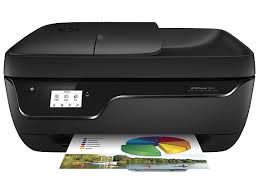
HP OfficeJet 3830 Printer Features and Reviews
We reviewed the HP OfficeJet 3830 All-in-One printer for you. We also found and added the latest drivers from HP’s official website. Moreover, we also added some utilities. We will also talk about our personal experiences about the HP OfficeJet 3830 printer. So let’s start.
HP OfficeJet 3830 All-in-One Printer is designed for general office use. It has print, copy, scan and fax functions. You can print black pages at 8.5 pages per minute and color pages at 6 pages per minute. Additionally, the printing time of the first page is 14 seconds. The number of pages recommended by HP per month is 100 to 250 pages. You may think this is a little bit low. I think it’s a little bit low. You can also print black print up to 1200×1200 dpi. When you want to print in color, this increases to 4800 x 1200 dpi. Scanning resolution is up to optical 1200 dpi.
Additionally, HP OfficeJet 3830 has a 2.2-inch touch screen with magic frame. Moreover, this printer has a 180MHz processor. It also has an automatic paper sensor. Additionally, you can use it with mobile devices thanks to its wireless (Wi-Fi) feature. It also has a high-speed USB 2.0 connection socket.
Compatible operating systems:
Windows 10, Windows 8.1, Windows 8, Windows 7; Mac OS X v10.8 Mountain Lion, OS X v10.9 Mavericks, OS
HP OfficeJet 3830 printer has 512Mb memory and 128MB Flash memory. It has a slightly small 60-sheet input tray. Additionally, the output tray is 25 sheets. Does not support automatic duplex printing.
Media types:
Plain paper, photo paper, brochure paper, envelopes, and other specialty inkjet papers.
Power consumption is 10watts during printing. 2.83watts in standby. 0.1watt when off.
If we compare it with toner laser printers, you will see that it is very efficient. Some HP printers consume 540 watts during printing. If you do not have extra insurance, HP offers a one-year commercial hardware warranty for this printer and 24-hour web support 7 days a week. However, this may vary depending on the country where you purchased the product. Some countries require at least a 2-year warranty.
Details HP OfficeJet 3830 Software Driver Download
The full solution software includes everything you need to install and use your HP printer. This collection of software includes the complete set of drivers, installer and optional software.
Fix and enhancements: Updated end user license agreement and data collection statement. Color Option and Auto Configuration option.
Release details
File name: Full_Webpack-40.17.1248-OJ3830_Full_Webpack.exe
Released: Dec 12, 2023
Version : 40.17.1248
Operating Systems :
Microsoft Windows 11, Microsoft Windows 10 (32bit/64bit), Microsoft Windows 8 (32bit/64bit), Microsoft Windows Vista (32bit/64bit), Microsoft Windows 8.1 (32bit/64bit), Microsoft Windows 7 (32bit/64bit), Microsoft Windows XP
File Size : 149.73 Mb
HP printer setup (HP Smart app)
Install HP Smart app to complete setup and support (Recommended)
Install HP Smart app to setup and use your Printer
- HP Smart will help you connect your printer, install driver, offer print, scan, fax, share files and Diagnose/Fix top issues. Click here to learn how to setup your Printer successfully (Recommended).
- Creating an HP Account and registering is mandatory for HP+/Instant-ink customers. It also helps in accessing assisted support options and more.
NOTE:
- Disconnect from Virtual Private Network (VPN) connection before downloading.
- Creating an account on Microsoft Store to download HP Smart app is optional.
The HP Smart app is the main software for your printer. Install it on the device you want to print from, and then use it to set up the printer connection. By installing the HP Smart app, you also install all drivers necessary to print and scan.
Install the HP Smart app
Download the HP Smart app from your app store.
- Microsoft Store (Windows): HP Smart (in English)
- Mac App Store (macOS): HP Smart for Desktop (in English)
- Google Play Store (Android): HP Smart (in English)
- App Store (iOS): HP Smart (in English)
Use the guided printer setup in the HP Smart app to connect your printer over USB or to the internet.