
hpdrivers.net is an independent website and is not affiliated with, endorsed by, or sponsored by HP Inc. Download links point to HP's official servers (ftp.hp.com). Learn more

HP LaserJet MFP M438dn Driver Download

HP LaserJet MFP M438dn Wireless All-in-One Color Printer Driver for Windows

Download HP LaserJet MFP M437,M438,M439,M440,M442,M443 Series Full Solution Software and Drivers
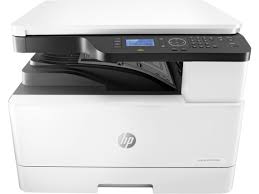
HP LaserJet MFP M438dn Printer Wireless All-in-One Color Printer

HP LaserJet MFP M438dn Driver

The full solution software includes everything you need to install your HP printer.

Version: 1.06
Release Date: May 31, 2023
File name: HP_LaserJet_MFP_M437-M443_Full_Software_and_Drivers_1.06.exe

Operating Systems

Microsoft Windows 11, Microsoft Windows 10 (32-bit), Microsoft Windows 10 (64-bit), Microsoft Windows 7 (32-bit), Microsoft Windows 7 (64-bit), Microsoft Windows 8 (32-bit), Microsoft Windows 8 (64-bit), Microsoft Windows 8.1 (32-bit), Microsoft Windows 8.1 (64-bit), Microsoft Windows Vista (32-bit), Microsoft Windows Vista (64-bit), Microsoft Windows XP (32-bit), Microsoft Windows XP x64

Download

File Size: 60.51 MB


HP Color LaserJet Managed E75245dn Printer Driver

Version: 49.1.4430
Release date: Feb 22, 2019
File name: CLE75245_Full_WebPack_49.1.4430.exe
Operating Systems: Windows 10 (32-bit) Windows 10 (64-bit) Windows 7 (32-bit) Windows 7 (64-bit) Windows 8 (32-bit) Windows 8 (64-bit) Windows 8.1 (32-bit) Windows 8.1 (64-bit)
Download
Size: 67.01 Mb

Printer Setup Notes

If you have purchased a new printer, you need to install its driver before connecting your device to the computer. Additionally, if you connect with a USB cable before installing the driver, your operating system can install the driver closest to your printer from its own archive. This may cause your printer not to work or to have problems. Therefore, you must first install the driver produced for your printer. If an installation CD was provided with your printer, you can use it. Or you can download the driver suitable for your operating system from our website. When you start the driver program, you can complete the installation by following the instructions. Additionally, when the installation is nearing completion, it will ask you to plug in the printer’s USB cable.

In conclusion, to summarize; First install the driver and then plug in the USB cable. If you still have problems, you can contact us.
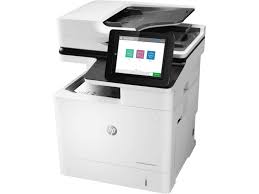
HP LaserJet Managed MFP E62555dn Driver Download

HP LaserJet Managed MFP E62555dn Driver Download for Windows 11-10-8.1-7 (32bit-64bit)

HP LaserJet Managed MFP E62555/E62565/E62575 PCL 6 Printer Driver (no installer).

Download HP LaserJet Managed MFP E62555/E62565/E62575 Printer Full Software Solution

HP LaserJet Managed MFP E62555dn Printer

Details for HP LaserJet Managed MFP E62555dn Driver Download for Windows

LaserJet Managed MFP E62555/E62565/E62575 PCL 6 Printer Software (no installer)

Version: 43.5.2519
Release Date: Nov 23, 2021
File Name: V3_DriveronlyWebpack-43.5.2519-LJE62555-E62575_V3_DriveronlyWebpack.exe 

Description: This solution provides only the PCL 6 driver without an installer. To install the print driver use the Add Printer Wizard.

Compatible systems: Windows 11- Windows 10 32bit- Windows 10 64bit- – Windows 8.1 32bit- Windows 8.1 64bit- – Windows 7 32bit- Windows 7 64bit

Download

Size: 13.77 MB

HP LaserJet Managed MFP E62555/E62565/E62575 Printer Full Software Solution

Version: 43.5.2519
Released: Nov 23, 2021
File Name: Full_Webpack-43.5.2519-LJE62555-E62575_Full_Webpack.exe

Description: The full solution software includes everything you need to install your HP printer. This collection of software includes the complete set of drivers, installer software, and other administrative tools found on the printer’s software CD.

Operating systems: Windows 11-10-10×64-8.1-8.1×64-7-7×64

Download

Size: 162.55 MB

Printer Setup Notes

If you have purchased a new printer, you need to install its driver before connecting your device to the computer. Additionally, if you connect with a USB cable before installing the driver, your operating system can install the driver closest to your printer from its own archive. This may cause your printer not to work or to have problems. Therefore, you must first install the driver produced for your printer. If an installation CD was provided with your printer, you can use it. Or you can download the driver suitable for your operating system from our website. When you start the driver program, you can complete the installation by following the instructions. Additionally, when the installation is nearing completion, it will ask you to plug in the printer’s USB cable.

In conclusion, to summarize; First install the driver and then plug in the USB cable. If you still have problems, you can contact us.

HP LaserJet MFP M436dn Drivers

Last checked against HP’s download list: November 1, 2026 · Checked by H&G

Looking for the HP LaserJet MFP M436dn driver? This page lists HP’s official software for the whole HP LaserJet MFP M436 Printer series. HP lists some packages for specific models in the series, so check that the package title includes your model. For Windows 11, Windows 10 (64-bit) and Windows 7 (64-bit), the package most people need is the HP LaserJet MFP M436 Printer Series Full Solution Software and Drivers.

Recommended downloads

Windows 11, Windows 10 (64-bit), Windows 7 (64-bit): HP LaserJet MFP M436 Printer Series Full Solution Software and DriversVersion 1.14 · Released Apr 27, 2023 · 148.6 MB

Download

Files download directly from HP’s official servers. hpdrivers.net does not host or modify them.


Models covered by this page

HP’s download list for this series names these models. It covers the whole LaserJet MFP M436 range, including model variants HP does not list by name:

  • HP LaserJet MFP M436n
  • HP LaserJet MFP M436nda
  • HP LaserJet MFP M436dn

Which Windows package should you choose?

HP publishes 4 kinds of Windows package for the LaserJet MFP M436:

  • HP LaserJet MFP M436 Printer Print and Scan Driver (v1.14, Apr 27, 2023): scanning from the computer.
  • Full software solution (v1.14, Apr 27, 2023, 148.6 MB): driver plus HP’s setup wizard and tools.
  • Driver files (no installer) (v1.14, Apr 27, 2023): bare driver files for Windows’ Add Printer wizard.
  • Firmware update (v3.82.01.21, Jan 17, 2022): updates the printer itself, not your PC.

All downloads for the LaserJet MFP M436

Windows

Package Windows Version Released Size
HP LaserJet MFP M436 Printer Print and Scan Driver

File details

File: HP_LaserJet_MFP_M436_Print_Scan_Drivers_1.14.exe

11, 10, 7 1.14 Apr 27, 2023 29.3 MB Download
HP LaserJet MFP M436 Printer Series Full Solution Software and Drivers

File details

File: HP_LaserJet_MFP_M436_Full_Software_and_Drivers_1.14.exe

11, 10, 7 1.14 Apr 27, 2023 148.6 MB Download
HP LaserJet MFP M436 Printer Print Driver (no installer)

File details

File: HP_LaserJet_MFP_M436_Driver.exe

11, 10, 7 1.14 Apr 27, 2023 11.0 MB Download
HP LaserJet MFP M436 Printer Series Firmware

File details

File: M436_V3.82.01.21.zip

11, 10, 7 3.82.01.21 Jan 17, 2022 18.3 MB Download

Other HP software listed for this series

Software Systems Version
HP System Health Apps Registration Utility Windows 10 1.0.0.0 Download

Linux

HP lists Linux support for this series through its HPLIP project, outside the regular download list: HP’s Linux printing page (HPLIP).

Installing the LaserJet MFP M436 driver

The driver files without an installer are added through Windows’ Add Printer wizard (Have Disk). For step-by-step instructions, see our guide to installing an HP printer driver.

Firmware update 3.82.01.21

The newest firmware HP lists for the LaserJet MFP M436 is version 3.82.01.21, released Jan 17, 2022.

  • Keep the printer and the computer switched on until the update has finished.

Specifications that matter for setup

Connections 1 High-speed USB 2.0 Device Port
Wi-Fi Not built in
Print languages PCL6
Functions Print, Copy, Scan
Recommended monthly volume 5000
Scan resolution Up to 600 x 600 dpi
Two-sided ADF scanning Yes
Scan file formats PDF, Single-Page-TIFF, JPEG, Multi-Page-TIFF, Single-Page-PDF, TIFF
Ways to scan TWAIN, WIA; Scan to PC (Local, Network) from ADF or Platen

Common setup problems

  • No Wi-Fi option during setup. HP’s specifications list no built-in Wi-Fi for the LaserJet MFP M436. Use an Ethernet cable or USB.