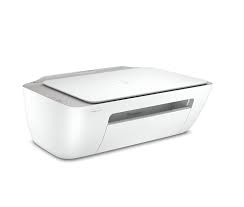
HP Smart Tank 580 All-in-One driver software and downloads for
HP Smart Tank 580 All-in-One Printer
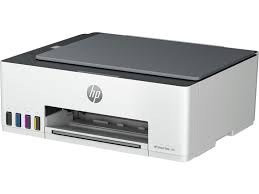
Boost productivity with up to 8000 black or 6000 color pages of Original HP Ink included.
Specifications
- Product number
- 1F3Y2A
- Functions
- Print, copy, scan
- Print speed (ISO, black)
- Up to 12 ppm
- Recommended monthly volume
- 400–800 pages
HP Smart Tank 580 All-in-One driver download for Windows
Recommended HP Smart Tank 580 All-in-One driver software
See full detailsWindows 11; Windows 10 (32/64-bit)
- Type:
- Installation Software and Driver-Includes print, scan, latest features, and solutions
- Version:
- 17.6.15
- Operating systems:
- Windows 11; Windows 10 (32/64-bit)
- Release date:
- Oct 13, 2026
- File name:
- HPEasyStart_17_6_15.exe
(26.5 MB)
Package notes
HP Easy Start provides guided setup and drivers for your HP printer.
- 1. Improved user experience.
- 2. Performance optimizations.
- 3. New product introduction.
Alternative packages
See full detailsWindows 11
- Type:
- Installation Software and Full/Basic Driver-Supports print and scan functionality only
- Version:
- 17.6.9
- Operating systems:
- Windows 11
- Release date:
- Oct 8, 2026
- File name:
- HPEasyStart-17.6.9-ST580-590_57_2_1673_Webpack.exe
(449.8 MB)
Package notes
This package allows you to setup the printer without internet. The full solution software includes everything you need to install and use your HP printer. This collection of software includes the complete set of drivers, installer software, and other administrative tools.
HP Smart Tank 580 All-in-One driver setup options
See full detailsWindows 11; Windows 11 on ARM (64-bit)
- Type:
- Installation Software and Full/Basic Driver-Supports print and scan functionality only
- Version:
- 17.6.9
- Operating systems:
- Windows 11; Windows 11 on ARM (64-bit)
- Release date:
- Oct 8, 2026
- File name:
- HPEasyStart-17.6.9-ST580-590_57_2_1673_ARM64_Webpack.exe
(456.3 MB)
Package notes
This package allows you to setup the printer without internet. The full solution software includes everything you need to install and use your HP printer. This collection of software includes the complete set of drivers, installer software, and other administrative tools.
Additional software
See full detailsWindows 11; Windows 10, 8.1 (32/64-bit)
- Type:
- Driver-Universal Scan Driver
- Version:
- 63.8.6459
- Operating systems:
- Windows 11; Windows 10, 8.1 (32/64-bit)
- Release date:
- Jul 1, 2026
- File name:
- Full_Webpack-63.8.6459-SJ0001_Full_Webpack.exe
(436.2 MB)
Package notes
Full webpack provides various scan functionalities. Does not include OCR capabilities and Cloud Destinations.
- 1. Scan speed optimized for faster performance
- 2. IRIS Downloader Support for Supported Devices
- 3. Note: Feature availability varies depending on the device type. Some functionalities might not be accessible on certain devices. To access the latest features and updates, ensure you have installed the most recent firmware and the latest version of the HP Scan.
HP Smart Tank 580 All-in-One driver compatibility packages
See full detailsWindows 11; Windows 11 on ARM (64-bit)
- Type:
- Driver-Universal Scan Driver
- Version:
- 63.8.6459
- Operating systems:
- Windows 11; Windows 11 on ARM (64-bit)
- Release date:
- Aug 9, 2026
- File name:
- Full_Webpack-63.8.6459_ARM64-SJ0001_Full_Webpack.exe
(437.0 MB)
Package notes
Full webpack provides various scan functionalities. Does not include OCR capabilities and Cloud Destinations.
- 1. NPI enablement of Devices
- 2. IRIS Downloader Support for Supported Devices
- 3. Note : Feature availability varies depending on the device type. Some functionalities might not be accessible on certain devices. To access the latest features and updates, ensure you have installed the most recent firmware and the latest version of the HP Scan.
More available software
See full detailsWindows 11; Windows 10 (64-bit)
- Type:
- Installation Software and Driver
- Version:
- N/A
- Operating systems:
- Windows 11; Windows 10 (64-bit)
- Release date:
- Jun 17, 2026
- File name:
- 9N9PHDT62W94
Package notes
Install HP app to setup and use your Printer HP app will help you connect your printer, install driver, offer print, scan, fax, share files and Diagnose/Fix top issues. Click here to learn how to setup your Printer successfully (Recommended). Creating an HP Account and registering is mandatory for HP+/Instant-ink customers. It also helps in accessing assisted support options and more. NOTE: Disconnect from Virtual Private Network (VPN) connection before downloading. Creating an account on Microsoft Store to download HP app is optional.
HP Smart Tank 580 All-in-One driver download options
See full detailsWindows 10 (32/64-bit)
- Type:
- Installation Software and Full/Basic Driver-Supports print and scan functionality only
- Version:
- 57.2.1673
- Operating systems:
- Windows 10 (32/64-bit)
- Release date:
- Oct 8, 2026
- File name:
- HPEasyStart-17.6.9-ST580-590_57_2_1673_1_Webpack.exe
(389.3 MB)
Package notes
This package allows you to setup the printer without internet. The full solution software includes everything you need to install and use your HP printer. This collection of software includes the complete set of drivers, installer software, and other administrative tools.
Other available packages
See full detailsWindows 10 (32-bit)
- Type:
- Installation Software and Driver
- Version:
- N/A
- Operating systems:
- Windows 10 (32-bit)
- Release date:
- Dec 15, 2024
- File name:
- 9wzdncrfhwlh
Package notes
HP Smart will help you: Install printer software and drivers Create an HP account and register your printer Connect your printer to Wi-Fi, load paper, and install cartridges After installation, you can use the HP Smart software to print, scan and copy files, print remotely, sign up for instant ink* and more. NOTE: Disconnect from Virtual Private Network (VPN) connection before downloading. If you are asked to sign in to a Microsoft Store account, you can either sign in, create one or close the sign in screen and continue to install HP Smart. HP Smart is compatible with Windows 11 and Windows 10 version 1809 or higher. HP values that updated operating systems offer our users increased security and privacy protection. *Limitations might apply. May not be applicable to all country/regions.
Recommended HP Smart Tank 580 All-in-One driver software
See full detailsWindows 8.1, 8 (32/64-bit)
- Type:
- Installation Software and Full/Basic Driver-Supports print and scan functionality only
- Version:
- 17.6.15
- Operating systems:
- Windows 8.1, 8 (32/64-bit)
- Release date:
- Oct 14, 2026
- File name:
- HPEasyStart_17_6_15.exe
(26.5 MB)
Package notes
HP Easy Start provides guided setup and drivers for your HP printer.
- 1. Improved user experience.
- 2. Performance optimizations.
- 3. New product introduction.
Alternative packages
See full detailsWindows 7 (32/64-bit)
- Type:
- Installation Software and Full/Basic Driver-Supports print and scan functionality only
- Version:
- 17.6.15
- Operating systems:
- Windows 7 (32/64-bit)
- Release date:
- Oct 13, 2026
- File name:
- HPEasyStart_17_6_15.exe
(26.5 MB)
Package notes
HP Easy Start provides guided setup and drivers for your HP printer. Win 7 Service Pack 1 (SP1) is the minimum requirement for HP Easy Start.
- 1. Improved user experience.
- 2. Performance optimizations.
- 3. New product introduction.
HP Smart Tank 580 All-in-One driver setup options
See full detailsWindows 7 (32/64-bit)
- Type:
- Driver-Universal Scan Driver
- Version:
- 51.7.5630
- Operating systems:
- Windows 7 (32/64-bit)
- Release date:
- Apr 15, 2024
- File name:
- Full_Webpack-51.7.5630-SJ0001_Full_Webpack.exe
(410.8 MB)
Package notes
This full software solution provides various scan functionalities.
- 1. Integrated HP OCR Imaging Library
- 2. Removed references to ReadIRIS from HP Scan Assistant
Additional software
See full detailsWindows 11; Windows 10, 8.1 (64-bit)
- Type:
- Driver-Universal Scan Driver
- Version:
- 63.8.6459
- Operating systems:
- Windows 11; Windows 10, 8.1 (64-bit)
- Release date:
- Jul 1, 2026
- File name:
- Basic_Webpack_x64-63.8.6459-SJ0001_Basicx64_Webpack.exe
(113.9 MB)
Package notes
This is the minimum Scan Software solution which provides basic Scan functionality, WIA and Twain support.Does not include OCR capabilities and Cloud Destinations.
- 1. Scan speed optimized for faster performance
- 2. IRIS Downloader Support for Supported Devices
- 3. Note: Feature availability varies depending on the device type. Some functionalities might not be accessible on certain devices. To access the latest features and updates, ensure you have installed the most recent firmware and the latest version of the HP Scan.
HP Smart Tank 580 All-in-One driver compatibility packages
See full detailsWindows 11; Windows 11 on ARM (64-bit)
- Type:
- Driver-Universal Scan Driver
- Version:
- 63.8.6459
- Operating systems:
- Windows 11; Windows 11 on ARM (64-bit)
- Release date:
- Aug 9, 2026
- File name:
- Basic_Webpack_x64-63.8.6459_ARM64-SJ0001_Basicx64_Webpack.exe
(118.7 MB)
Package notes
This is the minimum Scan Software solution which provides basic Scan functionality, WIA and Twain support.Does not include OCR capabilities and Cloud Destinations.
- 1. NPI enablement of Devices
- 2. IRIS Downloader Support for Supported Devices
- 3. Note : Feature availability varies depending on the device type. Some functionalities might not be accessible on certain devices. To access the latest features and updates, ensure you have installed the most recent firmware and the latest version of the HP Scan.
More available software
See full detailsWindows 10, 8.1 (32-bit)
- Type:
- Driver-Universal Scan Driver
- Version:
- 63.8.6459
- Operating systems:
- Windows 10, 8.1 (32-bit)
- Release date:
- Jul 1, 2026
- File name:
- Basic_Webpack_x86-63.8.6459-SJ0001_Basicx86_Webpack.exe
(86.1 MB)
Package notes
This is the minimum Scan Software solution which provides basic Scan functionality, WIA and Twain support.Does not include OCR capabilities and Cloud Destinations.
- 1. Scan speed optimized for faster performance
- 2. IRIS Downloader Support for Supported Devices
- 3. Note: Feature availability varies depending on the device type. Some functionalities might not be accessible on certain devices. To access the latest features and updates, ensure you have installed the most recent firmware and the latest version of the HP Scan.
HP Smart Tank 580 All-in-One driver download options
See full detailsWindows 7 (32-bit)
- Type:
- Driver-Universal Scan Driver
- Version:
- 51.7.5630
- Operating systems:
- Windows 7 (32-bit)
- Release date:
- Apr 15, 2024
- File name:
- Basic_Webpack_x86-51.7.5630-SJ0001_Basicx86_Webpack.exe
(78.7 MB)
Package notes
This is the minimum Scan Software solution which provides basic Scan functionality, WIA and Twain support.
- 1. Removed references to ReadIRIS from HP Scan Assistant
Other available packages
See full detailsWindows 7 (64-bit)
- Type:
- Driver-Universal Scan Driver
- Version:
- 51.7.5630
- Operating systems:
- Windows 7 (64-bit)
- Release date:
- Apr 15, 2024
- File name:
- Basic_Webpack_x64-51.7.5630-SJ0001_Basicx64_Webpack.exe
(98.8 MB)
Package notes
This is the minimum Scan Software solution which provides basic Scan functionality, WIA and Twain support.
- 1. Removed references to ReadIRIS from HP Scan Assistant
Firmware and utilities
See full detailsWindows 11; Windows 10 (32/64-bit)
- Type:
- Printer Firmware-Keeps your printer updated with latest fixes
- Version:
- 001.2630C
- Operating systems:
- Windows 11; Windows 10 (32/64-bit)
- Release date:
- Aug 16, 2026
- File name:
- HP_ST580_ST590_ST5100_2630C.exe
(14.7 MB)
Package notes
This software tool will help you update your printer to the latest firmware. Please refer to Enhancement/Fixes for more detail about the firmware update.
- 1. Wi-Fi connectivity fixes
- 2. Security fix
HP Smart Tank 580 All-in-One driver download for macOS
Recommended HP Smart Tank 580 All-in-One driver software
See full detailsmacOS 11–15, 26
- Type:
- Installation Software and Driver-Includes print, scan, latest features, and solutions
- Version:
- N/A
- Operating systems:
- macOS 11–15, 26
- Release date:
- Aug 28, 2025
- File name:
- id1474276998
Package notes
HP app will help you: Install printer software and drivers Create an HP account and register your printer Connect your printer to Wi-Fi, load paper, and install cartridges After installation, you can use the HP app software to print, scan and copy files, print remotely, sign up for instant ink* and more. NOTE: Disconnect from Virtual Private Network (VPN) connection before downloading. *Limitations might apply. May not be applicable to all country/regions.
Firmware and utilities
See full detailsmacOS 10.15, 11–15, 26
- Type:
- Printer Firmware-Keeps your printer updated with latest fixes
- Version:
- 001.2630C
- Operating systems:
- macOS 10.15, 11–15, 26
- Release date:
- Aug 16, 2026
- File name:
- HP_ST580_ST590_ST5100_2630C.dmg
(17.8 MB)
Package notes
This software tool will help you update your printer to the latest firmware. Please refer to Enhancement/Fixes for more detail about the firmware update.
- 1. Wi-Fi connectivity fixes
- 2. Security fix
HP Smart Tank 580 All-in-One driver Installation & Support
HP Smart Tank 580 All-in-One driver installation resources:
Help for HP Smart Tank 580 All-in-One driver
Installation instructions for HP Smart Tank 580 All-in-One driver
Common setup problems for HP Smart Tank 580 All-in-One driver
Official resources for HP Smart Tank 580 All-in-One driver
Package versions for HP Smart Tank 580 All-in-One driver are listed in the download sections above.
For HP Smart Tank 580 All-in-One driver, use the matching operating-system section before downloading.