hpdrivers.net is an independent website and is not affiliated with, endorsed by, or sponsored by HP Inc. Download links point to HP's official servers (ftp.hp.com). Read the full disclaimer

HP Color LaserJet Pro MFP 3302fdng Drivers (Color LaserJet Pro MFP 3301-3304 3388 Series)

Last checked against HP’s download list: November 1, 2026 · Checked by H&G

Looking for the HP Color LaserJet Pro MFP 3302fdng driver? This page lists HP’s official software for the whole HP Color LaserJet Pro MFP 3301-3304 3388 Printer Series. HP lists some packages for specific models in the series, so check that the package title includes your model. For Windows 11 and Windows 10 (64-bit), the package most people need is the HP Color LaserJet Pro MFP 3301fdn-3303fdn and 3388fdn Driver Installation Software – Includes Print, Scan, Fax drivers.. For a Mac, HP lists HP Easy Start Pro for Mac.

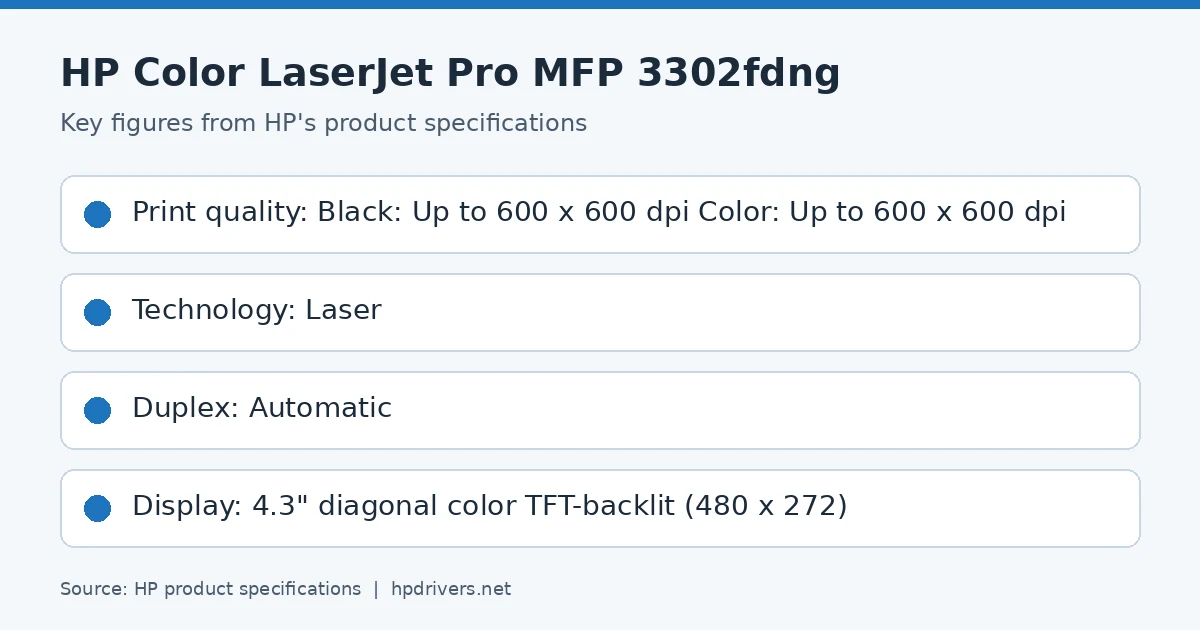
HP printer key specifications
HP product specifications card

Recommended downloads

Windows 11, Windows 10 (64-bit): HP Color LaserJet Pro MFP 3301fdn-3303fdn and 3388fdn Driver Installation Software – Includes Print, Scan, Fax drivers.Version 60.0.1840 · Released Oct 23, 2023 · 505.0 MB

Download

macOS 26, macOS 15, macOS 13: HP Easy Start Pro for MacVersion 2.8.0 · Released Sep 01, 2026 · 81.5 MB

Download

Files download directly from HP’s official servers. hpdrivers.net does not host or modify them.


Models covered by this page

HP’s download list for this series names these models. It covers the whole Color LaserJet Pro MFP 3301-3304 3388 range, including model variants HP does not list by name:

HP Color LaserJet Pro MFP 3302fdw HP Color LaserJet Pro MFP 3304fdw HP Color LaserJet Pro MFP 3301sdw HP Color LaserJet Pro MFP 3301fdn HP Color LaserJet Pro MFP 3301fdw HP Color LaserJet Pro MFP 3388sdw HP Color LaserJet Pro MFP 3388fdn HP Color LaserJet Pro MFP 3388fdw HP Color LaserJet Pro MFP 3301cdw

Which Windows package should you choose?

HP publishes 4 kinds of Windows package for the Color LaserJet Pro MFP 3301-3304 3388:

  • HP Universal Print Driver (v8.2.89, Sep 11, 2026): HP’s shared driver for many models, also listed for this series.
  • Full software solution (v60.0.1840, Oct 23, 2023, 505.0 MB): driver plus HP’s setup wizard and tools.
  • Driver files (no installer) (v60.0.1895, Mar 19, 2024): bare driver files for Windows’ Add Printer wizard.
  • Firmware update (v6.28.3.30-202606111700, Jul 18, 2026): updates the printer itself, not your PC.

All downloads for the Color LaserJet Pro MFP 3301-3304 3388

Windows

Package / Windows
Version
Released
Size
HP Color LaserJet Pro MFP 3301fdn-3303fdn and 3388fdn Driver Installation Software – Includes Print, Scan, Fax drivers.

Windows: 11, 10
File details

File: HPEasyStart-16.2.1-LJ3301-3304_UW_4_1_60_0_1860_2_Webpack.exe

60.0.1840
Oct 23, 2023
505.0 MB
HP Color LaserJet Pro MFP 3301-3304 3388 PCL-6 V4 Printer Driver (no installer)

Windows: 11, 10
File details

File: V4_DriveronlyWebpack-60.0.1895-LJ3301-3304_V4_DriveronlyWebpack.exe

60.0.1895
Mar 19, 2024
19.3 MB
HP Color LaserJet Pro MFP 3301fdw-3303fdw and 3388fdw Driver Installation Software – Includes Print, Scan, Fax drivers.

Windows: 11, 10
File details

File: HPEasyStart-16.2.1-LJ3301-3304_UWWL_4_1_60_0_1860_2_Webpack.exe

60.0.1840
Oct 23, 2023
505.0 MB
HP Color LaserJet Pro MFP 3301sdw-3303sdw and 3388sdw Driver Installation Software – Includes Print, Scan, Fax drivers.

Windows: 11, 10
File details

File: HPEasyStart-16.2.1-LJ3301-3304_UWWL_3_1_60_0_1860_2_Webpack.exe

60.0.1840
Oct 23, 2023
505.0 MB
HP Color LaserJet Pro MFP 3301-3304, 3388 Series Firmware Update Utility (with embedded firmware)

Windows: 11, 10
File details

File: HP_Color_LaserJet_Pro_MFP_3301-3388_Firmware_6.28.3.30-202606111700.exe

6.28.3.30-202606111700
Jul 18, 2026
269.9 MB
HP Color LaserJet Pro MFP 3301-3304, 3388 Series Firmware Update File

Windows: 11, 10
File details

File: HP_Color_LaserJet_Pro_MFP_3301-3388_Firmware_6.28.3.30-202606111700.bdl

6.28.3.30-202606111700
Jul 18, 2026
267.8 MB

macOS

Package / macOS
Version
Released
Size
HP Color LaserJet Pro MFP 3301-3304, 3388 Series Firmware Update File

macOS: 15, 13
File details

File: HP_Color_LaserJet_Pro_MFP_3301-3388_Firmware_6.28.3.30-202606111700.bdl

6.28.3.30-202606111700
Jul 18, 2026
267.8 MB

Other HP software listed for this series

Software / Systems
Version
Size
HP Universal Scan – Full Feature Software and Driver (ARM 64)
Systems: Windows 11
63.8.6459
437.0 MB
HP Universal Scan – Full Feature Software and Driver
Systems: Windows 11, Windows 10
63.8.6459
436.2 MB
HP Universal Scan – Basic Feature Software and Driver
Systems: Windows 11, Windows 10
63.8.6459
113.9 MB
HP Universal Scan – Basic Feature Software and Driver (ARM 64)
Systems: Windows 11
63.8.6459
118.7 MB
HP Easy Start Printer Setup Software (Internet connection required for driver installation)
Systems: Windows 11, Windows 10
17.4.18
–
HP Scan OCR Add-on Software
Systems: Windows 11, Windows 10
1.0.1020
224.9 MB
HP Smart Universal Printing Driver for Windows V3 (32-bit)
Systems: Windows 11
4.08.1.3348
25.1 MB
HP Smart Universal Printing Driver for Windows V3 (64-bit)
Systems: Windows 11, Windows 10, Windows 7
4.08.1.3348
28.4 MB
HP Smart Universal Printing Driver for Windows V4 (64-bit)
Systems: Windows 11, Windows 10
6.03.1.4143
18.4 MB
HP Smart Universal Printing Driver for Windows V4 (ARM64-bit)
Systems: Windows 11, Windows 10
6.03.1.4143
22.8 MB
HP Easy Start Pro for Mac
Systems: macOS 26, macOS 15, macOS 13
2.8.0
–

HP Universal Print Driver

HP lists its Universal Print Driver for this series on Windows 7, Windows 11 and Windows 10. Get it from our HP Universal Print Driver page.

Installing the Color LaserJet Pro MFP 3301-3304 3388 driver

The driver files without an installer are added through Windows’ Add Printer wizard (Have Disk). For step-by-step instructions, see our guide to installing an HP printer driver.

Firmware update 6.28.3.30-202606111700

The newest firmware HP lists for the Color LaserJet Pro MFP 3301-3304 3388 is version 6.28.3.30-202606111700, released Jul 18, 2026.

  • Keep the printer and the computer switched on until the update has finished.

Specifications that matter for setup

Connections
1 Hi-Speed USB 2.0 (device); 1 Hi-Speed USB 2.0 (host); 1 Wi-Fi 802.11ac (dual band); 2 RJ-11 Fax/Modem port/phone line; Auto-crossover Ethernet; 1 Gigabit Ethernet 10/100TX network
Print languages
HP PCL6, PostScript, HP PCL5, PDF, URF, PWG-Raster, PCLM, JPEG
Print speed (black)
Normal: Up to 26 ppm
Recommended monthly volume
150 to 2,500
Two-sided printing
Automatic
Scanner
ADF; Flatbed
Scan resolution
Up to 300 dpi (color and monochrome, ADF); Up to 1200 dpi (color and monochrome, Flatbed)
Two-sided ADF scanning
Yes
Document feeder
Standard, 50 sheets
Scan file formats
JPG; PDF; PDFA; TIFF
Ways to scan
Front-panel scan; HP Universal Scan and user applications via Twain

HP Color LaserJet Pro 3201dw Drivers (Color LaserJet Pro 3201-3204, 3288 Series)

Last checked against HP’s download list: November 1, 2026 · Checked by H&G

Looking for the HP Color LaserJet Pro 3201dw driver? This page lists HP’s official software for the whole HP Color LaserJet Pro 3201-3204, 3288 Printer Series. HP lists some packages for specific models in the series, so check that the package title includes your model. For Windows 11 and Windows 10 (64-bit), the package most people need is the HP Color LaserJet Pro 3201-3204 3288 Driver Installation Software – Includes Print, Scan, Fax drivers.. For a Mac, HP lists HP Easy Start Pro for Mac.

Recommended downloads

Windows 11, Windows 10 (64-bit): HP Color LaserJet Pro 3201-3204 3288 Driver Installation Software – Includes Print, Scan, Fax drivers.Version 60.0.1910 · Released Aug 05, 2024 · 162.1 MB

Download

macOS 26, macOS 15, macOS 13: HP Easy Start Pro for MacVersion 2.8.0 · Released Sep 01, 2026 · 81.5 MB

Download

Files download directly from HP’s official servers. hpdrivers.net does not host or modify them.


Models covered by this page

HP’s download list for this series names these models. It covers the whole Color LaserJet Pro 3201-3204, 3288 range, including model variants HP does not list by name:

HP Color LaserJet Pro 3202dw HP Color LaserJet Pro 3204dw HP Color LaserJet Pro 3288dw HP Color LaserJet Pro 3201dw HP Color LaserJet Pro 3288dn

Which Windows package should you choose?

HP publishes 3 kinds of Windows package for the Color LaserJet Pro 3201-3204, 3288:

  • Driver files (no installer) (v60.0.1910, Jul 11, 2024): bare driver files for Windows’ Add Printer wizard.
  • Full software solution (v60.0.1910, Aug 05, 2024, 162.1 MB): driver plus HP’s setup wizard and tools.
  • Firmware update (v6.28.3.30-202606111700, Jul 18, 2026): updates the printer itself, not your PC.

All downloads for the Color LaserJet Pro 3201-3204, 3288

Windows

Package / Windows
Version
Released
Size
HP Color LaserJet Pro 3201-3204 3288 PCL-6 V4 Printer Driver (no installer)

Windows: 11, 10
File details

File: V4_DriveronlyWebpack-60.0.1910-LJ3201-3204_V4_DriveronlyWebpack.exe

60.0.1910
Jul 11, 2024
19.4 MB
HP Color LaserJet Pro 3201-3204 3288 Driver Installation Software – Includes Print, Scan, Fax drivers.

Windows: 11, 10
File details

File: HPEasyStart-16.7.5-LJ3201-3204_60_0_1910_2_Webpack.exe

60.0.1910
Aug 05, 2024
162.1 MB
HP Color LaserJet Pro 3201-3204, 3288 Series Firmware Update Utility (with embedded firmware)

Windows: 11, 10
File details

File: HP_Color_LaserJet_Pro_3201-3288_Firmware_6.28.3.30-202606111700.exe

6.28.3.30-202606111700
Jul 18, 2026
145.8 MB

macOS

Package / macOS
Version
Released
Size
HP Color LaserJet Pro 3201-3204 3288 Driver Installation Software – Includes Print, Scan, Fax drivers.

macOS: 15
File details

File: HPEasyStart-16.7.5-LJ3201-3204_60_0_1910_2_Webpack.exe

60.0.1910
Aug 05, 2024
162.1 MB

Other HP software listed for this series

Software / Systems
Version
Size
HP Easy Start Printer Setup Software (Internet connection required for driver installation)
Systems: Windows 11, Windows 10
17.4.18
–
HP Smart Universal Printing Driver for Windows V4 (ARM64-bit)
Systems: Windows 11, Windows 10
6.03.1.4143
22.8 MB
HP Smart Universal Printing Driver for Windows V4 (64-bit)
Systems: Windows 10
6.03.1.4143
24.5 MB
HP Easy Start Pro for Mac
Systems: macOS 26, macOS 15, macOS 13
2.8.0
–

Installing the Color LaserJet Pro 3201-3204, 3288 driver

The driver files without an installer are added through Windows’ Add Printer wizard (Have Disk). For step-by-step instructions, see our guide to installing an HP printer driver.

Firmware update 6.28.3.30-202606111700

The newest firmware HP lists for the Color LaserJet Pro 3201-3204, 3288 is version 6.28.3.30-202606111700, released Jul 18, 2026.

  • Keep the printer and the computer switched on until the update has finished.

Specifications that matter for setup

Connections
1 Hi-Speed USB 2.0 (device); 1 Wi-Fi 802.11ac (dual band); Auto-crossover Ethernet; 1 Gigabit Ethernet 10/100TX network
Print languages
HP PCL6, PostScript, HP PCL5, PDF, URF, PWG-Raster, JPEG
Functions
Print
Print speed (black)
Normal: Up to 26 ppm
Recommended monthly volume
150 to 2,500
Two-sided printing
Automatic

HP LaserJet MFP M141cw Drivers (LaserJet MFP M139-M142 Series)

Last checked against HP’s download list: November 10, 2026 · Checked by H&G

Looking for the HP LaserJet MFP M141cw driver? This page lists HP’s official software for the whole HP LaserJet MFP M139-M142 Printer series. HP lists some packages for specific models in the series, so check that the package title includes your model. For Windows 11; Windows 10, 7 (32-bit and 64-bit), the package most people need is the HP LaserJet MFP M139a/M140a/M141a/M142a EasyStart Printer Setup Software – Offline Use Only. For a Mac, HP lists Install HP app to complete setup and support.

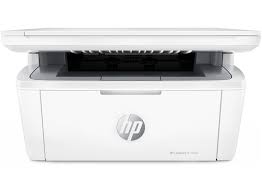
HP LaserJet MFP M141cw printer
HP LaserJet MFP M141cw

Recommended downloads

Windows 11; Windows 10, 7 (32-bit and 64-bit): HP LaserJet MFP M139a/M140a/M141a/M142a EasyStart Printer Setup Software – Offline Use OnlyVersion 54.3.5248 · Released Feb 08, 2023 · 186.1 MB
Download
macOS 26, 15, 14, 13, 12, 11: Install HP app to complete setup and supportReleased Aug 29, 2025 · HP rating: Recommended
Download

Files download directly from HP’s official servers. hpdrivers.net does not host or modify them.

Which Windows package should you choose?

HP publishes 2 kinds of Windows package for the LaserJet MFP M139-M142:

  • Firmware update (v20260530, Jul 23, 2026): updates the printer itself, not your PC.
  • Full software solution (v54.3.5248, Feb 08, 2023, 186.1 MB): driver plus HP’s setup wizard and tools.

All downloads for the LaserJet MFP M139-M142

Windows

Package / Windows
Version
Released
Size
HP LaserJet MFP M139-M142 Printer series Firmware Update Utility (not compatible with HP LaserJet MFP M139w Printer)
Windows: 11
10, 8.1, 8, 7 (32-bit and 64-bit)
File detailsFile: M139-M142_Series_FW_Update-20260530.exe
20260530
Jul 23, 2026
6.2 MB
HP LaserJet MFP M139w Printer Firmware Update Utility (not compatible with HP LaserJet MFP M139we Printer)
Windows: 11
10, 8.1, 8, 7 (32-bit and 64-bit)
File detailsFile: M139w_FW_Update-20260617.exe
20260617
Aug 21, 2026
6.2 MB
HP LaserJet MFP M139a/M140a/M141a/M142a EasyStart Printer Setup Software – Offline Use Only
Windows: 11
10, 7 (32-bit and 64-bit)
File detailsFile: HPEasyStart-13.6.5-LJM139-M142_U_54_3_5248_1_Webpack.exe
54.3.5248
Feb 08, 2023
186.1 MB
HP LaserJet MFP M139w/M139we/M140w/M140we/M141w/M141we/M142w/M142we EasyStart Printer Setup Software – Offline Use Only
Windows: 11
10, 7 (32-bit and 64-bit)
File detailsFile: HPEasyStart-13.6.5-LJM139-M142_UWL_54_3_5248_1_Webpack.exe
54.3.5248
Feb 08, 2023
186.1 MB

macOS

Package / macOS
Version
Released
Size
HP LaserJet MFP M139w Printer Firmware Update Utility (not compatible with HP LaserJet MFP M139we Printer)
macOS: 26, 15, 14, 13, 12, 11, 10.13, 10.12, 10.11, 10.10, 10.15, 10.14, 10.9, 10.8, 10.7, 10.6, 10.5
File detailsFile: M139w_FW_Update-20260617.dmg
20260617
Aug 21, 2026
11.7 MB
HP LaserJet MFP M139-M142 Printer series Firmware Update Utility (not compatible with HP LaserJet MFP M139w Printer)
macOS: 15, 14, 13, 12, 11, 10.13, 10.12, 10.11, 10.10, 10.15, 10.14, 10.9, 10.8, 10.7, 10.6, 10.5
File detailsFile: M139-M142_Series_FW_Update-20260530.dmg
20260530
Jul 23, 2026
11.7 MB

Other HP software listed for this series

Software / Systems
Version
Size
HP Universal Scan – Full Feature Software and Driver
Systems: Windows 11
Windows 10, 8.1, 7 (32-bit and 64-bit)
63.8.6459
436.2 MB
HP Universal Scan – Basic Feature Software and Driver
Systems: Windows 11
Windows 10, 8.1, 7 (32-bit and 64-bit)
63.8.6459
113.9 MB
ReadIRIS Advanced OCR
Systems: Windows 11
Windows 10 (32-bit and 64-bit)
17.4.211
448.6 MB
ReadIRIS Advanced PDF
Systems: Windows 11
Windows 10 (64-bit)
27.0.577.2
532.8 MB
HP Universal Scan – Full Feature Software and Driver (ARM 64)
Systems: Windows 11
63.8.6459
437.0 MB
HP Universal Scan – Basic Feature Software and Driver (ARM 64)
Systems: Windows 11
63.8.6459
118.7 MB
HP Easy Start Printer Setup Software (Internet connection required for driver installation)
Systems: Windows 11
Windows 10, 7 (32-bit and 64-bit)
17.6.15
26.5 MB
HP Scan OCR Add-on Software
Systems: Windows 11
Windows 10, 8.1, 7 (32-bit and 64-bit)
1.0.1020
224.9 MB
Install HP app to complete setup and support
Systems: Windows 11
Windows 10 (64-bit)
–
–
Install HP Smart app to complete setup and support
Systems: Windows 10 (32-bit)
–
–
Install HP app to complete setup and support
Systems: macOS 26, 15, 14, 13, 12, 11
–
–

Linux

HP lists Linux support for this series through its HPLIP project, outside the regular download list: HP’s Linux printing page (HPLIP).

Installing the LaserJet MFP M139-M142 driver

For step-by-step instructions, see our guide to installing an HP printer driver.

Firmware update 20260530

The newest firmware HP lists for the LaserJet MFP M139-M142 is version 20260530, released Jul 23, 2026. HP’s notes for it: USB Support for PSA Driver; Security updates; General improvements and bug fixes.

  • Check your current firmware version first on the printer’s Configuration Page, and update only if it is older.
  • Install the printer driver before running the update. HP’s utility needs it to reach the printer.

Specifications that matter for setup

Connections
1 Hi-Speed USB (compatible with USB 2.0 specifications)
Print languages
PCLm/PCLmS; URF; PWG
Functions
Print, copy, scan
Print speed (black)
Normal: Up to 21 ppm
Recommended monthly volume
100 to 1000
Two-sided printing
No
Scanner
Flatbed
Scan resolution
Up to 600 ppi
Scan file formats
JPG, RAW (BMP), PNG, TIFF, PDF
Ways to scan
Scanning via HP LaserJet Software Scan or TWAIN-compliant or WIA-compliant software

What comes in the box

HP lists these items with the LaserJet MFP M139-M142:

  • Printer
  • Power cord
  • Toner Cartridge
  • Setup Poster
  • Reference Guide
  • Warranty Guide

Paper handling and hardware details

Values below are HP’s published figures for the LaserJet MFP M139-M142; they help you check that this page matches your printer before you download anything.

Paper input tray
150-sheet input tray
Output tray
100-sheet output bin
Paper sizes
Letter, envelopes (No. 10), custom, Legal
Media types
Plain paper, envelope, postcard, label
Paper weight
17 to 32 lb
Print quality (black)
Black: Up to 600 x 600 dpi
Control panel
LED
Memory
64 MB
Processor
500 MHz
Power use
357 watts (active printing), 2.4 (ready), 1.0 watts (sleep), 0.05 watts (Auto-off Manual on) , 0.05 watts (manual off)
Size (W x D x H)
14.2 x 10.4 x 7.8 in
Weight
11.86 lbs
USB cable
1 USB cable added for AP and wireless for EMEA, AMS (EM only)
Warranty
One-year limited warranty

The Er11 error on the LaserJet MFP M139-M142

HP has a dedicated article for the M139-M142 and M232-M237 printers. An Er11 shows on the control panel, the HP Smart app reports a Supply Problem, and the printer will not print. HP’s fix is a firmware update.

Network-connected printers

  • Find the IP address in the HP Smart app under Network Information and open it in a browser. In the Embedded Web Server click System and sign in with admin and the printer PIN from the label at the rear or inside the cartridge access area.
  • Go to Administration and click Check Now. HP says not to turn the printer off during the update because that can permanently damage it. After restart, the Firmware Datecode in Device Configuration should be 20250311.

Printers not on a network

  • Connect the printer to the computer with a USB cable, open HP Software and Driver Downloads, enter the model, choose Firmware, download the update and follow the instructions. HP says that while Er11 shows, an update over LAN or wireless is not supported, so USB is the only route.

If it still fails after the update, HP’s last step is service or replacement through HP Customer Support.

Source: HP Support, HP LaserJet MFP M139-M142, M232-M237 Printers – ‘Er11’ displays on control panel.

Setup on iPhone: “We couldn’t find any 2.4 GHz networks”

HP’s article for the M109-M112 and M139-M142 explains this message in the HP Smart app on iOS. It usually means the phone is on a 5 GHz network.

HP’s fix

  • Close the HP Smart app, open Wi-Fi settings and join the 2.4 GHz network. The name may or may not contain 2.4, depending on router settings.
  • If no 2.4 GHz network appears, make sure the 2.4 GHz option is enabled in the router, and use your provider or the router documentation to find the setting.
  • Reopen HP Smart, tap Add printer and follow the prompts. After setup HP suggests opening Advanced Settings, signing in with admin and the PIN, and using Printer Updates, Check Now to install any update.

Source: HP Support, HP LaserJet M109-M112, M139-M142 printers – ‘We couldn’t find any 2.4 GHz networks’ message in HP Smart (iOS).