
hpdrivers.net is an independent website and is not affiliated with, endorsed by, or sponsored by HP Inc. Download links point to HP's official servers (ftp.hp.com). Learn more

HP OfficeJet 5258 Drivers Download for Windows 11-10-8-7

HP OfficeJet 5258 All-in-One Printer Software and Drivers Download for Windows 11/10/8/7/Vista/Xp 64bit-32bit, Installation instructions

Download HP OfficeJet 5200 All-in-One Print and Scan Driver and Accessories. HP Universal Fax Driver. Moreover, Features and Review.
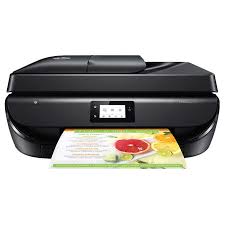
HP OfficeJet 5258 Prnter

HP OfficeJet 5258 is a very useful and multifunctional printer. It also supports double-sided printing. Moreover, it also supports Wi-Fi 802.11n wireless printing. Moreover, you can print in color with this printer. You can also scan in color. At the same time, the HP OfficeJet 5258 printer has a resolution of up to 600×300 dpi. This multifunctional all-in-one printer is suitable for use in both home and office environments. However, keep in mind that it is not as economical as printers with toner and tanks.
Below you can find the necessary software and drivers to use this printer.

Details HP OfficeJet 5258 Drivers Windows

HP OfficeJet 5258 All-in-One Printer and Scanner Driver and Accessories.

The full solution software includes everything you need to install and use your HP printer. This collection of software includes the complete set of drivers, installer and optional software.

Fix and enhancements:

Updated end user license agreement and data collection statement.

Relase Details

File Version: 44.9.2759
Released: Dec 2, 2021
File name: Full_Webpack-44.9.2759-OJ5200_Full_Webpack.exe

Operating Systems:

Microsoft Windows 11, Microsoft Windows 10 (32-bit), Microsoft Windows 10 (64-bit), Microsoft Windows 8 (32-bit), Microsoft Windows 8 (64-bit), Microsoft Windows 8.1 (32-bit), Microsoft Windows 8.1 (64-bit), Microsoft Windows 7 (32-bit), Microsoft Windows 7 (64-bit), Microsoft Windows Vista (32-bit), Microsoft Windows XP (32-bit)

Download

File Size: 151.32 MB

Installation instructions

Firstly, do not connect the USB cable until prompted by the installer. After that, If you are connecting to a network, make sure the network cable is connected before running the installer. Moreover, close any software programs running on your computer. After that, turn on the printer and click on the Download button on this page. Than, click the downloaded file. In this way, the files will be extracted and the installation process will automatically start. Than, follow the on-screen instructions to proceed with and complete the installation. Additionally, to install at a later date, select Save on step 4 and select a location on your hard disk. similarly, when ready to install, locate and double-click the file. This will automatically extract and start the installation process. Finally, follow the on-screen instructions to proceed with the installation.

HP Universal Fax Driver for Windows

The HP Universal Fax Driver is a solution installed on a client or server PC

Operating systems: Microsoft Windows 10 (32-bit), Microsoft Windows 10 (64-bit), Microsoft Windows 11, Microsoft Windows 7 (32-bit), Microsoft Windows 7 (64-bit), Microsoft Windows 8.1 (32-bit), Microsoft Windows 8.1 (64-bit), Microsoft Windows Server 2019

Version: 6.5.117

Release date: Nov 17, 2023

File name: UFD_JEDI_PHASE6.5-6.5.117-HPUFDDriver.exe

Download

File Name: 16.42Mb

HP Universal Scan – Full Feature Software and Driver

HP is undoubtedly one of the largest printer and scanner producing companies. A new update has been released to the universal driver produced for HP scanner devices. Also some improvements and fixes have been made. This driver full web suite provides various scanning functions. However, it does not include OCR capabilities and Cloud targets.

HP OfficeJet 5258 Scan – Full Feature Software and Driver

Fix and enhancements:

Scan to computer improvements have been made in this version. However, some features may vary depending on your browser model. Additionally, the language of the Data Collection Agreement Screens has been updated.

Version: 63.4.6169

File name: Full_Webpack-63.4.6169-SJ0001_Full_Webpack.exe

Relased: Aug 29, 2024

Operating Systems

Microsoft Windows 11, Microsoft Windows 10 (32-bit), Microsoft Windows 10 (64-bit), Microsoft Windows 8.1 (32-bit), Microsoft Windows 8.1 (64-bit), Microsoft Windows Server 2022

Download

File Size: 411.21 MB

Finally, let’s make a few reminders about the installation. First, download the installation file to your computer. It will generally download to the general downloads folder. Then open the file you downloaded. The installation wizard will guide you. When the installation is finished, you can delete the file you downloaded. Or you can save it to reinstall it in case you experience problems again. If you encounter a problem, do not hesitate to contact us.

Features and Review

You can scan, copy and fax with the HP Officejet 5258 printer. Fax supports 300×300 dpi resolution. Additionally, HP Officejet 5258 has 256Mb ddr3 memory. Since it has wireless feature, you can print with eprint and apple airprint. In this way, it can work with various mobile operating systems such as Android, BlackBerry, iOS, Symbian and Windows RT. HP is really successful in this regard.

In my opinion, the most lacking aspect of HP printers is that they do not provide sufficient support for Macintosh and Linux. This is not a very understandable situation. Both Mac and Linux users are not happy with this situation. As an Ubuntu user, unfortunately I cannot use all the features of my printer. Sometimes I may need to switch to Windows operating system. Printer manufacturers such as HP, Brother, Canon and Epson must provide drivers and basic programs for Linux and Mac. For this, collaborations can be made with Apple and Ubuntu.

If you have any problems with driver installation, feel free to let us know. We’d be happy to help you. You can also let us know about drivers you cannot find and broken links.

HP OfficeJet Pro 9120e Drivers (OfficeJet Pro 9120e All-in-One Series)

Last checked against HP’s download list: November 1, 2026 · Checked by H&G

Looking for the HP OfficeJet Pro 9120e driver? This page lists HP’s official software for the whole HP OfficeJet Pro 9120e All-in-One series: the OfficeJet Pro 9128e, OfficeJet Pro 9125e, OfficeJet Pro 9120e, OfficeJet Pro 9122e and OfficeJet Pro 9129e. HP lists some packages for specific models in the series, so check that the package title includes your model. For Windows 11 and Windows 10 (64-bit), the package most people need is the HP OfficeJet Pro 9120 series EasyStart Printer Setup Software – Offline Use Only.

Recommended downloads

Windows 11, Windows 10 (64-bit): HP OfficeJet Pro 9120 series EasyStart Printer Setup Software – Offline Use OnlyVersion 58.2.1857 · Released Nov 16, 2023 · 346.0 MB

Download

Files download directly from HP’s official servers. hpdrivers.net does not host or modify them.


Models covered by this page

All 5 models share one download list at HP:

  • HP OfficeJet Pro 9128e
  • HP OfficeJet Pro 9125e
  • HP OfficeJet Pro 9120e
  • HP OfficeJet Pro 9122e
  • HP OfficeJet Pro 9129e

Which Windows package should you choose?

HP publishes 3 kinds of Windows package for the OfficeJet Pro 9120e All-in-One:

  • HP Universal Print Driver (v8.2.89, Sep 11, 2026): HP’s shared driver for many models, also listed for this series.
  • Firmware update (v6.23.6.41, Jul 08, 2026): updates the printer itself, not your PC.
  • Full software solution (v58.2.1857, Nov 16, 2023, 346.0 MB): driver plus HP’s setup wizard and tools.

All downloads for the OfficeJet Pro 9120e All-in-One

Windows

Package Windows Version Released Size
HP OfficeJet 9120-9120e/HP OfficeJet Pro 9120-9120e All-in-one Printer series Firmware Update

File details

File: OJP9120_OJP9120e_OJP9120r_6.23.6.41.exe

11, 10 6.23.6.41 Jul 08, 2026 134.0 MB Download

macOS

Package macOS Version Released Size
HP OfficeJet 9120-9120e/HP OfficeJet Pro 9120-9120e All-in-one Printer series Firmware Update

File details

File: OJP9120_OJP9120e_OJP9120r_6.23.6.41.dmg

13 6.23.6.41 Jul 08, 2026 137.6 MB Download

Other HP software listed for this series

Software Systems Version
HP Universal Scan – Full Feature Software and Driver Windows 11, Windows 10 63.8.6459 Download
HP Universal Scan – Basic Feature Software and Driver Windows 11, Windows 10 63.8.6459 Download
HP Universal Scan – Basic Feature Software and Driver (ARM 64) Windows 11 63.8.6459 Download
HP Easy Start Printer Setup Software (Internet connection required for driver installation) Windows 11, Windows 10 17.6.15 Download
ReadIRIS Advanced OCR Windows 11, Windows 10 17.4.211 Download
ReadIRIS Advanced PDF Windows 11, Windows 10 27.0.577.2 Download
HP OfficeJet Pro 9120 series EasyStart Printer Setup Software – Offline Use Only Windows 11, Windows 10 58.2.1857 Download

HP Universal Print Driver

HP lists its Universal Print Driver for this series on Windows 11 and Windows 10. Get it from our HP Universal Print Driver page.

Installing the OfficeJet Pro 9120e All-in-One driver

For step-by-step instructions, see our guide to installing an HP printer driver.

Firmware update 6.23.6.41

The newest firmware HP lists for the OfficeJet Pro 9120e All-in-One is version 6.23.6.41, released Jul 08, 2026. HP’s notes for it: Security fixes; General enhancements and bug fixes.

  • Keep the printer and the computer switched on until the update has finished.

Specifications that matter for setup

Connections 1 Ethernet; 1 Hi-Speed USB 2.0 (device); 1 Hi-Speed USB 2.0 (host); 1 Wi-Fi 802.11 a/b/g/n/ac (dual band); 2 RJ-11 Fax/Modem port/phone line
Wi-Fi Yes, with built-in dual-band Wi-Fi 802.11 a/b/g/n/ac and a self-heal solution
Mobile printing Chrome OS; HP app; Apple AirPrint™; Wi-Fi® Direct Printing; Mopria™ certified
Print languages HP PCL3 GUI
Print speed (black) ISO Laser comparable, Professional Mode: Up to 22 ppm,General Office Mode: Up to 32 ppm
Recommended monthly volume Up to 1500
Two-sided printing Automatic

HP OfficeJet Pro 9730e Drivers (OfficeJet Pro 9730e Wide Format All-in-One Series)

Last checked against HP’s download list: November 1, 2026 · Checked by H&G

Looking for the HP OfficeJet Pro 9730e driver? This page lists HP’s official software for the whole HP OfficeJet Pro 9730e Wide Format All-in-One series. For Windows 11 and Windows 10 (64-bit), the package most people need is the HP OfficeJet Pro 9730 Series EasyStart Printer Setup Software – Offline Use Only.

Recommended downloads

Windows 11, Windows 10 (64-bit): HP OfficeJet Pro 9730 Series EasyStart Printer Setup Software – Offline Use OnlyVersion 60.0.1882 · Released Nov 13, 2023 · 494.0 MB

Download

Files download directly from HP’s official servers. hpdrivers.net does not host or modify them.


Which Windows package should you choose?

HP publishes 2 kinds of Windows package for the OfficeJet Pro 9730e Wide Format All-in-One:

  • Firmware update (v6.23.6.41, Jul 08, 2026): updates the printer itself, not your PC.
  • Full software solution (v60.0.1882, Nov 13, 2023, 494.0 MB): driver plus HP’s setup wizard and tools.

All downloads for the OfficeJet Pro 9730e Wide Format All-in-One

Windows

Package Windows Version Released Size
HP OfficeJet 9730-9730e/HP OfficeJet Pro 9730-9730e All-in-one Printer series Firmware Update

File details

File: OJP9730_9730e_6.23.6.41.exe

11, 10 6.23.6.41 Jul 08, 2026 133.9 MB Download

macOS

Package macOS Version Released Size
HP OfficeJet 9730-9730e/HP OfficeJet Pro 9730-9730e All-in-one Printer series Firmware Update

File details

File: OJP9730_9730e_6.23.6.41.dmg

13 6.23.6.41 Jul 08, 2026 137.4 MB Download

Other HP software listed for this series

Software Systems Version
HP Universal Scan – Full Feature Software and Driver Windows 11, Windows 10 63.8.6459 Download
HP Universal Scan – Basic Feature Software and Driver Windows 11, Windows 10 63.8.6459 Download
HP Universal Scan – Basic Feature Software and Driver (ARM 64) Windows 11 63.8.6459 Download
HP Universal Scan – Full Feature Software and Driver (ARM 64) Windows 11 63.8.6459 Download
HP Easy Start Printer Setup Software (Internet connection required for driver installation) Windows 11, Windows 10 17.6.15 Download
HP Smart Universal Printing Driver for Windows V4 (64-bit) Windows 11, Windows 10 6.03.1.4143 Download
HP Smart Universal Printing Driver for Windows V4 (ARM64-bit) Windows 11, Windows 10 6.03.1.4143 Download
HP OfficeJet Pro 9730 Series EasyStart Printer Setup Software – Offline Use Only Windows 11, Windows 10 60.0.1882 Download

Installing the OfficeJet Pro 9730e Wide Format All-in-One driver

For step-by-step instructions, see our guide to installing an HP printer driver.

Firmware update 6.23.6.41

The newest firmware HP lists for the OfficeJet Pro 9730e Wide Format All-in-One is version 6.23.6.41, released Jul 08, 2026. HP’s notes for it: Security fixes; General enhancements and bug fixes.

  • Keep the printer and the computer switched on until the update has finished.

Specifications that matter for setup

Connections 1 Ethernet; 1 Hi-Speed USB 2.0 (device); 1 Hi-Speed USB 2.0 (host); 1 Wi-Fi 802.11 a/b/g/n/ac (dual band)
Wi-Fi Yes, with built-in dual-band Wi-Fi 802.11 a/b/g/n/ac and a self-heal solution
Mobile printing Chrome OS; HP app; Apple AirPrint™; Mobile Apps; Wi-Fi® Direct Printing; Mopria™ certified
Print languages HP PCL3 GUI, HP PCL 3 Enhanced
Print speed (black) ISO Laser comparable, Professional Mode: Up to 22 ppm,General Office Mode: Up to 34 ppm
Recommended monthly volume 250 to 1500
Two-sided printing Automatic