Independent download guide for HP printer and scanner drivers
hpdrivers.net is an independent website and is not affiliated with, endorsed by, or sponsored by HP Inc. Download links point to HP's official servers (ftp.hp.com). Learn more
Users who seek a straightforward print driver to use with their HP device are the target audience for this driver-only software solution. PCs that don’t have the minimum system requirements needed to install the Full-Featured software solution can still use this software installation.
HP Smart Tank Plus 570 Wireless All-in-One Driver Download for Windows 11/10/8.1/8/7 (32-Bit)(64-Bit)
Download HP Smart Tank Plus 570 Print and Scan Driver and Accessories
Software and drivers for HP Smart Tank Plus 570 Wireless All-in-One. HP Thermal Inkjet
Functions: Print, copy, scan, wireless and fax.
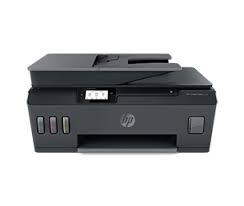
HP Smart Tank 570 Printer
High-quality ink tank printing with faster connections and easy mobile printing. Wireless capability : Yes, built-in dual band Wi-Fi 802.11b/g/n, Wireless direct, BLE Mobile printing capability : HP Smart app; Apple AirPrint; HP ePrint; Mopria certified Ports: Hi-Speed USB 2.0, Wi-Fi, Bluetooth LE
Details HP Smart Tank Plus 570
The full solution software includes everything you need to install and use your HP printer. This collection of software includes the complete set of drivers, installer software, and other administrative tools.
Relase Details HP Smart Tank Plus 570
Version: 50.2.4593_1 Release date: Jun 13, 2023 File name: Full_Webpack-50.2.4593_1-ST570_Full_Webpack.exe
Operating Systems
Microsoft Windows 11, Microsoft Windows 10 (32-bit), Microsoft Windows 10 (64-bit), Microsoft Windows 7 (32-bit), Microsoft Windows 7 (64-bit)
HP Print and Scan Doctor for Windows 10/8/8.1/7 32Bit-64Bit (Hp Smart Tank Plus 517)
HP created the HP Print and Scan Doctor to give users the troubleshooting and problem-solving tools they need to fix a wide range of typical issues with HP print and scan products linked to Windows-based computers. Run the tool and adhere to the directions displayed on the screen.
Version: 5.7.1.014 Release date: Dec 8, 2022 File name: HPPSdr.exe
HP LaserJet Managed MFP E72520 Driver for Windows 11/10/8.1/8/7 64bit
Download HP LaserJet Managed MFP E72520/E72525/E72530/E72535/E72540 Printer Full Software Solution
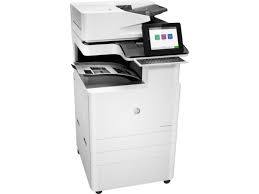
HP LaserJet Managed MFP E72520 Printer
Description:
The full solution software includes everything you need to install your HP printer. This collection of software includes the complete set of drivers, installer software, and other administrative tools found on the printer’s software CD.
Fix and enhancements: Updated end user license agreement and data collection statement
Release details
Version: 49.10.4644
Relase Date : Nov 11, 2021
Operating Systems: Microsoft Windows 11, Microsoft Windows 10 (32-bit), Microsoft Windows 10 (64-bit), Microsoft Windows 7 (32-bit), Microsoft Windows 7 (64-bit), Microsoft Windows 8 (32-bit), Microsoft Windows 8 (64-bit), Microsoft Windows 8.1 (32-bit), Microsoft Windows 8.1 (64-bit), Microsoft Windows Server 2019
Reminder: Wait until the installer prompts you to connect the USB cord. Before launching the installer, ensure sure the network cable is connected if you’re connecting to a network.
Any open software applications should be closed. Activate the printer. On this page, click the Download button. On the downloaded file, click. After the files have been extracted, the installation process will launch itself. To continue and finish the installation, adhere to the on-screen directions.
Select Save on step 4 and choose a spot on your hard drive to install later. Locate the file and double-click it when you’re ready to install. The installation process will immediately begin after this extraction. To continue with the installation, adhere to the on-screen directions.