HP 7255e driver software and downloads for
HP ENVY Inspire 7255e All-in-One Printer
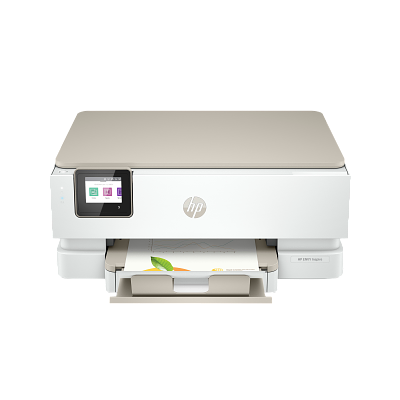
Work, learn and create with the printer that prints everything so you can tackle anything.
Specifications
- Product number
- 1W2Y9A
- Functions
- Print, copy, scan
- Print technology
- Ink
- Print speed black (ISO, A4)
- Up to 15 ppm
- Print speed black (ISO, Letter)
- Up to 15 ppm
HP 7255e driver download for Windows
Recommended HP 7255e driver software
See full detailsWindows 11; Windows 10, 7 (32/64-bit)
- Type:
- Installation Software and Full/Basic Driver-Supports print and scan functionality only
- Version:
- 55.4.5082
- Operating systems:
- Windows 11; Windows 10, 7 (32/64-bit)
- Release date:
- Aug 5, 2024
- File name:
- HPEasyStart-16.2.4-EN7200_55_4_5082_Webpack.exe
(220.2 MB)
Package notes
The full solution software includes everything you need to install and use your HP printer. This collection of software includes the complete set of drivers, installer software, and other administrative tools.
- 1. Handled blank screen issue due to deprecation of Internet Explorer.
Alternative packages
See full detailsWindows 11; Windows 10 (32/64-bit)
- Type:
- Installation Software and Driver-Includes print, scan, latest features, and solutions
- Version:
- 17.6.15
- Operating systems:
- Windows 11; Windows 10 (32/64-bit)
- Release date:
- Oct 13, 2026
- File name:
- HPEasyStart_17_6_15.exe
(26.5 MB)
Package notes
HP Easy Start provides guided setup and drivers for your HP printer.
- 1. Improved user experience.
- 2. Performance optimizations.
- 3. New product introduction.
HP 7255e driver setup options
See full detailsWindows 11; Windows 10 (64-bit)
- Type:
- Installation Software and Driver
- Version:
- N/A
- Operating systems:
- Windows 11; Windows 10 (64-bit)
- Release date:
- Jun 17, 2026
- File name:
- 9N9PHDT62W94
Package notes
Install HP app to setup and use your Printer HP app will help you connect your printer, install driver, offer print, scan, fax, share files and Diagnose/Fix top issues. Click here to learn how to setup your Printer successfully (Recommended). Creating an HP Account and registering is mandatory for HP+/Instant-ink customers. It also helps in accessing assisted support options and more. NOTE: Disconnect from Virtual Private Network (VPN) connection before downloading. Creating an account on Microsoft Store to download HP app is optional.
Additional software
See full detailsWindows 10 (32-bit)
- Type:
- Installation Software and Driver
- Version:
- N/A
- Operating systems:
- Windows 10 (32-bit)
- Release date:
- Dec 15, 2024
- File name:
- 9wzdncrfhwlh
Package notes
HP Smart will help you: Install printer software and drivers Create an HP account and register your printer Connect your printer to Wi-Fi, load paper, and install cartridges After installation, you can use the HP Smart software to print, scan and copy files, print remotely, sign up for instant ink* and more. NOTE: Disconnect from Virtual Private Network (VPN) connection before downloading. If you are asked to sign in to a Microsoft Store account, you can either sign in, create one or close the sign in screen and continue to install HP Smart. HP Smart is compatible with Windows 11 and Windows 10 version 1809 or higher. HP values that updated operating systems offer our users increased security and privacy protection. *Limitations might apply. May not be applicable to all country/regions.
HP 7255e driver compatibility packages
See full detailsWindows 7 (32/64-bit)
- Type:
- Installation Software and Full/Basic Driver-Supports print and scan functionality only
- Version:
- 17.6.15
- Operating systems:
- Windows 7 (32/64-bit)
- Release date:
- Oct 13, 2026
- File name:
- HPEasyStart_17_6_15.exe
(26.5 MB)
Package notes
HP Easy Start provides guided setup and drivers for your HP printer. Win 7 Service Pack 1 (SP1) is the minimum requirement for HP Easy Start.
- 1. Improved user experience.
- 2. Performance optimizations.
- 3. New product introduction.
Firmware and utilities
See full detailsWindows 11; Windows 10, 7 (32/64-bit)
- Type:
- Printer Firmware-Keeps your printer updated with latest fixes
- Version:
- 002.2621A
- Operating systems:
- Windows 11; Windows 10, 7 (32/64-bit)
- Release date:
- Jun 21, 2026
- File name:
- ENI7200_2621A.exe
(61.5 MB)
Package notes
This software tool will help you update your printer to the latest firmware. Please refer to Fixes and enhancements for more detail about the firmware update. Reminder: Dynamic security enabled printer. This Firmware includes dynamic security measures, which are used to block cartridges using a non-HP chip or modified or non-HP electronic circuitry. The printer is intended to work only with new or reused cartridges that have a new or reused HP chip or circuitry. Periodic firmware updates will maintain the effectiveness of the dynamic security measures and block cartridges that previously worked. More at: www.hp.com/learn/ds .
- 1. Security updates
- 2. Driver updates and general product fixes
HP 7255e driver download for macOS
Recommended HP 7255e driver software
See full detailsmacOS 11–15, 26
- Type:
- Installation Software and Driver-Includes print, scan, latest features, and solutions
- Version:
- N/A
- Operating systems:
- macOS 11–15, 26
- Release date:
- Aug 28, 2025
- File name:
- id1474276998
Package notes
HP app will help you: Install printer software and drivers Create an HP account and register your printer Connect your printer to Wi-Fi, load paper, and install cartridges After installation, you can use the HP app software to print, scan and copy files, print remotely, sign up for instant ink* and more. NOTE: Disconnect from Virtual Private Network (VPN) connection before downloading. *Limitations might apply. May not be applicable to all country/regions.
Firmware and utilities
See full detailsmacOS 10.12–10.15, 11–15, 26
- Type:
- Printer Firmware-Keeps your printer updated with latest fixes
- Version:
- 002.2621A
- Operating systems:
- macOS 10.12–10.15, 11–15, 26
- Release date:
- Jun 21, 2026
- File name:
- ENI7200_2621A.dmg
(64.0 MB)
Package notes
This software tool will help you update your printer to the latest firmware. Please refer to Fixes and enhancements for more detail about the firmware update. Reminder: Dynamic security enabled printer. This Firmware includes dynamic security measures, which are used to block cartridges using a non-HP chip or modified or non-HP electronic circuitry. The printer is intended to work only with new or reused cartridges that have a new or reused HP chip or circuitry. Periodic firmware updates will maintain the effectiveness of the dynamic security measures and block cartridges that previously worked. More at: www.hp.com/learn/ds .
- 1. Security updates
- 2. Driver updates and general product fixes
HP 7255e driver Installation & Support
HP 7255e driver installation resources:
Help for HP 7255e driver
Installation instructions for HP 7255e driver
Common setup problems for HP 7255e driver
Official resources for HP 7255e driver
Package versions for HP 7255e driver are listed in the download sections above.
For HP 7255e driver, use the matching operating-system section before downloading.