
HP Officejet 5742 Driver

HP Officejet 5742 e-All-in-One Printer Download Windows 11/10/8/7/Vista/Xp (Update : May 25, 2022)

Download HP Officejet 5740 e-All-in-One Printer Series Full Feature Software and Drivers
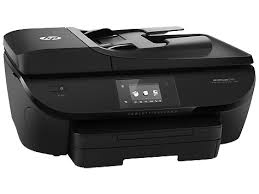
Hpdrivers.net- Officejet 5742 e-All-in-One Printer Software and Drivers
HP Officejet 5742 e-All-in-One Printer

HP Officejet 5742 e-All-in-One Printer Software and Drivers

Details

The full solution software includes everything you need to install and use your HP printer. This collection of software includes the complete set of drivers, installer and optional software

Fix and enhancements:

Repackaged without Optical Character Recognition (OCR) Functionality

Release details

File name: Full_Webpack-40.15.1230-OJ5740_Full_Webpack.exe

Released: May 25, 2022

Version : 40.15.1230_1

Operating Systems

Microsoft Windows 11, Microsoft Windows 10 32-Bit, Microsoft Windows 10 64-Bit, Microsoft Windows 8.1 32-Bit, Microsoft Windows 8.1 64-Bit, Microsoft Windows 8 32-Bit, Microsoft Windows 8 64-Bit, Microsoft Windows 7 32-Bit, Microsoft Windows 7 64-Bit

File Size: 91.42Mb
HP DeskJet Ink Advantage 1115 Driver Download

HP DeskJet Ink Advantage 1115 Printer Download Driver for Windows 11/10/8/8.1/7/Vista/XP (Update : Nov 23, 2021

Download HP DeskJet 1110 series Print and Scan Driver and Accessories

HP DeskJet Ink Advantage 1115 Printer
HP DeskJet Ink Advantage 1115 F5S21C Printer Series

On this page, we will talk about the drivers, technical specifications and user experiences of the HP DeskJet Ink Advantage 1115 Printer. HP 1115 is a printer suitable for home use. It may be inadequate for office use. Because it is cartridge based, printing costs are high. Also, the recommended monthly print count may not meet your needs. HP company’s recommended monthly printing volume is 50 to 100 pages. These numbers are not sufficient for office environments.

HP DeskJet Ink Advantage 1115 Printer uses 2 cartridges. The cartridge contains 3 colors, one of which is black. You can print up to 1200×1200 dpi on black pages. 4800×1200 dpi in color. Additionally, this inkjet printer has a 25-page input tray.

Let’s talk a little about the negative aspects of the HP DeskJet Ink Advantage 1115 Printer. It does not have automatic double-sided printing. Also no borderless printing. Moreover, there is no HP ePrint feature. Also, it does not have a wireless feature.

Compatible operating systems: Windows 10, Windows 8.1, Windows 8, Windows 7; OS X v10.8 Mountain Lion, OS X v10.9 Mavericks, OS

The manufacturer’s warranty provides a one-year limited hardware warranty unless you have purchased another warranty or insurance. It may vary depending on the country of purchase.

Details HP DeskJet Ink Advantage 1115 Driver

The full solution software includes everything you need to install and use your Hp printer. This collection of software includes the complete set of drivers, installer & optional software.

Fix and enhancements: Updated end user license agreement and data collection statement

Relase Details

File Version: 40.15.1230
File name: Full_Webpack-40.15.1230-DJ1110_Full_Webpack.exe
Release date: Nov 23, 2021

Operating Systems

Microsoft Windows 11, Microsoft Windows 10 (32-bit), Microsoft Windows 10 (64-bit), Microsoft Windows 8.1 (32-bit), Microsoft Windows 8.1 (64-bit), Microsoft Windows 8 (32-bit), Microsoft Windows 8 (64-bit), Microsoft Windows 7 (32-bit), Microsoft Windows 7 (64-bit), Microsoft Windows Vista (32-bit), Microsoft Windows Vista (64-bit), Microsoft Windows XP (32-bit)

Download

File Size: 124.72Mb

Information about installation:

The information we provide below is valid for all HP DeskJet 1110 series printers. After taking the product out of the box, open the front cover and remove the fixing sponge in the middle. Then open the cartridge cover and remove the print head fixing tape on the left side. These bands are generally blue in color. Make sure there is no more fixing tape remaining. Then, plug one end of the power cable that came with the printer into your printer and the other end into the electrical input. Turn on your printer. Then you will see the cartridge heads come to the middle.

The cartridges have copper electronic contacts on the front. Never touch them with your hand or any other object. Because it may cause your cartridge to deteriorate and cause an error when installed in your printer. There is already a protection band in these parts. Then you can remove these protection tapes and place them on the print head of your printer. Generally, the slot on the left side is for the color cartridge. The slot on the right is for the black cartridge. Gently press your cartridges into their slots and you will hear a clicking sound. Close the cartridge door and the device is ready for driver installation.

HP Deskjet D2466 Driver

HP Deskjet D2466 Printer Software for Windows 10/8/8,1

Download HP Print and Scan Doctor for Windows

HP Deskjet D2466 Printer Software

Diagnostic Tool-Fixes Installation and Driver Issues.

Download HP Print and Scan Doctor for Windows

The HP Print and Scan Doctor was designed by HP to provide users with troubleshooting and problem solving features needed to resolve many common problems experienced with HP print and scan products connected to Windows-based computers. Simply run the tool and follow the on-screen instructions.

Relase Details

File name: HPPSdr.exe
Released: Sep 3, 2021
Version 5.6.2.008
Compatibility: Microsoft Windows 10 (32-bit)(64-bit), Microsoft Windows 8 (32-bit)(64-bit), Microsoft Windows 8.1 (32-bit)(64-bit), Microsoft Windows 7 (32-bit)(64-bit)

Download

File Size : 11.3 Mb