HP DeskJet Ink Advantage 1115 Printer Download Driver for Windows 11/10/8/8.1/7/Vista/XP (Update : Nov 23, 2021
Download HP DeskJet 1110 series Print and Scan Driver and Accessories
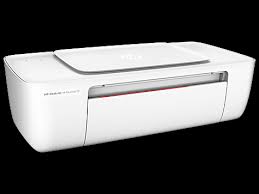
On this page, we will talk about the drivers, technical specifications and user experiences of the HP DeskJet Ink Advantage 1115 Printer. HP 1115 is a printer suitable for home use. It may be inadequate for office use. Because it is cartridge based, printing costs are high. Also, the recommended monthly print count may not meet your needs. HP company’s recommended monthly printing volume is 50 to 100 pages. These numbers are not sufficient for office environments.
HP DeskJet Ink Advantage 1115 Printer uses 2 cartridges. The cartridge contains 3 colors, one of which is black. You can print up to 1200×1200 dpi on black pages. 4800×1200 dpi in color. Additionally, this inkjet printer has a 25-page input tray.
Let’s talk a little about the negative aspects of the HP DeskJet Ink Advantage 1115 Printer. It does not have automatic double-sided printing. Also no borderless printing. Moreover, there is no HP ePrint feature. Also, it does not have a wireless feature.
Compatible operating systems: Windows 10, Windows 8.1, Windows 8, Windows 7; OS X v10.8 Mountain Lion, OS X v10.9 Mavericks, OS
The manufacturer’s warranty provides a one-year limited hardware warranty unless you have purchased another warranty or insurance. It may vary depending on the country of purchase.
Details HP DeskJet Ink Advantage 1115 Driver
The full solution software includes everything you need to install and use your Hp printer. This collection of software includes the complete set of drivers, installer & optional software.
Fix and enhancements: Updated end user license agreement and data collection statement
Relase Details
File Version: 40.15.1230
File name: Full_Webpack-40.15.1230-DJ1110_Full_Webpack.exe
Release date: Nov 23, 2021
Operating Systems
Microsoft Windows 11, Microsoft Windows 10 (32-bit), Microsoft Windows 10 (64-bit), Microsoft Windows 8.1 (32-bit), Microsoft Windows 8.1 (64-bit), Microsoft Windows 8 (32-bit), Microsoft Windows 8 (64-bit), Microsoft Windows 7 (32-bit), Microsoft Windows 7 (64-bit), Microsoft Windows Vista (32-bit), Microsoft Windows Vista (64-bit), Microsoft Windows XP (32-bit)
File Size: 124.72Mb
Information about installation:
The information we provide below is valid for all HP DeskJet 1110 series printers. After taking the product out of the box, open the front cover and remove the fixing sponge in the middle. Then open the cartridge cover and remove the print head fixing tape on the left side. These bands are generally blue in color. Make sure there is no more fixing tape remaining. Then, plug one end of the power cable that came with the printer into your printer and the other end into the electrical input. Turn on your printer. Then you will see the cartridge heads come to the middle.
The cartridges have copper electronic contacts on the front. Never touch them with your hand or any other object. Because it may cause your cartridge to deteriorate and cause an error when installed in your printer. There is already a protection band in these parts. Then you can remove these protection tapes and place them on the print head of your printer. Generally, the slot on the left side is for the color cartridge. The slot on the right is for the black cartridge. Gently press your cartridges into their slots and you will hear a clicking sound. Close the cartridge door and the device is ready for driver installation.