
Find HP Officejet J4680 All-in-One driver downloads, package details and supported operating systems for
HP Officejet J4680 All-in-One Printer
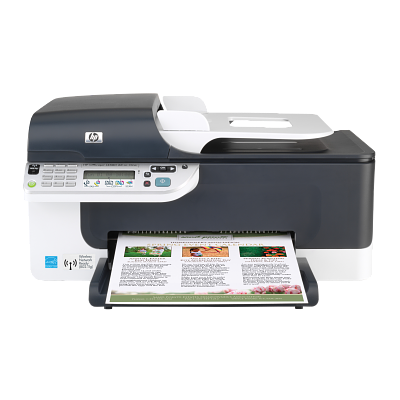
HP Officejet J4680 All-in-One Printer
Specifications
- Product number
- CB783A
- Recommended monthly page volume
- 350 to 600
- Paper handling input, standard
- 100-sheet input tray, 20-sheet automatic document feeder
- Print quality black (best)
- Black: Up to 600 x 600 dpi rendered dpi black Color: Up to 4800 x 1200 dpi Optimized on select HP photo papers with 1200 x 1200 input dpi
- Functions
- Print, copy, scan, fax
- Duty cycle (monthly, letter)
- Up to 3000 pages
- Connectivity, standard
- 1 USB, 1 Phone, 1 Ext Phone
HP Officejet J4680 All-in-One driver download for Windows
Recommended software
See full detailsWindows 7 (32/64-bit); Windows Vista (32-bit); Windows Vista (64-bit); Windows XP (32-bit)
- Type:
- Update
- Version:
- 3.0
- Operating systems:
- Windows 7 (32/64-bit); Windows Vista (32-bit); Windows Vista (64-bit); Windows XP (32-bit)
- Release date:
- Feb 18, 2011
- File name:
- CPE_SCAN_DESTINATION_UPDATE_hpcom_001_003.exe
(28.5 MB)
Package notes
When scanning after installing or upgrading to HP Solution Center 13, scanning appears to complete correctly, however scanned images or documents cannot be found on the computer.
Alternative packages
See full detailsWindows 7 (32/64-bit)
- Type:
- Update
- Version:
- 1.0
- Operating systems:
- Windows 7 (32/64-bit)
- Release date:
- Dec 5, 2009
- File name:
- dot4patch_reboot.exe
(1.3 MB)
Package notes
This Windows 7 patch fixes some printer functionality after upgrading Vista to Windows 7. For networked printers, please go to www.hp.com for more support information.
Setup options
See full detailsWindows 7 (64-bit)
- Type:
- Update
- Version:
- 1.0
- Operating systems:
- Windows 7 (64-bit)
- Release date:
- May 8, 2011
- File name:
- CPE_SLP_NETWORKMSI_hpcom_000_006.exe
(11.3 MB)
Package notes
This update corrects an issue which causes network-connected printers to disappear from the system
Additional software
See full detailsWindows Vista (32-bit); Windows Vista (64-bit); Windows XP (32-bit); +1 versions
- Type:
- Update
- Version:
- 1.0
- Operating systems:
- Windows Vista (32-bit); Windows Vista (64-bit); Windows XP (32-bit); +1 versions
- Release date:
- Mar 11, 2009
- File name:
- ConvergedIO_HPCOM_V3.exe
(1.6 MB)
Package notes
This update corrects an issue that can cause your computer to lose the connection with your printer, which may result in incomplete print jobs and loss of printer status messaging. NOTE: This update is applicable to driver version 8.0.0 and above only.
Compatibility packages
See full detailsWindows Vista (32-bit); Windows Vista (64-bit); Windows XP (32-bit); +1 versions
- Type:
- Update
- Version:
- 2.0
- Operating systems:
- Windows Vista (32-bit); Windows Vista (64-bit); Windows XP (32-bit); +1 versions
- Release date:
- Apr 8, 2009
- File name:
- slp_dd_hathi_110_017.exe
(25.3 MB)
Package notes
Corrects an issue that causes the network connected printer to disappear from the system and/or the USB connected printer to repeatedly attempt to reinstall, and improves system responsiveness while spooling and printing documents.
More available software
See full detailsWindows Vista (32-bit)
- Type:
- Utility-Diagnostic Tools
- Version:
- 10.0.0
- Operating systems:
- Windows Vista (32-bit)
- Release date:
- Apr 6, 2008
- File name:
- OJJ4500_XPS.exe
(16.7 MB)
Package notes
The HP XPS Printer Driver will work only with applications that support XPS Printing, such as the Windows Vista Photo Gallery. It uses Windows Color System (WCS) technology designed to improve quality and speed of color printing of documents with rich graphics.
Also applies to: HP XML Paper Specification (XPS) Printer Driver (recommended for advanced users only); HP XML Paper Specification (XPS) Printer Driver -Recommended for Advanced Users Only
Download options
See full detailsWindows Vista (32-bit)
- Type:
- Utility-Diagnostic Tools
- Version:
- 10.0.0
- Operating systems:
- Windows Vista (32-bit)
- Release date:
- Aug 4, 2008
- File name:
- OJJ4600_XPS.exe
(23.0 MB)
Package notes
Description: This package uses the same description as another package in this group.
Other available packages
See full detailsWindows Vista (64-bit)
- Type:
- Utility-Diagnostic Tools
- Version:
- 10.0.0
- Operating systems:
- Windows Vista (64-bit)
- Release date:
- Apr 6, 2008
- File name:
- OJJ4500_XPS_64-Bit.exe
(17.6 MB)
Package notes
Description: This package uses the same description as another package in this group.
Recommended software
See full detailsWindows Vista (64-bit)
- Type:
- Utility-Diagnostic Tools
- Version:
- 10.0.0
- Operating systems:
- Windows Vista (64-bit)
- Release date:
- Aug 4, 2008
- File name:
- OJJ4600_XPS_64-Bit.exe
(24.7 MB)
Package notes
Description: This package uses the same description as another package in this group.
Firmware and utilities
See full detailsWindows 8.1, 8 (32/64-bit)
- Type:
- Utility-Diagnostic Tools
- Version:
- 14.8.0
- Operating systems:
- Windows 8.1, 8 (32/64-bit)
- Release date:
- Oct 21, 2012
- File name:
- OJ_AIO_J4600_EntScruber_140_300.exe
(2.4 MB)
Package notes
This Software and Driver Removal Utility is intended for users to remove the HP software from their system. If problems arise while installing or uninstalling the HP software, download this removal utility to uninstall the software before attempting reinstallation.
Also applies to: HP Officejet Software and Driver Removal Utility; HP Officejet Basic Driver Removal Utility – IT Professional Use Only
More firmware and utilities
See full detailsWindows 8.1, 8 (32/64-bit)
- Type:
- Utility-Diagnostic Tools
- Version:
- 14.8.0
- Operating systems:
- Windows 8.1, 8 (32/64-bit)
- Release date:
- Oct 22, 2012
- File name:
- OJ_AIO_J4600_140_408_Scrubber.exe
(2.1 MB)
Package notes
This Software and Driver Removal Utility is intended for users to remove the HP software from their system.
Also applies to: HP Officejet Software and Driver Removal Utility
More firmware and utilities
See full detailsWindows 8.1, 8 (32/64-bit)
- Type:
- Utility-Diagnostic Tools
- Version:
- 14.8.0
- Operating systems:
- Windows 8.1, 8 (32/64-bit)
- Release date:
- Oct 22, 2012
- File name:
- OJ_AIO_J4500_140_408_Scrubber.exe
(2.0 MB)
Package notes
Description: This package uses the same description as another package in this group.
More firmware and utilities
See full detailsWindows 7 (32/64-bit)
- Type:
- Utility-Diagnostic Tools
- Version:
- 14.0.0
- Operating systems:
- Windows 7 (32/64-bit)
- Release date:
- Oct 15, 2014
- File name:
- OJJ4600_Corporate_Scrubber_14.exe
(2.5 MB)
Package notes
Description: This package uses the same description as another package in this group.
More firmware and utilities
See full detailsWindows 7 (32/64-bit)
- Type:
- Utility-Diagnostic Tools
- Version:
- 13.0.0
- Operating systems:
- Windows 7 (32/64-bit)
- Release date:
- Sep 2, 2014
- File name:
- OJJ4500_Scrubber_13.exe
(2.1 MB)
Package notes
Description: This package uses the same description as another package in this group.
More firmware and utilities
See full detailsWindows 7 (32/64-bit)
- Type:
- Utility-Diagnostic Tools
- Version:
- 13.0.0
- Operating systems:
- Windows 7 (32/64-bit)
- Release date:
- Oct 14, 2014
- File name:
- OJJ4600_Scrubber_13.exe
(2.6 MB)
Package notes
Description: This package uses the same description as another package in this group.
More firmware and utilities
See full detailsWindows 2000; Windows Server 2003; Windows Vista (32-bit); Windows XP (32-bit); Windows XP (64-bit)
- Type:
- Utility-Diagnostic Tools
- Version:
- 10.0.0
- Operating systems:
- Windows 2000; Windows Server 2003; Windows Vista (32-bit); Windows XP (32-bit); Windows XP (64-bit)
- Release date:
- Aug 4, 2008
- File name:
- OJJ4600_Corporate_scrubber_10.exe
(0.8 MB)
Package notes
This Software and Driver Removal Utility is intended for corporate users to remove HP Enterprise Solution from their system. If problems arise while installing or uninstalling the HP software, download this removal utility to uninstall the software before attempting reinstallation.
Also applies to: HP Officejet Basic Driver Removal Utility – IT Professional Use Only
More firmware and utilities
See full detailsWindows 2000; Windows Server 2003; Windows Vista (32-bit); Windows Vista (64-bit); Windows XP (32-bit); +1 versions
- Type:
- Utility-Diagnostic Tools
- Version:
- 10.0.0
- Operating systems:
- Windows 2000; Windows Server 2003; Windows Vista (32-bit); Windows Vista (64-bit); Windows XP (32-bit); +1 versions
- Release date:
- Apr 6, 2008
- File name:
- OJJ4500_Corporate_scrubber_10.exe
(1.1 MB)
Package notes
Description: This package uses the same description as another package in this group.
More firmware and utilities
See full detailsWindows Vista (32-bit); Windows Vista (64-bit); Windows XP (32-bit); +1 versions
- Type:
- Utility-Diagnostic Tools
- Version:
- 14.0.0
- Operating systems:
- Windows Vista (32-bit); Windows Vista (64-bit); Windows XP (32-bit); +1 versions
- Release date:
- Oct 14, 2014
- File name:
- OJJ4600_Scrubber_14.exe
(3.0 MB)
Package notes
Description: This package uses the same description as another package in this group.
More firmware and utilities
See full detailsWindows 2000; Windows Vista (32-bit); Windows Vista (64-bit); Windows XP (32-bit); +1 versions
- Type:
- Utility-Diagnostic Tools
- Version:
- 10.0.0
- Operating systems:
- Windows 2000; Windows Vista (32-bit); Windows Vista (64-bit); Windows XP (32-bit); +1 versions
- Release date:
- May 26, 2009
- File name:
- OJJ4600_Scrubber_10.exe
(1.4 MB)
Package notes
Description: This package uses the same description as another package in this group.
More firmware and utilities
See full detailsWindows 2000; Windows Vista (32-bit); Windows Vista (64-bit); Windows XP (32-bit); +1 versions
- Type:
- Utility-Diagnostic Tools
- Version:
- 10.0.0
- Operating systems:
- Windows 2000; Windows Vista (32-bit); Windows Vista (64-bit); Windows XP (32-bit); +1 versions
- Release date:
- Apr 7, 2008
- File name:
- OJJ4500_Scrubber_10.exe
(1.4 MB)
Package notes
Description: This package uses the same description as another package in this group.
More firmware and utilities
See full detailsWindows Server 2003; Windows Vista (64-bit); Windows XP (64-bit)
- Type:
- Utility-Diagnostic Tools
- Version:
- 10.0.0
- Operating systems:
- Windows Server 2003; Windows Vista (64-bit); Windows XP (64-bit)
- Release date:
- Aug 4, 2008
- File name:
- OJJ4600_Corporatex64_scrubber_10.exe
(1.0 MB)
Package notes
Description: This package uses the same description as another package in this group.
HP Officejet J4680 All-in-One driver download for macOS
Recommended software
See full detailsOS X 10.6
- Type:
- Driver-Product Installation Software
- Version:
- 10.3
- Operating systems:
- OS X 10.6
- Release date:
- Sep 13, 2009
- File name:
- HP_Installer_Officejet_Full_Group04_10.3.dmg
(139.3 MB)
Package notes
This download includes the HP print driver, HP Utility, HP Scan software and, if applicable for your device, the HP fax driver.
Alternative packages
See full detailsOS X 10.3–10.5
- Type:
- Driver-Product Installation Software
- Version:
- 9.6
- Operating systems:
- OS X 10.3–10.5
- Release date:
- Apr 7, 2008
- File name:
- OJ_J4500_Mac.dmg
(245.0 MB)
Package notes
This is a Full Feature Software/Driver solution intended for Macintosh users with their HP-all-in-One device.
Also applies to: HP Officejet Full Feature Software and Driver (Universal) – Mac OS X 10.3, 10.4 and 10.5
Setup options
See full detailsOS X 10.3–10.5
- Type:
- Driver-Product Installation Software
- Version:
- 9.6
- Operating systems:
- OS X 10.3–10.5
- Release date:
- Aug 4, 2008
- File name:
- OJ_J46X0_Mac.dmg
(245.0 MB)
Package notes
Description: This package uses the same description as another package in this group.
Additional software
See full detailsOS X 10.6–10.9
- Type:
- Update
- Version:
- 1.0.0
- Operating systems:
- OS X 10.6–10.9
- Release date:
- Jan 30, 2014
- File name:
- HP-Printer-Driver-Patch_v1.0.0.dmg
(10.6 MB)
Package notes
This HP Print Driver Update fixes an issue with HP Inkjet products that causes an additional page to be printed after the intended document has completed.
HP Officejet J4680 All-in-One Linux Support
Recommended software
See full detailsLinux
- Type:
- HP Support
- Version:
- Version not listed
- Operating systems:
- Linux
- Release date:
- Date not listed
- File name:
- HP Support
Package notes
Description: HP does not provide a separate package description for this download.
HP Officejet J4680 All-in-One Mobile Apps
Recommended software
See full detailsAndroid
- Type:
- Mobil uygulama
- Version:
- Version not listed
- Operating systems:
- Android
- Release date:
- Date not listed
- File name:
- Google Play
Package notes
Description: HP does not provide a separate package description for this download.
Alternative packages
See full detailsiPhone / iPad
- Type:
- Mobil uygulama
- Version:
- Version not listed
- Operating systems:
- iPhone / iPad
- Release date:
- Date not listed
- File name:
- App Store
Package notes
Description: HP does not provide a separate package description for this download.
HP Officejet J4680 All-in-One installation and support
Use these resources after choosing the package that matches your operating system.
Driver assistance
Installation instructions
Common setup problems
Official resources
Package versions are listed in the download sections above. Check the operating-system list before downloading.
Advertisement
thanks, very helpful.