
Find HP Photosmart C3180 All-in-One driver downloads, package details and supported operating systems for
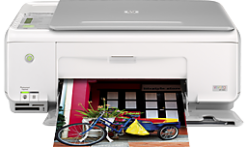
HP Photosmart C3180 All-in-One Printer
The HP Print and Scan Doctor was designed by HP to provide users with troubleshooting and problem solving features needed to resolve many common problems experienced with HP print and scan products connected to Windows-based computers. Simply run the tool and follow the on-screen instructions.
Specifications
- Product number
- 1146512
- Duplex printing
- None (not supported)
- Recommended monthly page volume
- 250 to 500
- Paper handling input, standard
- 100-sheet input tray
- Print quality black (best)
- Black: Up to 1200 rendered dpi black (when printing from a computer) Color: Up to 4800 x 1200 optimized dpi color (when printing from a computer and 1200 input dpi)
- Functions
- Print, copy, scan
- Print speed black (ISO, A4)
- Up to 7.1 ppm
Source verification: The model and driver information on this page was reviewed against archived HP source records on .
HP Photosmart C3180 All-in-One driver download for Windows
Recommended software
See full detailsWindows 11; Windows 10, 7 (64-bit)
- Type:
- Driver-Product Installation Software
- Version:
- N/A
- Operating systems:
- Windows 11; Windows 10, 7 (64-bit)
- Release date:
- Dec 20, 2021
- File name:
- HP support instructions
(N/A)
Package notes
Install the HP Printer Driver and Software provided within your operating system.
Alternative packages
See full detailsWindows 7 (64-bit)
- Type:
- Update
- Version:
- 3.0
- Operating systems:
- Windows 7 (64-bit)
- Release date:
- Feb 18, 2011
- File name:
- CPE_SCAN_DESTINATION_UPDATE_hpcom_001_003.exe
(28.5 MB)
Package notes
When scanning after installing or upgrading to HP Solution Center 13, scanning appears to complete correctly, however scanned images or documents cannot be found on the computer.
Setup options
See full detailsWindows 7 (64-bit)
- Type:
- Update
- Version:
- 1.0
- Operating systems:
- Windows 7 (64-bit)
- Release date:
- Dec 5, 2009
- File name:
- dot4patch_reboot.exe
(1.3 MB)
Package notes
This Windows 7 patch fixes some printer functionality after upgrading Vista to Windows 7. For networked printers, please go to www.hp.com for more support information.
HP Photosmart C3180 All-in-One Linux Support
Recommended software
See full detailsLinux
- Type:
- Driver-Product Installation Software
- Version:
- N/A
- Operating systems:
- Linux
- Release date:
- Nov 7, 2016
- File name:
- HP support instructions
(N/A)
Package notes
For Linux downloads, HP recommends another website. If you need to download Linux drivers, you will be directed to a website that is outside HP Customer Support.
HP Photosmart C3180 All-in-One installation and support
Use these resources after choosing the package that matches your operating system.
Driver assistance
Installation instructions
Common setup problems
Official resources
Package versions are listed in the download sections above. Check the operating-system list before downloading.
Advertisement