
Find HP 9120b driver downloads, package details and supported operating systems for
HP OfficeJet Pro 9120b All-in-One Printer
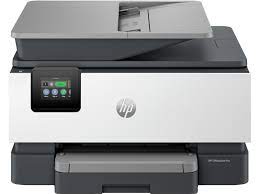
HP OfficeJet Pro 9120b All-in-One Series Printer Software Driver Download for Macintosh – mac OS 10.15 – 10.14, macOS 14-13-12-11
Specifications
- Product number
- 2101420710
- Duplex printing
- Automatic
- Print quality color (best)
- Up to 4800 x 1200 optimized dpi on HP Advance Photo Paper 1200 x 1200 dpi input
- Recommended monthly page volume
- Up to 1500 HP recommends the number of pages printed not exceed the recommended monthly page volume for optimum device performance.
- Paper handling input, standard
- 250-sheet input tray; 35-sheet ADF
- Print quality black (best)
- Black: 1200 x 1200 rendered dpi Color: Up to 4800 x 1200 optimized dpi on HP Advance Photo Paper 1200 x 1200 dpi input
- Connectivity, standard
- 1 Ethernet; 1 Hi-Speed USB 2.0 (device); 1 Hi-Speed USB 2.0 (host); 1 Wi-Fi 802.11 a/b/g/n/ac (dual band); 2 RJ-11 Fax/Modem port/phone line
HP 9120b driver download for Windows
Recommended software
See full detailsWindows 11; Windows 10 (64-bit)
- Type:
- Installation Software and Full/Basic Driver-Supports print and scan functionality only
- Version:
- 58.2.1917
- Operating systems:
- Windows 11; Windows 10 (64-bit)
- Release date:
- Nov 12, 2023
- File name:
- HPEasyStart-16.3.1-OJP9120b_58_2_1917_Webpack.exe
(526.4 MB)
Package notes
The full solution software includes everything you need to install and use your HP printer. This collection of software includes the complete set of drivers, installer software, and other administrative tools.
Alternative packages
See full detailsWindows 11; Windows 10 (64-bit)
- Type:
- Driver-Universal Scan Driver
- Version:
- 63.8.6459
- Operating systems:
- Windows 11; Windows 10 (64-bit)
- Release date:
- Jul 1, 2026
- File name:
- Full_Webpack-63.8.6459-SJ0001_Full_Webpack.exe
(436.2 MB)
Package notes
Full webpack provides various scan functionalities. Does not include OCR capabilities and Cloud Destinations.
Setup options
See full detailsWindows 11; Windows 10 (64-bit)
- Type:
- Driver-Universal Scan Driver
- Version:
- 63.8.6459
- Operating systems:
- Windows 11; Windows 10 (64-bit)
- Release date:
- Jul 1, 2026
- File name:
- Basic_Webpack_x64-63.8.6459-SJ0001_Basicx64_Webpack.exe
(113.9 MB)
Package notes
This is the minimum Scan Software solution which provides basic Scan functionality, WIA and Twain support.Does not include OCR capabilities and Cloud Destinations.
Also applies to: HP Universal Scan – Basic Feature Software and Driver (ARM 64)
Additional software
See full detailsWindows 11
- Type:
- Driver-Universal Scan Driver
- Version:
- 63.8.6459
- Operating systems:
- Windows 11
- Release date:
- Aug 9, 2026
- File name:
- Basic_Webpack_x64-63.8.6459_ARM64-SJ0001_Basicx64_Webpack.exe
(118.7 MB)
Package notes
Description: This package uses the same description as another package in this group.
Compatibility packages
See full detailsWindows 11; Windows 10 (64-bit)
- Type:
- Installation Software and Driver-Includes print, scan, latest features, and solutions
- Version:
- 17.6.15
- Operating systems:
- Windows 11; Windows 10 (64-bit)
- Release date:
- Oct 13, 2026
- File name:
- HPEasyStart_17_6_15.exe
(26.5 MB)
Package notes
HP Easy Start provides guided setup and drivers for your HP printer.
More available software
See full detailsWindows 11; Windows 10 (64-bit)
- Type:
- Software
- Version:
- N/A
- Operating systems:
- Windows 11; Windows 10 (64-bit)
- Release date:
- Jun 17, 2026
- File name:
- HP support instructions
(N/A)
Package notes
HP app will help you install printer drivers, print, scan, share files, send faxes and more. Some HP app features require a network connection and an HP account for full functionality.
Download options
See full detailsWindows 11
- Type:
- Driver-Smart Universal Print Driver
- Version:
- 4.08.1.3348
- Operating systems:
- Windows 11
- Release date:
- Sep 17, 2026
- File name:
- SUPD-4.08.1.3348-V3-x86.zip
(25.1 MB)
Package notes
This is the most current version of the V3 HP Smart Universal Printing Driver (SUPD) for Windows 32 bit systems.
Other available packages
See full detailsWindows 11; Windows 10 (64-bit)
- Type:
- Driver-Smart Universal Print Driver
- Version:
- 4.08.1.3348
- Operating systems:
- Windows 11; Windows 10 (64-bit)
- Release date:
- Sep 17, 2026
- File name:
- SUPD-4.08.1.3348-V3-x64.zip
(28.4 MB)
Package notes
This is the most current version of the V3 HP Smart Universal Printing Driver (SUPD) for Windows 64 bit systems.
Firmware and utilities
See full detailsWindows 11; Windows 10 (64-bit)
- Type:
- Driver-Universal Fax Driver
- Version:
- 8.2.89
- Operating systems:
- Windows 11; Windows 10 (64-bit)
- Release date:
- Sep 10, 2026
- File name:
- UFD_8.2-8.2.89-HPUFDDriver.exe
(25.2 MB)
Package notes
The HP Universal Fax Driver is a solution installed on a client PC. Note : This method is not supported for Windows Server PC.
More firmware and utilities
See full detailsWindows 11; Windows 10 (64-bit)
- Type:
- Driver-Universal Fax Driver
- Version:
- 8.2.89
- Operating systems:
- Windows 11; Windows 10 (64-bit)
- Release date:
- Sep 10, 2026
- File name:
- UFD_8.2-8.2.89-HPUFD_Driver_Files.exe
(13.8 MB)
Package notes
The HP Universal Fax Driver works well with a broad range of networked and direct-connected HP fax enabled Enterprise Multifunction Printers (MFPs).
More firmware and utilities
See full detailsWindows 11; Windows 10 (64-bit)
- Type:
- Printer Firmware-Keeps your printer updated with latest fixes
- Version:
- 6.23.5.36
- Operating systems:
- Windows 11; Windows 10 (64-bit)
- Release date:
- Jul 6, 2026
- File name:
- OJP9120b_6.23.5.36.exe
(196.4 MB)
Package notes
This software tool will help you update your printer to the latest firmware. Please refer to Enhancement/Fixes for more detail about the firmware update.
More firmware and utilities
See full detailsWindows 11; Windows 10 (64-bit)
- Type:
- Software
- Version:
- 17.4.211
- Operating systems:
- Windows 11; Windows 10 (64-bit)
- Release date:
- Feb 17, 2026
- File name:
- Readiris17-17.4.211_HP-cd25n005.exe
(448.6 MB)
Package notes
Exclusively for HP customers: Accelerate your digitization journey with ReadIRIS Advanced OCR. Convert paper documents, scanned images, and PDFs into fully editable and searchable digital files, making information easier to store, share, and manage.
More firmware and utilities
See full detailsWindows 11; Windows 10 (64-bit)
- Type:
- Software
- Version:
- 27.0.577.2
- Operating systems:
- Windows 11; Windows 10 (64-bit)
- Release date:
- Oct 6, 2026
- File name:
- Readiris_PDF-27.0.577.2-HP.msi
(532.8 MB)
Package notes
HP customers enjoy exclusive access to ReadIRIS Advanced PDF – your complete solution for digital document workflows. Merge, split, annotate, and secure PDFs effortlessly, helping you streamline processes and embrace a paperless future.
More firmware and utilities
See full detailsWindows 11; Windows 10 (64-bit)
- Type:
- Utility-Universal Print Driver
- Version:
- v1.9.2
- Operating systems:
- Windows 11; Windows 10 (64-bit)
- Release date:
- Nov 17, 2024
- File name:
- HP-PARK-v1.9.2.zip
(18.7 MB)
Package notes
The HP Print Administrator Resource Kit (PARK) is a collection of tools, scripts and documentation to help print administrators install, deploy, configure and manage the HP Universal Print Driver. The PARK contains both supported and unsupported software tools, scripts and documentation.
More firmware and utilities
See full detailsWindows 11; Windows 10 (64-bit)
- Type:
- Software-Smart Universal Print Driver
- Version:
- 5.06.1.604
- Operating systems:
- Windows 11; Windows 10 (64-bit)
- Release date:
- Jun 24, 2025
- File name:
- HPSPARKTools-5.06.1.604.zip
(101.5 MB)
Package notes
The HP Smart Print Administrator Resource Kit (HP SmartPARK) is a collection of tools, scripts, and documents to help print administrators install, deploy, configure and manage the "HP Smart Universal Printing" driver (HP SUPD) and the associated print queues.
HP 9120b installation and support
Use these resources after choosing the package that matches your operating system.
Driver assistance
Installation instructions
Common setup problems
Official resources
Package versions are listed in the download sections above. Check the operating-system list before downloading.
Advertisement