Independent download guide for HP printer and scanner drivers
hpdrivers.net is an independent website and is not affiliated with, endorsed by, or sponsored by HP Inc. Download links point to HP's official servers (ftp.hp.com). Read the full disclaimer
Last checked against HP’s download list: November 8, 2026 · Checked by H&G
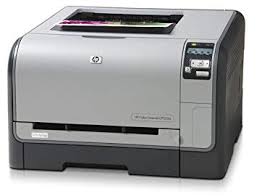
Looking for the HP Color LaserJet CP1515n driver? This page lists HP’s official software for the whole HP Color LaserJet CP1510 Printer series. HP lists some packages for specific models in the series, so check that the package title includes your model. For Windows Vista (32-bit and 64-bit); Windows XP (32-bit), the package most people need is the HP Color LaserJet CP1510 Printer series PCL6 USB and Network Default Install.
HP Color LaserJet CP1515n
Recommended downloads
Windows Vista (32-bit and 64-bit); Windows XP (32-bit): HP Color LaserJet CP1510 Printer series PCL6 USB and Network Default InstallVersion 61.72.52.0 · Released Sep 23, 2014 · 57.4 MB
Files download directly from HP’s official servers. hpdrivers.net does not host or modify them.
Which Windows package should you choose?
HP publishes 4 kinds of Windows package for the Color LaserJet CP1510:
Firmware update (v20130923, Nov 08, 2013): updates the printer itself, not your PC.
HP Universal Print Driver (v6.4.1.22169, Mar 28, 2017): HP’s shared driver for many models, also listed for this series.
HP Color LaserJet CP1510 Printer series PCL6 USB and Network Default Install (v61.72.52.0, Sep 23, 2014).
Driver files (no installer) (v61.72.52.0, Jun 22, 2009): bare driver files for Windows’ Add Printer wizard.
All downloads for the Color LaserJet CP1510
HP’s download list for this series includes Windows 10, 8.1, 8, 7, Vista (32-bit and 64-bit); Windows XP (32-bit) packages. It does not list separate Windows 11 packages.
Windows
Package / Windows
Version
Released
Size
HP Color LaserJet Printer Firmware Update Utility
Windows: 10, 8.1, 8, 7, Vista (32-bit and 64-bit) XP (32-bit)
HP lists its Universal Print Driver for this series on Windows 10, 8.1, 8, 7, Vista (32-bit and 64-bit); Windows XP (32-bit). Get it from our HP Universal Print Driver page.
Linux
HP lists Linux support for this series through its HPLIP project, outside the regular download list: HP’s Linux printing page (HPLIP).
Installing the Color LaserJet CP1510 driver
The driver files without an installer are added through Windows’ Add Printer wizard (Have Disk). For step-by-step instructions, see our guide to installing an HP printer driver.
Firmware update 20130923
The newest firmware HP lists for the Color LaserJet CP1510 is version 20130923, released Nov 08, 2013. HP’s notes for it: Fixed an issue that could cause a blurry mono print job if the job is sent immediately following a color print job; The Power Save Time menu item has been restored to the menu system.
Check your current firmware version first on the printer’s Configuration Page, and update only if it is older.
Install the printer driver before running the update. HP’s utility needs it to reach the printer.
Specifications that matter for setup
Connections
1 Hi-Speed USB 2.0; 1 Gigabit Ethernet; 2 EIO
Print languages
HP PCL 6, HP PCL 5c, HP postscript level 3 emulation, Hybrid print path
Print speed (black)
Normal: Up to 12 ppm
Recommended monthly volume
250 to 1000
Two-sided printing
Manual (driver support provided)
Paper handling and hardware details
Values below are HP’s published figures for the Color LaserJet CP1510; they help you check that this page matches your printer before you download anything.
Download HP LaserJet P1004 Printer Software Driver for Windows 10/8/8.1/7/Vista/XP [32Bir-64Bit]
HP LaserJet P1000-P1500 Hostbased Plug and Play Basic Software Driver
HP LaserJet P1004 Printer
Description
The Plug and Play driver provides easy installation and offers basic printing functions.
Relase Details
File name: ljP1000_P1500-HB-pnp-win64-en.exe
Released: Oct 15, 2013
Version : 20130415
Operating Systems: Microsoft Windows 10 (64-bit)
Microsoft Windows 8 (64-bit)
Microsoft Windows 8.1 (64-bit)
Microsoft Windows Server 2003 64-Bit Edition
Microsoft Windows Vista (64-bit)
Microsoft Windows XP 64-Bit Edition
Microsoft Windows XP x64
File Size : 3.91Mb
Operating Systems: Microsoft Windows 10 (32-bit)
Microsoft Windows 8 (32-bit)
Microsoft Windows 8.1 (32-bit)
Microsoft Windows Server 2003 32-Bit Edition
Microsoft Windows Vista (32-bit)
Microsoft Windows XP 32-Bit Edition
Microsoft Windows XP x86 File Size : 3.42 Mb
Last checked against HP’s download list: November 3, 2026 · Checked by H&G
Looking for the HP Color LaserJet Managed MFP E57540dn driver? This page lists HP’s official software for the whole HP Color LaserJet Managed MFP E57540 series: the Color LaserJet Managed MFP E57540dn and Color LaserJet Managed Flow MFP E57540c. HP lists some packages for specific models in the series, so check that the package title includes your model. For Windows 10 (64-bit) and Windows 7 (64-bit), the package most people need is the HP Color LaserJet Managed/Managed Flow MFP E57540 Printers V3 PCL 6 Print Driver (no installer). For Windows 11, HP lists the HP Universal Print Driver for Windows PCL6 (64-bit). For a Mac, HP lists Install HP Easy Start.
HP Color LaserJet Managed MFP E57540dn
Recommended downloads
Windows 10 (64-bit), Windows 7 (64-bit): HP Color LaserJet Managed/Managed Flow MFP E57540 Printers V3 PCL 6 Print Driver (no installer)Version 8.00.1329.6754 · Released May 20, 2021 · 11.2 MB
HP lists its Universal Print Driver for this series on Windows 7, Windows 11 and Windows 10. Get it from our HP Universal Print Driver page.
Linux
HP lists Linux support for this series through its HPLIP project, outside the regular download list: HP’s Linux printing page (HPLIP).
Installing the Color LaserJet Managed MFP E57540 driver
The driver files without an installer are added through Windows’ Add Printer wizard (Have Disk). For step-by-step instructions, see our guide to installing an HP printer driver.
Firmware update 2411226_066596
The newest firmware HP lists for the Color LaserJet Managed MFP E57540 is version 2411226_066596, released Feb 02, 2023.
Keep the printer and the computer switched on until the update has finished.
Specifications that matter for setup
Connections
2 Hi-Speed USB 2.0 Host; 1 Hi-Speed USB 2.0 Device; 1 Gigabit/Fast Ethernet 10/100/1000Base-TX network; Hardware Integration Pocket
Print languages
HP PCL 6; HP PCL 5c; HP postscript level 3 emulation, native PDF printing (v 1.7)
Functions
Print, copy, scan, optional fax
Print speed (black)
Normal: Up to 40 ppm
Recommended monthly volume
2000 to 15,000
Two-sided printing
Automatic (standard)
Scanner
Flatbed, ADF
Scan resolution
Up to 600 dpi
Two-sided ADF scanning
Yes
Document feeder
Standard, 100 sheets
Copy speed
Black: Up to 40 cpm Color: Up to 40 cpm
Ink supplies HP lists for the Color LaserJet Managed MFP E57540
HP’s specifications name these replacement supplies for the Color LaserJet Managed MFP E57540:
HP CF360XC High
What comes in the box
HP lists these items with the Color LaserJet Managed MFP E57540:
Printer
Four preinstalled HP LaserJet toner cartridges (Black: ~6000 pages, Color: ~5000 pages)
Toner collection unit
In-box documentation
CD
Power Cord
Paper handling and hardware details
Values below are HP’s published figures for the Color LaserJet Managed MFP E57540; they help you check that this page matches your printer before you download anything.
550-sheet media input tray 3, 550-sheet media input tray 4, 550-sheet media input tray 5
Paper sizes
Tray 1: letter, legal, oficio, executive, statement, 4 x 6, 3 x 5, 5 x 7, 5 x 8, postcard (JIS), double postcard (JIS), 8.5 x 13, envelope (commercial No. 9
Media types
Paper (plain, light, bond, recycled, mid-weight, heavy, mid-weight glossy, heavy glossy, extra heavy, extra heavy glossy, cardstock, card glossy), color transparency, labels, letterhead, envelope
Paper weight
Tray 1: 16 to 58 lb (plain); 28 to 58 lb (glossy); Tray 2: 16 to 58 lb (plain paper); 28 to 58 lb (glossy paper); Optional Trays 3+: 16 to 58 lb (plain paper)
Print speed (color)
Up to 40 ppm
Print quality (black)
Black: Up to 1200 x 1200 dpi Color: Up to 1200 x 1200 dpi
Control panel
8.0-in (20.3 cm) Color Graphics Display (CGD) with touchscreen; rotating (adjustable angle) display; illuminated Home button (for quick return to the Home menu)
Memory
1.25 GB (printer), 512 MB (scanner)
Processor
1.2 GHz
Internal storage
Standard, embedded HP High-Performance Secure Hard Disk, minimum 320 GB; AES 256 hardware encryption or greater