
hpdrivers.net is an independent website and is not affiliated with, endorsed by, or sponsored by HP Inc. Download links point to HP's official servers (ftp.hp.com). Read the full disclaimer

HP LaserJet 4050 Drivers

Last checked against HP’s download list: November 8, 2026 · Checked by H&G

Looking for the HP LaserJet 4050 driver? This page lists HP’s official software for the whole HP LaserJet 4050 Printer series. HP lists some packages for specific models in the series, so check that the package title includes your model. For Windows XP (32-bit), the package most people need is the HP LaserJet 4050 PCL 6 printer driver. For Windows 11, HP lists the HP Universal Print Driver for Windows PCL6 (64-bit).
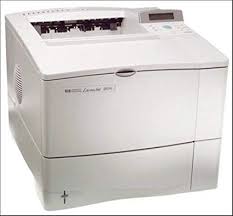
HP LaserJet 4050 printer
HP LaserJet 4050

Recommended downloads

Windows XP (32-bit): HP LaserJet 4050 PCL 6 printer driverVersion 4.27.4050.410 · Released Dec 12, 2003 · 1.6 MB
Download
Windows 11: HP Universal Print Driver for Windows PCL6 (64-bit)Version 8.2.0.26819 · Released Sep 26, 2026 · 20.2 MB
Download

Files download directly from HP’s official servers. hpdrivers.net does not host or modify them.

Models covered by this page

HP’s download list for this series names these models. It covers the whole LaserJet 4050 range, including model variants HP does not list by name:

HP LaserJet 4050 HP LaserJet 4050t HP LaserJet 4050n HP LaserJet 4050tn HP LaserJet 4050se HP LaserJet 4050 USB-MAC HP LaserJet 4050 Remarketed

Which Windows package should you choose?

HP publishes 2 kinds of Windows package for the LaserJet 4050:

  • HP Universal Print Driver (v8.2.0.26778, Sep 26, 2026): HP’s shared driver for many models, also listed for this series.
  • HP LaserJet 4050 PCL 6 printer driver (v4.27.4050.410, Dec 12, 2003).

All downloads for the LaserJet 4050

Windows

Package / Windows
Version
Released
Size
HP LaserJet 4050 PCL 6 printer driver
Windows: XP (32-bit)
File detailsFile: lj4050pcl6win2kxp2003-en.exe
4.27.4050.410
Dec 12, 2003
1.6 MB
HP LaserJet 4050 PCL 5e Printer Driver
Windows: XP (32-bit)
File detailsFile: lj4050pcl5ewin2kxp2003-en.exe
4.27.4050.410
Dec 12, 2003
1.6 MB

Other HP software listed for this series

Software / Systems
Version
Size
Shop for HP Supplies
Systems: Windows Vista, XP (32-bit)
14.0
12.7 MB
Screen reader accessibility for status and alerts
Systems: Windows XP (32-bit)
3.1
6.3 MB
Printer Status/Alerts and Internet-Enabled Supplies Ordering (IESO)/SureSupply for Direct Connect
Systems: Windows XP (32-bit)
3.1
6.3 MB

HP Universal Print Driver

HP lists its Universal Print Driver for this series on Windows 11; Windows 10, 8.1, 8, 7 (32-bit and 64-bit). Get it from our HP Universal Print Driver page.

Linux

HP lists Linux support for this series through its HPLIP project, outside the regular download list: HP’s Linux printing page (HPLIP).

Installing the LaserJet 4050 driver

For step-by-step instructions, see our guide to installing an HP printer driver.
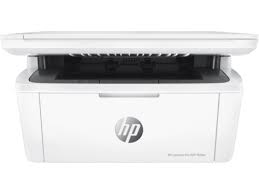
HP LaserJet Pro MFP M30 Driver Download

HP LaserJet Pro MFP M30 Printer Series Driver for Windows 11/10/8.1/8/7/Vista/X (32-bit)(64-Bit)

HP LaserJet Pro MFP M28/M29/M30/M31w Printer Full Software Solution

HP LaserJet Pro MFP M31 Printers

Details

The full solution software includes everything you need to install your HP printer. This collection of software includes the complete set of drivers, installer software, and other administrative tools found on the printer’s software CD.

Relase Details

Version: 46.5.2645
Release date: Mar 14, 2022
File name: Full_Webpack-46.5.2645-LJM28-M31_UWL_Full_Webpack.exe

Operating Systems

Microsoft Windows 11, Microsoft Windows 10 (32-bit), Microsoft Windows 10 (64-bit), Microsoft Windows 8.1 (32-bit), Microsoft Windows 8.1 (64-bit), Microsoft Windows 8 (32-bit), Microsoft Windows 8 (64-bit), Microsoft Windows 7 (32-bit), Microsoft Windows 7 (64-bit), Microsoft Windows Vista (32-bit), Microsoft Windows XP (32-bit)

Download

File Size: 144.81 MB

HP LaserJet Pro M1139 Drivers (LaserJet Pro M1139 Series)

Last checked against HP’s download list: November 1, 2026 · Checked by H&G

Looking for the HP LaserJet Pro M1139 driver? This page lists HP’s official software for the whole HP LaserJet Pro M1139 Multifunction Printer series. For Windows 11, Windows 10 (64-bit) and Windows 7 (64-bit), the package most people need is the HP LaserJet Full Feature Software and Driver.

HP LaserJet Pro M1139 printer
HP LaserJet Pro M1139

Recommended downloads

Windows 11, Windows 10 (64-bit), Windows 7 (64-bit): HP LaserJet Full Feature Software and DriverVersion 20180815_1 · Released Jul 22, 2021 · 240.8 MB · HP rating: Recommended

Download

Files download directly from HP’s official servers. hpdrivers.net does not host or modify them.


Which Windows package should you choose?

HP publishes 2 kinds of Windows package for the LaserJet Pro M1139 Multifunction:

  • Full software solution (v20180815_1, Jul 22, 2021, 240.8 MB): driver plus HP’s setup wizard and tools.
  • Firmware update (v20201012, Nov 03, 2020): updates the printer itself, not your PC.

All downloads for the LaserJet Pro M1139 Multifunction

Windows

Package / Windows
Version
Released
Size
HP LaserJet Firmware Update Utility

Windows: 10, 7
File details

File: HP_M1212_M1213_M1219_M1217_M1218_FW_Update_20201012.exe

20201012
Nov 03, 2020
5.8 MB

Other HP software listed for this series

Software / Systems
Version
Size
HP LaserJet Full Feature Software and Driver
Systems: Windows 11, Windows 10, Windows 7
20180815_1
240.8 MB
HP Smart Install Control Utility
Systems: Windows 10, Windows 7
20140214
1.1 MB

Installing the LaserJet Pro M1139 Multifunction driver

For step-by-step instructions, see our guide to installing an HP printer driver.

Firmware update 20201012

The newest firmware HP lists for the LaserJet Pro M1139 Multifunction is version 20201012, released Nov 03, 2020.

  • Check your current firmware version first on the printer’s Configuration Page, and update only if it is older.

Specifications that matter for setup

Connections
Hi-Speed USB 2.0 port
Wi-Fi
Not built in
Mobile printing
Mobile Print Capability not supported
Print languages
Host-based
Functions
Print, copy, scan
Recommended monthly volume
250 to 2000
Two-sided printing
Manual (driver support provided)
Scanner
Flatbed
Scan resolution
Up to 1200 dpi
Two-sided ADF scanning
No
Scan file formats
JPEG, TIF (compressed and uncompressed), PDF, GIF, BMP
Ways to scan
Scanning via HP LaserJet scan application or TWAIN—or WIA-compliant application software

Common setup problems

  • No Wi-Fi option during setup. HP’s specifications list no built-in Wi-Fi for the LaserJet Pro M1139 Multifunction. Connect it with a USB cable; HP lists no network port for it.