
hpdrivers.net is an independent website and is not affiliated with, endorsed by, or sponsored by HP Inc. Download links point to HP's official servers (ftp.hp.com). Read the full disclaimer

HP LaserJet Pro M202dw Drivers

Last checked against HP’s download list: November 4, 2026 · Checked by H&G

Looking for the HP LaserJet Pro M202dw driver? This page lists HP’s official software for the whole HP LaserJet Pro M202 series: the LaserJet Pro M202d, LaserJet Pro M202n and LaserJet Pro M202dw. HP lists some packages for specific models in the series, so check that the package title includes your model. For Windows 11; Windows 10, 8, 7, Vista (32-bit and 64-bit); Windows 8.1 (64-bit); Windows XP (32-bit), the package most people need is the HP LaserJet Pro M201dw, M201n, M202dw, and M202n Printer Full Software and Drivers.

HP LaserJet Pro M202dw printer
HP LaserJet Pro M202dw

Recommended downloads

Windows 11; Windows 10, 8, 7, Vista (32-bit and 64-bit); Windows 8.1 (64-bit); Windows XP (32-bit): HP LaserJet Pro M201dw, M201n, M202dw, and M202n Printer Full Software and DriversVersion 15.0.16065.399 · Released Mar 04, 2021 · 100.2 MB · HP rating: Recommended
Download

Files download directly from HP’s official servers. hpdrivers.net does not host or modify them.

Models covered by this page

All 3 models share one download list at HP:

HP LaserJet Pro M202d HP LaserJet Pro M202n HP LaserJet Pro M202dw

Which Windows package should you choose?

HP publishes 5 kinds of Windows package for the LaserJet Pro M202:

  • Full software solution (v15.0.16065.399, Mar 04, 2021, 100.2 MB): driver plus HP’s setup wizard and tools.
  • HP Universal Print Driver (v8.2.0.26778, Sep 26, 2026): HP’s shared driver for many models, also listed for this series.
  • Driver-only installer (v15.0.16028.33, Mar 04, 2021): print driver only, for PCs that can’t or shouldn’t take the full package.
  • Driver files (no installer) (v15.0.16064.399, Apr 06, 2021): bare driver files for Windows’ Add Printer wizard.
  • Firmware update (v20220414, Jun 16, 2022): updates the printer itself, not your PC.

All downloads for the LaserJet Pro M202

Windows

Package / Windows
Version
Released
Size
HP LaserJet Pro M201dw, M201n, M202dw, and M202n Printer Full Software and Drivers
Windows: 11
10, 8, 7, Vista (32-bit and 64-bit)
8.1 (64-bit)
XP (32-bit)
File detailsFile: LJ_Pro_M201-M202_Full_Solution_16065.exe
15.0.16065.399
Mar 04, 2021
100.2 MB
HP LaserJet Pro M201d and M202d Print Driver
Windows: 10, 8.1, 8, 7, Vista (32-bit and 64-bit)
XP (32-bit)
File detailsFile: LJ_Pro_M201d-M202d_Basic_Solution_16028.exe
15.0.16028.33
Mar 04, 2021
77.9 MB
HP LaserJet Pro M201dw, M201n, M202dw, and M202n Print Driver
Windows: 10, 8.1, 8, 7, Vista (32-bit and 64-bit)
XP (32-bit)
File detailsFile: LJ_Pro_M201-M202_Basic_Solution_16065.exe
15.0.16065.399
Mar 04, 2021
77.9 MB
HP LaserJet Pro M201dw, M201n, M202dw, and M202n PCL6 Print Driver (no installer)
Windows: 10, 8.1, 8, 7, Vista (32-bit and 64-bit)
XP (32-bit)
File detailsFile: LJ_Pro_M201-M202_Driver_Only_16064_1.exe
15.0.16064.399
Apr 06, 2021
22.4 MB
HP LaserJet Pro M201d and M202d PCL 6 Print Driver (no installer)
Windows: 10, 8.1, 8, 7, Vista (32-bit and 64-bit)
XP (32-bit)
File detailsFile: LJ_Pro_M201d-M202d_Driver_Only_16027_1.exe
61.165.01.17779
Apr 06, 2021
22.4 MB
HP LaserJet Pro M201d and M202d Printer Full Software and Drivers
Windows: 10, 8, 7, Vista (32-bit and 64-bit)
8.1 (64-bit)
XP (32-bit)
File detailsFile: LJ_Pro_M201d-M202d_Full_Solution_16028.exe
15.0.16028.33
Mar 04, 2021
92.9 MB
HP LaserJet Pro M201/M202 series Firmware Update Utility
Windows: 10, 8.1, 8, 7 (32-bit and 64-bit)
File detailsFile: M201_M202_Series_FW_Update-20220414.exe
20220414
Jun 16, 2022
15.6 MB

macOS

Package / macOS
Version
Released
Size
HP LaserJet Pro M201/M202 series Firmware Update Utility
macOS: 12, 11, 10.13, 10.12, 10.11, 10.10
File detailsFile: M201_M202_Series_FW_Update-20220112.dmg
20220112
Feb 01, 2022
19.8 MB

Other HP software listed for this series

Software / Systems
Version
Size
HP Easy Admin
Systems: macOS 26, 15, 14, 13, 11, 10.13, 10.12, 10.11, 10.10
2.16.0.251010
4.9 MB
HP ePrint Software for Network and Wireless Connected Printers
Systems: 10.10
2.5.0
6.7 MB

HP Universal Print Driver

HP lists its Universal Print Driver for this series on Windows 11; Windows 10, 8.1, 8, 7 (32-bit and 64-bit). Get it from our HP Universal Print Driver page.

Installing the LaserJet Pro M202 driver

The driver files without an installer are added through Windows’ Add Printer wizard (Have Disk). For step-by-step instructions, see our guide to installing an HP printer driver.

Firmware update 20220414

The newest firmware HP lists for the LaserJet Pro M202 is version 20220414, released Jun 16, 2022. HP’s notes for it: Network stack update; Supplies related fixes.

  • Check your current firmware version first on the printer’s Configuration Page, and update only if it is older.
  • Install the printer driver before running the update. HP’s utility needs it to reach the printer.

Specifications that matter for setup

Connections
1 Hi-Speed USB 2.0; 1 Ethernet 10/100
Print languages
PCL 5c, PCL 6, PS, PCLm, PDF
Recommended monthly volume
250 to 2000

Toner supplies HP lists for the LaserJet Pro M202

HP’s specifications name these replacement supplies for the LaserJet Pro M202:

  • HP 88A Black Original LaserJet Toner Cartridge (~1500 pages

Paper handling and hardware details

Values below are HP’s published figures for the LaserJet Pro M202; they help you check that this page matches your printer before you download anything.

Paper input tray
250-sheet input tray, 10-sheet priority tray
Output tray
150-sheet output tray
Media types
Paper (laser, plain, photo, rough, vellum), envelopes, labels, cardstock, transparencies, postcards
Print quality (black)
Black: Up to 1200 x 1200 dpi
Control panel
196 x 34 pixel graphic LCD
Processor
750 MHz
Power use
450 watts (Printing), 2.2 watts (Ready), 0.1 watts (Auto-Off), 0.1 watts (Manual-Off)
USB cable
Yes, 1 USB cable
Warranty
One-year unit exchange warranty

Common setup problems

  • An older driver is still installed. HP’s 2021 packages fixed a security vulnerability, so replace older versions with the current package.
HP Color LaserJet Pro MFP M277n Drivers

Last checked against HP’s download list: November 1, 2026 · Checked by H&G

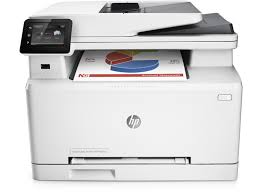
Looking for the HP Color LaserJet Pro MFP M277n driver? This page lists HP’s official software for the whole HP Color LaserJet Pro MFP M277 series: the Color LaserJet Pro MFP M277n, Color LaserJet Pro MFP M277dw and Color LaserJet Pro MFP M277c6. HP lists some packages for specific models in the series, so check that the package title includes your model. For Windows 10 (64-bit) and Windows 7 (64-bit), the package most people need is the HP Color LaserJet Pro M277 Printer series Full Software and PCL 6 Driver. For a Mac, HP lists Install HP Easy Start.

HP Color LaserJet Pro MFP M277n printer
HP Color LaserJet Pro MFP M277n

Recommended downloads

Windows 10 (64-bit), Windows 7 (64-bit): HP Color LaserJet Pro M277 Printer series Full Software and PCL 6 DriverVersion 14.0.22047.562 · Released Mar 21, 2022 · 116.5 MB · HP rating: Recommended

Download

macOS 26, macOS 15: Install HP Easy StartVersion 2.16.7.260722 · Released Aug 14, 2026 · 6.3 MB

Download

Files download directly from HP’s official servers. hpdrivers.net does not host or modify them.


Models covered by this page

All 3 models share one download list at HP:

HP Color LaserJet Pro MFP M277n HP Color LaserJet Pro MFP M277dw HP Color LaserJet Pro MFP M277c6

Which Windows package should you choose?

HP publishes 5 kinds of Windows package for the Color LaserJet Pro MFP M277:

  • Driver-only installer (v14.0.15345.533, Mar 04, 2021): print driver only, for PCs that can’t or shouldn’t take the full package.
  • Full software solution (v14.0.22047.562, Mar 21, 2022, 116.5 MB): driver plus HP’s setup wizard and tools.
  • Driver files (no installer) (v8.01.1320.2917, Apr 06, 2021): bare driver files for Windows’ Add Printer wizard.
  • HP Universal Print Driver (v6.4.1.22169, Mar 28, 2017): HP’s shared driver for many models, also listed for this series.
  • Firmware update (v20220414, May 20, 2022): updates the printer itself, not your PC.

All downloads for the Color LaserJet Pro MFP M277

HP’s download list for this series includes Windows 10 (64-bit) and Windows 7 (64-bit) packages. It does not list separate Windows 11 packages.

Windows

Package / Windows
Version
Released
Size
HP Color LaserJet Pro M277 Multifunction Printer series PCL 6 Printer Driver

Windows: 10, 7
File details

File: HP_Color_LJ_Pro_MFP_M277-basic-solution-15345.exe

14.0.15345.533
Mar 04, 2021
80.2 MB
HP Color LaserJet Pro M277 Printer series Full Software and PCL 6 Driver

Windows: 10, 7
File details

File: HP_Color_LJ_Pro_MFP_M277-full-solution-22047.exe

14.0.22047.562
Mar 21, 2022
116.5 MB
HP Color LaserJet Pro MFP M277 series PCL 6 Print Driver (no installer)

Windows: 10, 7
File details

File: HP_LaserJet_M277_PCL6_Print_Driver_no_Installer_15343_1.exe

8.01.1320.2917
Apr 06, 2021
11.6 MB
HP Color LaserJet Pro MFP M277 series PCL-6 Print Driver v4 (no installer)

Windows: 10
File details

File: HP_LaserJet_M277_PCL6_Win8_Plus_Print_Driver_no_Installer_15343_1.exe

8.01.1320.2917
Apr 06, 2021
8.9 MB
HP LaserJet Pro M277 series Firmware Update Utility

Windows: 10, 7
File details

File: M277_MFP_Series_FW_Update-20220414.nativeofficefonts.exe

20220414
May 20, 2022
28.3 MB

Other HP software listed for this series

Software / Systems
Version
Size
HP Easy Admin
Systems: macOS 26, macOS 15, macOS 13
2.16.0.251010
4.9 MB
Install HP Easy Start
Systems: macOS 26, macOS 15
2.16.7.260722
6.3 MB

HP Universal Print Driver

HP lists its Universal Print Driver for this series on Windows 7 and Windows 10. Get it from our HP Universal Print Driver page.

Linux

HP lists Linux support for this series through its HPLIP project, outside the regular download list: HP’s Linux printing page (HPLIP).

Installing the Color LaserJet Pro MFP M277 driver

The driver files without an installer are added through Windows’ Add Printer wizard (Have Disk). For step-by-step instructions, see our guide to installing an HP printer driver.

Firmware update 20220414

The newest firmware HP lists for the Color LaserJet Pro MFP M277 is version 20220414, released May 20, 2022. HP’s notes for it: Network stack update; Supplies related fixes.

  • Check your current firmware version first on the printer’s Configuration Page, and update only if it is older.
  • Install the printer driver before running the update. HP’s utility needs it to reach the printer.

Specifications that matter for setup

Connections
Hi-Speed USB 2.0 port; built-in Fast Ethernet 10/100/1000 Base-TX network port; Host USB
Print languages
HP PCL 6, HP PCL 5c, HP postscript level 3 emulation, PCLm, PDF, URF
Functions
Print, copy, scan, fax
Print speed (black)
Normal: Up to 19 ppm
Recommended monthly volume
250 to 2500
Scanner
Flatbed, ADF
Scan resolution
Up to 300 x 300 dpi (color and mono ADF); up to 300 x 300 dpi, 600 x 600 dpi, 1200 x 1200 dpi (Flatbed)
Two-sided ADF scanning
No
Document feeder
Standard, 50 sheets
Scan file formats
PDF, searchable PDF, JPG, RTF, TXT, BMP, PNG, TIFF
Ways to scan
Front-panel scan, copy, e-mail, fax, or file buttons; HP Scan software; and user application via TWAIN or WIA
Copy speed
Black: Up to 19 cpm Color: Up to 19 cpm First Copy Out and Copy Speed measured using ISO/IEC 29183, excludes first set of test documents.

Common setup problems

  • An older driver is still installed. HP’s 2021 packages fixed a security vulnerability, so replace older versions with the current package.

HP LaserJet P4515xm Driver

HP LaserJet P4515xm Printer Driver Download

Find the right HP LaserJet P4515xm driver for your operating system, with download links, package details, and installation guidance.

Go to Windows driver downloads ↓ · macOS / Linux support

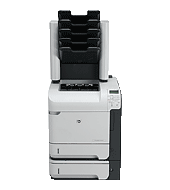
HP LaserJet P4515xm printer

The HP LaserJet P4515xm (CB517A) is a monochrome workgroup printer with automatic two-sided printing and a 500-sheet, five-bin mailbox. That mailbox is an important distinction of the xm configuration: it provides separate output bins for sorting print jobs, alongside the additional 500-sheet input tray included with this model.

Its standard paper supply combines a 100-sheet multipurpose tray with two 500-sheet trays, for a total of 1,100 sheets. HP rates the P4515 family at up to 60 pages per minute on A4 paper and 62 pages per minute on Letter paper. USB 2.0 and built-in Gigabit Ethernet provide local and wired network connection options.

For this configuration, choosing a compatible driver is only the first step. After installation, check that the driver recognises the duplex unit, extra input tray and mailbox fitted to your printer. These accessories matter when selecting two-sided output, the paper source or an output bin. The Windows packages below are separated by operating system and processor type so that you can select the appropriate download before setting up those options.

Specifications
Product number
CB517A
Print speed
Up to 60 ppm A4 / 62 ppm Letter
Standard input
100-sheet multipurpose tray + two 500-sheet trays
Two-sided printing
Automatic duplex
Output accessory
500-sheet, five-bin mailbox
Connections
USB 2.0 and Gigabit Ethernet

HP LaserJet P4515xm Windows drivers

Windows 11 — 64-bit (x64)

HP Universal Print Driver for Windows PCL6 (64-bit)
V8.2.0.26819
Sep 26, 2026
20.2 MB
See full detailsWindows 11; Windows Server 2025
Type:
Driver-Universal Print Driver
Version:
V8.2.0.26819
Operating systems:
Windows 11, Windows Server 2025
Release date:
Sep 26, 2026
File name:
upd-pcl6-win11-x64-8.2.0.26819.zip
(20.2 MB)
MD5:
5660c16a00e21f11736fd003063d6d13
Description:

This is the most current PCL6 driver of the HP Universal Print Driver (UPD) for Windows 64 bit systems. It is intended for Windows 11 and Windows Server 2025.

Windows 10 — 64-bit (x64)

HP Universal Print Driver for Windows PCL6 (64-bit)
v8.2.0.26778
Sep 26, 2026
20.3 MB
See full detailsWindows 10, 8.1, 8, 7 (64-bit); Windows Server 2022, 2019, 2016, 2012, 2012 R2, 2008 R2, 2008
Type:
Driver-Universal Print Driver
Version:
v8.2.0.26778
Operating systems:
Windows Server 2022, Windows 10 (64-bit), Windows 8.1 (64-bit), Windows 8 (64-bit), Windows 7 (64-bit), Windows Server 2019, Windows Server 2016, Windows Server 2012, Windows Server 2012 R2, Windows Server 2008 R2, Windows Server 2008 W32, Windows Server 2008 x64, Windows Server 2008 Small Business, Windows Server 2008 Itanium, Windows Server 2008 Foundation Edition, Windows Server 2008 Essential Business
Release date:
Sep 26, 2026
File name:
upd-pcl6-win10-x64-8.2.0.26778.zip
(20.3 MB)
MD5:
1311b735d1ada9b02676d32b5ba5b232
Description:

This is the most current PCL6 driver of the HP Universal Print Driver (UPD) for Windows 64 bit systems.

Additional Windows architectures — 32-bit (x86) and ARM64 (2)

Windows 10 — 32-bit (x86)

HP Universal Print Driver for Windows PCL6 (32-bit)
v8.2.0.26778
Sep 26, 2026
17.8 MB
See full detailsWindows 10, 8.1, 8, 7 (32-bit); Windows Server 2022, 2019, 2016, 2012, 2012 R2, 2008 R2, 2008
Type:
Driver-Universal Print Driver
Version:
v8.2.0.26778
Operating systems:
Windows Server 2022, Windows 10 (32-bit), Windows 8.1 (32-bit), Windows 8 (32-bit), Windows 7 (32-bit), Windows Server 2019, Windows Server 2016, Windows Server 2012, Windows Server 2012 R2, Windows Server 2008 R2, Windows Server 2008 W32, Windows Server 2008 x64, Windows Server 2008 Small Business, Windows Server 2008 Itanium, Windows Server 2008 Foundation Edition, Windows Server 2008 Essential Business
Release date:
Sep 26, 2026
File name:
upd-pcl6-win10-x32-8.2.0.26778.zip
(17.8 MB)
MD5:
b747438680b3c4d234d39a05b6aec127
Description:

This is the most current PCL6 driver of the HP Universal Print Driver (UPD) for Windows 32 bit systems.

Windows 11 — ARM64

HP Universal Print Driver for Windows PCL6 (ARM64-bit)
v8.2.0.26778
Sep 26, 2026
20.1 MB
See full detailsWindows 11; Windows 11 on ARM (64-bit)
Type:
Driver-Universal Print Driver
Version:
v8.2.0.26778
Operating systems:
Windows 11, Windows 11 on ARM (64-bit)
Release date:
Sep 26, 2026
File name:
upd-pcl6-win11-ARM64-8.2.0.26778.zip
(20.1 MB)
MD5:
e270ca97f4ddb5139217621ccc205506
Description:

This is the most current PCL6 driver of the HP Universal Print Driver (UPD) for Windows ARM64 bit systems.

PostScript drivers (3)

Windows 11 — 64-bit (x64)

HP Universal Print Driver for Windows PS (64-bit)
V8.2.0.26819
Sep 26, 2026
21.4 MB
See full detailsWindows 11; Windows Server 2025
Type:
Driver-Universal Print Driver
Version:
V8.2.0.26819
Operating systems:
Windows 11, Windows Server 2025
Release date:
Sep 26, 2026
File name:
upd-ps-win11-x64-8.2.0.26819.zip
(21.4 MB)
MD5:
d27ad643905526df8cc9a89b556dbf42
Description:

This is the most current PostScript® emulation driver of the HP Universal Print Driver (UPD) for Windows 64 bit systems. It is intended for Windows 11 and Windows Server 2025.

Windows 10 — 64-bit (x64)

HP Universal Print Driver for Windows PostScript (64-bit)
v8.2.0.26778
Sep 26, 2026
21.5 MB
See full detailsWindows 10, 8.1, 8, 7 (64-bit); Windows Server 2022, 2019, 2016, 2012, 2012 R2, 2008 R2, 2008
Type:
Driver-Universal Print Driver
Version:
v8.2.0.26778
Operating systems:
Windows Server 2022, Windows 10 (64-bit), Windows 8.1 (64-bit), Windows 8 (64-bit), Windows 7 (64-bit), Windows Server 2019, Windows Server 2016, Windows Server 2012, Windows Server 2012 R2, Windows Server 2008 R2, Windows Server 2008 W32, Windows Server 2008 x64, Windows Server 2008 Small Business, Windows Server 2008 Itanium, Windows Server 2008 Foundation Edition, Windows Server 2008 Essential Business
Release date:
Sep 26, 2026
File name:
upd-ps-win10-x64-8.2.0.26778.zip
(21.5 MB)
MD5:
626ec0b8d41d3be40357b3c825c3502d
Description:

This is the most current PostScript® emulation driver of the HP Universal Print Driver (UPD) for Windows 64 bit systems; Level 2 and 3 emulation.

Windows 10 — 32-bit (x86)

HP Universal Print Driver for Windows PostScript (32-bit)
v8.2.0.26778
Sep 26, 2026
19.0 MB
See full detailsWindows 10, 8.1, 8, 7 (32-bit); Windows Server 2022, 2019, 2016, 2012, 2012 R2, 2008 R2, 2008
Type:
Driver-Universal Print Driver
Version:
v8.2.0.26778
Operating systems:
Windows Server 2022, Windows 10 (32-bit), Windows 8.1 (32-bit), Windows 8 (32-bit), Windows 7 (32-bit), Windows Server 2019, Windows Server 2016, Windows Server 2012, Windows Server 2012 R2, Windows Server 2008 R2, Windows Server 2008 W32, Windows Server 2008 x64, Windows Server 2008 Small Business, Windows Server 2008 Itanium, Windows Server 2008 Foundation Edition, Windows Server 2008 Essential Business
Release date:
Sep 26, 2026
File name:
upd-ps-win10-x32-8.2.0.26778.zip
(19.0 MB)
MD5:
257b9dc0589b1269643092312dfe6ec3
Description:

This is the most current PostScript® emulation driver of the HP Universal Print Driver (UPD) for Windows 32 bit systems; Level 2 and 3 emulation.

USB communication support (2)

DOT4 supplies USB communication support; it is not the print driver. It is not needed for an Ethernet connection. Use it only where the HP USB setup requires DOT4, matching the computer’s architecture.

HP LaserJet USB (DOT4) communication driver for Windows 8 and Higher (32-bit)
7.0.0.29
Apr 21, 2015
1.1 MB
See full detailsWindows 10, 8.1, 8 (32-bit)
Type:
Driver-USB
Version:
7.0.0.29
Operating systems:
Windows 10 (32-bit), Windows 8.1 (32-bit), Windows 8 (32-bit)
Release date:
Apr 21, 2015
File name:
Dot4x86.msi
(1.1 MB)
MD5:
1bf2cb1705df0e5434057074f8e91ac9
Description:

This driver only solution provides DOT4 USB bi-directional communication functionality on Windows 8 and higher operating systems.

HP LaserJet USB (DOT4) communication driver for Windows 8 and Higher (64-bit)
7.0.0.29
Apr 21, 2015
1.5 MB
See full detailsWindows 10, 8.1, 8 (64-bit); Windows Server 2012
Type:
Driver-USB
Version:
7.0.0.29
Operating systems:
Windows 10 (64-bit), Windows 8.1 (64-bit), Windows 8 (64-bit), Windows Server 2012
Release date:
Apr 21, 2015
File name:
Dot4x64.msi
(1.5 MB)
MD5:
0eacd9b44879a4cdb528b66938b29139
Description:

This driver only solution provides DOT4 USB bi-directional communication functionality on Windows 8 and higher operating systems.

Firmware and README (3)

Firmware updates the printer, not the computer’s print driver. HP’s README explicitly includes P4515xm product number CB517A. The ZIP retains HP’s catalog title “CP4015”; use the README to confirm compatibility and update instructions. The EXE utility runs on Windows; its catalog entries under Mac/Linux do not make it a native application for those systems. Read the code-signing and downgrade restrictions before updating.

HP LaserJet CP4015 Series Printer Firmware (Includes Code Signing) for – All Operating Systems – (Must Read README Before Installing)
04.270.2
Jan 24, 2017
29.9 MB
See full detailsWindows 11, 2000; Windows 10, 8.1, 8, 7 (32/64-bit); Windows Server 2022, 2025, 2019, 2016, 2012, 2012 R2, 2008 R2, 2008, 2003; OS X 10.5–10.11; Windows 11 on ARM (64-bit); Windows Vista (32-bit); Windows Vista (64-bit); +3 versions
Type:
Firmware
Version:
04.270.2
Operating systems:
Windows Server 2022, Windows 11, Windows 11 on ARM (64-bit), Windows Server 2025, Windows 10 (32-bit), Windows 10 (64-bit), Windows 8.1 (32-bit), Windows 8.1 (64-bit), Windows 8 (32-bit), Windows 8 (64-bit), Windows 7 (32-bit), Windows 7 (64-bit), Windows Vista (32-bit), Windows Vista (64-bit), Windows XP (32-bit), Windows XP (64-bit), Windows 2000, Windows Server 2019, Windows Server 2016, Windows Server 2012, Windows Server 2012 R2, Windows Server 2008 R2, Windows Server 2008 W32, Windows Server 2008 x64, Windows Server 2008 Small Business, Windows Server 2008 Itanium, Windows Server 2008 Foundation Edition, Windows Server 2008 Essential Business, Windows Server 2003, Mac OS X 10.11, Mac OS X 10.10, Mac OS X 10.9, Mac OS X 10.8, Mac OS X 10.7, Mac OS X 10.6, Mac OS X 10.5, Linux
Release date:
Jan 24, 2017
File name:
ljP4000_fw_04_270_2.zip
(29.9 MB)
MD5:
bda4dd9c9f46273880d9dfde22b400d5
Description:

The HP LaserJet printer firmware update file available from the HP web site contains firmware for the printer, embedded JetDirect (if applicable), HP paper handling accessories used with the device in one convenient download file.

HP LaserJet P4000 Series HP Easy Firmware Upgrade Utility (Includes Code Signing) for Windows Operating Systems
04.270.2
Jan 24, 2017
35.2 MB
See full detailsWindows 11, 2000; Windows 10, 8.1, 8, 7 (32/64-bit); Windows Server 2022, 2025, 2019, 2016, 2012, 2012 R2, 2008 R2, 2008, 2003; Windows 11 on ARM (64-bit); Windows Vista (32-bit); Windows Vista (64-bit); +2 versions
Type:
Firmware
Version:
04.270.2
Operating systems:
Windows Server 2022, Windows 11, Windows 11 on ARM (64-bit), Windows Server 2025, Windows 10 (32-bit), Windows 10 (64-bit), Windows 8.1 (32-bit), Windows 8.1 (64-bit), Windows 8 (32-bit), Windows 8 (64-bit), Windows 7 (32-bit), Windows 7 (64-bit), Windows Vista (32-bit), Windows Vista (64-bit), Windows XP (32-bit), Windows XP (64-bit), Windows 2000, Windows Server 2019, Windows Server 2016, Windows Server 2012, Windows Server 2012 R2, Windows Server 2008 R2, Windows Server 2008 W32, Windows Server 2008 x64, Windows Server 2008 Small Business, Windows Server 2008 Itanium, Windows Server 2008 Foundation Edition, Windows Server 2008 Essential Business, Windows Server 2003
Release date:
Jan 24, 2017
File name:
ljP4000_fw_utility_04_270_2.exe
(35.2 MB)
MD5:
79d475bc24ca23cf4754a5cb5d77297a
Description:

The HP LaserJet printer firmware update file available from the HP web site contains firmware for the printer, embedded JetDirect (if applicable), HP paper handling accessories used with the device in one convenient download file.

HP LaserJet P4000 Series Printer README
04.270.2
Jan 24, 2017
0.6 MB
See full detailsWindows 11, 2000; Windows 10, 8.1, 8, 7 (32/64-bit); Windows Server 2022, 2025, 2019, 2016, 2012, 2012 R2, 2008 R2, 2008, 2003; OS X 10.5–10.11; Windows 11 on ARM (64-bit); Windows Vista (32-bit); Windows Vista (64-bit); +3 versions
Type:
Documentation — firmware README
Version:
04.270.2
Operating systems:
Windows Server 2022, Windows 11, Windows 11 on ARM (64-bit), Windows Server 2025, Windows 10 (32-bit), Windows 10 (64-bit), Windows 8.1 (32-bit), Windows 8.1 (64-bit), Windows 8 (32-bit), Windows 8 (64-bit), Windows 7 (32-bit), Windows 7 (64-bit), Windows Vista (32-bit), Windows Vista (64-bit), Windows XP (32-bit), Windows XP (64-bit), Windows 2000, Windows Server 2019, Windows Server 2016, Windows Server 2012, Windows Server 2012 R2, Windows Server 2008 R2, Windows Server 2008 W32, Windows Server 2008 x64, Windows Server 2008 Small Business, Windows Server 2008 Itanium, Windows Server 2008 Foundation Edition, Windows Server 2008 Essential Business, Windows Server 2003, Mac OS X 10.11, Mac OS X 10.10, Mac OS X 10.9, Mac OS X 10.8, Mac OS X 10.7, Mac OS X 10.6, Mac OS X 10.5, Linux
Release date:
Jan 24, 2017
File name:
readme_ljP4000fw_04_270_2.pdf
(0.6 MB)
MD5:
791cb49ef025ca5df06f2efae65e047c
Description:

The HP LaserJet printer firmware update file available from the HP web site contains firmware for the printer, embedded JetDirect (if applicable), HP paper handling accessories used with the device in one convenient download file.

Administrator tools and documentation (4)
HP Print Administrator Resource Kit
v1.9.2
Nov 18, 2024
18.7 MB
See full detailsWindows 11; Windows 10, 8.1, 8, 7 (32/64-bit); Windows Server 2022, 2019, 2016, 2012, 2012 R2, 2008 R2, 2008
Type:
Utility-Universal Print Driver
Version:
v1.9.2
Operating systems:
Windows Server 2022, Windows 11, Windows 10 (32-bit), Windows 10 (64-bit), Windows 8.1 (32-bit), Windows 8.1 (64-bit), Windows 8 (32-bit), Windows 8 (64-bit), Windows 7 (32-bit), Windows 7 (64-bit), Windows Server 2019, Windows Server 2016, Windows Server 2012, Windows Server 2012 R2, Windows Server 2008 R2, Windows Server 2008 W32, Windows Server 2008 x64, Windows Server 2008 Small Business, Windows Server 2008 Itanium, Windows Server 2008 Foundation Edition, Windows Server 2008 Essential Business
Release date:
Nov 18, 2024
File name:
HP-PARK-v1.9.2.zip
(18.7 MB)
MD5:
b7f948771a52c13721d963c6830ac7b5
Description:

The HP Print Administrator Resource Kit (PARK) is a collection of tools, scripts and documentation to help print administrators install, deploy, configure and manage the HP Universal Print Driver. The PARK contains both supported and unsupported software tools, scripts and documentation.

Release Notes, Manuals, and White papers for use with the HP Universal Print Driver
N/A
Apr 23, 2013
Size not listed
See full detailsWindows 10, 8.1, 8, 7 (32/64-bit); Windows Server 2012, 2012 R2, 2008 R2, 2008, 2003
Type:
Driver-Universal Print Driver
Version:
N/A
Operating systems:
Windows 10 (32-bit), Windows 10 (64-bit), Windows 8.1 (32-bit), Windows 8.1 (64-bit), Windows 8 (32-bit), Windows 8 (64-bit), Windows 7 (32-bit), Windows 7 (64-bit), Windows Server 2012, Windows Server 2012 R2, Windows Server 2008 R2, Windows Server 2008 W32, Windows Server 2008 x64, Windows Server 2008 Small Business, Windows Server 2008 Itanium, Windows Server 2008 Foundation Edition, Windows Server 2008 Essential Business, Windows Server 2003
Release date:
Apr 23, 2013
File name:
manuals
Description:

Click on the "More Information" link to get access to Release Notes, Manuals, and White papers for use with the HP Universal Print Driver

HP Printer Security Plug-in
1.0.2.6
Sep 30, 2019
224.1 MB
See full detailsWindows Server 2016, 2012, 2012 R2
Type:
Manageability-Tools
Version:
1.0.2.6
Operating systems:
Windows Server 2016, Windows Server 2012, Windows Server 2012 R2
Release date:
Sep 30, 2019
File name:
sp99339.exe
(224.1 MB)
MD5:
0b865e8a7c8e91bcd0b5c9dc33c15b66
Description:

HP Printer Security Plug-in is a policy-based printer security compliance tool that integrates with the industry standard Microsoft System Center Configuration Manager(SCCM).

HP Printer Security Plug-in
1.0.2.4
Sep 14, 2018
224.7 MB
See full detailsWindows Server 2016, 2012, 2012 R2
Type:
Manageability-Tools
Version:
1.0.2.4
Operating systems:
Windows Server 2016, Windows Server 2012, Windows Server 2012 R2
Release date:
Sep 14, 2018
File name:
sp91366.exe
(224.7 MB)
MD5:
c9fd95b5b165f2da1d7af631e876c818
Description:

HP Printer Security Plug-in is a policy-based printer security compliance tool that integrates with the industry standard Microsoft System Center Configuration Manager(SCCM).

Legacy Windows packages (10)

These older packages are retained for their listed operating systems. They are not the recommended Windows 10 or Windows 11 downloads.

HP LaserJet 4010 series/4510 Series PCL5 Universal Print Driver
61.081.32.00
May 1, 2008
18.1 MB
See full detailsWindows 2000; Windows Server 2003; Windows Vista (32-bit); Windows XP (32-bit)
Type:
Driver
Version:
61.081.32.00
Operating systems:
Windows Vista (32-bit), Windows XP (32-bit), Windows 2000, Windows Server 2003
Release date:
May 1, 2008
File name:
HP_LJ_P4010_P4510_32bit_2000_XP_S2003_Vista_PCL5.exe
(18.1 MB)
MD5:
fe4c5732c2a78b05cdb1db827315ee5d
Description:

This package contains only the HP LaserJet P4014/4015/4515 printer driver for Windows Vista, Windows XP, Windows Server 2003, and Windows 2000.

HP LaserJet 4010 series/4510 Series PostScript Universal Print Driver
61.081.32.00
May 1, 2008
18.9 MB
See full detailsWindows 2000; Windows Server 2003; Windows Vista (32-bit); Windows XP (32-bit)
Type:
Driver
Version:
61.081.32.00
Operating systems:
Windows Vista (32-bit), Windows XP (32-bit), Windows 2000, Windows Server 2003
Release date:
May 1, 2008
File name:
HP_LJ_P4010_P4510_32bit_2000_XP_S2003_Vista_PS.exe
(18.9 MB)
MD5:
06d46871d86f935af44d5638340c38ca
Description:

This package contains only the HP LaserJet P4014/4015/4515 printer driver for Windows Vista, Windows XP, Windows Server 2003, and Windows 2000.

HP LaserJet P4010 Series/P4510 Series Installer – Americas/Europe1
2.0
May 1, 2008
342.5 MB
See full detailsWindows 2000; Windows Server 2003; Windows Vista (32-bit); Windows Vista (64-bit); Windows XP (32-bit); +1 versions
Type:
Software
Version:
2.0
Operating systems:
Windows Vista (32-bit), Windows Vista (64-bit), Windows XP (32-bit), Windows XP (64-bit), Windows 2000, Windows Server 2003
Release date:
May 1, 2008
File name:
HP_LJ_P4010_P4510_Installer_cd1.exe
(342.5 MB)
MD5:
994c2d82569fc7057998c8a949294dd4
Description:

HP LaserJet P4010 Series/P4510 Series Installer – Americas/Europe1 for Windows 2000, Windows XP, Windows Server 2003, Windows Vista, Windows XP x64, Windows Server 2003 x64 and Windows Vista x64.

HP LaserJet P4010 Series/P4510 Series Installer – Asia Pacific
2.0
May 1, 2008
253.7 MB
See full detailsWindows 2000; Windows Server 2003; Windows Vista (32-bit); Windows Vista (64-bit); Windows XP (32-bit); +1 versions
Type:
Software
Version:
2.0
Operating systems:
Windows Vista (32-bit), Windows Vista (64-bit), Windows XP (32-bit), Windows XP (64-bit), Windows 2000, Windows Server 2003
Release date:
May 1, 2008
File name:
HP_LJ_P4010_P4510_Installer_cd2.exe
(253.7 MB)
MD5:
709eb358144fd1c10c4ea2dfe52592ca
Description:

HP LaserJet P4010 Series/P4510 Series Installer – Asia Pacific for Windows 2000, Windows XP, Windows Server 2003, Windows Vista, Windows XP x64, Windows Server 2003 x64 and Windows Vista x64

HP LaserJet P4010 Series/P4510 Series Installer – English
2.0
May 1, 2008
166.3 MB
See full detailsWindows 2000; Windows Server 2003; Windows Vista (32-bit); Windows Vista (64-bit); Windows XP (32-bit); +1 versions
Type:
Software
Version:
2.0
Operating systems:
Windows Vista (32-bit), Windows Vista (64-bit), Windows XP (32-bit), Windows XP (64-bit), Windows 2000, Windows Server 2003
Release date:
May 1, 2008
File name:
HP_LJ_P4010_P4510_Installer_English.exe
(166.3 MB)
MD5:
83ab07ddfa6e10c12127bf094e289bd1
Description:

HP LaserJet P4010 Series/P4510 Series Installer – English, for Windows 2000, Windows XP, Windows Server 2003, Windows Vista, Windows XP x64, Windows Server 2003 x64 and Windows Vista x64

HP LaserJet P4010 Series/P4510 Series Installer – Europe 2
1.0
May 2, 2008
357.0 MB
See full detailsWindows 2000; Windows Server 2003; Windows Vista (32-bit); Windows Vista (64-bit); Windows XP (32-bit); +1 versions
Type:
Software
Version:
1.0
Operating systems:
Windows Vista (32-bit), Windows Vista (64-bit), Windows XP (32-bit), Windows XP (64-bit), Windows 2000, Windows Server 2003
Release date:
May 2, 2008
File name:
HP_LJ_P4010_P4510_Installer_cd3.exe
(357.0 MB)
MD5:
fe4222aad95936dc1268df36e2338f8d
Description:

HP LaserJet P4010 Series/P4510 Series Installer – Europe 2, for Windows 2000, Windows XP, Windows Server 2003, Windows Vista, Windows XP x64, Windows Server 2003 x64 and Windows Vista x64

HP LaserJet P4010 series/P4510 Series PCL6 Driver
61.082.75.21
Aug 10, 2009
14.5 MB
See full detailsWindows Server 2008 R2, 2008, 2003; Windows Vista (32-bit); Windows XP (32-bit)
Type:
Driver
Version:
61.082.75.21
Operating systems:
Windows Vista (32-bit), Windows XP (32-bit), Windows Server 2008 R2, Windows Server 2008 W32, Windows Server 2008 Small Business, Windows Server 2008 Itanium, Windows Server 2008 Foundation Edition, Windows Server 2008 Essential Business, Windows Server 2003
Release date:
Aug 10, 2009
File name:
ljP4010-P4510_pcl6_win2k-xp-vista-32.exe
(14.5 MB)
MD5:
7af99375f9abd3abd5d6712e575dbf82
Description:

This Readme file provides specific information you should know before you install and use any of the driver versions that have been listed above. In addition, a list of fixes and enhancements are provided for these drivers.

HP LaserJet 4010 series/4510 Series PCL5 Universal Print Driver
61.081.32.00
May 1, 2008
18.6 MB
See full detailsWindows Server 2003; Windows Vista (64-bit); Windows XP (64-bit)
Type:
Driver
Version:
61.081.32.00
Operating systems:
Windows Vista (64-bit), Windows XP (64-bit), Windows Server 2003
Release date:
May 1, 2008
File name:
HP_LJ_P4010_P4510_64bit_XP_S2003_Vista_PCL5.exe
(18.6 MB)
MD5:
464c31dccb370c2ac849eec7c8117d09
Description:

This package contains only the HP LaserJet P4014/4015/4515 printer driver for x64 versions of Windows Vista, Windows XP and Windows Server 2003. >

HP LaserJet 4010 series/4510 Series PostScript Universal Print Driver
61.081.32.00
May 1, 2008
19.3 MB
See full detailsWindows Server 2003; Windows Vista (64-bit); Windows XP (64-bit)
Type:
Driver
Version:
61.081.32.00
Operating systems:
Windows Vista (64-bit), Windows XP (64-bit), Windows Server 2003
Release date:
May 1, 2008
File name:
HP_LJ_P4010_P4510_64bit_XP_S2003_Vista_PS.exe
(19.3 MB)
MD5:
c1fc5ddd8a5af4d8f4c1b773f005ef59
Description:

This package contains only the HP LaserJet P4014/4015/4515 printer driver for x64 versions of Windows Vista, Windows XP and Windows Server 2003. >

HP LaserJet P4010 Series/P4510 Series PCL6 Driver
61.082.75.21
Aug 10, 2009
14.4 MB
See full detailsWindows Server 2008 R2, 2008, 2003; Windows Vista (64-bit); Windows XP (64-bit)
Type:
Driver
Version:
61.082.75.21
Operating systems:
Windows Vista (64-bit), Windows XP (64-bit), Windows Server 2008 R2, Windows Server 2008 x64, Windows Server 2008 Small Business, Windows Server 2008 Itanium, Windows Server 2008 Foundation Edition, Windows Server 2008 Essential Business, Windows Server 2003
Release date:
Aug 10, 2009
File name:
ljP4010-P4510_pcl6_winxp-vista-x64.exe
(14.4 MB)
MD5:
5ed8ba6af2f1aa162d7de84305994c99
Description:

This Readme file provides specific information you should know before you install and use any of the driver versions that have been listed above. In addition, a list of fixes and enhancements are provided for these drivers.

macOS and Linux support

macOS: The retrieved HP catalog contains firmware entries but no Mac print-driver download. Historical OS X compatibility does not establish support for current macOS, and this page does not claim AirPrint compatibility. Check the exact model’s HP driver page for your operating system.

Linux: HP lists the exact P4515xm in its HPLIP supported-device table, with minimum HPLIP 2.8.5, USB/network connections and no required proprietary driver plug-in. Use your distribution’s supported HPLIP package and check its installation requirements. The firmware ZIP above is not a Linux print driver.

Installation help

  1. Check Windows version and system type in Settings → System → About. Choose the matching x64, x86 or ARM64 card; Windows 10 and Windows 11 x64 have separate packages.
  2. Extract a downloaded ZIP before installing. If using Windows Add Printer with an INF driver, choose Have Disk and browse to the extracted INF folder. See HP’s INF installation instructions.
  3. For a network printer, confirm the printer’s IP address and select that device during setup. After installation, check the installed duplex unit, paper trays and five-bin mailbox in printer properties, then print a test page.

HP — Manuals and guides

Sources and review dates

Driver package data: HP catalog retrieved October 27, 2026 at 16:47 UTC. Model configuration and compatibility sources reviewed October 27, 2026. The introduction is an editorial explanation based on HP’s model configuration and user guide, not a quotation or a claim of hands-on testing.

MD5 values reproduce HP’s catalog records for file comparison. A match alone does not establish security or current operating-system support.