Independent download guide for HP printer and scanner drivers
hpdrivers.net is an independent website and is not affiliated with, endorsed by, or sponsored by HP Inc. Download links point to HP's official servers (ftp.hp.com). Read the full disclaimer
Last checked against HP’s download list: November 13, 2026 · Checked by H&G
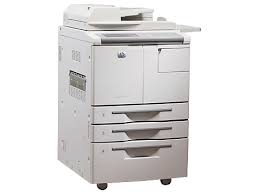
Looking for the HP LaserJet 9065mfp driver? This page lists HP’s official software for the whole HP LaserJet 9065mfp. For Windows 11, the package most people need is the HP Universal Print Driver for Windows PCL6 (64-bit).
HP LaserJet 9065mfp
Recommended downloads
Windows 11: HP Universal Print Driver for Windows PCL6 (64-bit)Version 8.2.0.26819 · Released Sep 26, 2026 · 20.2 MB
HP lists its Universal Print Driver for this series on Windows 11; Windows 10, 8.1, 8, 7 (32-bit and 64-bit). Get it from our HP Universal Print Driver page.
The newest firmware HP lists for the LaserJet 9065mfp is version 07.006.7, released Feb 20, 2008.
Check your current firmware version first on the printer’s Configuration Page, and update only if it is older.
Specifications that matter for setup
Connections
Optional with HP Print Kit accessory
Print languages
HP PCL 6, PostScript Level 3 emulation, direct PDF; automatic language switching
Functions
Print, copy, send-to email, advanced paper handling
Print speed (black)
Normal: Up to 65 ppm
Two-sided printing
Automatic (standard)
Scanner
Sheetfed
Scan resolution
Up to 600 dpi
Document feeder
Standard, 100 sheets
Ways to scan
Front-panel copy and scan buttons
Paper handling and hardware details
Values below are HP’s published figures for the LaserJet 9065mfp; they help you check that this page matches your printer before you download anything.
Paper (plain), transparencies, tabbed dividers, blueprint master
Paper weight
Tray 1, 2, 3, 4: 13 to 110 lb; automatic document feeder (ADF): 13 to 34 lb; scanner glass: 13 to 110 lb
Memory
64 MB
Processor
350 MHz
Internal storage
Optional, copy controller hard drive for copy job storage and image overlays
Power use
Printing power consumption is with HP Print Kit option printing continuous simplex. Copying power consumption is continuous simplex from ADF. Auto-off (sleep 2)
Size (W x D x H)
25.6 x 29.9 x 44.9 in
Weight
418.5 lb
USB cable
No
Warranty
90-day warranty (parts only)
Installing the HP LaserJet 9065mfp on Linux (HPLIP)
On Linux the LaserJet 9065mfp is handled by HPLIP, HP’s own open-source imaging and printing package, not by the Windows or macOS downloads above. The details below come from the HPLIP model database entry for this printer.
First HPLIP release with support: 0.9.5 (any newer HPLIP also works).
Print technology in the HPLIP database: mono laser.
Connections HPLIP can use: USB, wired network (Ethernet).
Binary plug-in: not needed; the open-source driver is enough.
USB ID:03f0:0000 (shown by lsusb when the printer is connected).
Same HPLIP entry also covers: LaserJet 9065 Multifunction Printer.
Install the hplip package from your distribution, then run hp-setup -i (or: hp-setup -i <printer IP> for a network printer) and follow the prompts. hp-check reports anything missing, and hp-toolbox shows ink levels and maintenance tools where the model supports them.
Looking for an HP LaserJet M3027 driver download? This page lists HP’s official software for the HP LaserJet M3027 and M3027x, which HP lists with (almost) the same downloads. HP lists some packages for specific models in the series, so check that the package title includes your model. For Windows 10, 7 (64-bit), the package most people need is the HP PC Send Fax Driver. For Windows 11, HP lists the HP Universal Print Driver for Windows PCL6 (64-bit).
Last checked against HP’s download list: November 16, 2026 · Checked by H&G
HP LaserJet M3027 MFP
Recommended downloads
Windows 10, 7 (64-bit): HP PC Send Fax DriverVersion 61.063.666.41 · Released Jun 10, 2013 · 10.1 MB
Files download directly from HP’s official servers. hpdrivers.net does not host or modify them.
Models covered by this page
All 2 models share one download list at HP:
HP LaserJet M3027 MultifunctionHP LaserJet M3027x Multifunction
Which Windows package should you choose?
HP publishes 4 kinds of Windows package for the LaserJet M3027 Multifunction:
HP Universal Print Driver (v8.2.0.26778, Sep 26, 2026): HP’s shared driver for many models, also listed for this series.
Firmware update (v48.430.1, Aug 31, 2017): updates the printer itself, not your PC.
Driver-only installer (v61.063.666.41, Jun 10, 2013): print driver only, for PCs that can’t or shouldn’t take the full package.
HP LaserJet USB (DOT4) communication driver for Windows 8 and Higher (64-bit) (v7.0.0.29, Apr 21, 2015).
All downloads for the LaserJet M3027 Multifunction
Each LaserJet M3027 driver download below links straight to the file on HP’s servers; HP’s own support page for the LaserJet M3027 lists the same files.
Windows
Package / Windows
Version
Released
Size
HP LaserJet M3027/3035 MFP Printer Firmware (Includes Code Signing) for – All Operating Systems – (Must Read README Before Installing)
HP lists its Universal Print Driver for this series on Windows 11, Windows 10, 7 (64-bit). Get it from our HP Universal Print Driver page.
Linux
HP lists a Linux driver for this series: HP LaserJet M3027/3035 MFP Printer Firmware (Includes Code Signing) for – All Operating Systems – (Must Read README Before Installing) (Version 48.430.1 · Released Aug 31, 2017 · 49.6 MB). Download from HP.
Installing the LaserJet M3027 Multifunction driver
Once the LaserJet M3027 driver download from the table above is complete, follow these steps.
Choose the PCL 6 or Universal Print Driver for current Windows versions; the PCL 5 driver listed by HP is for older systems.
Connect the printer to the network and print a configuration page to get its IP address.
Run the installer, or add the printer in Windows and point it to the driver files you extracted.
For scanning to email or folders, set up the MFP with HP’s MFP Wizard Console listed on this page.
The newest firmware HP lists for the LaserJet M3027 Multifunction is version 48.430.1, released Jan 05, 2017.
Keep the printer and the computer switched on until the update has finished.
Specifications that matter for setup
Wi-Fi
Optional, enabled with purchase of a hardware accessory
Print languages
HP postscript level 3 emulation, PCL 5, PCL 6, PDF 1.5
Functions
Print, copy, send-to email/network folder, (fax on some models)
Print speed (black)
Normal: Up to 27 ppm Speed specifications have been updated to reflect current industry testing methods.
Recommended monthly volume
2000 to 6000
Scanner
Flatbed, ADF
Scan resolution
Up to 600 dpi
Document feeder
Standard, 50 sheets
Scan file formats
TIFF, JPEG, PDF
Ways to scan
Front-panel scan, Copy, Fax, E-mail, ADF
Copy speed
Black: Up to 27 cpm Color: Speed specifications have been updated to reflect current industry testing methods.
Ink supplies HP lists for the LaserJet M3027 Multifunction
HP’s specifications name these replacement supplies for the LaserJet M3027 Multifunction:
HP LaserJet Q7551A Black Print Cartridge (6.5k)
HP LaserJet Q7551X Black Print Cartridge (13k)
Paper handling and hardware details
Values below are HP’s published figures for the LaserJet M3027 Multifunction; they help you check that this page matches your printer before you download anything.
One-year on-site warranty; 24-hour/7-day-a-week phone support
Print quality problems on the LaserJet M3027 and what HP suggests
HP has a print-quality guide written for the M3025 and M3027 MFP series. These are the points that apply most often, in HP’s own order of checks.
Light print or faded pages
Make sure the print cartridge is fully installed, and replace it if the toner is nearly gone.
On light print across the whole page, HP says to turn Economode off at the control panel and in the driver, then raise Toner Density in the Print Quality menu under Administration.
Try a different media type. HP notes that media that is too moist or too rough can cause partial light print.
Specks, lines and gray background
Specks can appear after a jam is cleared. HP says to print a few more pages, then clean the inside of the device and run a cleaning page.
For a gray background, avoid media that already went through the device, turn the stack over or rotate it 180 degrees, and increase Toner Density.
Check the cartridge for leaks if specks continue.
Loose toner and dropouts
If toner rubs off the page or the media is rough or heavy, HP says to open Fuser Modes in the Print Quality menu and select the media type you are using.
Printing on the smoother side of the paper can help.
Repeating defects
HP says that if the defects repeat every 47 mm (1.9 in), 62 mm (2.4 in) or 96 mm (3.8 in), the print cartridge might need to be replaced.
Error 421 “Print service not available” on the M3027
This error is not a driver problem. HP describes it for LaserJet printers that accept FTP printing.
What HP says
The error can appear when a file is pushed to the printer in an FTP prompt session.
Check that a firewall is not blocking the port, and enable FTP Printing in the printer’s Embedded Web Server (EWS).
FTP printing uses two TCP connections, a control connection and a data connection. HP says the session stays open until the client ends it or both connections are idle for 900 seconds (15 minutes), and that this setting cannot be changed.
The advice applies only to printers that support FTP printing.
HP troubleshooting articles for the LaserJet M3027
HP’s troubleshooting page for this series lists these articles. Some titles name sister models that share the same hardware, so check the model list inside an article before following it.
HP rates the M3027 for copies at up to 27 per minute and the M3035 at 35. The scanner is slower as well: up to 25 images per minute in black-and-white and 9 in color on the M3027, against 32 and 12 on the M3035. The duty cycle is the same, up to 75,000 pages a month.
Whichever LaserJet M3027 driver download you choose, the paper path is the M3027’s own: a 500-sheet input tray, a 100-sheet multipurpose tray and a 50-sheet automatic document feeder, with an optional extra 500-sheet tray and a 250-sheet output bin.
Based on HP’s product specifications for this series.
Similar models
This page is the LaserJet M3027 driver download page for this model only. The LaserJet M3035 is the faster model and has its own page.
Last checked against HP’s download list: November 1, 2026 · Checked by H&G
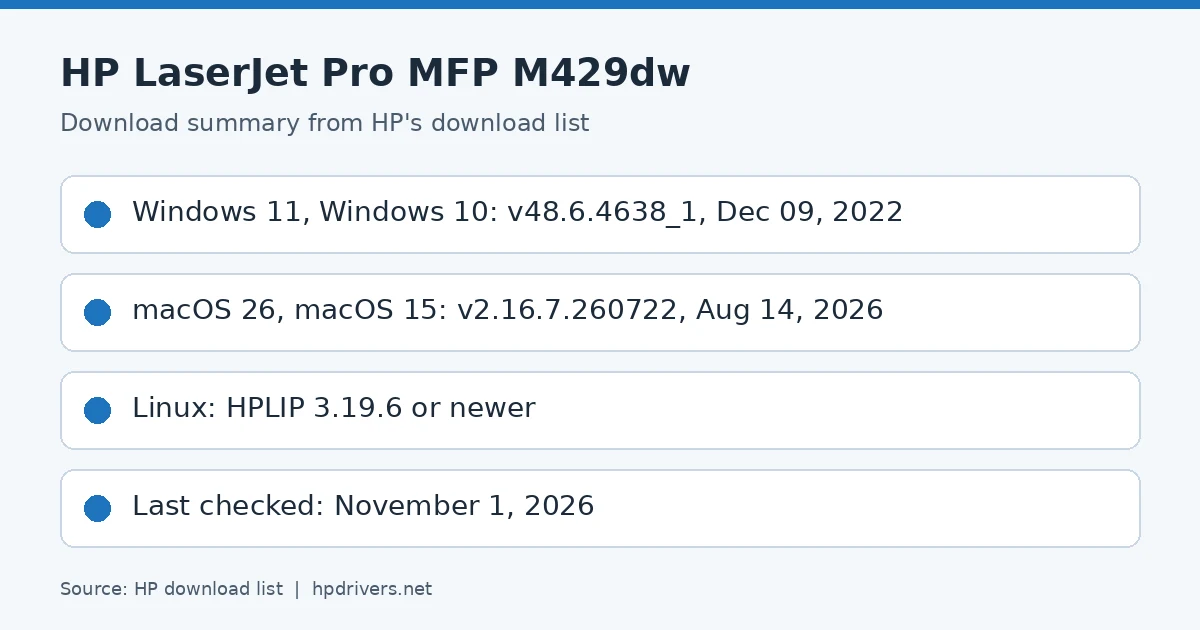
Looking for the HP LaserJet Pro MFP M429dw driver? This page lists HP’s official software for the whole HP LaserJet Pro MFP M428-M429 series: the LaserJet Pro MFP M428dw and LaserJet Pro MFP M429dw. HP lists some packages for specific models in the series, so check that the package title includes your model. For Windows 11, Windows 10 (64-bit) and Windows 7 (64-bit), the package most people need is the HP LaserJet Pro M428/M429dw Printer Full Software Solution. For a Mac, HP lists Install HP Easy Start.
HP LaserJet Pro MFP M429dw download summary
Recommended downloads
Windows 11, Windows 10 (64-bit), Windows 7 (64-bit): HP LaserJet Pro M428/M429dw Printer Full Software SolutionVersion 48.6.4638_1 · Released Dec 09, 2022 · 165.7 MB · HP rating: Recommended
HP lists its Universal Print Driver for this series on Windows 7, Windows 11 and Windows 10. Get it from our HP Universal Print Driver page.
Linux
HP lists Linux support for this series through its HPLIP project, outside the regular download list: HP’s Linux printing page (HPLIP).
Installing the LaserJet Pro MFP M428-M429 driver
The driver files without an installer are added through Windows’ Add Printer wizard (Have Disk). For step-by-step instructions, see our guide to installing an HP printer driver.
Firmware update 002_2626A
The newest firmware HP lists for the LaserJet Pro MFP M428-M429 is version 002_2626A, released Sep 03, 2026. HP’s notes for it: Fixed 2-sided option disappears from printer settings issue; Contains all previous fixes; Security updates.
Keep the printer and the computer switched on until the update has finished.
Specifications that matter for setup
Connections
1 Hi-Speed USB 2.0; 1 host USB at rear side;Gigabit Ethernet 10/100/1000BASE-T network; 802.3az(EEE) 802.11b/g/n / 2.4 / 5 GHZ Wi-Fi radio
Print languages
HP PCL 6, HP PCL 5e, HP postscript level 3 emulation, PDF, URF, Native Office, PWG Raster
Functions
Print, Copy, Scan, Email
Print speed (black)
Normal: Up to 40 ppm (default) ; Up to 42 ppm (HP High Speed)
Recommended monthly volume
750 to 4000
Two-sided printing
Automatic (default)
Scanner
Flatbed, ADF
Scan resolution
Up to 1200 x 1200 dpi
Two-sided ADF scanning
Yes
Document feeder
Standard, 50 sheets
Scan file formats
PDF, JPG, TIFF
Ways to scan
Front-panel scan, copy, email, or file buttons; HP Scan software; and user application via TWAIN or WIA