
Advertisement
Find HP 4700dtn driver downloads, package details and supported operating systems for
HP Color LaserJet 4700dtn Printer
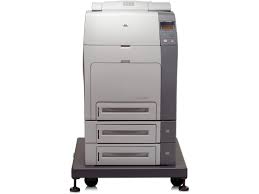
HP recommends that the number of printed pages per month be within the stated range for optimum device performance, based on factors including supplies replacement intervals and device life over an extended warranty period.
Specifications
- Product number
- 473042
- Recommended monthly page volume
- 3000 to 10,000 HP recommends that the number of printed pages per month be within the stated range for optimum device performance, based on factors including supplies replacement intervals and device life over an extended warranty period.
- Print quality black (best)
- Black: Up to 600 x 600 dpi Color: Up to 600 x 600 dpi
- Duty cycle (monthly, letter)
- Up to 100,000 pages Duty cycle is defined as the maximum number of pages per month of imaged output. This value provides a comparison of product robustness in relation to other HP LaserJet or HP Color LaserJet devices, and enables appropriate deployment of printers and MFPs to satisfy the demands of connected individuals or groups.
- Connectivity, standard
- 1 IEEE 1284-C parallel; 1 Hi-Speed USB 2.0; 2 EIO; 1 Foreign interface; 1 Accessory port (for third-party solutions)
HP 4700dtn driver download for Windows
Recommended software
See full detailsWindows 11
- Type:
- Driver-Universal Print Driver
- Version:
- v8.2.0.26778
- Operating systems:
- Windows 11
- Release date:
- Sep 25, 2026
- File name:
- upd-pcl6-win11-ARM64-8.2.0.26778.zip
(20.1 MB)
Package notes
This is the most current PCL6 driver of the HP Universal Print Driver (UPD) for Windows ARM64 bit systems.
Alternative packages
See full detailsWindows 11
- Type:
- Driver-Universal Print Driver
- Version:
- V8.2.0.26819
- Operating systems:
- Windows 11
- Release date:
- Sep 25, 2026
- File name:
- upd-pcl6-win11-x64-8.2.0.26819.zip
(20.2 MB)
Package notes
This is the most current PCL6 driver of the HP Universal Print Driver (UPD) for Windows 64 bit systems. It is intended for Windows 11 and Windows Server 2025. If you need a driver for Windows 10 or earlier operating systems, select Choose a different OS above and choose the operating system for your deployment.
Setup options
See full detailsWindows 11
- Type:
- Driver-Universal Print Driver
- Version:
- V8.2.0.26819
- Operating systems:
- Windows 11
- Release date:
- Sep 25, 2026
- File name:
- upd-ps-win11-x64-8.2.0.26819.zip
(21.4 MB)
Package notes
This is the most current PostScript® emulation driver of the HP Universal Print Driver (UPD) for Windows 64 bit systems. It is intended for Windows 11 and Windows Server 2025. If you need a driver for Windows 10 or earlier operating systems, select Choose a different OS above and choose the operating system for your deployment.
Additional software
See full detailsWindows 11; Windows 10, 7 (64-bit); macOS 13, 15, 26; Linux
- Type:
- Firmware
- Version:
- 46.230.6
- Operating systems:
- Windows 11; Windows 10, 7 (64-bit); macOS 13, 15, 26; Linux
- Release date:
- Dec 23, 2014
- File name:
- readme_clj4700fw_46_230_6.pdf
(0.3 MB)
Package notes
This Readme file provides specific installation instructions and other information you should know before you perform a firmware update for your HP Color LaserJet Series printer. Installation instructions are provided for Single and Multiple Printer Updates. This document provides specific update, installation and troubleshooting information. For additional information on the device features, refer to the online user guide found on the Windows Printing System Installer CD-ROM that came with your printer or at hp.com. What is included in a Remote Firmware Update (RFU)? The HP Color LaserJet Printer Remote Firmware Update file available from the hp web site contains firmware for the printer, embedded JetDirect (if applicable), HP paper handling accessories used with the device in one convenient download file. When the Remote Firmware Upgrade file is sent to the HP Color LaserJet Printer firmware for the engine and all connected accessories are upgraded. Who needs this firmware? Similar to Hewlett Packard providing improved software for your HP Color LaserJet Printer, Hewlett Packard provides firmware updates for your printer periodically through its supported lifecycle. A firmware update may be necessary if it is determined that you may benefit from the resolution of any issue that is documented below. These updates are available on the HP support web site. Determining the current version level of your firmware To determine the current level of firmware installed on the device: 1. Go to the printer's control panel. 2. Press the green checkmark button. 3. Use the arrow keys and select the "INFORMATION" selection on the control panel. 4. Use the arrow keys and select the "PRINT CONFIGURATION" selection. 5. Press the green checkmark button to print the Configuration Page. On the printed CONFIGURATION page look in the section marked "Device Information" for the firmware date code. The firmware date code will look something like this: 20080306 46.034.1
Compatibility packages
See full detailsWindows 10 (64-bit)
- Type:
- Driver-USB
- Version:
- 7.0.0.29
- Operating systems:
- Windows 10 (64-bit)
- Release date:
- Apr 20, 2015
- File name:
- Dot4x64.msi
(1.5 MB)
Package notes
This driver only solution provides DOT4 USB bi-directional communication functionality on Windows 8 and higher operating systems.
More available software
See full detailsWindows 10, 7 (64-bit)
- Type:
- Driver-Universal Print Driver
- Version:
- v8.2.0.26778
- Operating systems:
- Windows 10, 7 (64-bit)
- Release date:
- Sep 25, 2026
- File name:
- upd-ps-win10-x64-8.2.0.26778.zip
(21.5 MB)
Package notes
This is the most current PostScript® emulation driver of the HP Universal Print Driver (UPD) for Windows 64 bit systems; Level 2 and 3 emulation.
Download options
See full detailsWindows 10, 7 (64-bit)
- Type:
- Driver-Universal Print Driver
- Version:
- v8.2.0.26778
- Operating systems:
- Windows 10, 7 (64-bit)
- Release date:
- Sep 25, 2026
- File name:
- upd-pcl6-win10-x64-8.2.0.26778.zip
(20.3 MB)
Package notes
This is the most current PCL6 driver of the HP Universal Print Driver (UPD) for Windows 64 bit systems.
Firmware and utilities
See full detailsWindows 11; Windows 10, 7 (64-bit); macOS 13, 15, 26; Linux
- Type:
- Firmware
- Version:
- 46.230.6
- Operating systems:
- Windows 11; Windows 10, 7 (64-bit); macOS 13, 15, 26; Linux
- Release date:
- Dec 23, 2014
- File name:
- clj4700_fw_utility_46_230_6.exe
(21.4 MB)
Package notes
This Readme file provides specific installation instructions and other information you should know before you perform a firmware update for your HP Color LaserJet Series printer. Installation instructions are provided for Single and Multiple Printer Updates. This document provides specific update, installation and troubleshooting information. For additional information on the device features, refer to the online user guide found on the Windows Printing System Installer CD-ROM that came with your printer or at hp.com. What is included in a Remote Firmware Update (RFU)? The HP Color LaserJet Printer Remote Firmware Update file available from the hp web site contains firmware for the printer, embedded JetDirect (if applicable), HP paper handling accessories used with the device in one convenient download file. When the Remote Firmware Upgrade file is sent to the HP Color LaserJet Printer firmware for the engine and all connected accessories are upgraded. Who needs this firmware? Similar to Hewlett Packard providing improved software for your HP Color LaserJet Printer, Hewlett Packard provides firmware updates for your printer periodically through its supported lifecycle. A firmware update may be necessary if it is determined that you may benefit from the resolution of any issue that is documented below. These updates are available on the HP support web site. Determining the current version level of your firmware To determine the current level of firmware installed on the device: 1. Go to the printer's control panel. 2. Press the green checkmark button. 3. Use the arrow keys and select the "INFORMATION" selection on the control panel. 4. Use the arrow keys and select the "PRINT CONFIGURATION" selection. 5. Press the green checkmark button to print the Configuration Page. On the printed CONFIGURATION page look in the section marked "Device Information" for the firmware date code. The firmware date code will look something like this: 20080306 46.034.1
More firmware and utilities
See full detailsWindows 11; Windows 10, 7 (64-bit); macOS 13, 15, 26; Linux
- Type:
- Firmware
- Version:
- 46.230.6
- Operating systems:
- Windows 11; Windows 10, 7 (64-bit); macOS 13, 15, 26; Linux
- Release date:
- Dec 23, 2014
- File name:
- clj4700_fw_46_230_6.zip
(19.8 MB)
Package notes
This Readme file provides specific installation instructions and other information you should know before you perform a firmware update for your HP Color LaserJet Series printer. Installation instructions are provided for Single and Multiple Printer Updates. This document provides specific update, installation and troubleshooting information. For additional information on the device features, refer to the online user guide found on the Windows Printing System Installer CD-ROM that came with your printer or at hp.com. What is included in a Remote Firmware Update (RFU)? The HP Color LaserJet Printer Remote Firmware Update file available from the hp web site contains firmware for the printer, embedded JetDirect (if applicable), HP paper handling accessories used with the device in one convenient download file. When the Remote Firmware Upgrade file is sent to the HP Color LaserJet Printer firmware for the engine and all connected accessories are upgraded. Who needs this firmware? Similar to Hewlett Packard providing improved software for your HP Color LaserJet Printer, Hewlett Packard provides firmware updates for your printer periodically through its supported lifecycle. A firmware update may be necessary if it is determined that you may benefit from the resolution of any issue that is documented below. These updates are available on the HP support web site. Determining the current version level of your firmware To determine the current level of firmware installed on the device: 1. Go to the printer's control panel. 2. Press the green checkmark button. 3. Use the arrow keys and select the "INFORMATION" selection on the control panel. 4. Use the arrow keys and select the "PRINT CONFIGURATION" selection. 5. Press the green checkmark button to print the Configuration Page. On the printed CONFIGURATION page look in the section marked "Device Information" for the firmware date code. The firmware date code will look something like this: 20080306 46.034.1
More firmware and utilities
See full detailsWindows 11; Windows 10, 7 (64-bit)
- Type:
- Utility-Universal Print Driver
- Version:
- v1.9.2
- Operating systems:
- Windows 11; Windows 10, 7 (64-bit)
- Release date:
- Nov 17, 2024
- File name:
- HP-PARK-v1.9.2.zip
(18.7 MB)
Package notes
The HP Print Administrator Resource Kit (PARK) is a collection of tools, scripts and documentation to help print administrators install, deploy, configure and manage the HP Universal Print Driver. The PARK contains both supported and unsupported software tools, scripts and documentation. Supported tools include: HP Driver Configuration Utility HP Driver Deployment Utility HP Managed Printing Administrator HP UPD Active Directory Administrative template AutoUpgradeUPD PRNCon
HP 4700dtn Linux Support
Recommended software
See full detailsLinux
- Type:
- Firmware-Color Tables
- Version:
- 1.1
- Operating systems:
- Linux
- Release date:
- Aug 31, 2006
- File name:
- clj4700_clj9500_1_1.tgz
(0.3 MB)
Package notes
WHAT IS INCLUDED IN A REMOTE CUSTOM COLOR TABLE UPGRADE? The CLJ Custom Color Table Remote Upgrade file available from the HP web site contains a custom color table. When the Remote Custom Color Table Upgrade file is sent to the printer, the printer's custom color table is upgraded. The printer's firmware and all paper handling accessory's firmware is not modified. TABLES PROVIDED WITH THIS UPDATE clj4700_clj9500_1_1.rfu — A simulation of the HP CLJ9500 series printers in their default state. Version 1.1 Files names are constructed as follows: clj####_{what}_{ver}.rfu Where: clj#### is the printer model number the color table is for {what} is a one word description of what the table will do {ver} is a two part version number consisting of a major and minor value ie.clj4700_clj9500_1_1.rfu is an HP CLJ9500 emulation for the CLJ4700 version 1.1 Note: Ensure your printer model matches the model described in the filename. Note: This update affects both the RGB and CMYK custom slots of your printer While every care was taken to ensure a close match was made during the creation of these tables, there are several factors that can affect the outcome of the match including, but not limited to, differences between printers within and between a given model line the media type used the age and state of both printers being compared the use of non- HP supplies environmental conditions To access the new table, be sure to select "Custom Profile" from the RGB and/or CMYK color options. To check if a custom color table is being used, refer to the configuration page for a "@" mark next to the "Last DMax/DHalf:" line under the "Calibration Information" sub-section.
Alternative packages
See full detailsLinux
- Type:
- Firmware-Color Tables
- Version:
- 1.1
- Operating systems:
- Linux
- Release date:
- Aug 31, 2006
- File name:
- clj4700_clj4650_1_1.tgz
(0.3 MB)
Package notes
WHAT IS INCLUDED IN A REMOTE CUSTOM COLOR TABLE UPGRADE? The CLJ Custom Color Table Remote Upgrade file available from the HP web site contains a custom color table. When the Remote Custom Color Table Upgrade file is sent to the printer, the printer's custom color table is upgraded. The printer's firmware and all paper handling accessory's firmware is not modified. TABLES PROVIDED WITH THIS UPDATE clj4700_clj4650_1_1.rfu — A simulation of the HP CLJ4650 series printers in their default state. Version 1.1 Files names are constructed as follows: clj####_{what}_{ver}.rfu Where: clj#### is the printer model number the color table is for {what} is a one word description of what the table will do {ver} is a two part version number consisting of a major and minor value ie.clj4700_clj9500_1_1.rfu is an HP CLJ9500 emulation for the CLJ4700 version 1.1 Note: Ensure your printer model matches the model described in the filename. Note: This update affects both the RGB and CMYK custom slots of your printer While every care was taken to ensure a close match was made during the creation of these tables, there are several factors that can affect the outcome of the match including, but not limited to, differences between printers within and between a given model line the media type used the age and state of both printers being compared the use of non- HP supplies environmental conditions To access the new table, be sure to select "Custom Profile" from the RGB and/or CMYK color options. To check if a custom color table is being used, refer to the configuration page for a "@" mark next to the "Last DMax/DHalf:" line under the "Calibration Information" sub-section.
Setup options
See full detailsLinux
- Type:
- Firmware-Color Tables
- Version:
- 1.1
- Operating systems:
- Linux
- Release date:
- Aug 31, 2006
- File name:
- clj4700_clj5550_1_1.tgz
(0.3 MB)
Package notes
WHAT IS INCLUDED IN A REMOTE CUSTOM COLOR TABLE UPGRADE? The CLJ Custom Color Table Remote Upgrade file available from the HP web site contains a custom color table. When the Remote Custom Color Table Upgrade file is sent to the printer, the printer's custom color table is upgraded. The printer's firmware and all paper handling accessory's firmware is not modified. TABLES PROVIDED WITH THIS UPDATE clj4700_clj5550_1_1.rfu — A simulation of the HP CLJ5550 series printers in their default state. Version 1.1 Files names are constructed as follows: clj####_{what}_{ver}.rfu Where: clj#### is the printer model number the color table is for {what} is a one word description of what the table will do {ver} is a two part version number consisting of a major and minor value ie.clj4700_clj9500_1_1.rfu is an HP CLJ9500 emulation for the CLJ4700 version 1.1 Note: Ensure your printer model matches the model described in the filename. Note: This update affects both the RGB and CMYK custom slots of your printer While every care was taken to ensure a close match was made during the creation of these tables, there are several factors that can affect the outcome of the match including, but not limited to, differences between printers within and between a given model line the media type used the age and state of both printers being compared the use of non- HP supplies environmental conditions To access the new table, be sure to select "Custom Profile" from the RGB and/or CMYK color options. To check if a custom color table is being used, refer to the configuration page for a "@" mark next to the "Last DMax/DHalf:" line under the "Calibration Information" sub-section.
Additional software
See full detailsLinux
- Type:
- Firmware-Color Tables
- Version:
- 1.1
- Operating systems:
- Linux
- Release date:
- Aug 31, 2006
- File name:
- clj4700_clj4500_1_1.tgz
(0.3 MB)
Package notes
WHAT IS INCLUDED IN A REMOTE CUSTOM COLOR TABLE UPGRADE? The CLJ Custom Color Table Remote Upgrade file available from the HP web site contains a custom color table. When the Remote Custom Color Table Upgrade file is sent to the printer, the printer's custom color table is upgraded. The printer's firmware and all paper handling accessory's firmware is not modified. TABLES PROVIDED WITH THIS UPDATE clj4700_clj4500_1_1.rfu — A simulation of the HP CLJ4500 series printers in their default state. Version 1.1 Files names are constructed as follows: clj####_{what}_{ver}.rfu Where: clj#### is the printer model number the color table is for {what} is a one word description of what the table will do {ver} is a two part version number consisting of a major and minor value ie.clj4700_clj9500_1_1.rfu is an HP CLJ9500 emulation for the CLJ4700 version 1.1 Note: Ensure your printer model matches the model described in the filename. Note: This update affects both the RGB and CMYK custom slots of your printer While every care was taken to ensure a close match was made during the creation of these tables, there are several factors that can affect the outcome of the match including, but not limited to, differences between printers within and between a given model line the media type used the age and state of both printers being compared the use of non- HP supplies environmental conditions To access the new table, be sure to select "Custom Profile" from the RGB and/or CMYK color options. To check if a custom color table is being used, refer to the configuration page for a "@" mark next to the "Last DMax/DHalf:" line under the "Calibration Information" sub-section.
Firmware and utilities
See full detailsLinux
- Type:
- Firmware-Color Tables
- Version:
- 1.1
- Operating systems:
- Linux
- Release date:
- Aug 31, 2006
- File name:
- clj4700_Reset_1_1.tgz
(0.2 MB)
Package notes
WHAT IS INCLUDED IN A REMOTE CUSTOM COLOR TABLE UPGRADE? The CLJ Custom Color Table Remote Upgrade file available from the HP web site contains a custom color table. When the Remote Custom Color Table Upgrade file is sent to the printer, the printer's custom color table is upgraded. The printer's firmware and all paper handling accessory's firmware is not modified. TABLES PROVIDED WITH THIS UPDATE clj4700_reset_1_1.rfu — Use this table to return the printer to its original state. Files names are constructed as follows: clj####_{what}_{ver}.rfu Where: clj#### is the printer model number the color table is for {what} is a one word description of what the table will do {ver} is a two part version number consisting of a major and minor value ie.clj4700_clj9500_1_1.rfu is an HP CLJ9500 emulation for the CLJ4700 version 1.1 Note: Ensure your printer model matches the model described in the filename. Note: This update affects both the RGB and CMYK custom slots of your printer While every care was taken to ensure a close match was made during the creation of these tables, there are several factors that can affect the outcome of the match including, but not limited to, differences between printers within and between a given model line the media type used the age and state of both printers being compared the use of non- HP supplies environmental conditions To access the new table, be sure to select "Custom Profile" from the RGB and/or CMYK color options. To check if a custom color table is being used, refer to the configuration page for a "@" mark next to the "Last DMax/DHalf:" line under the "Calibration Information" sub-section.
HP 4700dtn installation and support
Use these resources after choosing the package that matches your operating system.
Driver assistance
Installation instructions
Common setup problems
Official resources
Package versions are listed in the download sections above. Check the operating-system list before downloading.
Advertisement