
Looking for the HP Deskjet D1663 driver? This page lists HP’s official software for the whole HP Deskjet D1600 Printer series: the Deskjet D1620, Deskjet D1630, Deskjet D1650, Deskjet D1658, Deskjet D1660, Deskjet D1663 and Deskjet D1668. HP lists some packages for specific models in the series, so check that the package title includes your model.
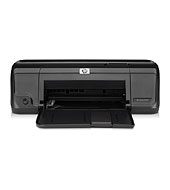
What HP still lists for this series
HP's current download list for the Deskjet D1600 no longer includes a full software and driver package. The items HP still lists for this series are in the table below.
The newest Windows version named in that list is Windows 10.
Files download directly from HP’s official servers. hpdrivers.net does not host or modify them.
Models covered by this page
All 7 models share one download list at HP:
HP Deskjet D1620 HP Deskjet D1630 HP Deskjet D1650 HP Deskjet D1658 HP Deskjet D1660 HP Deskjet D1663 HP Deskjet D1668
All downloads for the Deskjet D1600
Other HP software listed for this series
Installing the Deskjet D1600 driver
For step-by-step instructions, see our guide to installing an HP printer driver.
Models and HP part numbers in the Deskjet D1600 series
HP sold the Deskjet D1600 under several model names that differ only by region or bundle. The part number on the label at the back of the printer tells you which one you have; all of them use the same software and drivers listed on this page.
Model codes and HP part numbers (for example, the D1658 is the HP Deskjet D1658): D1658 CB766D, CB767A · D1660 CB770A, CB770B, CB765C · D1663 CB770C · D1668 CB767D
Size and weight (HP specification): height 127 mm (5.0 inches); width 432 mm (17.0 inches); depth 305 mm (12.0 inches).
Source: HP support document c01763230 (“Printer Specifications for HP Deskjet D1600 Printer Series”).
Windows driver for the Deskjet D1600 from Microsoft Update Catalog
Microsoft distributes HP’s driver for the Deskjet D1600 through Windows Update, and the same packages can be downloaded by hand from the Microsoft Update Catalog. The files below come straight from Microsoft’s download servers. They are driver packages only, not HP’s full software installer.
Windows 8; Server 2012
9.7 MB
Installing a .cab driver: download the file, open it and extract its contents to a new folder. Connect the printer, open Device Manager, right-click the printer (it may appear under Other devices or Print queues), chooseUpdate driver, then Browse my computer for drivers and point it to that folder.
Source: Microsoft Update Catalog (catalog.update.microsoft.com).
Installing the HP Deskjet D1663 on Linux (HPLIP)
On Linux the Deskjet D1663 is handled by HPLIP, HP’s own open-source imaging and printing package, not by the Windows or macOS downloads above. The details below come from the HPLIP model database entry for this printer.
- First HPLIP release with support: 3.9.8 (any newer HPLIP also works).
- Print technology in the HPLIP database: colour inkjet.
- Connections HPLIP can use: USB.
- Binary plug-in: not needed; the open-source driver is enough.
- USB ID:
03f0:7f11(shown bylsusbwhen the printer is connected). - Supply numbers listed by HPLIP: HP 816 (numbers vary by sales region).
- Same HPLIP entry also covers: Deskjet D1620 Printer, Deskjet D1630 Printer, Deskjet D1650 Printer, Deskjet D1658 Printer, Deskjet D1660 Printer, Deskjet D1668 Printer.
Install the hplip package from your distribution, then run hp-setup -i and follow the prompts. hp-check reports anything missing, and hp-toolbox shows ink levels and maintenance tools where the model supports them.
Print resolution of the Deskjet D1600
HP’s specification for the D1600 series lists the resolution per print mode. Black on plain paper prints at 300 x 300 dpi in FastDraft and 600 x 600 dpi in Normal and Best; inkjet paper also uses 600 x 600 dpi. Colour on plain paper follows the same pattern.
Based on HP support document c01763230 (“Printer Specifications for HP Deskjet D1600 Printer Series”).
thanks
i love this program
thank you very much
the fill size is big
where is d1663 driver. i keep downloading it n i only get 1600
plz help i have the same problem
where is d1663 driver. i keep downloading it n i only get 1600
where is d1663 driver. i keep downloading it n i only get 1600