
hpdrivers.net is an independent website and is not affiliated with, endorsed by, or sponsored by HP Inc. Download links point to HP's official servers (ftp.hp.com). Learn more

HP DeskJet 2910 All-in-One Printer Driver Download

Find HP DeskJet 2910 All-in-One driver downloads, package details and supported operating systems for

HP DeskJet 2910 All-in-One Printer
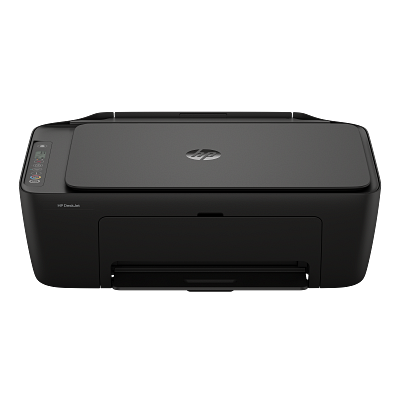
HP DeskJet 2910 All-in-One Printer printer

Setup that’s a breeze thanks to HP's easiest-to-use print app. Print everything from return labels to fun, colorful learning worksheets.

Specifications

Product number
89F98B
Functions
Print, copy, scan
Print speed (ISO, A4)
Black: up to 7.5 ppm; color: up to 5.5 ppm
Monthly duty cycle (A4)
Up to 1,000 pages
Recommended monthly volume
50 to 100 pages

HP DeskJet 2910 All-in-One driver download for Windows

DescriptionVersionRelease dateFile sizeDownload

Recommended software

HP DeskJet 2900 EasyStart Printer Setup Software – Offline Use Only Recommended
63.1.42
Jun 12, 2025
373.3 MB
See full detailsWindows 11; Windows 10 (32/64-bit)
Type:
Installation Software and Full/Basic Driver-Supports print and scan functionality only
Version:
63.1.42
Operating systems:
Windows 11; Windows 10 (32/64-bit)
Release date:
Jun 12, 2025
File name:
HPEasyStart-16.8.12-DJ2900_63_1_42_3_Webpack.exe
(373.3 MB)

Package notes

Description:

The full solution software includes everything you need to install and use your HP printer. This collection of software includes the complete set of drivers, installer software, and other administrative tools.

Alternative packages

HP DeskJet 2900 EasyStart Printer Setup Software (ARM 64) – Offline Use Only Recommended
63.1.80
Dec 9, 2025
383.9 MB
See full detailsWindows 11
Type:
Installation Software and Full/Basic Driver-Supports print and scan functionality only
Version:
63.1.80
Operating systems:
Windows 11
Release date:
Dec 9, 2025
File name:
HPEasyStart-17.2.17-DJ2900_63_1_80_Webpack.exe
(383.9 MB)

Package notes

Description:

The full solution software includes everything you need to install and use your HP printer. This collection of software includes the complete set of drivers, installer software, and other administrative tools.

Setup options

HP Easy Start Printer Setup Software (Internet connection required for driver installation) Recommended
17.6.15
Oct 13, 2026
26.5 MB
See full detailsWindows 11; Windows 10 (32/64-bit)
Type:
Installation Software and Driver-Includes print, scan, latest features, and solutions
Version:
17.6.15
Operating systems:
Windows 11; Windows 10 (32/64-bit)
Release date:
Oct 13, 2026
File name:
HPEasyStart_17_6_15.exe
(26.5 MB)

Package notes

Description:

HP Easy Start provides guided setup and drivers for your HP printer.

Additional software

HP Universal Scan – Full Feature Software and Driver Recommended
63.8.6459
Jul 1, 2026
436.2 MB
See full detailsWindows 11; Windows 10, 8.1 (32/64-bit)
Type:
Driver-Universal Scan Driver
Version:
63.8.6459
Operating systems:
Windows 11; Windows 10, 8.1 (32/64-bit)
Release date:
Jul 1, 2026
File name:
Full_Webpack-63.8.6459-SJ0001_Full_Webpack.exe
(436.2 MB)

Package notes

Description:

Full webpack provides various scan functionalities. Does not include OCR capabilities and Cloud Destinations.

Compatibility packages

HP Universal Scan – Full Feature Software and Driver (ARM 64) Recommended
63.8.6459
Aug 9, 2026
437.0 MB
See full detailsWindows 11; Windows 11 on ARM (64-bit)
Type:
Driver-Universal Scan Driver
Version:
63.8.6459
Operating systems:
Windows 11; Windows 11 on ARM (64-bit)
Release date:
Aug 9, 2026
File name:
Full_Webpack-63.8.6459_ARM64-SJ0001_Full_Webpack.exe
(437.0 MB)

Package notes

Description:

Full webpack provides various scan functionalities. Does not include OCR capabilities and Cloud Destinations.

More available software

HP Universal Scan – Basic Feature Software and Driver
63.8.6459
Jul 1, 2026
113.9 MB
See full detailsWindows 11; Windows 10, 8.1 (64-bit)
Type:
Driver-Universal Scan Driver
Version:
63.8.6459
Operating systems:
Windows 11; Windows 10, 8.1 (64-bit)
Release date:
Jul 1, 2026
File name:
Basic_Webpack_x64-63.8.6459-SJ0001_Basicx64_Webpack.exe
(113.9 MB)

Package notes

Description:

This is the minimum Scan Software solution which provides basic Scan functionality, WIA and Twain support.Does not include OCR capabilities and Cloud Destinations.

Download options

HP Universal Scan – Basic Feature Software and Driver (ARM 64)
63.8.6459
Aug 9, 2026
118.7 MB
See full detailsWindows 11; Windows 11 on ARM (64-bit)
Type:
Driver-Universal Scan Driver
Version:
63.8.6459
Operating systems:
Windows 11; Windows 11 on ARM (64-bit)
Release date:
Aug 9, 2026
File name:
Basic_Webpack_x64-63.8.6459_ARM64-SJ0001_Basicx64_Webpack.exe
(118.7 MB)

Package notes

Description:

This is the minimum Scan Software solution which provides basic Scan functionality, WIA and Twain support.Does not include OCR capabilities and Cloud Destinations.

Other available packages

HP Universal Scan – Basic Feature Software and Driver
63.8.6459
Jul 1, 2026
86.1 MB
See full detailsWindows 10, 8.1 (32-bit)
Type:
Driver-Universal Scan Driver
Version:
63.8.6459
Operating systems:
Windows 10, 8.1 (32-bit)
Release date:
Jul 1, 2026
File name:
Basic_Webpack_x86-63.8.6459-SJ0001_Basicx86_Webpack.exe
(86.1 MB)

Package notes

Description:

This is the minimum Scan Software solution which provides basic Scan functionality, WIA and Twain support.Does not include OCR capabilities and Cloud Destinations.

Firmware and utilities

HP DeskJet/Ink Advantage 2900 and DeskJet Ink Advantage Ultra 5100 All-in-One Printer series Firmware Update
6.29.7.0
Aug 6, 2026
14.5 MB
See full detailsWindows 11; Windows 10 (32/64-bit)
Type:
Printer Firmware-Keeps your printer updated with latest fixes
Version:
6.29.7.0
Operating systems:
Windows 11; Windows 10 (32/64-bit)
Release date:
Aug 6, 2026
File name:
DJ2900_DJIA2900_DJUIA5100_6.29.7.0.exe
(14.5 MB)

Package notes

Description:

This Firmware update is to resolve a critical issue.

HP DeskJet 2910 All-in-One driver download for macOS

Firmware and utilities

HP DeskJet/Ink Advantage 2900 and DeskJet Ink Advantage Ultra 5100 All-in-One Printer series Firmware Update
6.29.7.0
Aug 6, 2026
17.9 MB
See full detailsmacOS 10.12–10.15, 11–15, 26
Type:
Printer Firmware-Keeps your printer updated with latest fixes
Version:
6.29.7.0
Operating systems:
macOS 10.12–10.15, 11–15, 26
Release date:
Aug 6, 2026
File name:
DJ2900_DJIA2900_DJUIA5100_6.29.7.0.dmg
(17.9 MB)

Package notes

Description:

This Firmware update is to resolve a critical issue.

HP DeskJet 2910 All-in-One installation and support

Use these resources after choosing the package that matches your operating system.

Driver assistance

Installation instructions

Common setup problems

Official resources

Package versions are listed in the download sections above. Check the operating-system list before downloading.

HP Envy Photo 7975 Drivers (Envy Photo 7900 All-in-One Series)

Last checked against HP’s download list: November 1, 2026 · Checked by H&G

Looking for the HP Envy Photo 7975 driver? This page lists HP’s official software for the whole HP Envy Photo 7900 All-in-One Printer series: the Envy Photo 7930, Envy Photo 7931, Envy Photo 7934, Envy Photo 7935, Envy Photo 7975 and Envy Photo 7978. HP lists some packages for specific models in the series, so check that the package title includes your model. For Windows 11 and Windows 10 (64-bit), the package most people need is the HP Easy Start Printer Setup Software (Internet connection required for driver installation).

Recommended downloads

Windows 11, Windows 10 (64-bit): HP Easy Start Printer Setup Software (Internet connection required for driver installation)Version 17.6.15 · Released Oct 14, 2026 · 26.5 MB

Download

Files download directly from HP’s official servers. hpdrivers.net does not host or modify them.


Models covered by this page

All 6 models share one download list at HP:

  • HP Envy Photo 7930
  • HP Envy Photo 7931
  • HP Envy Photo 7934
  • HP Envy Photo 7935
  • HP Envy Photo 7975
  • HP Envy Photo 7978

All downloads for the Envy Photo 7900 All-in-One

Windows

Package Windows Version Released Size
HP Envy Photo 7900 All-in-One Printer series Firmware Update

File details

File: ENP7900_2622B.exe

11, 10, 7 001.2622B Jul 10, 2026 61.4 MB Download
HP Envy Photo 7900 Easy Start Printer Setup Software (ARM64) – Offline Use Only

File details

File: HPEasyStart-17.2.17-EN7900_63_1_2123_Webpack.exe

11 63.1.2123 Dec 15, 2025 376.8 MB Download
HP Envy Photo 7900 Easy Start Printer Setup Software – Offline Use Only

File details

File: HPEasyStart-17.2.17-EN7900_63_1_4_1_Webpack.exe

11, 10 63.1.4 Sep 23, 2025 369.6 MB Download

macOS

Package macOS Version Released Size
HP Envy Photo 7900 All-in-One Printer series Firmware Update

File details

File: ENP7900_2622B.dmg

26, 15, 13 001.2622B Jul 10, 2026 67.3 MB Download

Other HP software listed for this series

Software Systems Version
HP Universal Scan – Full Feature Software and Driver Windows 11, Windows 10 63.8.6459 Download
HP Universal Scan – Basic Feature Software and Driver Windows 11, Windows 10 63.8.6459 Download
HP Universal Scan – Basic Feature Software and Driver (ARM 64) Windows 11 63.8.6459 Download
HP Universal Scan – Full Feature Software and Driver (ARM 64) Windows 11 63.8.6459 Download
HP Easy Start Printer Setup Software (Internet connection required for driver installation) Windows 11, Windows 10 17.6.15 Download

Installing the Envy Photo 7900 All-in-One driver

HP Easy Start needs an internet connection; it downloads the right software for your exact model during setup. For step-by-step instructions, see our guide to installing an HP printer driver.

Firmware update 001.2622B

The newest firmware HP lists for the Envy Photo 7900 All-in-One is version 001.2622B, released Jul 10, 2026. HP’s notes for it: Key product improvements and bug fixes.

  • Keep the printer and the computer switched on until the update has finished.

Specifications that matter for setup

Connections 1 USB 2.0 client; 1 Wi-Fi 802.11a/b/g/n/ac, dual band; Wi-Fi 2.4/5Hhz
Wi-Fi Yes, built-in self-healing dual band Wi-Fi 802.11a/b/g/n/ac
Mobile printing HP app; Apple AirPrint; Chrome OS; Mopria Print Service; Mopria-certified; HP Print Service Plugin
Print languages HP PCL 3 GUI
Functions Print, Scan, Copy, Photo
Recommended monthly volume 300 to 400
Two-sided printing Automatic
Scanner ADF; Flatbed
Scan resolution Up to 1200 dpi
Document feeder Standard, 35 sheets
Scan file formats JPG, BMP, TIFF, PDF, PNG
Ways to scan Mopria Scan; Front-panel; HP app; EWS

HP LaserJet Pro MFP 3105sdw Drivers (LaserJet Pro MFP 3101-3108 sdn/sdw Series)

Last checked against HP’s download list: November 1, 2026 · Checked by H&G

Looking for the HP LaserJet Pro MFP 3105sdw driver? This page lists HP’s official software for the whole HP LaserJet Pro MFP 3101-3108 sdn/sdw Printer series: the LaserJet Pro MFP 3101sdw, Laserjet Pro MFP 3106sdw and Laserjet Pro MFP 3105sdw. HP lists some packages for specific models in the series, so check that the package title includes your model. For Windows 11 and Windows 10 (64-bit), the package most people need is the HP LaserJet Pro MFP 3101-3108 Driver Installation Software – Includes Print and Scan drivers. For a Mac, HP lists HP Easy Start Pro for Mac.

Recommended downloads

Windows 11, Windows 10 (64-bit): HP LaserJet Pro MFP 3101-3108 Driver Installation Software – Includes Print and Scan driversVersion 54.5.5383 · Released Feb 13, 2024 · 205.8 MB · HP rating: Recommended

Download

macOS 26, macOS 15, macOS 13: HP Easy Start Pro for MacVersion 2.8.0 · Released Sep 01, 2026 · 81.5 MB

Download

Files download directly from HP’s official servers. hpdrivers.net does not host or modify them.


Models covered by this page

All 3 models share one download list at HP:

  • HP LaserJet Pro MFP 3101sdw
  • HP Laserjet Pro MFP 3106sdw
  • HP Laserjet Pro MFP 3105sdw

Which Windows package should you choose?

HP publishes 3 kinds of Windows package for the LaserJet Pro MFP 3101-3108 sdn/sdw:

  • Full software solution (v54.5.5383, Feb 13, 2024, 205.8 MB): driver plus HP’s setup wizard and tools.
  • Driver files (no installer) (v54.5.5383, Feb 14, 2024): bare driver files for Windows’ Add Printer wizard.
  • Firmware update (v2624A, Aug 17, 2026): updates the printer itself, not your PC.

All downloads for the LaserJet Pro MFP 3101-3108 sdn/sdw

Windows

Package Windows Version Released Size
HP LaserJet Pro MFP 3101-3108 Driver Installation Software – Includes Print and Scan drivers

File details

File: HPEasyStart-16.3.6-LJ3101-3108_54_5_5383_Webpack.exe

11, 10 54.5.5383 Feb 13, 2024 205.8 MB Download
HP LaserJet Pro MFP 3101-3108 PCL-6 V3 Printer Driver (no installer)

File details

File: V3_DriveronlyWebpack-54.5.5383-LJ3101-3108_V3_DriveronlyWebpack.exe

11, 10 54.5.5383 Feb 14, 2024 15.3 MB Download
HP LaserJet Pro MFP 3101-3108 PCL-6 V4 Printer Driver (no installer)

File details

File: V4_DriveronlyWebpack-54.5.5383-LJ3101-3108_V4_DriveronlyWebpack.exe

11, 10 54.5.5383 Feb 14, 2024 11.6 MB Download
HP LaserJet Pro MFP 3101-3108 series Firmware Update Utility

File details

File: HP_Laserjet_Pro_3100e_Series_002.2624A.exe

11, 10, 7 2624A Aug 17, 2026 96.5 MB Download

macOS

Package macOS Version Released Size
HP LaserJet Pro MFP 3101-3108 series Firmware Update Utility

File details

File: HP_Laserjet_Pro_3100e_Series_002.2624A.dmg

15, 13 2624A Aug 17, 2026 98.8 MB Download

Other HP software listed for this series

Software Systems Version
HP Easy Start Printer Setup Software Windows 11, Windows 10 17.6.15 Download
HP Universal Scan – Full Feature Software and Driver (ARM 64) Windows 11 63.8.6459 Download
HP Universal Scan – Full Feature Software and Driver Windows 11, Windows 10 63.8.6459 Download
HP Universal Scan – Basic Feature Software and Driver (ARM 64) Windows 11 63.8.6459 Download
HP Universal Scan – Basic Feature Software and Driver Windows 11, Windows 10 63.8.6459 Download
ReadIRIS Advanced OCR Windows 11, Windows 10 17.4.211 Download
ReadIRIS Advanced PDF Windows 11, Windows 10 27.0.577.2 Download
HP Easy Start Pro for Mac macOS 26, macOS 15, macOS 13 2.8.0 Download

Installing the LaserJet Pro MFP 3101-3108 sdn/sdw driver

The driver files without an installer are added through Windows’ Add Printer wizard (Have Disk). For step-by-step instructions, see our guide to installing an HP printer driver.

Firmware update 2624A

The newest firmware HP lists for the LaserJet Pro MFP 3101-3108 sdn/sdw is version 2624A, released Aug 17, 2026.

  • Keep the printer and the computer switched on until the update has finished.

Specifications that matter for setup

Connections 1 Hi-Speed USB 2.0 (device); Ethernet 10/100 BT; Wireless 802.11b/g/n, Dual band 2.4GHz/5GHz
Mobile printing Apple AirPrint™; Mopria™ certified; HP app; Wi-Fi® Direct Printing
Print languages PCL5c; PCL6; PS; PCLmS; PDF; URF; PWG; PCLm
Functions Print, copy, scan
Print speed (black) Normal: Up to 35 ppm
Recommended monthly volume 350 to 2500 pages
Two-sided printing Automatic (standard)
Scanner ADF, flatbed
Scan resolution Up to 300 dpi (color and mono, ADF); Up to 1200 dpi (color and mono, flatbed)
Two-sided ADF scanning No
Document feeder Standard, 50 sheets
Scan file formats JPG, TIFF, XPS, PDF, PDF/A
Ways to scan HP app; and user applications via Twain
Copy speed Black: Up to 35 cpm Color: First Copy Out from Ready and Simplex Copy Speed measured using ISO/IEC 29183, Duplex Copy Speed measured using ISO/IEC 24735, excludes first set of test documents.

Common setup problems

  • You’d rather not install software on a Mac. HP’s specifications list AirPrint support, so macOS can usually add the printer from System Settings without extra software.