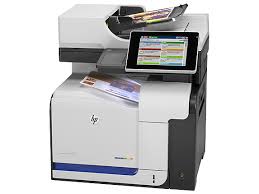
Looking for the HP LaserJet Enterprise M575c driver? This page lists HP’s official software for the whole HP LaserJet Enterprise 500 color MFP M575: the LaserJet Enterprise 500 color MFP M575dn, LaserJet Enterprise 500 color MFP M575f and LaserJet Enterprise color flow MFP M575c. HP lists some packages for specific models in the series, so check that the package title includes your model. For Windows 10, 8.1, 8, 7 (32-bit and 64-bit), the package most people need is the HP LaserJet color flow MFP M575c, M575cm Printer Full Software and Drivers. For Windows 11, HP lists the HP Universal Print Driver for Windows PCL6 (64-bit). For a Mac, HP lists Install HP Easy Start.
Recommended downloads
Files download directly from HP’s official servers. hpdrivers.net does not host or modify them.
Models covered by this page
All 3 models share one download list at HP:
HP LaserJet Enterprise 500 color MFP M575dn HP LaserJet Enterprise 500 color MFP M575f HP LaserJet Enterprise color flow MFP M575c
Which Windows package should you choose?
HP publishes 7 kinds of Windows package for the LaserJet Enterprise 500 color MFP M575:
- Firmware update (v2411226_066602, Feb 02, 2023): updates the printer itself, not your PC.
- HP Universal Print Driver (v8.2.0.26778, Sep 26, 2026): HP’s shared driver for many models, also listed for this series.
- Driver files (no installer) (v61.121.04.12258, Apr 09, 2021): bare driver files for Windows’ Add Printer wizard.
- MFP Network Twain Scan Package (v1.0.683, Jun 29, 2020): scanning from the computer.
- Driver-only installer (v5.0.12221.198, Mar 14, 2021): print driver only, for PCs that can’t or shouldn’t take the full package.
- Full software solution (v5.0.12221.198, Mar 14, 2021, 113.9 MB): driver plus HP’s setup wizard and tools.
- HP LaserJet USB (DOT4) communication driver for Windows 8 and Higher (64-bit) (v7.0.0.29, Apr 21, 2015).
All downloads for the LaserJet Enterprise 500 color MFP M575
Windows
10, 8.1, 8, 7 (32-bit and 64-bit)
File details
File:HP_CLJ_M575_ICC_profiles.zip10, 8.1, 8, 7 (32-bit and 64-bit)
File details
File:HP_CLJ_M575_Pantone_Files_Windows.zip10, 8.1, 8, 7 (32-bit and 64-bit)
File details
File:cljM575_fs4.12.0.1_fw_2411226_066602.zip10, 8.1, 8, 7 (32-bit and 64-bit)
File details
File:cljM575_fs3.9.12_fw_2309088_001482.zipFile details
File:LJ-Ent-color-flow-MFP-M575-Drv-no-installer-12220_1.exeFile details
File:LJ-Color-MFP-M575-17018-Driver_Only_1.exeFile details
File:LJ-Ent-color-flow-MFP-M575-Drv-installer-12221.exe.exeFile details
File:LJ-Ent-color-flow-MFP-M575-Full-Solution-12221.exeFile details
File:LJ-Color-MFP-M575-17019-Full_Solution.exeFile details
File:LJ-Color-MFP-M575-17019-Driver_Installer.exemacOS
File details
File:HP_CLJ_M575_Pantone_Files_Macintosh.zipFile details
File:HP_CLJ_M575_ICC_profiles.zipFile details
File:cljM575_fs4.12.0.1_fw_2411226_066602.zipFile details
File:cljM575_fs3.9.12_fw_2309088_001482.zipFile details
File:HP-LaserJet-Enterprise-color-flow-MFP-M575_v12.23.0.dmgFile details
File:HP-LaserJet-Enterprise-500-color-MFP-M575_v12.28.0.dmgFile details
File:HP-LaserJet-Enterprise-500-color-MFP-M575_v12.0.0.dmgOther HP software listed for this series
Windows 11
Windows 10, 7 (32-bit)
Windows 10, 7 (64-bit)
Windows 10 (64-bit)
HP Universal Print Driver
HP lists its Universal Print Driver for this series on Windows 11; Windows 10, 8.1, 8, 7 (32-bit and 64-bit). Get it from our HP Universal Print Driver page.
Linux
HP lists a Linux driver for this series: HP Color LaserJet M575 Pantone color palette files (Mac) (Version 1.0 · Released Feb 10, 2014 · 9.6 MB). Download from HP.
Installing the LaserJet Enterprise 500 color MFP M575 driver
The driver files without an installer are added through Windows’ Add Printer wizard (Have Disk). For step-by-step instructions, see our guide to installing an HP printer driver.
Firmware update 2309088_001482
The newest firmware HP lists for the LaserJet Enterprise 500 color MFP M575 is version 2309088_001482, released Jan 31, 2023.
- Keep the printer and the computer switched on until the update has finished.
Specifications that matter for setup
Toner supplies HP lists for the LaserJet Enterprise 500 color MFP M575
HP’s specifications name these replacement supplies for the LaserJet Enterprise 500 color MFP M575:
- HP 507A Black LaserJet Toner Cartridge (yield ~5500 pages) CE400A
- HP 507X Black LaserJet Toner Cartridge (yield ~11
- 000 pages) CE400X
- HP 507A Cyan LaserJet Toner Cartridge (yield ~6000 pages) CE401A
- HP 507A Yellow LaserJet Toner Cartridge (yield ~6000 pages) CE402A
- HP 507A Magenta LaserJet Toner Cartridge (yield ~6000 pages) CE403A
Paper handling and hardware details
Values below are HP’s published figures for the LaserJet Enterprise 500 color MFP M575; they help you check that this page matches your printer before you download anything.
Common setup problems
- You’d rather not install software on a Mac. HP’s specifications list AirPrint support, so macOS can usually add the printer from System Settings without extra software.
Fuser area jams (13.B9) on the M575c
HP’s article for the color flow MFP M575c lists 13.B9.Az, 13.B9.Cz (fuser wrap), 13.B9.Dz and 13.B9.DD. HP warns that the fuser can be hot.
Steps
- Open the right door. Pull paper entering the output bin downward, and pull out any sheet inside the door.
- Lift the paper feed cover inside the right door and pull paper straight out, then close the cover and clear the pickup area.
- For the Tray 2 roller area, push up the two green tabs to open the jam access door and remove paper.
- If paper is entering the bottom of the fuser, pull it down. Paper can also be hidden inside the fuser: lift it slightly by its handles and pull it straight out. HP says not to touch the transfer roller.
Source: HP Support, HP LaserJet Enterprise color flow MFP M575c – 13.B9 jam error in the fuser.
Lower right door, Tray 2 and 3, and document feeder jams on the M575c
13.B2 in the lower right door
- Open the lower right door, pull the sheet up or down and close the door.
13.B2.D2 and 13.A3 in Tray 2 or 3
- Open the tray, make sure the paper is stacked correctly, remove jammed or damaged sheets and close it.
31.13 in the document feeder (c models)
- HP lists 31.13.01, 02 (jam), 03 (pick error), 13 and 15. Open the feeder cover and the jam access door, turn the green wheel if needed, then lift the input tray, squeeze the slots at both ends of the e-Duplex assembly and pull it out to clear the duplex area. Slide it back until it clicks.
Source: HP Support, 13.B2 jam error in the lower right door. 13.B2, 13.A3 jam error in tray 2 or tray 3 and HP LaserJet Enterprise Flow MFP M525, M575 – 31.13 jam error in the document feeder (c models).
50.7F.xx fuser error on the M575
HP says 50.7F.xx points to the fuser, with the last two digits naming the exact issue.
Reseat the fuser
- Open the right door, hold the fuser by its handles, squeeze the blue release levers and pull it straight out. HP warns that the rollers can stay hot after the body has cooled.
- Open its jam access door and pull out any paper inside, removing all fragments, then push the fuser fully back in and close the door. If the error returns, contact HP.
Source: HP Support, HP LaserJet Enterprise 500 color MFP M575 printers – 50.7F.xx errors.
Output bin jam, first power-on and disk errors on the M575
13.E1 in the output bin
- Pull a visible sheet out by its leading edge, and also check the duplex output area.
Tray 2 lifting on first power-on
- HP says a new M575 shows Tray 2 lifting if it was turned on before the shipping sheet at the secondary transfer assembly was removed. Open the right door and take the sheet out. Newer firmware shows Remove Shipping Sheet instead.
99.09.64 to 99.09.69
- HP’s disk error article names the M575: turn the printer off and on, and if the message stays, reseat the hard disk or solid state drive after unplugging the printer.
Source: HP Support, HP LaserJet Enterprise 500 Color MFP M575 – 13.E1 jam error in the output bin. Tray 2 lifting message appears when product is first powered on and 99.09.64, 99.09.65, 99.09.66 and 99.09.69 Errors.
Tray 1 jam (13.B2.A1, 13.B2.D1) on the M575
For a jam in Tray 1 HP’s M575 article gives these steps.
Steps
- Pull a visible sheet straight out of Tray 1.
- If it will not come or cannot be seen, close Tray 1, open the right door, pull any sheet out by its trailing edge, clear the pickup area and close the door.
Source: HP Support, HP LaserJet Enterprise 500 Color MFP M575 – 13.B2.A1, 13.B2.D1 jam error tray 1.
Tray 3 jams (13.A3, 13.AD.D3) on the M575
For the optional Tray 3 HP lists 13.A3.A3, 13.A3.D3 and 13.AD.D3.
Steps
- Open Tray 3, check that the paper is stacked correctly, remove damaged or jammed sheets and close the tray.
Source: HP Support, HP LaserJet Enterprise 500 Color MFP M575 – 13.A3, 13.AD.D3 jam error in tray 3.
Toner collection unit on the M575c
HP’s supplies page for the M575 and the color flow MFP M575c lists the toner collection unit, part CE254A, which holds waste toner.
Replacing it
- Replace it when the control panel asks. HP says it is single-use: do not empty and reuse it, because spilled toner can reduce print quality. Heavy-coverage printing fills it faster, so HP suggests keeping a spare.
- Open the front door fully, lift the old unit out by the blue label at the top, and put the attached blue cap over its opening.
- Insert the new unit bottom first and push the top until it clicks. HP notes the front door will not close fully if the unit is not seated.
Source: HP Support, HP LaserJet Enterprise 500 Color MFP M575 and Color flow MFP M575c – Toner collection unit.