Independent download guide for HP printer and scanner drivers
hpdrivers.net is an independent website and is not affiliated with, endorsed by, or sponsored by HP Inc. Download links point to HP's official servers (ftp.hp.com). Read the full disclaimer
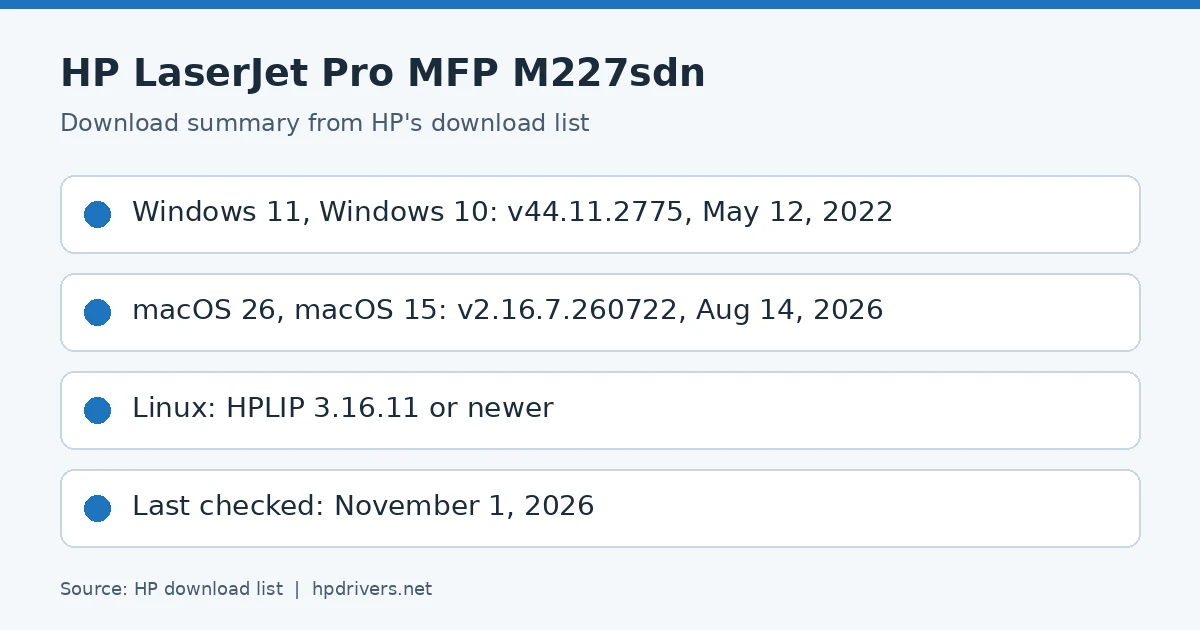
Last checked against HP’s download list: November 1, 2026 · Checked by H&G
Looking for the HP LaserJet Pro MFP M227sdn driver? This page lists HP’s official software for the whole HP LaserJet Pro MFP M227 series: the LaserJet Pro MFP M227sdn, LaserJet Pro MFP M227fdw, LaserJet Pro MFP M227d and LaserJet Pro MFP M227fdn. HP lists some packages for specific models in the series, so check that the package title includes your model. For Windows 11, Windows 10 (64-bit) and Windows 7 (64-bit), the package most people need is the HP LaserJet Pro MFP M227sdn/Ultra M230sdn Full Feature Software and Drivers. For a Mac, HP lists Install HP Easy Start.
HP LaserJet Pro MFP M227sdn download summary
Recommended downloads
Windows 11, Windows 10 (64-bit), Windows 7 (64-bit): HP LaserJet Pro MFP M227sdn/Ultra M230sdn Full Feature Software and DriversVersion 44.11.2775 · Released May 12, 2022 · 184.2 MB
The newest firmware HP lists for the LaserJet Pro MFP M227 is version 20241025, released Dec 03, 2024. HP’s notes for it: Add DigiCert Root G5 Certificate to printer; Security Fixes.
Keep the printer and the computer switched on until the update has finished.
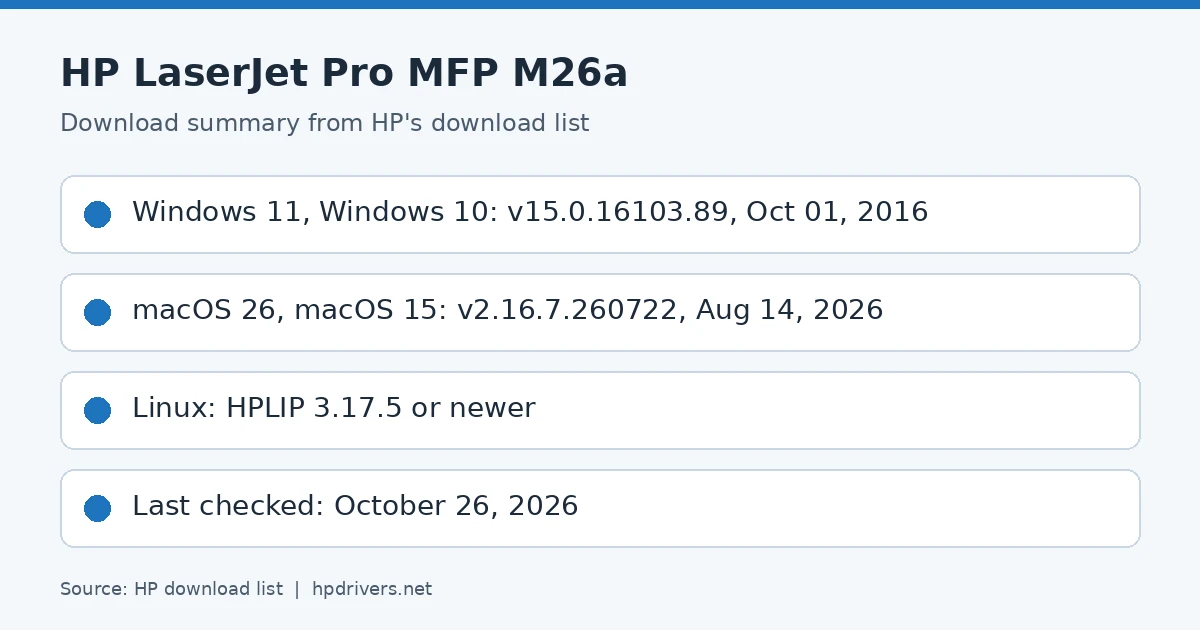
Last checked against HP’s download list: October 26, 2026 · Checked by H&G
Looking for the HP LaserJet Pro MFP M26a driver download? This page lists HP’s official software for the whole HP LaserJet Pro MFP M25-M27 series. HP lists some packages for specific models in the series, so check that the package title includes your model. For Windows 11, Windows 10 (64-bit) and Windows 7 (64-bit), the package most people need is the HP LaserJet Pro MFP M25-M27 Series Full Software and Drivers . For a Mac, HP lists Install HP Easy Start.
HP LaserJet Pro MFP M26a download summary
Recommended downloads
Windows 11, Windows 10 (64-bit), Windows 7 (64-bit): HP LaserJet Pro MFP M25-M27 Series Full Software and Drivers Version 15.0.16103.89 · Released Oct 01, 2016 · 86.2 MB · HP rating: Recommended
The driver files without an installer are added through Windows’ Add Printer wizard (Have Disk). For step-by-step instructions, see our guide to installing an HP printer driver.
Firmware update 20201012
The newest firmware HP lists for the LaserJet Pro MFP M25-M27 is version 20201012, released Nov 03, 2020.
Check your current firmware version first on the printer’s Configuration Page, and update only if it is older.
Looking for the HP Color LaserJet Enterprise M653x driver? This page lists HP’s official software for the whole HP Color LaserJet Enterprise M653 series: the Color LaserJet Enterprise M653dn, Color LaserJet Enterprise M653x and Color LaserJet Enterprise M653dh. HP lists some packages for specific models in the series, so check that the package title includes your model. For Windows 11; Windows 10, 8.1, 8, 7 (32-bit and 64-bit), the package most people need is the HP Color LaserJet Enterprise M652/M653 Printer Full Software Solution. For a Mac, HP lists Install HP Easy Start.
Last checked against HP’s download list: November 10, 2026 · Checked by H&G
HP Color LaserJet Enterprise M653x
Recommended downloads
Windows 11; Windows 10, 8.1, 8, 7 (32-bit and 64-bit): HP Color LaserJet Enterprise M652/M653 Printer Full Software SolutionVersion 43.5.2519 · Released Nov 24, 2021 · 157.4 MB · HP rating: Recommended
Files download directly from HP’s official servers. hpdrivers.net does not host or modify them.
Models covered by this page
All 3 models share one download list at HP:
HP Color LaserJet Enterprise M653dnHP Color LaserJet Enterprise M653xHP Color LaserJet Enterprise M653dh
HP lists exactly the same download files for the HP Color LaserJet Enterprise M652n on its own series page, so that model is covered by this page as well.
Which Windows package should you choose?
HP publishes 3 kinds of Windows package for the Color LaserJet Enterprise M653:
Firmware update (v2411226_066612, Feb 02, 2023): updates the printer itself, not your PC.
Full software solution (v43.5.2519, Nov 24, 2021, 157.4 MB): driver plus HP’s setup wizard and tools.
HP Universal Print Driver (v8.2.0.26778, Sep 26, 2026): HP’s shared driver for many models, also listed for this series.
All downloads for the Color LaserJet Enterprise M653
Windows
Package / Windows
Version
Released
Size
FutureSmart Bundle Version 4.12.0.1 – HP LaserJet Enterprise M652/653 Series Printer FIRMWARE
HP lists its Universal Print Driver for this series on Windows 11; Windows 10, 8.1, 8, 7 (32-bit and 64-bit). Get it from our HP Universal Print Driver page.
Linux
HP lists a Linux driver for this series: FutureSmart Bundle Version 4.12.0.1 – HP LaserJet Enterprise M652/653 Series Printer FIRMWARE (Version 2411226_066612 · Released Feb 02, 2023 · 96.9 MB). Download from HP.
Installing the Color LaserJet Enterprise M653 driver
The newest firmware HP lists for the Color LaserJet Enterprise M653 is version 2411226_066612, released Feb 02, 2023.
Keep the printer and the computer switched on until the update has finished.
Specifications that matter for setup
Print languages
HP PCL 6; HP PCL 5c; HP postscript level 3 emulation, native PDF printing (v 1.7), URF (AirPrint)
Print speed (black)
Normal: Up to 60 ppm
Recommended monthly volume
2000 to 17,000
Two-sided printing
Automatic (standard)
Toner supplies HP lists for the Color LaserJet Enterprise M653
HP’s specifications name these replacement supplies for the Color LaserJet Enterprise M653:
HP 655A Black Original LaserJet Toner Cartridge (~12
Paper handling and hardware details
Values below are HP’s published figures for the Color LaserJet Enterprise M653; they help you check that this page matches your printer before you download anything.
Output tray
500-sheet output bin
Media types
Paper (plain, light, bond, recycled, mid-weight, heavy, mid-weight glossy, heavy glossy, extra heavy, extra heavy glossy, cardstock, card glossy), color transparency, labels, letterhead, envelope
Print speed (color)
Up to 60 ppm
Print quality (black)
Black: Up to 1200 x 1200 dpi Color: Up to 1200 x 1200 dpi
Control panel
4.3-in (10.92 cm) Color Graphics Display (CGD) with touchscreen; rotating (adjustable angle)
The M653x is the M653 model that comes with a 1×550-sheet feeder (Tray 3) already fitted; on the M653dn it is an option. That is also why the x is taller: HP lists 770 mm for the M653x against 640 mm for the M653dn with the printer open.
Both print at 60 pages per minute on Letter (56 on A4) and both use the HP 655A/656X toner set, with the M653 models also carrying the color touchscreen control panel.
Based on HP user guide c05306568 (“HP Color LaserJet Enterprise M652, M653 – User Guide”).