Independent download guide for HP printer and scanner drivers
hpdrivers.net is an independent website and is not affiliated with, endorsed by, or sponsored by HP Inc. Download links point to HP's official servers (ftp.hp.com). Read the full disclaimer
Last checked against HP’s download list: November 5, 2026 · Checked by H&G
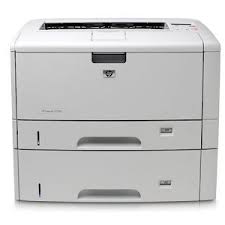
Looking for the HP LaserJet 5200dnt driver? This page lists HP’s official software for the whole HP LaserJet 5200 Printer series: the LaserJet 5200, LaserJet 5200n, LaserJet 5200tn, LaserJet 5200dtn, LaserJet 5200L and LaserJet 5200LX. HP lists some packages for specific models in the series, so check that the package title includes your model. For Windows 10, 8.1, 8 (64-bit), the package most people need is the HP LaserJet USB (DOT4) communication driver for Windows 8 and Higher (64-bit). For Windows 11, HP lists the HP Universal Print Driver for Windows PCL6 (64-bit).
HP LaserJet 5200dnt (one model of this series)
Recommended downloads
Windows 10, 8.1, 8 (64-bit): HP LaserJet USB (DOT4) communication driver for Windows 8 and Higher (64-bit)Version 7.0.0.29 · Released Apr 21, 2015 · 1.5 MB
HP lists its Universal Print Driver for this series on Windows 11; Windows 10, 8.1, 8, 7 (32-bit and 64-bit). Get it from our HP Universal Print Driver page.
Linux
HP lists a Linux driver for this series: HP LaserJet 5200 Series HP Easy Firmware Upgrade Utility (Includes Code Signing) for Windows Operating Systems (Version 08.290.2 · Released Mar 27, 2017 · 16.9 MB). Download from HP.
Exact speed varies depending on the system configuration, software program, document complexity, network, media width, media weight, environment, and job size
Print quality (black)
Black: Up to 1200 x 1200 dpi
Control panel
2-line LCD (text)
Processor
460 MHz
USB cable
No, please purchase USB cable separately
Warranty
One-year, next business day, on-site limited warranty
Last checked against HP’s download list: November 7, 2026 · Checked by H&G
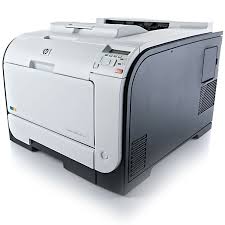
Looking for the HP LaserJet Pro M451dn driver? This page lists HP’s official software for the whole HP LaserJet Pro 400 color Printer M451 series: the LaserJet Pro 400 color Printer M451nw, LaserJet Pro 400 color Printer M451dw and LaserJet Pro 400 color Printer M451dn. HP lists some packages for specific models in the series, so check that the package title includes your model. For Windows 10, 8.1, 8, 7, Vista (32-bit and 64-bit); Windows XP (32-bit), the package most people need is the HP LaserJet Pro 300/400 color M351/M451 Series Software and Drivers. For Windows 11, HP lists the HP Universal Print Driver for Windows PCL6 (64-bit). For a Mac, HP lists Install HP Easy Start.
HP LaserJet Pro M451dn
Recommended downloads
Windows 10, 8.1, 8, 7, Vista (32-bit and 64-bit); Windows XP (32-bit): HP LaserJet Pro 300/400 color M351/M451 Series Software and DriversVersion 15.0.15189.1840 · Released Mar 05, 2021 · 123.8 MB · HP rating: Recommended
HP lists its Universal Print Driver for this series on Windows 11; Windows 10, 8.1, 8, 7 (32-bit and 64-bit). Get it from our HP Universal Print Driver page.
Installing the LaserJet Pro 400 color Printer M451 driver
The newest firmware HP lists for the LaserJet Pro 400 color Printer M451 is version 20190306, released Mar 18, 2019. HP’s notes for it: Corrected Bar Mitzvah security vulnerability; Fixed an issue that in rare case printer would send SNMP TRAP to unwanted destination; Fixed a 79 error that would possibly occur during vulnerability scan.
Check your current firmware version first on the printer’s Configuration Page, and update only if it is older.
Specifications that matter for setup
Print languages
HP PCL 6, HP PCL 5c, HP postscript level 3 emulation
Print speed (black)
Normal: Up to 21 ppm
Recommended monthly volume
750 to 2000
Toner supplies HP lists for the LaserJet Pro 400 color Printer M451
HP’s specifications name these replacement supplies for the LaserJet Pro 400 color Printer M451:
HP 305A Black LaserJet Toner Cartridge (yield ~2200 pages) CE410A
HP 305X Black LaserJet Toner Cartridge (yield ~4000 pages) CE410X
HP 305A Cyan LaserJet Toner Cartridge (yield ~2600 pages) CE411A
HP 305A Yellow LaserJet Toner Cartridge (yield ~2600 pages) CE412A
Values below are HP’s published figures for the LaserJet Pro 400 color Printer M451; they help you check that this page matches your printer before you download anything.
Last checked against HP’s download list: October 26, 2026 · Checked by H&G
Looking for the HP LaserJet Pro 400 M401a driver download? This page lists HP’s official software for the whole HP LaserJet Pro 400 Printer M401 series: the LaserJet Pro 400 Printer M401a, LaserJet Pro 400 Printer M401d, LaserJet Pro 400 Printer M401dn, LaserJet Pro 400 Printer M401dw, LaserJet Pro 400 Printer M401n and LaserJet Pro 400 Printer M401dne. The files apply to every model in the series. For Windows 11, HP lists only its Universal Print Driver for this series; for Windows 10 (64-bit) and Windows 7 (64-bit) there is the HP LaserJet Pro 400 M401dne Printer Full Software and Drivers. For a Mac, HP lists Install HP Easy Start.
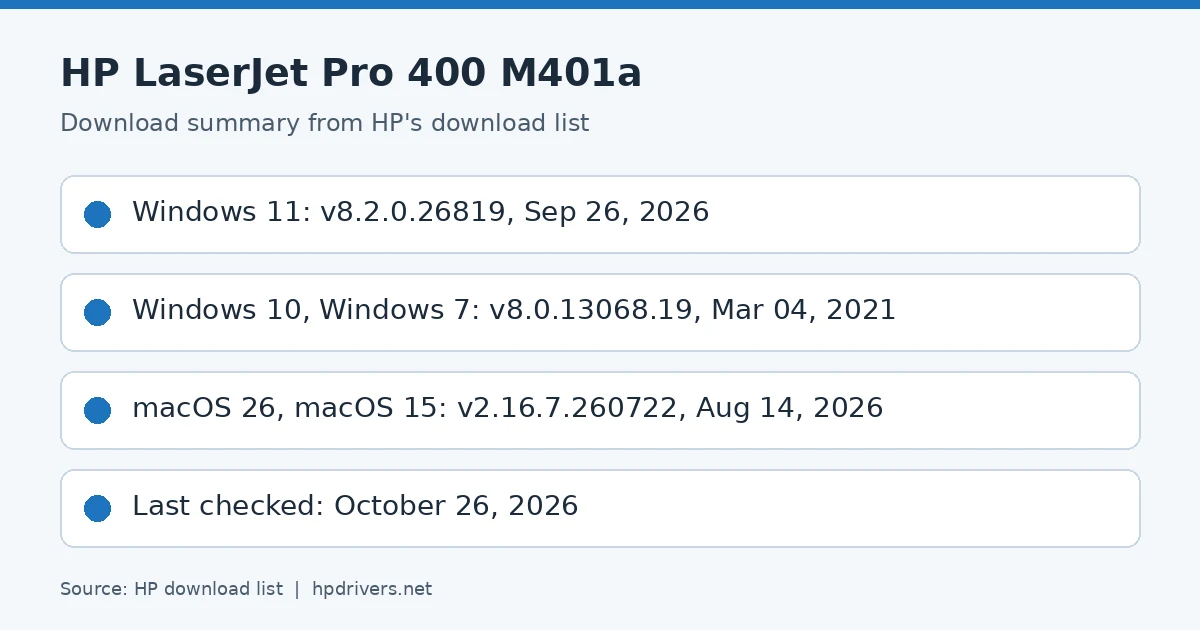
HP LaserJet Pro 400 M401a download summary
Recommended downloads
Windows 11: HP Universal Print Driver for Windows PCL6 (64-bit)Version 8.2.0.26819 · Released Sep 26, 2026 · 20.2 MB
Windows 10 (64-bit), Windows 7 (64-bit): HP LaserJet Pro 400 M401dne Printer Full Software and DriversVersion 8.0.13068.19 · Released Mar 04, 2021 · 162.3 MB · HP rating: Recommended
Files download directly from HP’s official servers. hpdrivers.net does not host or modify them.
Models covered by this page
All 6 models share one download list at HP:
HP LaserJet Pro 400 Printer M401aHP LaserJet Pro 400 Printer M401dHP LaserJet Pro 400 Printer M401dnHP LaserJet Pro 400 Printer M401dwHP LaserJet Pro 400 Printer M401nHP LaserJet Pro 400 Printer M401dne
Which Windows package should you choose?
HP publishes 6 kinds of Windows package for the LaserJet Pro 400 Printer M401:
HP Universal Print Driver (v8.2.0.26778, Sep 26, 2026): HP’s shared driver for many models, also listed for this series.
Full software solution (v8.0.13068.19, Mar 04, 2021, 162.3 MB): driver plus HP’s setup wizard and tools.
Driver files (no installer) (v61.140.04.14138, Apr 06, 2021): bare driver files for Windows’ Add Printer wizard.
Driver-only installer (v8.0.13068.19, Mar 04, 2021): print driver only, for PCs that can’t or shouldn’t take the full package.
Firmware update (v20210202, Feb 12, 2021): updates the printer itself, not your PC.
HP ePrint Software for Network and Wireless Connected Printers (v5.5.118.22560, Sep 18, 2017).
All downloads for the LaserJet Pro 400 Printer M401
Windows
Package / Windows
Version
Released
Size
HP LaserJet Pro 400 M401dne Printer Full Software and Drivers
Windows: 10, 7
File details
File: LJ-M401dne-full-solution-13068.exe HP’s change note: fixed the Security Vulnerability.
HP also lists its Universal Print Driver for the LaserJet Pro 400 Printer M401 on Windows 7, Windows 11 and Windows 10 (PCL 6 and PostScript; newest version 8.2.0.26819, Sep 26, 2026). All UPD downloads are on our HP Universal Print Driver page.
Installing the LaserJet Pro 400 Printer M401 driver
The driver files without an installer are added through Windows’ Add Printer wizard (Have Disk). For step-by-step instructions, see our guide to installing an HP printer driver.
Firmware update 20210202
The newest firmware HP lists for the LaserJet Pro 400 Printer M401 is version 20210202, released Feb 12, 2021. HP’s notes for it: Network component update; Fix issue with syslog not generated; Fix IPv4-IPv6 mapped addresses for WSD.
Check your current firmware version first on the printer’s Configuration Page, and update only if it is older.
Install the printer driver before running the update. HP’s utility needs it to reach the printer.
Keep the printer and the computer switched on until the update has finished.
Specifications that matter for setup
Print languages
HP PCL 5, HP PCL 6, HP postscript level 3 emulation, direct PDF (v 1.7) printing
Print speed (black)
Normal: Up to 35 ppm
Recommended monthly volume
750 to 3000
Common setup problems
An older driver is still installed. HP’s 2021 packages fixed a security vulnerability, so replace older versions with the current package.
The full package doesn’t suit your Windows 11 PC. HP also lists its Universal Print Driver for this series on Windows 11.