Independent download guide for HP printer and scanner drivers
hpdrivers.net is an independent website and is not affiliated with, endorsed by, or sponsored by HP Inc. Download links point to HP's official servers (ftp.hp.com). Read the full disclaimer
Last checked against HP’s download list: November 10, 2026 · Checked by H&G
Looking for the HP LaserJet M1120 driver? This page lists HP’s official software for the whole HP LaserJet M1120 Multifunction Printer series: the LaserJet M1120 Multifunction and LaserJet M1120n Multifunction. HP lists some packages for specific models in the series, so check that the package title includes your model. For Windows 7 (32-bit), the package most people need is the HP LaserJet Full Feature Software and Driver. For a Mac, HP lists Mac Printer Driver.
HP LaserJet M1120
Recommended downloads
Windows 7 (32-bit): HP LaserJet Full Feature Software and DriverVersion 4.0 · Released Oct 21, 2009 · 253.2 MB · HP rating: Recommended
macOS 12, 11, 10.13, 10.12, Mac OS X 10.11, Mac OS X 10.10, 10.15, 10.14, Mac OS X 10.9: Mac Printer DriverVersion 5.1 · Released Aug 18, 2022 · 557.4 MB
The newest firmware HP lists for the LaserJet M1120 Multifunction is version 20120305, released Mar 22, 2012. HP’s notes for it: Firmware Version 20120305 Fix: Added the "RFU" item to the "Service Menu" to control remote firmware updates; The options are "On", "Off", and "Off and Locked"; The default value is "On" – permitting firmware updates.
Check your current firmware version first on the printer’s Configuration Page, and update only if it is older.
Specifications that matter for setup
Wi-Fi
Not built in
Print languages
Host-based
Functions
Print, copy, scan
Print speed (black)
Normal: Up to 20 ppm
Recommended monthly volume
250 to 2000
Two-sided printing
Manual (driver support provided)
Scanner
Flatbed
Scan resolution
Up to 1200 dpi
Scan file formats
JPEG, TIF (compressed and uncompressed), PDF, GIF, and BMP.
Ways to scan
Scanning via HP LaserJet scan application or TWAIN—or WIA-compliant application software
Ink supplies HP lists for the LaserJet M1120 Multifunction
HP’s specifications name these replacement supplies for the LaserJet M1120 Multifunction:
HP LaserJet CB436A Black Print Cartridge CB436A
Paper handling and hardware details
Values below are HP’s published figures for the LaserJet M1120 Multifunction; they help you check that this page matches your printer before you download anything.
Paper input tray
250-sheet input tray, 10-sheet priority feed slot
Output tray
125-sheet face-down bin
Paper sizes
Media input tray and priority slot: letter, legal, envelopes (No. 5 1/2 baronial through No. 11), index cards, postcards
Media types
Paper (plain, laser), envelopes, transparencies, labels, cardstock, postcards
Paper weight
Priority feed slot: 11 to 69 lb; main tray: 16 to 43 lb
Print speed (color)
Exact speed varies depending on the system configuration, software program, and document complexity
Print quality (black)
Black: Up to 600 x 600 x 2 dpi
Memory
32 MB
Processor
230 MHz
Power use
370 watts (printing), 7 watts (standby), 7 watts (sleep), 0 watts (off) Power reported is the highest value measured for all models using all standard voltages
Size (W x D x H)
18.0 x 14.5 x 12.7 in
Weight
18.95 lb
USB cable
No, please purchase USB cable separately
Warranty
One-year limited warranty
Common setup problems
No Wi-Fi option during setup. HP’s specifications list no built-in Wi-Fi for the LaserJet M1120 Multifunction. Use an Ethernet cable or USB.
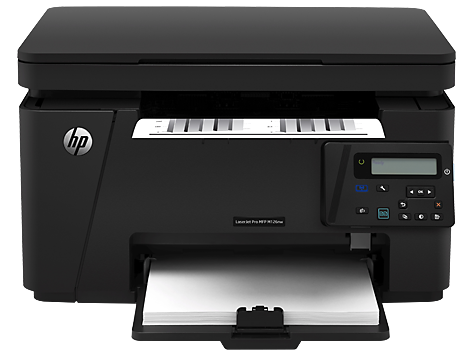
Looking for an HP LaserJet Pro MFP M126 driver download? This page lists HP’s official software for the HP LaserJet Pro MFP M126a and M126nw, which HP lists with (almost) the same downloads. HP lists some packages for specific models in the series, so check that the package title includes your model. For Windows 11, Windows 10, 8.1, 8, 7, Vista (32-bit and 64-bit); Windows XP (32-bit), the package most people need is the HP LaserJet Pro MFP M125/126 Series Full Software and Drivers. For a Mac, HP lists Install HP Easy Start.
Last checked against HP’s download list: November 16, 2026 · Checked by H&G
HP LaserJet Pro MFP M126nw
Recommended downloads
Windows 11, Windows 10, 8.1, 8, 7, Vista (32-bit and 64-bit); Windows XP (32-bit): HP LaserJet Pro MFP M125/126 Series Full Software and DriversVersion 15.0.15311.1315 · Released Mar 05, 2021 · 108.8 MB · HP rating: Recommended
Files download directly from HP’s official servers. hpdrivers.net does not host or modify them.
Models covered by this page
All 2 models share one download list at HP:
HP LaserJet Pro MFP M126aHP LaserJet Pro MFP M126nw
Which Windows package should you choose?
HP publishes 4 kinds of Windows package for the LaserJet Pro MFP M126:
Driver-only installer (v15.0.15311.1315, Mar 05, 2021): print driver only, for PCs that can’t or shouldn’t take the full package.
Full software solution (v15.0.15311.1315, Mar 05, 2021, 108.8 MB): driver plus HP’s setup wizard and tools.
Firmware update (v20230330, May 06, 2024): updates the printer itself, not your PC.
Driver files (no installer) (v15.0.15309.1315, Apr 08, 2021): bare driver files for Windows’ Add Printer wizard.
All downloads for the LaserJet Pro MFP M126
Each LaserJet Pro MFP M126 driver download below links straight to the file on HP’s servers; HP’s own support page for this series lists the same files.
Windows
Package / Windows
Version
Released
Size
HP LaserJet Pro MFP M125nw, M125rnw, and M126nw Firmware Update
Windows: 11 10, 8.1, 8, 7, Vista (32-bit and 64-bit) XP (32-bit)
HP lists Linux support for this series through its HPLIP project, outside the regular download list: HP’s Linux printing page (HPLIP).
Installing the LaserJet Pro MFP M126 driver
Once the LaserJet Pro MFP M126 driver download from the table above is complete, follow these steps. Whichever LaserJet Pro MFP M126 driver download you pick, check that the file name matches your Windows or macOS version before you run it. If the LaserJet Pro MFP M126 driver download you downloaded does not start, download it again from the HP link and disable any download blocker.
Download HP Easy Start or the Full Software package from the Recommended downloads box.
Keep the USB cable unplugged until the installer asks for it; for a network model, connect to your Wi-Fi or Ethernet first.
Run the installer and select your model when it lists the printers it found.
Print a test page and a scan to check that both work.
The driver files without an installer are added through Windows’ Add Printer wizard (Have Disk). For step-by-step instructions, see our guide to installing an HP printer driver.
Firmware update 20201013
The newest firmware HP lists for the LaserJet Pro MFP M126 is version 20201013, released Oct 23, 2020.
Check your current firmware version first on the printer’s Configuration Page, and update only if it is older.
Specifications that matter for setup
Print languages
PCLm/PCLmS
Functions
Print, copy, scan
Recommended monthly volume
250 to 2000
Two-sided printing
Manual (driver support provided)
Scanner
Flatbed
Scan resolution
Up to 1200 dpi
Two-sided ADF scanning
No
Scan file formats
Windows Scan Software supports file format: JPG, RAW (BMP), PDF, TIFF, PNG; Mac Scan SW supports file format: TIFF, PNG, JPEG, JPEG-2000, PDF, PDF-Searchable, RTF, TXT
Ways to scan
Solution Center Lite (Windows Vista, Windows XP) or Device Stage (Windows 7, Windows 8); TWAIN-compliant or WIA-compliant software
Toner supplies HP lists for the LaserJet Pro MFP M126
HP’s specifications name these replacement supplies for the LaserJet Pro MFP M126:
HP 88A Black LaserJet Toner Cartridge (~1500
Paper handling and hardware details
Values below are HP’s published figures for the LaserJet Pro MFP M126; they help you check that this page matches your printer before you download anything.
Paper input tray
150-sheet input tray
Output tray
100-sheet face-down bin
Media types
Paper (plain, LaserJet), envelopes, transparencies, labels, postcards
An older driver is still installed. HP’s 2021 packages fixed a security vulnerability, so replace older versions with the current package.
M126a and M126nw: the first models of the M125-M128 guide
HP’s guide covers the M125, M126, M127 and M128 together and groups them by control panel. The M126a shares a 2-digit LED panel with the M125a; the M126nw is the wireless version and shares its panel with the M125nw. The faster and bigger fax models (M127, M128) have separate sections.
These printers print 20 pages per minute on A4 and 21 on Letter and copy from a flatbed scanner at 300 dpi. The M126nw supports HP Wireless Direct printing; the guide has a full set of wireless troubleshooting steps, such as what to do when the printer does not print after setup or the network is missing from the list.
Based on HP user guide c03628466 (“HP LaserJet Pro MFP M125-126 M127-128 – User Guide”).
Toner for the M126: HP 83A
HP lists one toner cartridge for these printers, the HP 83A (CF283A). Because the M126a has no network connection and the M126nw has, install the software through the connection type that matches your model: USB for the M126a, USB or wireless for the M126nw.
Based on HP user guide c03628466 (“HP LaserJet Pro MFP M125-126 M127-128 – User Guide”).
Similar models
This page is the LaserJet Pro MFP M126 driver download page for this model only. The LaserJet Pro MFP M125 has its own page.
Last checked against HP’s download list: November 4, 2026 · Checked by H&G
Looking for the HP LaserJet P1009 driver? This page lists HP’s official software for the whole HP LaserJet P1009 Printer. For Windows Vista (32-bit and 64-bit); Windows XP (32-bit), the package most people need is the HP LaserJet P1009 Full Feature Software and Driver. For a Mac, HP lists Mac Printer Driver.
HP LaserJet P1009
Recommended downloads
Windows Vista (32-bit and 64-bit); Windows XP (32-bit): HP LaserJet P1009 Full Feature Software and DriverVersion 1.0 · Released Oct 07, 2008 · 458.3 MB · HP rating: Recommended
Files download directly from HP’s official servers. hpdrivers.net does not host or modify them.
Which Windows package should you choose?
HP publishes 2 kinds of Windows package for the LaserJet P1009 Printer:
Full software solution (v1.0, Oct 07, 2008, 458.3 MB): driver plus HP’s setup wizard and tools.
Driver-only installer (v20080418, Oct 07, 2008): print driver only, for PCs that can’t or shouldn’t take the full package.
All downloads for the LaserJet P1009 Printer
HP’s download list for this series includes Windows Vista (32-bit and 64-bit); Windows XP (32-bit) packages. It does not list separate Windows 11 packages.
Windows
Package / Windows
Version
Released
Size
HP LaserJet P1009 Full Feature Software and Driver