
hpdrivers.net is an independent website and is not affiliated with, endorsed by, or sponsored by HP Inc. Download links point to HP's official servers (ftp.hp.com). Read the full disclaimer

HP Color LaserJet Enterprise M455 Drivers

Looking for the HP Color LaserJet Enterprise M455 driver? This page lists HP’s official software for the whole HP Color LaserJet Enterprise M455 series. For Windows 11; Windows 10, 8.1, 7 (32-bit and 64-bit), the package most people need is the HP Color LaserJet M455 Printer Full Software Solution. For a Mac, HP lists Install HP Easy Start.
Last checked against HP’s download list: November 10, 2026 · Checked by H&G
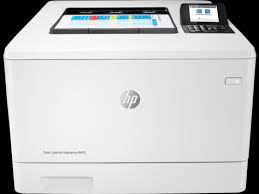
HP Color LaserJet Enterprise M455 printer
HP Color LaserJet Enterprise M455

Recommended downloads

Windows 11; Windows 10, 8.1, 7 (32-bit and 64-bit): HP Color LaserJet M455 Printer Full Software SolutionVersion 52.2.4918 · Released Nov 11, 2021 · 77.9 MB · HP rating: Recommended
Download
macOS 26, 15, 14: Install HP Easy StartVersion 2.16.7.260722 · Released Aug 14, 2026 · 6.3 MB
Download

Files download directly from HP’s official servers. hpdrivers.net does not host or modify them.

Which Windows package should you choose?

HP publishes 4 kinds of Windows package for the Color LaserJet Enterprise M455:

  • Firmware update (v2510156_069180, Aug 28, 2026): updates the printer itself, not your PC.
  • Driver files (no installer) (v52.2.4918, Nov 11, 2021): bare driver files for Windows’ Add Printer wizard.
  • Full software solution (v52.2.4918, Nov 11, 2021, 77.9 MB): driver plus HP’s setup wizard and tools.
  • HP Universal Print Driver (v8.2.0.26778, Sep 26, 2026): HP’s shared driver for many models, also listed for this series.

All downloads for the Color LaserJet Enterprise M455

Windows

Package / Windows
Version
Released
Size
FutureSmart Bundle Version 5.10.0.7 – HP Color LaserJet Enterprise M455 Printer FIRMWARE
Windows: 11
10, 8.1, 8, 7 (32-bit and 64-bit)
File detailsFile: cljM455_fs5.10.0.7_fw_2510156_069180.zip
2510156_069180
Aug 28, 2026
339.0 MB
HP Color LaserJet M455 series PCL-6 V4 Printer Driver (no installer)
Windows: 11
10, 8.1, 7 (32-bit and 64-bit)
File detailsFile: V4_DriveronlyWebpack-52.2.4918-CLJM455_V4_DriveronlyWebpack.exe
52.2.4918
Nov 11, 2021
11.5 MB
HP Color LaserJet M455 series PCL 6 V3 Printer Driver (no installer)
Windows: 11
10, 8.1, 7 (32-bit and 64-bit)
File detailsFile: V3_DriveronlyWebpack-52.2.4918-CLJM455_V3_DriveronlyWebpack.exe
52.2.4918
Nov 11, 2021
14.8 MB
HP Color LaserJet M455 Printer Full Software Solution
Windows: 11
10, 8.1, 7 (32-bit and 64-bit)
File detailsFile: Full_Webpack-52.2.4918-CLJM455_Full_Webpack.exe
52.2.4918
Nov 11, 2021
77.9 MB

macOS

Package / macOS
Version
Released
Size
FutureSmart Bundle Version 5.10.0.7 – HP Color LaserJet Enterprise M455 Printer FIRMWARE
macOS: 26, 15, 14, 13, 12, 11, 10.13, 10.12, 10.11, 10.10, 10.15, 10.14, 10.9, 10.8, 10.7, 10.6, 10.5
File detailsFile: cljM455_fs5.10.0.7_fw_2510156_069180.zip
2510156_069180
Aug 28, 2026
339.0 MB

Other HP software listed for this series

Software / Systems
Version
Size
HP Easy Start Printer Setup Software (Internet connection required for driver installation)
Systems: Windows 11
Windows 10, 7 (32-bit and 64-bit)
17.6.15
26.5 MB
HP System Health Apps Registration Utility
Systems: Windows 10 (32-bit and 64-bit)
1.0.0.0
1.3 MB
Install HP Easy Start
Systems: macOS 26, 15, 14
2.16.7.260722
6.3 MB

HP Universal Print Driver

HP lists its Universal Print Driver for this series on Windows 11; Windows 10, 8.1, 8, 7 (32-bit and 64-bit). Get it from our HP Universal Print Driver page.

Linux

HP lists a Linux driver for this series: FutureSmart Bundle Version 5.10.0.7 – HP Color LaserJet Enterprise M455 Printer FIRMWARE (Version 2510156_069180 · Released Aug 28, 2026 · 339.0 MB). Download from HP.

Installing the Color LaserJet Enterprise M455 driver

The driver files without an installer are added through Windows’ Add Printer wizard (Have Disk). For step-by-step instructions, see our guide to installing an HP printer driver.

Firmware update 2510156_069180

The newest firmware HP lists for the Color LaserJet Enterprise M455 is version 2510156_069180, released Aug 28, 2026.

  • Keep the printer and the computer switched on until the update has finished.

Specifications that matter for setup

Connections
2 Hi-Speed USB 2.0 Host; 1 Hi-Speed USB 2.0 Device; 1 Gigabit Ethernet 10/100/1000T network
Wi-Fi
Optional, enabled with purchase of a wireless hardware accessory. Dual band Wireless Station and Wi-Fi Direct functionality available with HP Jetdirect 3100w BLE/NFC/Wireless Accessory 3JN69A
Mobile printing
HP ePrint; Apple AirPrint™; NFC touch-to-print (optional); Mopria™ Certified; PrinterOn Print; Wi-Fi® Direct printing
Print languages
HP PCL 6, HP PCL 5, HP PostScript level 3 emulation, native PDF printing (v 1.7), Apple AirPrint™
Print speed (black)
Normal: Up to 29 ppm
Recommended monthly volume
900 to 4,800 Pages
Two-sided printing
Automatic (default)

Toner supplies HP lists for the Color LaserJet Enterprise M455

HP’s specifications name these replacement supplies for the Color LaserJet Enterprise M455:

  • HP 414A Black Original LaserJet Toner Cartridge (~2
  • 400 pages) W2020A HP 414A Cyan Original LaserJet Toner Cartridge (~2
  • 100 pages) W2021A HP 414A Yellow Original LaserJet Toner Cartridge (~2
  • 100 pages) W2022A HP 414A Magenta Original LaserJet Toner Cartridge (~2
  • 100 pages) W2023A HP 414X High

What comes in the box

HP lists these items with the Color LaserJet Enterprise M455:

  • HP Color LaserJet Enterprise M455dn printer
  • HP Black Original LaserJet Toner Cartridge (~2,400 pages)
  • HP Cyan, Magenta, Yellow Original LaserJet Toner Cartridges (~2,100 pages each)
  • Getting started Guide
  • 1 Power cord

Paper handling and hardware details

Values below are HP’s published figures for the Color LaserJet Enterprise M455; they help you check that this page matches your printer before you download anything.

Paper input tray
50-sheet multipurpose tray, 250-sheet input tray
Output tray
150-sheet output bin
Optional trays
Optional 550-sheet tray
Paper sizes
Tray 1: letter, legal, oficio, executive, statement, 4 x 6, 3 x 5, 5 x 7, 5 x 8, postcard (JIS), double postcard (JIS), 8.5 x 13, envelope (commercial No. 9
Media types
Paper (bond, brochure, colored, glossy, letterhead, photo, plain, preprinted, prepunched, recycled, rough), postcards, labels, envelopes
Paper weight
Tray 1: 16 to 47 lb bond (up to 52 lb with HP Color laser glossy photo papers); Tray 2: 16 to 43 lb bond (up to 47 lb with postcards
Print speed (color)
Normal: Up to 29 ppm
Print quality (black)
Black: Up to 600 x 600 dpi Color: Up to 600 x 600 dpi
Control panel
2.658" diagonal Color TFT-LCD back-lit (960 (H) x 240 (V))
Processor
800 MHz
Power use
574 watts (active printing), 16.7 watts (ready), 1.1 watts (sleep), 0.08 watts (auto-off/manual-on)
Size (W x D x H)
16.3 x 18.6 x 12 in
Weight
~41.7 lb
USB cable
No, please purchase USB cable separately; Yes, 1 USB (APJ Only)
Warranty
One-year, On-site Repair 24-hour / 7 day a week phone support

Common setup problems

  • You’d rather not install software on a Mac. HP’s specifications list AirPrint support, so macOS can usually add the printer from System Settings without extra software.
HP Color LaserJet Enterprise MFP M480 Drivers

Last checked against HP’s download list: November 1, 2026 · Checked by H&G

Looking for the HP Color LaserJet Enterprise MFP M480 driver? This page lists HP’s official software for the whole HP Color LaserJet Enterprise MFP M480 series. For Windows 11, Windows 10 (64-bit) and Windows 7 (64-bit), the package most people need is the HP Color LaserJet MFP M480 Printer Full Software Solution. For a Mac, HP lists Install HP Easy Start.

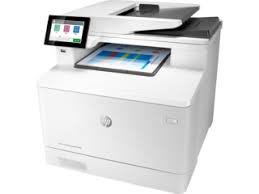
HP Color LaserJet Enterprise MFP M480 printer
HP Color LaserJet Enterprise MFP M480

Recommended downloads

Windows 11, Windows 10 (64-bit), Windows 7 (64-bit): HP Color LaserJet MFP M480 Printer Full Software SolutionVersion 52.2.5009 · Released Jul 09, 2024 · 78.2 MB · HP rating: Recommended

Download

macOS 26, macOS 15: Install HP Easy StartVersion 2.16.7.260722 · Released Aug 14, 2026 · 6.3 MB

Download

Files download directly from HP’s official servers. hpdrivers.net does not host or modify them.


Which Windows package should you choose?

HP publishes 5 kinds of Windows package for the Color LaserJet Enterprise MFP M480:

  • Driver files (no installer) (v52.2.5009, Jul 09, 2024): bare driver files for Windows’ Add Printer wizard.
  • Full software solution (v52.2.5009, Jul 09, 2024, 78.2 MB): driver plus HP’s setup wizard and tools.
  • HP Universal Print Driver (v8.2.89, Sep 11, 2026): HP’s shared driver for many models, also listed for this series.
  • Firmware update (v2510156_069171, Aug 28, 2026): updates the printer itself, not your PC.
  • HP Scan and Twain Package for USB (v52.1.5109, Sep 09, 2020): scanning from the computer.

All downloads for the Color LaserJet Enterprise MFP M480

Windows

Package / Windows
Version
Released
Size
HP Color LaserJet MFP M480 series PCL 6 V3 Printer Driver (no installer)

Windows: 11, 10, 7
File details

File: V3_DriveronlyWebpack-52.2.5009-CLJM480_V3_DriveronlyWebpack.exe

52.2.5009
Jul 09, 2024
14.9 MB
HP Color LaserJet MFP M480 Printer Full Software Solution

Windows: 11, 10, 7
File details

File: Full_Webpack-52.2.5009-CLJM480_Full_Webpack.exe

52.2.5009
Jul 09, 2024
78.2 MB
HP Color LaserJet MFP M480 series PCL-6 V4 Printer Driver (no installer)

Windows: 11, 10, 7
File details

File: V4_DriveronlyWebpack-52.2.5009-CLJM480_V4_DriveronlyWebpack.exe

52.2.5009
Jul 09, 2024
11.6 MB
FutureSmart Bundle Version 5.10.0.7 – HP Color LaserJet Enterprise M480 Printer FIRMWARE

Windows: 11, 10, 7
File details

File: cljM480_fs5.10.0.7_fw_2510156_069171.zip

2510156_069171
Aug 28, 2026
405.2 MB

macOS

Package / macOS
Version
Released
Size
FutureSmart Bundle Version 5.10.0.7 – HP Color LaserJet Enterprise M480 Printer FIRMWARE

macOS: 26, 15, 13
File details

File: cljM480_fs5.10.0.7_fw_2510156_069171.zip

2510156_069171
Aug 28, 2026
405.2 MB

Other HP software listed for this series

Software / Systems
Version
Size
HP Universal Scan – Full Feature Software and Driver (ARM 64)
Systems: Windows 11
63.8.6459
437.0 MB
HP Universal Scan – Full Feature Software and Driver
Systems: Windows 11, Windows 10, Windows 7
63.8.6459
436.2 MB
HP Universal Scan – Basic Feature Software and Driver
Systems: Windows 11, Windows 10, Windows 7
63.8.6459
113.9 MB
HP Universal Scan – Basic Feature Software and Driver (ARM 64)
Systems: Windows 11
63.8.6459
118.7 MB
HP Easy Start Printer Setup Software (Internet connection required for driver installation)
Systems: Windows 11, Windows 10, Windows 7
17.6.15
26.5 MB
ReadIRIS Advanced OCR
Systems: Windows 11, Windows 10
17.4.211
448.6 MB
ReadIRIS Advanced PDF
Systems: Windows 11, Windows 10
27.0.577.2
532.8 MB
HP Scan OCR Add-on Software
Systems: Windows 11, Windows 10, Windows 7
1.0.1020
224.9 MB
HP Smart Universal Printing Driver for Windows V3 (32-bit)
Systems: Windows 11
4.08.1.3348
25.1 MB
HP Scan and Twain Package for USB
Systems: Windows 10, Windows 7
52.1.5109
–
MFP Network Twain Scan Package
Systems: Windows 10, Windows 7
52.1.1193
22.0 MB
HP System Health Apps Registration Utility
Systems: Windows 10
1.0.0.0
1.3 MB
HP Easy Admin
Systems: macOS 26, macOS 15, macOS 13
2.16.0.251010
4.9 MB
Install HP Easy Start
Systems: macOS 26, macOS 15
2.16.7.260722
6.3 MB

HP Universal Print Driver

HP lists its Universal Print Driver for this series on Windows 7, Windows 11 and Windows 10. Get it from our HP Universal Print Driver page.

Linux

HP lists Linux support for this series through its HPLIP project, outside the regular download list: HP’s Linux printing page (HPLIP).

Installing the Color LaserJet Enterprise MFP M480 driver

The driver files without an installer are added through Windows’ Add Printer wizard (Have Disk). For step-by-step instructions, see our guide to installing an HP printer driver.

Firmware update 2510156_069171

The newest firmware HP lists for the Color LaserJet Enterprise MFP M480 is version 2510156_069171, released Aug 28, 2026.

  • Keep the printer and the computer switched on until the update has finished.

Specifications that matter for setup

Connections
2 Hi-Speed USB 2.0 Host; 1 Hi-Speed USB 2.0 Device; 1 Gigabyte Ethernet 10/100/1000T network; 1 FAX
Wi-Fi
Optional, enabled with purchase of a wireless hardware accessory. Dual band Wireless Station and Wi-Fi Direct functionality available with HP Jetdirect 3100w BLE/NFC/Wireless Accessory 3JN69A
Mobile printing
HP ePrint; Apple AirPrint™; Mopria™ Certified; Wi-Fi® Direct Printing; NFC Touch-to-print (optional); PrinterOn Print
Print languages
HP PCL 6, HP PCL 5, HP PostScript level 3 emulation, native PDF printing (v 1.7), Apple AirPrint™
Functions
Print, copy, scan, fax
Print speed (black)
Normal: Up to 29 ppm
Recommended monthly volume
900 to 4,800 pages
Two-sided printing
Automatic (default)
Scanner
Flatbed, ADF
Scan resolution
Up to 600 dpi
Two-sided ADF scanning
Yes, single pass duplexing ADF
Document feeder
Standard, 50 sheets
Copy speed
Black: Up to 28 cpm Color: Up to 28 cpm

Common setup problems

  • You’d rather not install software on a Mac. HP’s specifications list AirPrint support, so macOS can usually add the printer from System Settings without extra software.

HP LaserJet Enterprise M407dn Drivers

Last checked against HP’s download list: November 1, 2026 · Checked by H&G

Looking for the HP LaserJet Enterprise M407dn driver? This page lists HP’s official software for the whole HP LaserJet Enterprise M407 series. For Windows 11, Windows 10 (64-bit) and Windows 7 (64-bit), the package most people need is the HP LaserJet M406-M407 Printer Full Software Solution. For a Mac, HP lists Install HP Easy Start.

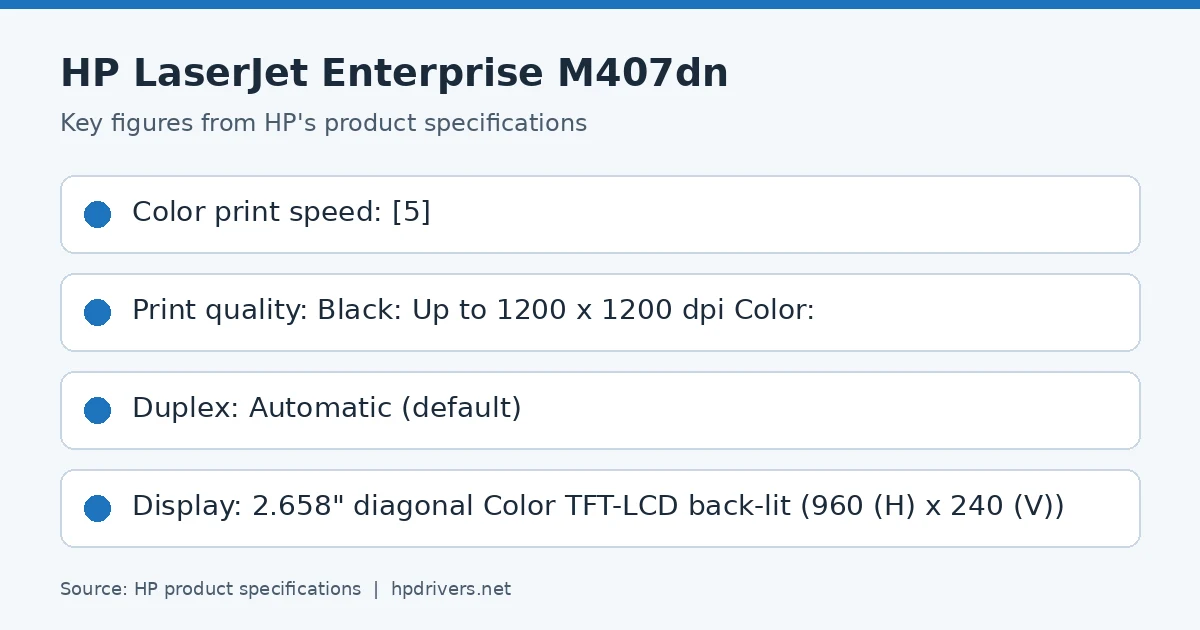
HP printer key specifications
HP product specifications card

Recommended downloads

Windows 11, Windows 10 (64-bit), Windows 7 (64-bit): HP LaserJet M406-M407 Printer Full Software SolutionVersion 52.2.4918 · Released Nov 11, 2021 · 78.0 MB · HP rating: Recommended

Download

macOS 26, macOS 15: Install HP Easy StartVersion 2.16.7.260722 · Released Aug 14, 2026 · 6.3 MB

Download

Files download directly from HP’s official servers. hpdrivers.net does not host or modify them.


Which Windows package should you choose?

HP publishes 4 kinds of Windows package for the LaserJet Enterprise M407:

  • Driver files (no installer) (v52.2.4918, Nov 11, 2021): bare driver files for Windows’ Add Printer wizard.
  • Full software solution (v52.2.4918, Nov 11, 2021, 78.0 MB): driver plus HP’s setup wizard and tools.
  • HP Universal Print Driver (v8.2.0.26778, Sep 26, 2026): HP’s shared driver for many models, also listed for this series.
  • Firmware update (v2510156_069170, Aug 28, 2026): updates the printer itself, not your PC.

All downloads for the LaserJet Enterprise M407

Windows

Package / Windows
Version
Released
Size
HP LaserJet M406-M407 series PCL-6 V4 Printer Driver (no installer)

Windows: 11, 10, 7
File details

File: V4_DriveronlyWebpack-52.2.4918-LJM406M407_V4_DriveronlyWebpack.exe

52.2.4918
Nov 11, 2021
11.5 MB
HP LaserJet M406-M407 series PCL 6 V3 Printer Driver (no installer))

Windows: 11, 10, 7
File details

File: V3_DriveronlyWebpack-52.2.4918-LJM406M407_V3_DriveronlyWebpack.exe

52.2.4918
Nov 11, 2021
14.8 MB
HP LaserJet M406-M407 Printer Full Software Solution

Windows: 11, 10, 7
File details

File: Full_Webpack-52.2.4918-LJM406M407_Full_Webpack.exe

52.2.4918
Nov 11, 2021
78.0 MB
FutureSmart Bundle Version 5.10.0.7 – HP LaserJet Enterprise M406/407 Printer FIRMWARE

Windows: 11, 10, 7
File details

File: ljM406_M407_fs5.10.0.7_fw_2510156_069170.zip

2510156_069170
Aug 28, 2026
336.9 MB

macOS

Package / macOS
Version
Released
Size
FutureSmart Bundle Version 5.10.0.7 – HP LaserJet Enterprise M406/407 Printer FIRMWARE

macOS: 26, 15, 13
File details

File: ljM406_M407_fs5.10.0.7_fw_2510156_069170.zip

2510156_069170
Aug 28, 2026
336.9 MB

Other HP software listed for this series

Software / Systems
Version
Size
HP Easy Start Printer Setup Software (Internet connection required for driver installation)
Systems: Windows 11, Windows 10, Windows 7
17.6.15
26.5 MB
HP System Health Apps Registration Utility
Systems: Windows 10
1.0.0.0
1.3 MB
HP Easy Admin
Systems: macOS 26, macOS 15, macOS 13
2.16.0.251010
4.9 MB
Install HP Easy Start
Systems: macOS 26, macOS 15
2.16.7.260722
6.3 MB

HP Universal Print Driver

HP lists its Universal Print Driver for this series on Windows 7, Windows 11 and Windows 10. Get it from our HP Universal Print Driver page.

Linux

HP lists Linux support for this series through its HPLIP project, outside the regular download list: HP’s Linux printing page (HPLIP).

Installing the LaserJet Enterprise M407 driver

The driver files without an installer are added through Windows’ Add Printer wizard (Have Disk). For step-by-step instructions, see our guide to installing an HP printer driver.

Firmware update 2510156_069170

The newest firmware HP lists for the LaserJet Enterprise M407 is version 2510156_069170, released Aug 28, 2026.

  • Keep the printer and the computer switched on until the update has finished.

Specifications that matter for setup

Connections
1 Hi-Speed USB 2.0 Host; 1 Hi-Speed USB 2.0 Device; 1 Gigabit Ethernet 10/100/1000T network
Wi-Fi
Optional, enabled with purchase of a wireless hardware accessory. Dual band Wireless Station and Wi-Fi Direct functionality available with HP Jetdirect 3100w BLE/NFC/Wireless Accessory 3JN69A
Mobile printing
HP ePrint; Apple AirPrint™; Mopria™ Certified; PrinterOn Print
Print languages
HP PCL 6, HP PCL 5, HP PostScript level 3 emulation, native PDF printing (v 1.7), Apple AirPrint™
Print speed (black)
Normal: Up to 40 ppm (default); Up to 42 ppm (HP high speed mode)
Recommended monthly volume
900 to 4,800 pages
Two-sided printing
Automatic (default)

Common setup problems

  • You’d rather not install software on a Mac. HP’s specifications list AirPrint support, so macOS can usually add the printer from System Settings without extra software.