Independent download guide for HP printer and scanner drivers
hpdrivers.net is an independent website and is not affiliated with, endorsed by, or sponsored by HP Inc. Download links point to HP's official servers (ftp.hp.com). Read the full disclaimer
Last checked against HP’s download list: November 1, 2026 · Checked by H&G
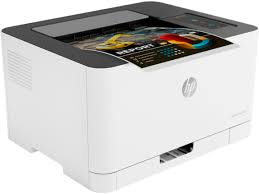
Looking for the HP Color Laser 150a driver? This page lists HP’s official software for the whole HP Color Laser 150 Printer series: the Color Laser 150a and Color Laser 150nw. HP lists some packages for specific models in the series, so check that the package title includes your model. For Windows 11, Windows 10 (64-bit) and Windows 7 (64-bit), the package most people need is the HP Color Laser 150 Printer series Full Solution Software and Drivers.
HP Color Laser 150a
Recommended downloads
Windows 11, Windows 10 (64-bit), Windows 7 (64-bit): HP Color Laser 150 Printer series Full Solution Software and DriversVersion 1.20 · Released Jun 05, 2023 · 48.8 MB · HP rating: Recommended
HP lists Linux support for this series through its HPLIP project, outside the regular download list: HP’s Linux printing page (HPLIP).
Installing the Color Laser 150 driver
The driver files without an installer are added through Windows’ Add Printer wizard (Have Disk). For step-by-step instructions, see our guide to installing an HP printer driver.
Firmware update 3.82.01.20
The newest firmware HP lists for the Color Laser 150 is version 3.82.01.20, released Apr 22, 2025.
Check your current firmware version first on the printer’s Configuration Page, and update only if it is older.
Install the printer driver before running the update. HP’s utility needs it to reach the printer.
Specifications that matter for setup
Mobile printing
Apple AirPrint™; Google Cloud Print™; Mobile Apps; Mopria™ Certified; Wi-Fi® Direct printing
HP LaserJet Pro M521 Multifunction Printer Series Driver Download for Windows 10/8.1/8/7/Vista/XP (32-Bit/64-Bit)
Download HP LaserJet Pro MFP M521 Series Full Software and Drivers
HP LaserJet Pro M521 MFP
Description
The full solution software includes everything you need to install your HP LaserJet printer. This collection of software includes the complete set of drivers, installer software, and other administrative tools found on the printer’s software CD.
Release details
Version: 15.0.15330.477
Relase Date : Mar 4, 2021
Operating Systems: Microsoft Windows XP, Microsoft Windows Vista, Microsoft Windows Vista (64-bit), Microsoft Windows 7 (64-bit), Microsoft Windows 8 (32-bit), Microsoft Windows 8 (64-bit), Microsoft Windows Server 2012, Microsoft Windows 8.1 (32-bit), Microsoft Windows 8.1 (64-bit), Microsoft Windows 10 (32-bit), Microsoft Windows 10 (64-bit)
Last checked against HP’s download list: November 4, 2026 · Checked by H&G
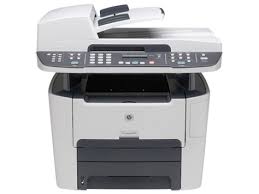
Looking for the HP LaserJet 3390 driver? This page lists HP’s official software for the whole HP LaserJet 3390 All-in-One Printer. For Windows Vista, XP (32-bit), the package most people need is the HP LaserJet 3050/3052/3055/3390/3392 PCL5 Print Driver Package. For Windows 11, HP lists the HP Universal Print Driver for Windows PCL6 (64-bit).
HP LaserJet 3390 All-in-One Printer
Recommended downloads
Windows Vista, XP (32-bit): HP LaserJet 3050/3052/3055/3390/3392 PCL5 Print Driver PackageVersion 60.063.461.42 · Released Jun 17, 2007 · 6.9 MB
HP lists its Universal Print Driver for this series on Windows 11; Windows 10, 8.1, 8, 7 (32-bit and 64-bit). Get it from our HP Universal Print Driver page.
Linux
HP lists Linux support for this series through its HPLIP project, outside the regular download list: HP’s Linux printing page (HPLIP).
Installing the LaserJet 3390 All-in-One Printer driver
The newest firmware HP lists for the LaserJet 3390 All-in-One Printer is version 20120925, released Oct 08, 2012. HP’s notes for it: Added the "RFU" item to the "Setup Menu" to control remote firmware updates.
Check your current firmware version first on the printer’s Configuration Page, and update only if it is older.
Install the printer driver before running the update. HP’s utility needs it to reach the printer.
Specifications that matter for setup
Connections
Built-in 10/100 wired Ethernet network connectivity with 1 RJ-45 port; Hi-Speed USB (compatible with USB 2.0 specifications) port
Print languages
HP PCL 6, HP PCL 5, HP postscript level 3 emulation
Functions
Print, copy, scan, fax
Print speed (black)
Normal: Up to 22 ppm
Recommended monthly volume
1000 to 3000
Two-sided printing
Automatic (standard)
Scanner
Flatbed, sheetfed
Scan resolution
Up to 1200 dpi
Document feeder
Standard, 50 sheets
Scan file formats
JPEG, TIF, BMP, GIF, PDF, PNG
Ways to scan
Front control panel Scan, Copy or Fax buttons, scanning via HP LaserJet Scan (Windows), HP Director (Macintosh) or TWAIN-compliant or WIA-compliant software
Paper handling and hardware details
Values below are HP’s published figures for the LaserJet 3390 All-in-One Printer; they help you check that this page matches your printer before you download anything.