
hpdrivers.net is an independent website and is not affiliated with, endorsed by, or sponsored by HP Inc. Download links point to HP's official servers (ftp.hp.com). Read the full disclaimer

HP LaserJet Pro M203 Drivers

Last checked against HP’s download list: October 30, 2026 · Checked by H&G

Looking for the HP LaserJet Pro M203 driver? This page lists HP’s official software for the whole HP LaserJet Pro M203 Printer series: the LaserJet Pro M203dn, LaserJet Pro M203dw and LaserJet Pro M203d. HP lists some packages for specific models in the series, so check that the package title includes your model. For Windows 11, Windows 10 (64-bit) and Windows 7 (64-bit), the package most people need is the HP LaserJet Pro M203dn / Ultra M206dn Printer Full Feature Software and Drivers. For a Mac, HP lists Install HP Easy Start.

HP LaserJet Pro M203 printer
HP LaserJet Pro M203

Recommended downloads

Windows 11, Windows 10 (64-bit), Windows 7 (64-bit): HP LaserJet Pro M203dn / Ultra M206dn Printer Full Feature Software and DriversVersion 44.11.2779 · Released Aug 25, 2022 · 133.4 MB

Download

macOS 26, macOS 15: Install HP Easy StartVersion 2.16.7.260722 · Released Aug 14, 2026 · 6.3 MB

Download

Files download directly from HP’s official servers. hpdrivers.net does not host or modify them.


Models covered by this page

All 3 models share one download list at HP:

HP LaserJet Pro M203dn HP LaserJet Pro M203dw HP LaserJet Pro M203d

Which Windows package should you choose?

HP publishes 4 kinds of Windows package for the LaserJet Pro M203:

  • HP Universal Print Driver (v8.2.0.26778, Sep 26, 2026): HP’s shared driver for many models, also listed for this series.
  • Full software solution (v44.11.2779, Aug 25, 2022, 133.4 MB): driver plus HP’s setup wizard and tools.
  • Driver-only installer (v44.11.2779, Aug 26, 2022): print driver only, for PCs that can’t or shouldn’t take the full package.
  • Firmware update (v20220414, Apr 29, 2022): updates the printer itself, not your PC.

All downloads for the LaserJet Pro M203

Windows

Package / Windows
Version
Released
Size
HP LaserJet Pro M203dn / Ultra M206dn Printer Full Feature Software and Drivers

Windows: 11, 10, 7
File details

File: Full_Webpack-44.11.2779-LJM203-M206_UW_Full_Webpack.exe

44.11.2779
Aug 25, 2022
133.4 MB
HP LaserJet Pro M203d Printer Full Feature Software and Drivers

Windows: 11, 10, 7
File details

File: Full_Webpack-44.11.2779-LJM203-M206_U_Full_Webpack.exe

44.11.2779
Aug 26, 2022
133.4 MB
HP LaserJet Pro M203dw Printer Full Feature Software and Drivers

Windows: 11, 10, 7
File details

File: Full_Webpack-44.11.2779-LJM203-M206_UWWL_Full_Webpack.exe

44.11.2779
Aug 25, 2022
133.4 MB
HP LaserJet Pro M203dw Printer Basic Drivers

Windows: 11, 10, 7
File details

File: Basic_Webpack_x64-44.11.2779-LJM203-M206_UWWL_Basicx64_Webpack.exe

44.11.2779
Aug 26, 2022
62.9 MB
HP LaserJet Pro M203d Printer Basic Drivers

Windows: 11, 10, 7
File details

File: Basic_Webpack_x64-44.11.2779-LJM203-M206_U_Basicx64_Webpack.exe

44.11.2779
Aug 26, 2022
62.9 MB
HP LaserJet Pro M203dn / Ultra M206dn Printer Basic Drivers

Windows: 11, 10, 7
File details

File: Basic_Webpack_x64-44.11.2779-LJM203-M206_UW_Basicx64_Webpack.exe

44.11.2779
Aug 26, 2022
62.9 MB
HP LaserJet Pro M203 and Ultra M206 Printer Series Firmware Update Utility

Windows: 10, 7
File details

File: HP_LaserJet_Pro_M203_Ultra_M206_Printer_Series_update_Utility_20220414.exe

20220414
Apr 29, 2022
10.6 MB

Other HP software listed for this series

Software / Systems
Version
Size
HP Easy Start Printer Setup Software (Internet connection required for driver installation)
Systems: Windows 11, Windows 10, Windows 7
17.6.15
26.5 MB
HP Easy Admin
Systems: macOS 26, macOS 15, macOS 13
2.16.0.251010
4.9 MB
Install HP Easy Start
Systems: macOS 26, macOS 15
2.16.7.260722
6.3 MB

HP Universal Print Driver

HP lists its Universal Print Driver for this series on Windows 7, Windows 11 and Windows 10. Get it from our HP Universal Print Driver page.

Linux

HP lists Linux support for this series through its HPLIP project, outside the regular download list: HP’s Linux printing page (HPLIP).

Installing the LaserJet Pro M203 driver

For step-by-step instructions, see our guide to installing an HP printer driver.

Firmware update 20220414

The newest firmware HP lists for the LaserJet Pro M203 is version 20220414, released Apr 29, 2022. HP’s notes for it: Network stack update.

  • Check your current firmware version first on the printer’s Configuration Page, and update only if it is older.
  • Install the printer driver before running the update. HP’s utility needs it to reach the printer.
Specifications that matter for setup

Print languages
PCL5c; PCL6; PS; PCLm; PDF; URF; PWG
Print speed (black)
Normal: Up to 30 ppm
Recommended monthly volume
250 to 2500
Two-sided printing
Automatic (standard)

HP LaserJet Pro M501 Drivers

Last checked against HP’s download list: October 30, 2026 · Checked by H&G

Looking for the HP LaserJet Pro M501 driver? This page lists HP’s official software for the whole HP LaserJet Pro M501 series: the LaserJet Pro M501n and LaserJet Pro M501dn. HP lists some packages for specific models in the series, so check that the package title includes your model. For Windows 10 (64-bit), the package most people need is the HP LaserJet Pro M501 Printer series PCL-6 v4 Full Software and Drivers. For Windows 11, HP lists the HP Universal Print Driver for Windows PCL6 (64-bit). For a Mac, HP lists Install HP Easy Start.

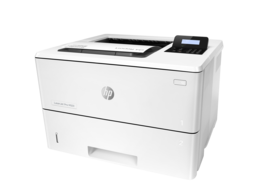
HP LaserJet Pro M501 printer
HP LaserJet Pro M501

Recommended downloads

Windows 10 (64-bit): HP LaserJet Pro M501 Printer series PCL-6 v4 Full Software and DriversVersion 18.0.19228.302 · Released Mar 04, 2021 · 73.5 MB · HP rating: Recommended

Download

Windows 11: HP Universal Print Driver for Windows PCL6 (64-bit)Version 8.2.0.26819 · Released Sep 26, 2026 · 20.2 MB

Download

macOS 26, macOS 15: Install HP Easy StartVersion 2.16.7.260722 · Released Aug 14, 2026 · 6.3 MB

Download

Files download directly from HP’s official servers. hpdrivers.net does not host or modify them.


Models covered by this page

All 2 models share one download list at HP:

HP LaserJet Pro M501n HP LaserJet Pro M501dn

Which Windows package should you choose?

HP publishes 5 kinds of Windows package for the LaserJet Pro M501:

  • HP Universal Print Driver (v8.2.0.26778, Sep 26, 2026): HP’s shared driver for many models, also listed for this series.
  • Firmware update (v20240807, Oct 23, 2024): updates the printer itself, not your PC.
  • Driver files (no installer) (v8.00.1324.6679, Apr 05, 2021): bare driver files for Windows’ Add Printer wizard.
  • Full software solution (v18.0.19228.302, Mar 04, 2021, 73.5 MB): driver plus HP’s setup wizard and tools.
  • Driver-only installer (v18.0.19228.302, Mar 04, 2021): print driver only, for PCs that can’t or shouldn’t take the full package.

All downloads for the LaserJet Pro M501

Windows

Package / Windows
Version
Released
Size
HP LaserJet Pro M501 Printer Series Firmware Update Utility

Windows: 11, 10, 7
File details

File: M501_Series_FW_Update-20240807.exe

20240807
Oct 23, 2024
14.2 MB
HP LaserJet Pro M501 PCL 6 v3 Print Driver (no installer)

Windows: 10, 7
File details

File: HP_LaserJet_Pro_M501_PCL6_Print_Driver_no_Installer_21028_1.exe

8.00.1324.6679
Apr 05, 2021
9.5 MB
HP LaserJet Enterprise M501 PCL-6 Print Driver v4 (no installer)

Windows: 10
File details

File: HP_LJ_Pro_M501_PCL-6_Win8_Plus_Print_Driver_no_Installer_21028_1.exe

8.00.1324.6679
Apr 05, 2021
8.0 MB
HP LaserJet Pro M501 Printer series PCL-6 v4 Full Software and Drivers

Windows: 10
File details

File: HP_LaserJet_Pro_M501_PCL-6_Win8plus_Full_Solution_19228.exe

18.0.19228.302
Mar 04, 2021
73.5 MB
HP LaserJet Pro M501 Printer Series Full Software and Drivers

Windows: 7
File details

File: HP_LaserJet_Pro_M501-Full_Solution-19228.exe

18.0.19228.302
Mar 04, 2021
86.4 MB
HP LaserJet Pro M501 Printer Series PCL 6 v3 Driver

Windows: 7
File details

File: HP_LaserJet_Pro_M501-Basic_Solution-19228.exe

18.0.19228.302
Mar 04, 2021
72.0 MB

macOS

Package / macOS
Version
Released
Size
HP LaserJet Pro M501 Printer Series Firmware Update Utility

macOS: 13
File details

File: M501_Series_FW_Update-20240807.dmg

20240807
Oct 23, 2024
19.1 MB

Other HP software listed for this series

Software / Systems
Version
Size
HP Easy Admin
Systems: macOS 26, macOS 15, macOS 13
2.16.0.251010
4.9 MB
Install HP Easy Start
Systems: macOS 26, macOS 15
2.16.7.260722
6.3 MB

HP Universal Print Driver

HP lists its Universal Print Driver for this series on Windows 7, Windows 11 and Windows 10. Get it from our HP Universal Print Driver page.

Linux

HP lists Linux support for this series through its HPLIP project, outside the regular download list: HP’s Linux printing page (HPLIP).

Installing the LaserJet Pro M501 driver

The driver files without an installer are added through Windows’ Add Printer wizard (Have Disk). For step-by-step instructions, see our guide to installing an HP printer driver.

Firmware update 20240807

The newest firmware HP lists for the LaserJet Pro M501 is version 20240807, released Oct 23, 2024. HP’s notes for it: Contains all previous fixes and enhancements; Security updates.

  • Check your current firmware version first on the printer’s Configuration Page, and update only if it is older.
  • Install the printer driver before running the update. HP’s utility needs it to reach the printer.

Specifications that matter for setup

Connections
Hi-Speed USB 2.0 Host/Device Ports; Fast Ethernet 10Base-T/100Base-Tx, Gigabit Ethernet 1000Base-T
Wi-Fi
Not built in
Mobile printing
HP ePrint; Apple AirPrint™; Mopria™-certified
Print languages
HP PCL 5, HP PCL 6, HP postscript level 3 emulation, direct PDF (v 1.7) printing, URF, PCLM, PWG
Print speed (black)
Normal: Up to 45 ppm
Recommended monthly volume
1500 to 6000

Common setup problems

  • No Wi-Fi option during setup. HP’s specifications list no built-in Wi-Fi for the LaserJet Pro M501. Use an Ethernet cable or USB.
  • An older driver is still installed. HP’s 2021 packages fixed a security vulnerability, so replace older versions with the current package.
  • You’d rather not install software on a Mac. HP’s specifications list AirPrint support, so macOS can usually add the printer from System Settings without extra software.

HP LaserJet 2200 Drivers

Last checked against HP’s download list: November 4, 2026 · Checked by H&G

Looking for the HP LaserJet 2200 driver? This page lists HP’s official software for the whole HP LaserJet 2200 Printer series. HP lists some packages for specific models in the series, so check that the package title includes your model. For Windows XP (32-bit), the package most people need is the HP LaserJet 2200 PCL6 Point and Print bundle. For Windows 11, HP lists the HP Universal Print Driver for Windows PCL6 (64-bit).

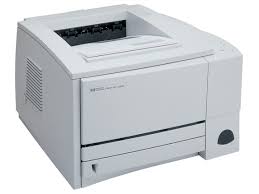
HP LaserJet 2200 printer
HP LaserJet 2200

Recommended downloads

Windows XP (32-bit): HP LaserJet 2200 PCL6 Point and Print bundleVersion 4.3.2.192 · Released Jun 14, 2002 · 6.1 MB
Download
Windows 11: HP Universal Print Driver for Windows PCL6 (64-bit)Version 8.2.0.26819 · Released Sep 26, 2026 · 20.2 MB
Download

Files download directly from HP’s official servers. hpdrivers.net does not host or modify them.

Models covered by this page

HP’s download list for this series names these models. It covers the whole LaserJet 2200 range, including model variants HP does not list by name:

HP LaserJet 2200d HP LaserJet 2200dt HP LaserJet 2200dtn HP LaserJet 2200dn HP LaserJet 2200dse HP LaserJet 2200dse Remarketed HP LaserJet 2200

Which Windows package should you choose?

HP publishes 2 kinds of Windows package for the LaserJet 2200:

  • HP Universal Print Driver (v8.2.0.26778, Sep 26, 2026): HP’s shared driver for many models, also listed for this series.
  • HP LaserJet USB (DOT4) communication driver for Windows 8 and Higher (64-bit) (v7.0.0.29, Apr 21, 2015).

All downloads for the LaserJet 2200

Windows

Package / Windows
Version
Released
Size
HP LaserJet 2200 PCL6 Point and Print bundle
Windows: XP (32-bit)
File detailsFile: lj985en.exe
4.3.2.192
Jun 14, 2002
6.1 MB
hp LaserJet 2200 PostScript driver
Windows: XP (32-bit)
File detailsFile: lj973en.exe
2.0.0.0
Jun 14, 2002
0.2 MB
hp LaserJet 2200 PCL5e Point and Print bundle
Windows: XP (32-bit)
File detailsFile: lj984en.exe
4.3.2.192
Jun 14, 2002
6.1 MB
hp LaserJet 2200 PCL6 driver
Windows: XP (32-bit)
File detailsFile: lj2200pcl6win2kxp2003-en.exe
4.27.2200.410
Apr 22, 2004
1.9 MB
hp LaserJet 2200 PostScript Point and Print bundle
Windows: XP (32-bit)
File detailsFile: lj986en.exe
2.0.0.0
Jun 14, 2002
1.7 MB
HP LaserJet 2200 PCL5e Driver
Windows: XP (32-bit)
File detailsFile: lj2200pcl5ewin2kxp2003-en.exe
4.27.2200.410
Apr 22, 2004
1.9 MB

Other HP software listed for this series

Software / Systems
Version
Size
HP LaserJet USB (DOT4) communication driver for Windows 8 and Higher (32-bit)
Systems: Windows 10, 8.1, 8 (32-bit)
7.0.0.29
1.1 MB
HP LaserJet USB (DOT4) communication driver for Windows 8 and Higher (64-bit)
Systems: Windows 10, 8.1, 8 (64-bit)
7.0.0.29
1.5 MB
Shop for HP Supplies
Systems: Windows Vista, XP (32-bit)
14.0
12.7 MB
HP LaserJet Windows XP Communication Patch
Systems: Windows XP (32-bit)
1.08
0.1 MB
Screen Reader Accessibility for Status and Alerts
Systems: Windows XP (32-bit)
3.1
6.3 MB
Printer Status/Alerts and Internet-Enabled Supplies Ordering (IESO)/SureSupply for Direct Connect
Systems: Windows XP (32-bit)
3.1
6.3 MB

HP Universal Print Driver

HP lists its Universal Print Driver for this series on Windows 11; Windows 10, 8.1, 8, 7 (32-bit and 64-bit). Get it from our HP Universal Print Driver page.

Linux

HP lists Linux support for this series through its HPLIP project, outside the regular download list: HP’s Linux printing page (HPLIP).

Installing the LaserJet 2200 driver

For step-by-step instructions, see our guide to installing an HP printer driver.