Independent download guide for HP printer and scanner drivers
hpdrivers.net is an independent website and is not affiliated with, endorsed by, or sponsored by HP Inc. Download links point to HP's official servers (ftp.hp.com). Read the full disclaimer
Last checked against HP’s download list: November 13, 2026 · Checked by H&G
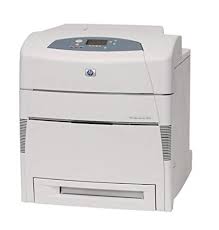
Looking for the HP Color LaserJet 5550 driver? This page lists HP’s official software for the whole HP Color LaserJet 5550 Printer series. HP lists some packages for specific models in the series, so check that the package title includes your model. For Windows 10, 8.1, 8 (64-bit), the package most people need is the HP LaserJet USB (DOT4) communication driver for Windows 8 and Higher (64-bit). For Windows 11, HP lists the HP Universal Print Driver for Windows PCL6 (64-bit).
HP Color LaserJet 5550
Recommended downloads
Windows 10, 8.1, 8 (64-bit): HP LaserJet USB (DOT4) communication driver for Windows 8 and Higher (64-bit)Version 7.0.0.29 · Released Apr 21, 2015 · 1.5 MB
Files download directly from HP’s official servers. hpdrivers.net does not host or modify them.
Models covered by this page
All 10 models share one download list at HP:
HP Color LaserJet 5550HP Color LaserJet 5550nHP Color LaserJet 5550dnHP Color LaserJet 5550dtnHP Color LaserJet 5550hdnHP Color LaserJet 5550hdn RemarketedHP Color LaserJet 5550dn RemarketedHP Color LaserJet 5550dtn RemarketedHP Color LaserJet 5550 RemarketedHP Color LaserJet 5550n Remarketed
Which Windows package should you choose?
HP publishes 3 kinds of Windows package for the Color LaserJet 5550:
Firmware update (v07.220.1, Oct 18, 2013): updates the printer itself, not your PC.
HP Universal Print Driver (v8.2.0.26778, Sep 26, 2026): HP’s shared driver for many models, also listed for this series.
HP LaserJet USB (DOT4) communication driver for Windows 8 and Higher (64-bit) (v7.0.0.29, Apr 21, 2015).
HP lists its Universal Print Driver for this series on Windows 11; Windows 10, 8.1, 8, 7 (32-bit and 64-bit). Get it from our HP Universal Print Driver page.
The newest firmware HP lists for the Color LaserJet 5550 is version 07.220.1, released Oct 18, 2013.
Check your current firmware version first on the printer’s Configuration Page, and update only if it is older.
Specifications that matter for setup
Wi-Fi
Optional, enabled with purchase of a hardware accessory
Print languages
HP PCL 6, HP PCL 5 (HP PCL 5 driver available from the Web only), HP postscript level 3 emulation, native PDF printing (v1.3)
Print speed (black)
Normal: Up to 27 ppm
Recommended monthly volume
2500 to 10,000
Paper handling and hardware details
Values below are HP’s published figures for the Color LaserJet 5550; they help you check that this page matches your printer before you download anything.
Output tray
250-sheet output bin
Paper sizes
Letter, legal, statement, executive, 11 x 17 in, ledger, envelopes (No. 10, Monarch)
Media types
Paper (extra heavy, glossy, heavy, heavy glossy, high gloss images, intermediate, light, plain, recycle, tough), envelopes, labels, cardstock, transparencies
Paper weight
Tray 1: 16 to 53 lb; Tray 2, 3, 4, 5: 16 to 32 lb
Print speed (color)
Up to 27 ppm
Print quality (black)
Black: Up to 600 x 600 dpi Color: Up to 600 x 600 dpi
Control panel
4-line LCD (text)
Processor
533 MHz
Power use
Values current as of February 2, 2004. Power reported is the highest value measured for color and monochrome printing using all standard voltages. For current i
Warranty
One-year, next business day onsite warranty
Installing the HP Color LaserJet 5550 on Linux (HPLIP)
On Linux the Color LaserJet 5550 is handled by HPLIP, HP’s own open-source imaging and printing package, not by the Windows or macOS downloads above. The details below come from the HPLIP model database entry for this printer.
First HPLIP release with support: 0.9.5 (any newer HPLIP also works).
Print technology in the HPLIP database: colour laser.
Connections HPLIP can use: USB, wired network (Ethernet).
Binary plug-in: not needed; the open-source driver is enough.
USB ID:03f0:1f17 (shown by lsusb when the printer is connected).
Supply numbers listed by HPLIP: HP 30, 31, 33, 32, 35, 34 (numbers vary by sales region).
Same HPLIP entry also covers: Color LaserJet 5550n Printer, Color LaserJet 5550dn Printer, Color LaserJet 5550dtn Printer, Color LaserJet 5550hdn Printer.
Install the hplip package from your distribution, then run hp-setup -i (or: hp-setup -i <printer IP> for a network printer) and follow the prompts. hp-check reports anything missing, and hp-toolbox shows ink levels and maintenance tools where the model supports them.
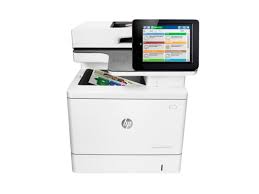
Looking for the HP Color LaserJet Managed MFP M577cm driver? This page lists HP’s official software for the whole HP Color LaserJet Managed MFP M577 series: the Color LaserJet Managed MFP M577dnm and Color LaserJet Managed Flow MFP M577cm. HP lists some packages for specific models in the series, so check that the package title includes your model. For Windows 10, 8.1, 8 (32-bit and 64-bit), the package most people need is the HP Color LaserJet Flow MFP M577z, M577c, M577cm PCL-6 v4 Full Solution. For a Mac, HP lists Install HP Easy Start.
Last checked against HP’s download list: November 10, 2026 · Checked by H&G
HP Color LaserJet Managed MFP M577dnm (one model of this series)
Recommended downloads
Windows 10, 8.1, 8 (32-bit and 64-bit): HP Color LaserJet Flow MFP M577z, M577c, M577cm PCL-6 v4 Full SolutionVersion 16.0.19235.653 · Released Mar 09, 2021 · 107.8 MB · HP rating: Recommended
HP lists a Linux driver for this series: FutureSmart Bundle Version 3.9.12 – HP Color LaserJet Enterprise M577 Series Printer FIRMWARE (Version 2309088_001500 · Released Feb 01, 2023 · 152.2 MB). Download from HP.
Installing the Color LaserJet Managed MFP M577 driver
The driver files without an installer are added through Windows’ Add Printer wizard (Have Disk). For step-by-step instructions, see our guide to installing an HP printer driver.
Firmware update 2411226_066596
The newest firmware HP lists for the Color LaserJet Managed MFP M577 is version 2411226_066596, released Feb 02, 2023.
Keep the printer and the computer switched on until the update has finished.
Specifications that matter for setup
Print languages
HP PCL 6; HP PCL 5c; HP postscript level 3 emulation, native PDF printing (v 1.7)
Print speed (black)
Normal: Up to 40 ppm
Recommended monthly volume
2000 to 15,000
Two-sided printing
Automatic (standard)
Scanner
Flatbed, ADF (two-sided, single-pass)
Scan resolution
Up to 600 dpi
Two-sided ADF scanning
Yes
Document feeder
Standard, 100 sheets
Copy speed
Black: Up to 40 cpm Color: Up to 40 cpm
Toner supplies HP lists for the Color LaserJet Managed MFP M577
HP’s specifications name these replacement supplies for the Color LaserJet Managed MFP M577:
HP 508X Black Contract LaserJet Toner Cartridge (~14
900 ISO
Paper handling and hardware details
Values below are HP’s published figures for the Color LaserJet Managed MFP M577; they help you check that this page matches your printer before you download anything.
550-sheet media input tray 3, 550-sheet media input tray 4, 550-sheet media input tray 5
Paper sizes
Tray 1: letter, legal, oficio, executive, statement, 4 x 6, 3 x 5, 5 x 7, 5 x 8, postcard (JIS), double postcard (JIS), 8.5 x 13, envelope (commercial No. 9
Media types
Paper (plain, light, bond, recycled, mid-weight, heavy, mid-weight glossy, heavy glossy, extra heavy, extra heavy glossy, cardstock, card glossy), color transparency, labels, letterhead, envelope
Paper weight
Tray 1: 16 to 58 lb (plain); 28 to 58 lb (glossy); Tray 2: 16 to 58 lb (plain paper); 28 to 58 lb (glossy paper); Optional Trays 3+: 16 to 58 lb (plain paper)
Print speed (color)
Up to 40 ppm
Print quality (black)
Black: HP ImageREt 3600 Color: HP ImageREt 3600
Control panel
8" color touchscreen
Memory
1.25 GB (printer), 512 MB (scanner)
Processor
1.2 GHz
Internal storage
Standard, embedded HP High-Performance Secure Hard Disk, minimum 320 GB; AES 256 hardware encryption or greater
An older driver is still installed. HP’s 2021 packages fixed a security vulnerability, so replace older versions with the current package.
Tray 1 and right door jams on the Color LaserJet MFP M577
HP says its videos for these jams show another model but the steps apply to the M577 and M578.
13.B9.Az from Tray 1
If most of the sheet is still in the tray, pull it out slowly and make sure none is left. Otherwise lift the right door latch, open the door, remove the paper and close it.
13.B jams in the right door and fuser area
Let the fuser cool. Open the right door with its latch and clear the pickup area.
Push down the green levers to open the jam access cover, remove the paper and any torn pieces, close the cover and lower the transfer assembly.
Codes 31.13.00, 01, 02 and 13. Lift the latch, open the feeder cover and remove the paper, then lift the feeder input tray and clear any paper underneath. Close the cover and check that its latch is fully shut.
To avoid repeats, set the guides against the originals without bending them, remove staples and clips, and copy narrow pages on the glass.
99.09.64 to 99.09.69
HP’s disk error article for the M506 to M577 family: turn the printer off and on, and if the message stays, reseat the hard disk or solid state drive.
HP lists 13.A3.A3, 13.A3.D3 and 13.B2.D3 for the optional 550-sheet feeders of the M577 and M578.
Steps
Open the lower-right door and pull out any jammed paper.
Pull the tray out, lifting it slightly, remove damaged sheets, check the fill level and guides, and pull paper off the feed rollers inside, left first and then forward. Close the door and the tray.
Then open the right door, clear the pickup area, push down the green levers to open the jam access cover, remove the paper and any torn bits, and close the cover, the transfer assembly and the door.
HP says the M577 MFP ships with its USB port disabled, configured for network printing only to meet Blue Angel requirements and lower energy use, so a USB-connected computer cannot print after setup.
Enabling it
On the control panel open Administration, General Settings, Enable Device USB, choose Enabled and Save.
Then open Energy Settings, Sleep Timer Settings, choose All Events and Save, so the port stays available while the printer is on.
HP describes 49 errors on FutureSmart LaserJet Enterprise printers as firmware communication errors, with W, X, Y and Z as variable digits.
Intermittent or persistent
Intermittent 49 errors come and go and usually clear with a power cycle. Persistent ones return even after restarting.
HP names typical causes: files with unsupported printer commands, third-party solutions not designed for the printer, and timing, network traffic or several jobs at once.
What HP says to do
Turn the printer off and on. If it comes back, print the Event Log to see how often it happens; HP says once a week or less is no more serious than an occasional jam.
Document feeder kit messages (10.39.xx) on the M577
The M577’s document feeder has a maintenance kit, and HP logs its state in the Event Log.
Codes
10.39.60 Document feeder kit low, 10.39.69 very low, 10.39.70 scanning past very low.
Replace the document feeder maintenance kit and then choose New Document Feeder Kit under Manage Supplies to reset its counter. HP notes that the Premium Protection Warranty for a supply ends once it reaches very low.
HP’s document feeder guide for Enterprise and Managed 500 and 600 class MFPs gives the M577’s limits.
Figures HP lists for the M577
Originals 101.6 to 216 mm (4 to 8.5 in) wide and 148 to 356 mm (5.8 to 14 in) long, from 49 to 120 g/m² (16 to 32 lb bond).
Capacity is 100 sheets of 75 g/m² (20 lb) paper for the 500 series, less for heavier paper.
Use the glass instead for
Wrinkled, curled or torn originals, pages with clips, staples or sticky notes, carbon or coated paper, very thin paper, photos, transparencies and pages stuck together or wet with glue or correction fluid.
PQ troubleshooting pages and the boot indicator on the M577
Built-in print quality pages
HP’s Color LaserJet Enterprise printers have a set of internal PQ troubleshooting pages. On FutureSmart 4 open Support Tools, Troubleshooting, Print Quality Pages, PQ Troubleshooting Pages and Print (on FutureSmart 3 the path starts from Administration).
The first page explains how to check supplies and calibrate. On the others, a spot or streak in one color points to that color’s toner cartridge, for example cyan marks to the cyan cartridge.
Boot progress indicator
During start-up FutureSmart Enterprise printers show eight stages, from 1/8 to 8/8; stages 6 to 8 also show an activity bar with text such as Initializing or Checking Hardware.
HP says the stage number at which the printer stops is the key detail for diagnosing a printer that never reaches Ready, so note it before contacting support.
HP’s checklist for LaserJet Enterprise printers that do not print goes in this order.
Checks
The control panel should show Ready; if not, restart the printer. If it shows an error, resolve it and resend the job.
On a network, the light next to the network port should be green, the cable must be a network cable, not a phone cord, and the router or switch must be working.
In Windows, open the printer’s Printer Properties, Ports tab, and check that the selected port matches the printer name on its configuration page.
Check that the trays hold supported paper and, under Supplies on the panel, that toner and the toner collection unit are not empty or full.
Looking for the HP LaserJet Pro MFP M148fdw driver? This page lists HP’s official software for the whole HP LaserJet Pro MFP M148-M149 series. HP lists some packages for specific models in the series, so check that the package title includes your model. For Windows 11, Windows 10 (64-bit) and Windows 7 (64-bit), the package most people need is the HP LaserJet Pro MFP M148fdw Printer Full Software Solution. For a Mac, HP lists Install HP Easy Start.
Last checked against HP’s download list: November 3, 2026 · Checked by H&G
HP LaserJet Pro MFP M148dw (one model of this series)
Recommended downloads
Windows 11, Windows 10 (64-bit), Windows 7 (64-bit): HP LaserJet Pro MFP M148fdw Printer Full Software SolutionVersion 44.11.2779 · Released Mar 02, 2023 · 201.4 MB · HP rating: Recommended
Files download directly from HP’s official servers. hpdrivers.net does not host or modify them.
Models covered by this page
HP’s download list for this series names these models. It covers the whole LaserJet Pro MFP M148-M149 range, including model variants HP does not list by name:
HP LaserJet Pro MFP M148dwHP LaserJet Pro MFP M148fdwHP LaserJet Pro MFP M149fdw
Which Windows package should you choose?
HP publishes 4 kinds of Windows package for the LaserJet Pro MFP M148-M149:
Full software solution (v44.11.2775, Dec 15, 2022, 189.7 MB): driver plus HP’s setup wizard and tools.
Driver-only installer (v44.11.2775, Dec 15, 2022): print driver only, for PCs that can’t or shouldn’t take the full package.
HP Universal Print Driver (v8.2.89, Sep 11, 2026): HP’s shared driver for many models, also listed for this series.
Firmware update (v20241025, Dec 03, 2024): updates the printer itself, not your PC.
All downloads for the LaserJet Pro MFP M148-M149
Windows
Package / Windows
Version
Released
Size
HP LaserJet Pro MFP M148dw Printer Full Software Solution
The newest firmware HP lists for the LaserJet Pro MFP M148-M149 is version 20241025, released Dec 03, 2024. HP’s notes for it: Add DigiCert Root G5 Certificate to printer; Security Fixes.
Keep the printer and the computer switched on until the update has finished.
Specifications that matter for setup
Connections
1 Hi-Speed USB 2.0; 1 Ethernet 10/100Base-TX; 1 phone line (in); 1 phone line (out); 1 WiFi 802.11n (dual band)
Mobile printing
HP ePrint; Apple AirPrint™; Google Cloud Print™; HP app; Wi-Fi® Direct Printing
Print languages
PCL5c; PCL6; PS; PCLm; PDF; URF; PWG
Functions
Print, copy, scan, fax
Print speed (black)
Normal: Up to 30 ppm
Recommended monthly volume
200 to 2000
Two-sided printing
Automatic (standard)
Scanner
Flatbed, ADF
Scan resolution
Up to 300 dpi (color and mono, ADF); Up to 600 dpi (color, flatbed); Up to 1200 dpi (mono, flatbed)
Two-sided ADF scanning
No
Document feeder
Standard, 35 sheets
Scan file formats
JPG, RAW (BMP), PNG, TIFF, PDF
Ways to scan
Scanning via HP LaserJet Software Scan or TWAIN-compliant or WIA-compliant software
Toner supplies HP lists for the LaserJet Pro MFP M148-M149
HP’s specifications name these replacement supplies for the LaserJet Pro MFP M148-M149:
HP 94A Original Black LaserJet Toner Cartridge CF294A (~1200 pages)
HP 94X Original Black LaserJet Toner Cartridge CF294X (~2800 pages)
HP 32A Original LaserJet Imaging Drum CF232A (~23000 pages)
Paper handling and hardware details
Values below are HP’s published figures for the LaserJet Pro MFP M148-M149; they help you check that this page matches your printer before you download anything.
Paper input tray
250-sheet input tray, 10-sheet priority tray
Output tray
150-sheet output tray
Paper sizes
Letter; legal; executive; 8.5 x 13 in; envelopes
Media types
Paper (laser, plain, photo, rough, vellum), envelopes, labels, cardstock, postcards
You’d rather not install software on a Mac. HP’s specifications list AirPrint support, so macOS can usually add the printer from System Settings without extra software.