
hpdrivers.net is an independent website and is not affiliated with, endorsed by, or sponsored by HP Inc. Download links point to HP's official servers (ftp.hp.com). Learn more

HP Officejet Pro L7680 Drivers Windows 7-8-Vista-Xp

HP Officejet Pro L7680 All-in-One Printer Drivers

Download HP Officejet Pro Full Feature Software
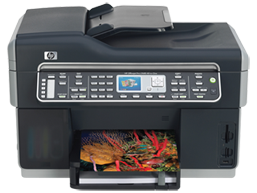
 HP Officejet Pro L7680 All-in-One Printer www.hpdrivers.net
HP Officejet Pro L7680 All-in-One Printer www.hpdrivers.net

Diagnostic Tool-Fixes Installation and Driver Issues.

HP Print and Scan Doctor for Windows

Details

The HP Print and Scan Doctor was designed by HP to provide users with troubleshooting and problem solving features needed to resolve many common problems experienced with HP print and scan products connected to Windows-based computers. Simply run the tool and follow the on-screen instructions.

Relase Details

File name: HPPSdr.exe
Released: Sep 3, 2021
Version 5.6.2.008
Compatibility: Microsoft Windows 10 (32-bit)(64-bit), Microsoft Windows 8 (32-bit)(64-bit), Microsoft Windows 8.1 (32-bit)(64-bit), Microsoft Windows 7 (32-bit)(64-bit)

Download

File Size : 11.3 Mb


HP ePrint Software for Network and Wireless Connected Printers

HP ePrint Software makes it easy to print from a desktop or laptop PC to any HP ePrinter. You can easily print your digital content wirelessly to supported HP printers on a local wireless network (Wi-Fi), HP printer enabled Wireless or WiFi Direct, or over the wired LAN. Additionally, you can print to your HP ePrint-enabled printer via the cloud at home, the office, or on-the-go, whenever the printer is connected to the Internet. You can even print to thousands of HP ePrint Public Print Locations worldwide.

File name: HPEPrintAppSetupx64.exe
Released: Sep 18, 2017
Version : 5.5.118.22560
Compatibility: Microsoft Windows 10 (64-bit), Microsoft Windows 8 (64-bit), Microsoft Windows 8.1 (64-bit), Microsoft Windows 7 (64-bit)

Download

File Size : 31.21 Mb

Above you can find windows drivers for HP Officejet Pro L7680 printer. To install your printer driver, you first need to download the software to your computer. Before starting the installation, you must disconnect the USB cable from your printer. Open the file you downloaded. Complete the installation by following the installation instructions. Print a test page from your printer. If everything goes well, you can delete the file you downloaded.
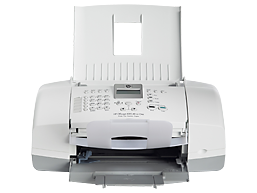
HP Officejet 4315 All-in-One Printer Driver Download

Find HP Officejet 4315 All-in-One driver downloads, package details and supported operating systems for

HP Officejet 4315 All-in-One Printer

HP Officejet 4315 All-in-One Printer printer

This product is listed in the supplied HP printer catalog with its available software and driver packages.

Specifications

Product number
1138383
Duplex printing
None
Paper handling input, standard
100-sheet input tray, 20-sheet automatic document feeder
Print quality black (best)
Black: Up to 1200 x 1200 dpi Color: Up to 4800 x 1200 optimized dpi color (when printing from a computer and 1200 input dpi)
Functions
Print, copy, scan, fax
Connectivity, standard
1 USB

HP Officejet 4315 All-in-One driver download for Windows

DescriptionVersionRelease dateFile sizeDownload

Recommended software

Installing Your Printer Driver Using the Windows Built-in Solution
N/A
Dec 20, 2021
N/A
See full detailsWindows 11; Windows 10, 7 (64-bit)
Type:
Driver-Product Installation Software
Version:
N/A
Operating systems:
Windows 11; Windows 10, 7 (64-bit)
Release date:
Dec 20, 2021
File name:
HP support instructions
(N/A)

Package notes

Description:

Install the HP Printer Driver and Software provided within your operating system.

Alternative packages

HP Print Software Patch When Upgrading Vista to Windows 7
1.0
Dec 5, 2009
1.3 MB
See full detailsWindows 7 (64-bit)
Type:
Update
Version:
1.0
Operating systems:
Windows 7 (64-bit)
Release date:
Dec 5, 2009
File name:
dot4patch_reboot.exe
(1.3 MB)

Package notes

Description:

This Windows 7 patch fixes some printer functionality after upgrading Vista to Windows 7. For networked printers, please go to www.hp.com for more support information.

HP Officejet 4315 All-in-One Linux Support

DescriptionVersionRelease dateFile sizeDownload

Recommended software

HP Printers – Driver Support for Linux OS
N/A
Nov 7, 2016
N/A
See full detailsLinux
Type:
Driver-Product Installation Software
Version:
N/A
Operating systems:
Linux
Release date:
Nov 7, 2016
File name:
HP support instructions
(N/A)

Package notes

Description:

For Linux downloads, HP recommends another website. If you need to download Linux drivers, you will be directed to a website that is outside HP Customer Support.

HP Officejet 4315 All-in-One installation and support

Use these resources after choosing the package that matches your operating system.

Driver assistance

Installation instructions

Common setup problems

Official resources

Package versions are listed in the download sections above. Check the operating-system list before downloading.

HP Officejet Pro 8630 Firmware Download

HP Officejet Pro 8630 e-All-in-One Printer

Download HP Officejet Pro 8630 Firmware Update

Description

This firmware update addresses an important security vulnerability (see Security Bulletin HPSBHF03589 on the HP Support Page)

Release details

Released :Jun 29, 2020
File name: OJP8630_2022A.exe
Version: 2022A

Compatibility:

Microsoft Windows 10 (32-bit), Microsoft Windows 10 (64-bit), Microsoft Windows 7 (32-bit), Microsoft Windows 7 (64-bit), Microsoft Windows 8 (32-bit), Microsoft Windows 8 (64-bit), Microsoft Windows 8.1 (32-bit), Microsoft Windows 8.1 (64-bit)

Download

File Size : 23.71 MB

Fix/Enhancement

Security changes for SNMP and WJA
Improve control panel work-flow and messaging
Enhance NFC tag spec 1.1 support
Protection against OpenSSL Heartbleed bug