
hpdrivers.net is an independent website and is not affiliated with, endorsed by, or sponsored by HP Inc. Download links point to HP's official servers (ftp.hp.com). Read the full disclaimer

HP LaserJet Tank MFP 1602a Driver Download

HP LaserJet Tank MFP 1602a Printer Driver Download for Windows  11/10/7 (32-Bit)(64-Bit)

Download HP LaserJet Tank MFP 1602w/1604w EasyStart Printer Setup Software – Offline Use Only
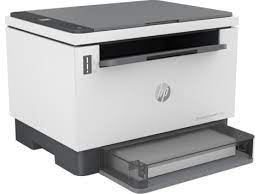
HP LaserJet Tank MFP 1602a Printer

Details HP LaserJet Tank 1602a

Print, Copy, Scan.
Hi-Speed USB (compatible with USB 2.0 specifications); 802.11a/b/g/n (2.4/5 GHz) Wi-Fi radio + BLE. built-in WiFi 802.11b/g/n (2.4/5GHz).

The full solution software includes everything you need to install and use your HP printer. This collection of software includes the complete set of drivers, installer software, and other administrative tools.

Fix and enhancements: Original Software/Drivers

Relase Details

Version: 56.2.5271
Release date: Feb 7, 2022
File name: HPEasyStart-13.6.5-LJTMFP160x_UWL_56_2_5271_1_Webpack.exe

Operating Systems

Microsoft Windows 11 All Editions (64-bit), Microsoft Windows 10 (32-bit), Microsoft Windows 10 (64-bit), Microsoft Windows 7 (32-bit), Microsoft Windows 7 (64-bit)

Download

File Size: 201.24MB


HP Smart Tank Plus 651 Driver Download Page

Version: 48.5.4607
Release date: Dec 6, 2021
File name: HPEasyStart-13.4.8-STF650_48_5_4607_2_Webpack.exe

Download

File Size: 307.49MB


HP LaserJet Tank 1602a Universal Scan – Full Feature Software and Driver

HP is undoubtedly one of the largest printer and scanner producing companies. A new update has been released to the universal driver produced for HP scanner devices. Also some improvements and fixes have been made. This driver full web suite provides various scanning functions. However, it does not include OCR capabilities and Cloud targets.

HP LaserJet Tank MFP 1602a Scanner – Full Feature Software and Driver Download

Fix and enhancements:

Scan to computer improvements have been made in this version. However, some features may vary depending on your browser model. Additionally, the language of the Data Collection Agreement Screens has been updated.

Version: 63.4.6169

File name: Full_Webpack-63.4.6169-SJ0001_Full_Webpack.exe

Relased: Aug 29, 2024

Operating Systems

Microsoft Windows 11, Microsoft Windows 10 (32-bit), Microsoft Windows 10 (64-bit), Microsoft Windows 8.1 (32-bit), Microsoft Windows 8.1 (64-bit), Microsoft Windows Server 2022

Download

File Size: 411.21 MB

Finally, let’s make a few reminders about the installation. First, download the installation file to your computer. It will generally download to the general downloads folder. Then open the file you downloaded. The installation wizard will guide you. When the installation is finished, you can delete the file you downloaded. Or you can save it to reinstall it in case you experience problems again. If you encounter a problem, do not hesitate to contact us.
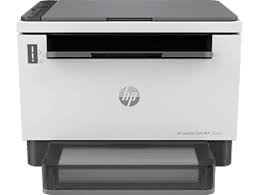
HP LaserJet Pro MFP 3101fdw Drivers (LaserJet Pro MFP 3101-3108fdn/fdw Series)

Last checked against HP’s download list: November 1, 2026 · Checked by H&G

Looking for the HP LaserJet Pro MFP 3101fdw driver? This page lists HP’s official software for the whole HP LaserJet Pro MFP 3101-3108fdn/fdw Printer series. HP lists some packages for specific models in the series, so check that the package title includes your model. For Windows 11, Windows 10 (64-bit) and Windows 7 (64-bit), the package most people need is the HP LaserJet Pro MFP 3101-3108fdn/fdw Driver Installation Software – Includes Print, Scan, Fax drivers. For a Mac, HP lists HP Easy Start Pro for Mac.

Recommended downloads

Windows 11, Windows 10 (64-bit), Windows 7 (64-bit): HP LaserJet Pro MFP 3101-3108fdn/fdw Driver Installation Software – Includes Print, Scan, Fax driversVersion 54.4.5329 · Released Nov 13, 2023 · 230.7 MB · HP rating: Recommended

Download

macOS 26, macOS 15, macOS 13: HP Easy Start Pro for MacVersion 2.8.0 · Released Sep 01, 2026 · 81.5 MB

Download

Files download directly from HP’s official servers. hpdrivers.net does not host or modify them.


Models covered by this page

HP’s download list for this series names these models. It covers the whole LaserJet Pro MFP 3101-3108fdn/fdw range, including model variants HP does not list by name:

HP LaserJet Pro MFP 3101fdw HP LaserJet Pro MFP 3102fdw HP LaserJet Pro MFP 3104fdw HP LaserJet Pro MFP 3103fdw

Which Windows package should you choose?

HP publishes 4 kinds of Windows package for the LaserJet Pro MFP 3101-3108fdn/fdw:

  • HP Universal Print Driver (v8.2.89, Sep 11, 2026): HP’s shared driver for many models, also listed for this series.
  • Driver files (no installer) (v54.4.5329, Nov 06, 2023): bare driver files for Windows’ Add Printer wizard.
  • Full software solution (v54.4.5329, Nov 13, 2023, 230.7 MB): driver plus HP’s setup wizard and tools.
  • Firmware update (v2624A, Aug 17, 2026): updates the printer itself, not your PC.

All downloads for the LaserJet Pro MFP 3101-3108fdn/fdw

Windows

Package / Windows
Version
Released
Size
HP LaserJet Pro MFP 3101-3108 PCL-6 V3 Printer Driver (no installer)

Windows: 11, 10, 7
File details

File: V3_DriveronlyWebpack-54.4.5329-LJ3101-3108_V3_DriveronlyWebpack.exe

54.4.5329
Nov 06, 2023
15.3 MB
HP LaserJet Pro MFP 3101-3108 PCL-6 V4 Printer Driver (no installer)

Windows: 11, 10, 7
File details

File: V4_DriveronlyWebpack-54.4.5329-LJ3101-3108_V4_DriveronlyWebpack.exe

54.4.5329
Nov 06, 2023
11.6 MB
HP LaserJet Pro MFP 3101-3108fdn/fdw Driver Installation Software – Includes Print, Scan, Fax drivers

Windows: 11, 10, 7
File details

File: HPEasyStart-16.3.1-LJ3101-3108_UW_4_1_54_4_5329_Webpack.exe

54.4.5329
Nov 13, 2023
230.7 MB
HP LaserJet Pro MFP 3101-3108fdn/fdw Driver Installation Software – Includes Print, Scan, Fax drivers

Windows: 11, 10, 7
File details

File: HPEasyStart-16.3.1-LJ3101-3108_UWWL_4_1_54_4_5329_Webpack.exe

54.4.5329
Nov 13, 2023
230.7 MB
HP LaserJet Pro MFP 3101-3108 series Firmware Update Utility

Windows: 11, 10, 7
File details

File: HP_Laserjet_Pro_3100e_Series_002.2624A.exe

2624A
Aug 17, 2026
96.5 MB

macOS

Package / macOS
Version
Released
Size
HP LaserJet Pro MFP 3101-3108 series Firmware Update Utility

macOS: 15, 13
File details

File: HP_Laserjet_Pro_3100e_Series_002.2624A.dmg

2624A
Aug 17, 2026
98.8 MB

Other HP software listed for this series

Software / Systems
Version
Size
HP Universal Scan – Full Feature Software and Driver (ARM 64)
Systems: Windows 11
63.8.6459
437.0 MB
HP Universal Scan – Full Feature Software and Driver
Systems: Windows 11, Windows 10, Windows 7
63.8.6459
436.2 MB
HP Universal Scan – Basic Feature Software and Driver
Systems: Windows 11, Windows 10, Windows 7
63.8.6459
113.9 MB
HP Universal Scan – Basic Feature Software and Driver (ARM 64)
Systems: Windows 11
63.8.6459
118.7 MB
HP Easy Start software includes options for remote solutions and tools via cloud Connectivity. Requires Internet connection.
Systems: Windows 11, Windows 10, Windows 7
17.6.15
–
ReadIRIS Advanced OCR
Systems: Windows 11, Windows 10
17.4.211
448.6 MB
ReadIRIS Advanced PDF
Systems: Windows 11, Windows 10
27.0.577.2
532.8 MB
HP Scan OCR Add-on Software
Systems: Windows 11, Windows 10, Windows 7
1.0.1020
224.9 MB
HP Easy Start Pro for Mac
Systems: macOS 26, macOS 15, macOS 13
2.8.0
–

HP Universal Print Driver

HP lists its Universal Print Driver for this series on Windows 7, Windows 11 and Windows 10. Get it from our HP Universal Print Driver page.

Linux

HP lists Linux support for this series through its HPLIP project, outside the regular download list: HP’s Linux printing page (HPLIP).

Installing the LaserJet Pro MFP 3101-3108fdn/fdw driver

The driver files without an installer are added through Windows’ Add Printer wizard (Have Disk). For step-by-step instructions, see our guide to installing an HP printer driver.

Firmware update 2624A

The newest firmware HP lists for the LaserJet Pro MFP 3101-3108fdn/fdw is version 2624A, released Aug 17, 2026.

  • Keep the printer and the computer switched on until the update has finished.

Specifications that matter for setup

Connections
1 Hi-Speed USB 2.0 (device); Ethernet 10/100 BT; Wireless 802.11b/g/n, Dual band 2.4GHz/5GHz
Mobile printing
Apple AirPrint™; Mopria™ certified; HP app; Wi-Fi® Direct Printing
Print languages
PCL5c; PCL6; PS; PCLmS; PDF; URF; PWG; PCLm
Functions
Print, copy, scan, fax
Print speed (black)
Normal: Up to 35 ppm
Recommended monthly volume
350 to 2500 pages
Two-sided printing
Automatic (standard)
Scanner
ADF, flatbed
Scan resolution
Up to 300 dpi (color and mono, ADF); Up to 1200 dpi (color and mono, flatbed)
Two-sided ADF scanning
No
Document feeder
Standard, 50 sheets
Scan file formats
JPG, TIFF, XPS, PDF, PDF/A
Ways to scan
HP app; and user applications via Twain
Copy speed
Black: Up to 35 cpm Color: First Copy Out from Ready and Simplex Copy Speed measured using ISO/IEC 29183, Duplex Copy Speed measured using ISO/IEC 24735, excludes first set of test documents.

Common setup problems

  • You’d rather not install software on a Mac. HP’s specifications list AirPrint support, so macOS can usually add the printer from System Settings without extra software.

HP LaserJet Tank 1020nw Driver Download

HP LaserJet Tank 1020nw Printer Driver Download for Windows  11/10/7 (32-Bit)(64-Bit)

Download HP LaserJet Tank 1020nw EasyStart Printer Setup Software – Offline Use Only

HP LaserJet Tank 1020nw Printer

Details HP LaserJet Tank HP LaserJet Tank 1020nw

The full solution software includes everything you need to install and use your HP printer. This collection of software includes the complete set of drivers, installer software, and other administrative tools.

Fix and enhancements: Original Software/Drivers

Relase Details

Version: 56.2.5271
Release date: Feb 7, 2022
File name: HPEasyStart-13.6.5-LJT1020_UWL_56_2_5271_1_Webpack.exe

Operating Systems

Microsoft Windows 11 All Editions (64-bit), Microsoft Windows 10 (32-bit), Microsoft Windows 10 (64-bit), Microsoft Windows 7 (32-bit), Microsoft Windows 7 (64-bit)

Download

File Size: 150.64MB


HP Smart Tank Plus 559 Wireless Aio Printer Driver

Version: 48.4.4588
Release date: Apr 22, 2021
File name: HPEasyStart-12.8.9-ST550_48_4_4588_1_Full_Webpack.exe

Download

File Size: 282.49MB