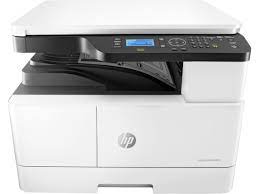
Looking for the HP LaserJet Enterprise M612dn driver? This page lists HP’s official software for the whole HP LaserJet Enterprise M612 series. HP lists some packages for specific models in the series, so check that the package title includes your model. For Windows 11; Windows 10, 8.1, 8, 7 (32-bit and 64-bit), the package most people need is the HP LaserJet Enterprise M610/M611/M612 series Full Software Solution. For a Mac, HP lists Install HP Easy Start.
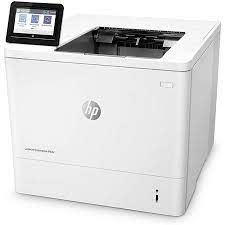
Recommended downloads
Files download directly from HP’s official servers. hpdrivers.net does not host or modify them.
Which Windows package should you choose?
HP publishes 4 kinds of Windows package for the LaserJet Enterprise M612:
- Firmware update (v2510156_069212, Aug 29, 2026): updates the printer itself, not your PC.
- Driver files (no installer) (v49.10.4644, Nov 11, 2021): bare driver files for Windows’ Add Printer wizard.
- Full software solution (v49.13.4899, Mar 25, 2026, 63.5 MB): driver plus HP’s setup wizard and tools.
- HP Universal Print Driver (v8.2.0.26778, Sep 26, 2026): HP’s shared driver for many models, also listed for this series.
All downloads for the LaserJet Enterprise M612
Windows
10, 8.1, 8, 7, Vista (32-bit and 64-bit)
XP (32-bit)
File details
File:ljM610_611_612_fs5.10.0.7_fw_2510156_069212.zip10, 8.1, 8, 7, Vista (32-bit and 64-bit)
XP (32-bit)
File details
File:ljM610_611_612_fs4.12.0.1_fw_2411226_066578.zip10, 8.1 (32-bit and 64-bit)
File details
File:V4_DriveronlyWebpack-49.10.4644-LJM610-M611-M612_V4_DriveronlyWebpack.exe10, 8.1, 8, 7 (32-bit and 64-bit)
File details
File:V3_DriveronlyWebpack-49.13.4899-LJM610-M611-M612_V3_DriveronlyWebpack.exe10, 8.1, 8, 7 (32-bit and 64-bit)
File details
File:Full_Webpack-49.13.4899-LJM610-M611-M612_Full_Webpack.exemacOS
File details
File:ljM610_611_612_fs5.10.0.7_fw_2510156_069212.zipFile details
File:ljM610_611_612_fs4.12.0.1_fw_2411226_066578.zipOther HP software listed for this series
Windows 10, 7 (32-bit and 64-bit)
HP Universal Print Driver
HP lists its Universal Print Driver for this series on Windows 11; Windows 10, 8.1, 8, 7 (32-bit and 64-bit). Get it from our HP Universal Print Driver page.
Linux
HP lists a Linux driver for this series: FutureSmart Bundle Version 5.10.0.7 – HP LaserJet Enterprise M610/611/612 Series Printer FIRMWARE (Version 2510156_069212 · Released Aug 29, 2026 · 104.0 MB). Download from HP.
Installing the LaserJet Enterprise M612 driver
The driver files without an installer are added through Windows’ Add Printer wizard (Have Disk). For step-by-step instructions, see our guide to installing an HP printer driver.
Firmware update 2411226_066578
The newest firmware HP lists for the LaserJet Enterprise M612 is version 2411226_066578, released Feb 02, 2023.
- Keep the printer and the computer switched on until the update has finished.
Specifications that matter for setup
Toner supplies HP lists for the LaserJet Enterprise M612
HP’s specifications name these replacement supplies for the LaserJet Enterprise M612:
- HP 147A Black Original LaserJet Toner Cartridge (~10
- 500 pages) W1470A
- HP 147X High
What comes in the box
HP lists these items with the LaserJet Enterprise M612:
- HP LaserJet Multifunction Printer
- Documentation (Hardware Install Guide, Regulatory Flyer)
- Power cord
Paper handling and hardware details
Values below are HP’s published figures for the LaserJet Enterprise M612; they help you check that this page matches your printer before you download anything.
Replacing the secondary transfer roller on the LaserJet Enterprise M612dn
HP’s removal and replacement article for the secondary transfer roller covers the LaserJet Enterprise M607 to M612 and the Managed E60055 to E60175 printers (it also covers the M631 to M637 MFPs, which use a different video). HP gives a 5 minute mean time to repair and a Basic service level.
Notes from HP’s article
- HP says that when an assembly has special installation instructions, they come at the end of the removal procedure, so read the removal steps completely first.
- HP’s page has a video named How to Replace the Secondary Transfer Roller for HP LaserJet Enterprise M607-M612, Managed E600xx-E601xx Series.
Source: HP Support, HP LaserJet M607 … M612, E60055 … E60175; MFP M631 … M637, E62555 … E62675 – Removal and replacement: Secondary transfer roller.
Installing the internal USB ports module on the M612dn
HP has a separate removal and replacement article for the internal USB ports and AA module on the M607 to M612 and Managed E60055 to E60175 printers, again with a 5 minute mean time to repair and a Basic service level.
Before you start
- HP says to disconnect the power cable first. Its warning is to turn the printer off, wait 30 seconds and remove the power cable before servicing, to avoid damage to the printer.
Source: HP Support, HP LaserJet Enterprise M607 … M612; HP LaserJet Managed E60055 … E60175 – Removal and replacement: Internal USB ports/AA module. The secondary transfer roller article is here.
Toner redistribution and energy settings on the M612dn
When the M612dn warns that the toner is low, HP says the cartridge does not need replacing yet. Keep printing, and when quality drops take the cartridge out, rock it gently back and forth along its horizontal axis and put it back before closing the cover. Replace it only when this no longer helps.
The Energy Settings menu controls the sleep time, how quickly the printer goes to sleep and what wakes it.
Based on HP user guide c06498743 (“HP LaserJet Enterprise M610, M611, M612 – User Guide”).
Job storage modes on the M612dn
HP lists four job-storage modes in the print driver’s Job Storage tab. Proof and Hold prints one copy for you to check before the rest. Personal Job waits until you request it at the control panel; with a PIN you must type it there, with encryption you need the password, and the job is deleted after printing and lost if the printer loses power. Quick Copy prints the copies and keeps one in memory for later, and Stored Job keeps a job so other people can print it at any time, again optionally with a PIN or password.
Based on HP user guide c06498743 (“HP LaserJet Enterprise M610, M611, M612 – User Guide”).