
hpdrivers.net is an independent website and is not affiliated with, endorsed by, or sponsored by HP Inc. Download links point to HP's official servers (ftp.hp.com). Read the full disclaimer

HP Color LaserJet Enterprise Flow MFP 5800zf Driver Download

HP Color LaserJet Enterprise Flow MFP 5800zf Printer Series Series Software Driver Download for Windows 11/10/7 64bit-32bit

Download HEWLETT PACKARD LaserJet Enterprise Flow MFP 5800 Series PCL-6 V4 Printer Driver
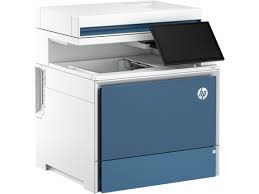
HP Color LaserJet Enterprise Flow MFP 5800zf Printer Series Series Software

Experience fast performance with automatic duplex printing and an impressive print speed of 45 ppm for quick output. With a high print resolution of 1200 x 1200, the 5800zf delivers professional-quality documents with sharp text and vivid colors. Options for handling media include a 100-sheet multipurpose tray and a 550-sheet input tray. Quick start-up is ensured with the printer’s 7.3 second first print out time.

HP Easy Start Printer Setup Software

HP Color LaserJet MFP 5800 PCL-6 V4 Printer Driver (no installer)

Description:

This solution provides only the PCL-6 driver without an installer. To install the print driver use the Add Printer Wizard.

Release details

Version: 57.2.5371

Relase Date : May 22, 2024

Operating Systems:
Microsoft Windows 11, Microsoft Windows 10 (32-bit), Microsoft Windows 10 (64-bit), Microsoft Windows Server 2019

File name: V4_DriveronlyWebpack-57.2.5371-CLJ5800_V4_DriveronlyWebpack.exe

Download

File Size : 49.33 MB

HP Color LaserJet Enterprise MFP 5800zf PCL-6 V3 Printer Driver (no installer)

This solution provides only the PCL 6 driver without an installer. To install the print driver use the Add Printer Wizard.

Operating Systems: Microsoft Windows 10 (32-bit), Microsoft Windows 11, Microsoft Windows 10 (64-bit), Microsoft Windows Server 2019, Microsoft Windows 7 (32-bit)Microsoft Windows 7 (64-bit)

Version: 57.2.5371
Relase Date : May 22, 2024
File name: V3_DriveronlyWebpack-57.2.5371-CLJ5800_V3_DriveronlyWebpack.exe

Download

File Size : 49.31Mb


HP 5800zf MFP Smart Universal Printing Driver for Windows V3 (32-bit)

This is the most current version of the V3 HP Smart Universal Printing Driver (SUPD) for Windows 32 bit systems.

Operating Systems: Microsoft Windows 10 (32-bit), Microsoft Windows 11, Microsoft Windows 7 (32-bit), Microsoft Windows Server 2022

Version: v4.01.2.2972
Relase Date : May 7, 2024
File name: SUPD-V3-x86-4.01.2.2972.exe

Download

File Size : 32.41Mb

HP LaserJet MFP 5800zf Smart Universal Printing Driver for Windows V3 (64-bit)

This is the most current version of the V3 HP Smart Universal Printing Driver (SUPD) for Windows 64 bit systems.

Operating Systems: Microsoft Windows 10 (64-bit), Microsoft Windows 11, Microsoft Windows 7 (64-bit), Microsoft Windows Server 2019

Version: v4.01.2.2972
Relase Date : May 7, 2024
File name: SUPD-V3-x64-4.01.2.2972.exe

Download

File Size : 36.23Mb

HP LaserJet MFP 5800zf Product details

HP Clr LaserJet Ent FlwMFP 5800zf Prntr US,CA,MX,LA (no AR,CL,BR)-EN,ES,FR

  • Print your documents with great efficiency and speed with Laser print technology
  • A heavy duty 80000 duty cycle printer that will fit your needs
  • Cut your paper cost by 50% with Automatic Duplex Printing that allows you to print on both sides
  • Boost your productivity with an impressive speed of 45 ppm mono and 45 ppm color
  • Experience crisp and clear output with a 1200 x 1200 maximum print resolution (dpi)
  • The printer offers professional quality documents that can be printed either in color or monochrome
  • Apple AirPrint wireless print technology for maximum efficiency with high-quality results
  • Save time and money for your business by using one printer for all your employees
  • Gigabit Ethernet Ethernet technology for easy, convenient printing with maximum efficiency
  • This affordable Copier/Fax/Printer/Scanner is a multitasker in one space-saving design
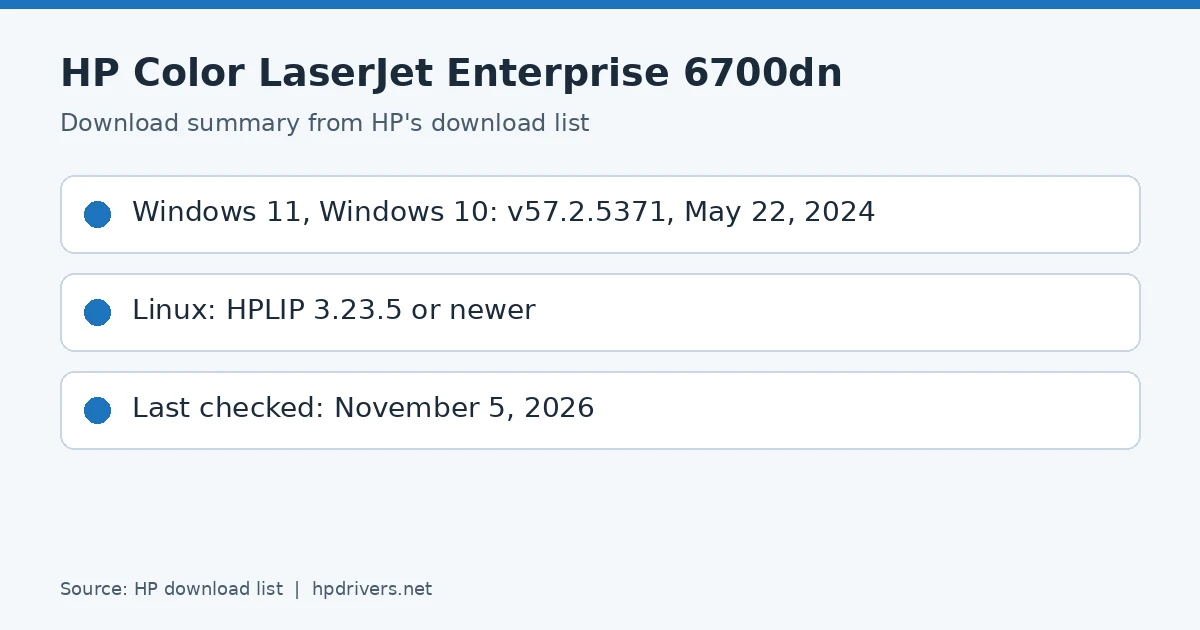
HP Color LaserJet Enterprise 6700dn Drivers

Last checked against HP’s download list: November 5, 2026 · Checked by H&G

Looking for the HP Color LaserJet Enterprise 6700dn driver? This page lists HP’s official software for the whole HP Color LaserJet Enterprise 6700dn Printer series. For Windows 11; Windows 10, 7 (32-bit and 64-bit), the package most people need is the HP Color LaserJet Enterprise 6700/6700dn Printer series for PCL-6 V3 Printer Driver (no installer).

HP Color LaserJet Enterprise 6700dn driver download summary: HP package versions and release dates
HP Color LaserJet Enterprise 6700dn download summary

Recommended downloads

Windows 11; Windows 10, 7 (32-bit and 64-bit): HP Color LaserJet Enterprise 6700/6700dn Printer series for PCL-6 V3 Printer Driver (no installer)Version 57.2.5371 · Released May 22, 2024 · 49.4 MB
Download

Files download directly from HP’s official servers. hpdrivers.net does not host or modify them.

Which Windows package should you choose?

HP publishes 3 kinds of Windows package for the Color LaserJet Enterprise 6700dn:

  • Driver files (no installer) (v57.2.5371, May 22, 2024): bare driver files for Windows’ Add Printer wizard.
  • HP Universal Print Driver (v8.2.0.26778, Sep 26, 2026): HP’s shared driver for many models, also listed for this series.
  • Firmware update (v2510156_069179, Aug 28, 2026): updates the printer itself, not your PC.

All downloads for the Color LaserJet Enterprise 6700dn

Windows

Package / Windows
Version
Released
Size
HP Color LaserJet Enterprise 6700/6700dn Printer series for PCL-6 V3 Printer Driver (no installer)
Windows: 11
10, 7 (32-bit and 64-bit)
File detailsFile: V3_DriveronlyWebpack-57.2.5371-CLJ6700-6701_V3_DriveronlyWebpack.exe
57.2.5371
May 22, 2024
49.4 MB
HP Color LaserJet Enterprise 6700/6700dn Printer series for PCL-6 V4 Printer Driver (no installer)
Windows: 11
10 (32-bit and 64-bit)
File detailsFile: V4_DriveronlyWebpack-57.2.5371-CLJ6700-6701_V4_DriveronlyWebpack.exe
57.2.5371
May 22, 2024
49.4 MB
FutureSmart Bundle Version 5.10.0.7 – HP Color LaserJet Enterprise 6700/6701 Series Printer FIRMWARE
Windows: 11
10, 8.1, 8, 7, Vista (32-bit and 64-bit)
XP (32-bit)
File detailsFile: clj6700_6701_fs5.10.0.7_fw_2510156_069179.zip
2510156_069179
Aug 28, 2026
924.3 MB

Other HP software listed for this series

Software / Systems
Version
Size
HP Easy Start Printer Setup Software (Internet connection required for driver installation)
Systems: Windows 11
Windows 10, 7 (32-bit and 64-bit)
17.6.15
26.5 MB
HP Smart Universal Printing Driver for Windows V3 (32-bit)
Systems: Windows 11
Windows 10, 7 (32-bit)
4.08.1.3348
25.1 MB
HP Smart Universal Printing Driver for Windows V3 (64-bit)
Systems: Windows 11
Windows 10, 7 (64-bit)
4.08.1.3348
28.4 MB
HP Smart Universal Printing Driver for Windows V4 (64-bit)
Systems: Windows 11
Windows 10 (64-bit)
6.03.1.4143
18.4 MB
HP Smart Universal Printing Driver for Windows V4 (ARM64-bit)
Systems: Windows 11
Windows 10 (64-bit)
6.03.1.4143
22.8 MB
HP System Health Apps Registration Utility
Systems: Windows 10 (32-bit and 64-bit)
1.0.0.0
1.3 MB
HP Smart Universal Printing Driver for Windows V4 (32-bit)
Systems: Windows 10 (32-bit)
6.03.1.4143
23.0 MB
HP Easy Start Printer Setup Software
Systems: Windows 8.1, 8 (32-bit and 64-bit)
17.6.15
26.5 MB

HP Universal Print Driver

HP lists its Universal Print Driver for this series on Windows 11; Windows 10, 8.1, 8, 7 (32-bit and 64-bit). Get it from our HP Universal Print Driver page.

Linux

HP lists a Linux driver for this series: FutureSmart Bundle Version 5.10.0.7 – HP Color LaserJet Enterprise 6700/6701 Series Printer FIRMWARE (Version 2510156_069179 · Released Aug 28, 2026 · 924.3 MB). Download from HP.

Installing the Color LaserJet Enterprise 6700dn driver

The driver files without an installer are added through Windows’ Add Printer wizard (Have Disk). For step-by-step instructions, see our guide to installing an HP printer driver.

Firmware update 2510156_069179

The newest firmware HP lists for the Color LaserJet Enterprise 6700dn is version 2510156_069179, released Aug 28, 2026.

  • Keep the printer and the computer switched on until the update has finished.

Specifications that matter for setup

Connections
1 SuperSpeed USB 3.0 (device); 1 SuperSpeed USB 3.0 (host); 1 Hi-Speed USB 2.0 (host); 1 Gigabit Ethernet 10/100/1000T network; 1 Hardware Integration Pocket 2nd generation (HIP2)
Mobile printing
Apple AirPrint™; NFC touch-to-print (optional); Mopria™ Certified
Print languages
HP PCL 6; HP PCL 5c; HP postscript level 3 emulation, native PDF printing (v 1.7), URF (AirPrint)
Print speed (black)
Normal: Up to 55 ppm
Recommended monthly volume
2000 to 14,000
Two-sided printing
Automatic

Toner supplies HP lists for the Color LaserJet Enterprise 6700dn

HP’s specifications name these replacement supplies for the Color LaserJet Enterprise 6700dn:

  • W2130A HP 213A Black Original LaserJet Toner Cartridge (~3
  • 500 pages); W2131A HP 213A CyanOriginal LaserJet Toner Cartridge (~3
  • 000 pages); W2132A HP 213A Yellow Original LaserJet Toner Cartridge (~3
  • 000 pages); W2133A HP 213A Magenta Original LaserJet Toner Cartridge (~3
  • 000 pages); W2130X HP 213X High

What comes in the box

HP lists these items with the Color LaserJet Enterprise 6700dn:

  • HP Color LaserJet Single-function Printer
  • Documentation (Hardware Install Guide)
  • Power cord

Paper handling and hardware details

Values below are HP’s published figures for the Color LaserJet Enterprise 6700dn; they help you check that this page matches your printer before you download anything.

Paper input tray
100-sheet multi-purpose tray, 550-sheet input tray 2
Output tray
500-sheet output bin
Optional trays
Optional 1×550-sheet paper feeder, optional Stand and storage unit, optional caster base stand, optional 2100-sheet HCI Feeder and Stand
Paper sizes
Tray 1: letter, legal, executive, statement, Oficio, 3 x 5 in, 4 x 6 in, 5 x 7 in, 5 x 8 in, envelopes (No. 9, No. 10, Monarch); Tray 2
Media types
Paper (plain, light, intermediate, light bond, bond, recycled, mid-weight, heavy, mid-weight glossy, heavy glossy, extra heavy, extra heavy glossy, cardstock, card glossy), color transparency, labels
Paper weight
Tray 1: 16 to 58 lb (plain), 32 to 58 lb (glossy); Tray 2: 16 to 58 lb (plain), 32 to 58 lb (glossy); optional 550-sheet input trays: 16 to 58 lb (plain)
Print speed (color)
Normal: Up to 55 ppm
Print quality (black)
Black: Up to 1200 x 1200 dpi Color: Up to 1200 x 1200 dpi
Control panel
4.3 in (10.9 cm) Color Graphic Display (CGD) with touchscreen; rotating (adjustable angle)
Processor
1.2 GHz
Power use
708 watts (Printing/Copying), 47.3 watts (Ready), 1.23 watts (Sleep), 0.08 watts (Auto Off/Manual On)
Size (W x D x H)
19.7 x 18.1 x 16.3 in
Weight
72.5 lb
Warranty
One-year, next-business day, onsite warranty

HP Laser MFP M137fnw Printer Driver Download

HP Laser MFP M137fnw Printer Driver for Windows 11/10/8.1/8/7 32bit-64bit

Download HP Laser MFP M137fnw Printer series Full Solution Software and Driver

HP Laser MFP M137fnw Printer Driver for Windows 11/10/8.1/8/7 32bit-64bit

Print, Scan, Copy features and LED control panel are available. It reaches printing speeds of up to 20 ppm. It has a Hi-Speed ​​USB 2.0 port. HP Auto On-Off technology is available to Save Energy.

HP Laser M137fnw Driver for Windows

Operating Systems : Windows 11, Microsoft Windows 7 (32-bit), Microsoft Windows 7 (64-bit), Microsoft Windows 8 (32-bit), Microsoft Windows 8 (64-bit), Microsoft Windows 8.1 (32-bit), Microsoft Windows 8.1 (64-bit), Microsoft Windows 10 (32-bit), Microsoft Windows 10 (64-bit)

HP Laser MFP 130 Printer Series Full Solution Software and Drivers

Operating systems: Microsoft Windows 11/10/8/8.1/7/Server 2016 (64bit/32bit)

The full solution software includes everything you need to install your HP printer.

Download

Relase Date: May 31, 2023

HP Laser MFP 130 Printer Series Printer and Scan Driver for Windows 11/10/8/8.1/7 32bit/64bit

The driver installer file automatically installs the print and scan driver for your HP printer.

Download

File Size : 30.41Mb

HP Laser MFP 130 Printer Series Print Driver (No Installer) for Windows 11/10/8/8.1/7 32bit/64bit

This solution provides only the print driver without an installer. To install the print driver use the Add Printer Wizard.

Download

File Size : 10.33Mb

HP Print and Scan Doctor for Windows 11/10/8/8.1/7 32bit/64bit

The HP Print and Scan Doctor was designed by HP to provide users with troubleshooting and problem solving features needed to resolve many common problems experienced with HP print and scan products connected to Windows-based computers. Simply run the tool and follow the on-screen instructions.

Download

File Size : 11.42 MB

Installation instructions

The HP Print and Scan Doctor does not require installation.

To use the HP Print and Scan Doctor, simply download the file and run it.

  1. Click the Download button and save the file to your computer.
  2. Navigate to the location where you saved the file on your computer and double-click the HPPSdr.exe filename to open and run the tool.
  3. Follow the on-screen instructions to use the HP Print and Scan Doctor.

Note: The first time you run the HPPSdr.exe file it will place a shortcut to the HP Print and Scan Doctor on your desktop. This convenient shortcut can be used for easy access to the HP Print and Scan Doctor for troubleshooting and problem solving help you may need in the future.


HP LaserJet Pro MFP 138pnw Driver Download

Version: 1.17
Relased: Jan 29, 2022
File name: HP_Color_Laser_MFP_178_179_Full_Software_and_Drivers_1.14.exe
Microsoft Windows 10 (32-bit), Microsoft Windows 10 (64-bit), Microsoft Windows 8.1 (32-bit), Microsoft Windows 8.1 (64-bit), Microsoft Windows 8 (32-bit), Microsoft Windows 8 (64-bit), Microsoft Windows 7 (32-bit), Microsoft Windows 7 (64-bit)

Download

Size: 86.92 MB