
HP often lists several downloads for one printer: full software, a smaller print and scan driver, the HP Universal Print Driver and the HP app. The right one depends on your computer and on what is not working. The HP printer setup finder asks five short questions. It then shows the download HP lists for that exact case, or tells you plainly when HP’s list does not confirm it.
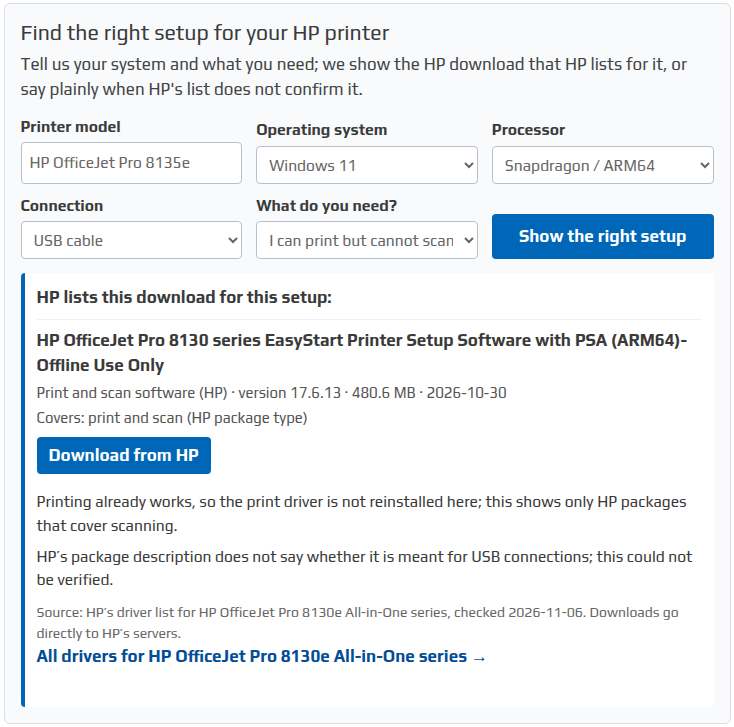
Find the right setup for your HP printer
Tell us your system and what you need; we show the HP download that HP lists for it, or say plainly when HP's list does not confirm it.
How the HP printer setup finder decides
- Operating system: the finder looks only at packages HP lists for the system you pick. HP lists Windows 10 32-bit and 64-bit separately, and so does the finder.
- Processor: on a Snapdragon (ARM64) PC, the finder shows only packages that HP names as ARM64. On an Intel or AMD PC, it leaves ARM64 packages out.
- What you need: “Set up printing and scanning” prefers HP software that covers both. “Printing only” prefers the smaller driver. “I can print but cannot scan” skips print drivers, since printing already works, and shows only packages that cover scanning. Our guide HP printer not scanning but still prints covers the other checks for that problem.
- Connection: HP rarely publishes separate packages for USB and network use. The finder names a connection type only when HP’s own package description mentions it.
What “could not be verified” means
Our record of HP’s driver list for that printer has no package for the combination you chose. That does not mean the printer cannot do it. In that case the finder links to HP’s own support page for the printer, where HP may list newer software than our records.
Snapdragon and other ARM64 Windows PCs
Many HP printers have Windows 11 software for Intel and AMD PCs but no package named for ARM64. The finder does not offer an Intel or AMD package to an ARM64 PC as a substitute, because HP does not say it installs there. When HP lists an ARM64 package, such as an ARM64 version of the HP Universal Print Driver or a printer’s setup software, the finder shows it.
Where the answers come from
We build the finder’s table from HP’s published driver lists, one per printer series. It currently covers 162 HP printer and scanner series, and each answer shows the date we checked HP’s list. Nothing in an answer is guessed or generated on the spot. Every download button goes straight to HP’s servers; HPDrivers.net does not host the files. HPDrivers.net is an independent site and has no affiliation with HP Inc.
Printer not in the HP printer setup finder yet?
We add printers as we check them. Until then, use HP’s driver search, or follow our guide on how to install an HP printer driver. For many HP LaserJet and business printers, the HP Universal Print Driver is another option for printing.