
A HP 59.F0 error on a LaserJet is a hardware message, not a driver or software problem: the printer stops because something in its own mechanism did not do what it was told. HP does not publish a plain-language page for the 59.F0 code. What HP does publish is a short service note for the closely related 59.00.F0 code and a general guide for 59.X motor errors. This article puts those together, says clearly what is and is not known, and lists what is safe to try before you call for service.
The short version
- The 59 family is a motor or mechanism error. Reinstalling drivers will not touch it.
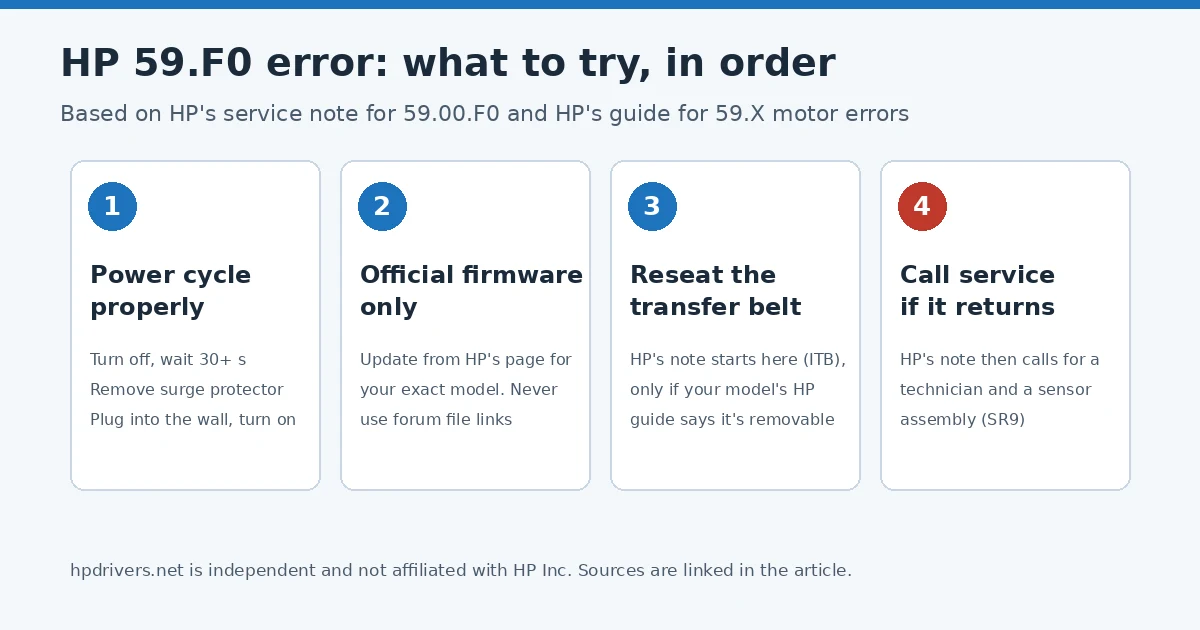
- Do HP’s power reset first: turn the printer off, wait at least 30 seconds, take away any surge protector, plug it into the wall, turn it on and let it initialize.
- If the code comes back, HP’s own service note for 59.00.F0 says to remove and reinstall the ITB (the transfer belt unit), and after that to send a technician with a sensor assembly.
- Use firmware only from HP. Do not install “fix” files from forum links.
What HP says the 59.F0 error means
HP’s support site has a one-entry note titled 59.00.F0 T1 alienation mechanism failure. It is written for HP’s call agents, so it is short. It says to remove and re-install the ITB and make sure it is correctly installed. If the error persists, it says to send an on-site technician with the SR9 sensor assembly.
HP does not explain the wording in that note, and it does not describe the 59.F0 error in everyday language anywhere I could find. Reading it plainly: the failure is in a mechanism around the transfer belt unit, and the part HP expects to be replaced is a sensor assembly. That points at the printer’s inside, not at toner, paper, the network or the computer. This is my reading of HP’s note, not a quote from HP.
HP’s general guide for the LaserJet Pro 400 M401 describes the broader 59.X error the same way: “the product has experienced a problem with one of the motors,” with the same first action. That guide is for one model, but it shows how HP treats the 59 family.
Which printers show it
HP has no list of 59.F0 models that I could find. The code shows up in HP Community threads about the Color LaserJet CP3525 and CP4525, the LaserJet 500 color M551 (as 59.00 F0), and the Color LaserJet Pro M452 and M477 families. Those threads are user reports, so treat them as a sign of where the code appears, not as HP’s statement. If you have one of these models, the driver and firmware pages we link to point to HP’s own servers: Color LaserJet Pro M452, Color LaserJet Pro MFP M477, LaserJet Enterprise M551 and Color LaserJet Enterprise M553.
Is it the same as an F0.XX.XX.XX error?
No, and the two get mixed up. HP’s guide for the Color LaserJet Pro 4201 to 4203 and MFP 4301 to 4303 says that F0 and C1 are event codes mostly related to firmware events, not hardware issues. For those, HP says to turn the printer off and on, then update the firmware if it does not return to Ready, then do a factory reset if the code persists. A 59.F0 has the 59 in front, which is the motor and mechanism family above, so do not assume the firmware route fixes it.
What you can safely try for a HP 59.F0 error
1. Reset the printer the way HP describes
- Turn the printer off and wait at least 30 seconds.
- If you use a surge protector, remove it and plug the printer directly into a wall socket.
- Turn it on and wait for it to finish initializing.
This is HP’s routine for 59.X and 79 errors on the M401, and it does no harm on other models. If the printer reaches Ready and prints normally, note when the code appears (at start-up, on the first color page, after a certain page count), because HP support will ask.
2. Update the firmware, from HP only
HP recommends a firmware update for F0 and C1 event codes. HP’s 59.00.F0 note does not mention firmware, so an update may or may not change anything for a 59.F0. It is still a reasonable check, because it is what HP asks for in the related F0 guide. Take the file from HP’s download page for your exact model, which is where our model pages send you.
3. Reseat the transfer belt unit, only if HP’s guide for your model shows it
HP’s service note starts with reinstalling the ITB. Whether the belt unit is something an owner may remove depends on the model. Look in your model’s HP user or service guide for the belt unit. If the guide shows it as removable, follow that guide exactly, with the printer off. If it does not, skip this step. I am not giving removal steps here because they differ by model and I have not verified them for any single model.
4. Stop and call service
If the code returns after the reset and a correct ITB reinstall, HP’s own note moves to a technician with a sensor assembly. Contact HP support or an authorized service provider for your model, and check your warranty status first. A repair estimate is worth getting before you decide whether an older printer is worth repairing.
What not to do
Several forum threads about 59.F0 contain links to files on personal file-sharing accounts, offered as “the fix.” In one HP Community thread about a LaserJet Pro MFP 477, a reply links to a Dropbox folder and says it works for M477 and M452 printers. Do not flash firmware from a source like that, whatever the 59.F0 error thread promises. A bad firmware file can leave a printer unusable, and HP’s support pages are the only place I would take firmware from. Also avoid paid “59.F0 repair” tools and support phone numbers found in search ads. Nothing in HP’s notes calls for either.
Questions people ask
Is 59.F0 a driver problem?
Nothing in HP’s notes points to a driver. The code is raised by the printer itself. If you need a driver for other reasons, our install guide covers the standard route.
Is 59.F0 the same as 59.00.F0?
They look like the same family, and the control panel text can differ by model and firmware. HP’s published note uses 59.00.F0. I could not find an HP statement that treats them as identical, so check your model’s message list if you have it.
Can I keep printing with it?
If the printer stops with the code and will not clear after the reset, it needs service. HP does not describe a workaround.
Sources: HP Support, 59.00.F0 T1 alienation mechanism failure; HP Support, HP LaserJet Pro 400 Printer M401 – Interpret Control Panel Messages; HP Support, HP Color LaserJet Pro 4201, 4202, 4203, MFP 4301, 4302, 4303 – F0.XX.XX.XX and C1.XX.XX.XX errors troubleshooting guide. Model list based on HP Community threads, for example 59.F0 error message not associated with hardware issues (M477, 2019).
Advertisement