hpdrivers.net is an independent website and is not affiliated with, endorsed by, or sponsored by HP Inc. Download links point to HP's official servers (ftp.hp.com). Read the full disclaimer

HP Officejet 4610 Drivers (Officejet 4610 All-in-One Series)

Last checked against HP’s download list: November 9, 2026 · Checked by H&G

Looking for the HP Officejet 4610 driver? This page lists HP’s official software for the whole HP Officejet 4610 All-in-One Printer series. HP lists some packages for specific models in the series, so check that the package title includes your model. For Windows 11; Windows 10, 8.1, 8, 7, Vista (32-bit and 64-bit); Windows XP (32-bit), the package most people need is the HP Officejet 4610 All-in-One Printer series Full Feature Software and Drivers. For a Mac, HP lists Install HP Easy Start.

Advertisement
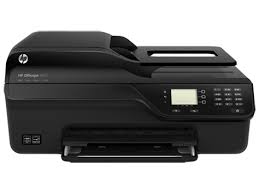
HP Officejet 4610 printer
HP Officejet 4610

Recommended downloads

Windows 11; Windows 10, 8.1, 8, 7, Vista (32-bit and 64-bit); Windows XP (32-bit): HP Officejet 4610 All-in-One Printer series Full Feature Software and DriversVersion 28.1.1317_1 · Released May 18, 2022 · 68.3 MB · HP rating: Recommended
Download
macOS 26, 15, 14: Install HP Easy StartVersion 2.16.7.260722 · Released Aug 14, 2026 · 6.3 MB
Download

Files download directly from HP’s official servers. hpdrivers.net does not host or modify them.

Advertisement

Which Windows package should you choose?

HP publishes 4 kinds of Windows package for the Officejet 4610 All-in-One:

  • HP Universal Print Driver (v8.2.89, Sep 11, 2026): HP’s shared driver for many models, also listed for this series.
  • Driver-only installer (v28.1.1317, Dec 08, 2021): print driver only, for PCs that can’t or shouldn’t take the full package.
  • Full software solution (v28.1.1317_1, May 18, 2022, 68.3 MB): driver plus HP’s setup wizard and tools.
  • Firmware update (v1829A, Jul 31, 2018): updates the printer itself, not your PC.

All downloads for the Officejet 4610 All-in-One

Windows

Package / Windows
Version
Released
Size
HP Officejet 4610 All-in-One Printer series Basic Drivers
Windows: 11
10, 8.1, 8, 7, Vista (64-bit)
File detailsFile: Basic_Webpack_x64-1317-OJ4610_Basicx64_Webpack.exe
28.1.1317
Dec 08, 2021
25.2 MB
HP Officejet 4610 All-in-One Printer series Full Feature Software and Drivers
Windows: 11
10, 8.1, 8, 7, Vista (32-bit and 64-bit)
XP (32-bit)
File detailsFile: Full_Webpack-1317_1-OJ4610_Full_Webpack.exe
28.1.1317_1
May 18, 2022
68.3 MB
HP Officejet 4610 All-in-One Printer series Basic Drivers
Windows: 10, 8.1, 8, 7, Vista, XP (32-bit)
File detailsFile: Basic_Webpack_x86-1317-OJ4610_Basicx86_Webpack.exe
28.1.1317
Dec 08, 2021
23.3 MB
HP Officejet/Deskjet Ink Advantage 4610/4620 Firmware Update
Windows: 10, 8.1, 8, 7, Vista (32-bit and 64-bit)
File detailsFile: OJ4610_1829A.exe
1829A
Jul 31, 2018
8.9 MB

macOS

Package / macOS
Version
Released
Size
HP Officejet/Deskjet Ink Advantage 4610/4620 Firmware Update
macOS: 10.13, 10.12, 10.11, 10.10, 10.9
File detailsFile: OJ4610_1829A.dmg
1829A
Aug 24, 2018
13.0 MB
HP Officejet 4610 series Full Feature Software and Drivers
macOS: 10.12, 10.11, 10.10, 10.9, 10.8
File detailsFile: HP_Mountain_Lion_Ink_SW_v12.23.41.dmg
12.23.0
Oct 22, 2014
203.0 MB

Other HP software listed for this series

Software / Systems
Version
Size
Recommended update to resolve the ePrintCenter window from opening in front of the HP Printer Assistant
Systems: Windows 7, Vista (32-bit and 64-bit)
Windows XP (32-bit)
1.0
1.0 MB
Install HP Easy Start
Systems: macOS 26, 15, 14
2.16.7.260722
6.3 MB
HP Officejet Full Feature Software and Drivers – Mac OS X v10.5, v10.6, v10.7
Systems: 10.7, 10.6, 10.5
12.16
197.6 MB

HP Universal Print Driver

HP lists its Universal Print Driver for this series on Windows 11; Windows 10, 8.1, 8, 7, Vista (32-bit and 64-bit); Windows XP (32-bit). Get it from our HP Universal Print Driver page.

Linux

HP lists Linux support for this series through its HPLIP project, outside the regular download list: HP’s Linux printing page (HPLIP).

Installing the Officejet 4610 All-in-One driver

For step-by-step instructions, see our guide to installing an HP printer driver.

Firmware update 1829A

The newest firmware HP lists for the Officejet 4610 All-in-One is version 1829A, released Jul 31, 2018. HP’s notes for it: Critical security fixes.

  • Keep the printer and the computer switched on until the update has finished.

Specifications that matter for setup

Connections
1 Hi-Speed USB 2.0; 1 Phone
Wi-Fi
Not built in
Print languages
HP PCL 3 GUI, HP PCL 3 Enhanced
Functions
Print, copy, scan, fax
Print speed (black)
Normal: Up to 8 ppm Either after first page or after first set of ISO test pages. For details see http://www.hp.com/go/printerclaims
Recommended monthly volume
150 to 600
Scanner
Flatbed, ADF
Scan resolution
Up to 1200 dpi
Document feeder
Standard, 35 sheets
Scan file formats
Bitmap(.bmp), JPEG(.jpg), PNG(.png), TIFF(.tif), PDF(.pdf), Searchable PDF(.pdf), Text(.txt), Rich Text (.rtf).
Ways to scan
Front Panel (Scan and Copy), Software Solution Center

Paper handling and hardware details

Values below are HP’s published figures for the Officejet 4610 All-in-One; they help you check that this page matches your printer before you download anything.

Paper input tray
80-sheet input tray, 35-sheet automatic document feeder (ADF)
Output tray
20-sheet (stacker) output tray
Paper sizes
A; 4 x 6-in; 4 x 6.5-in Plain, Premium Plus; Photo media (Advanced, Everyday Photo Gloss, Brochure)
Media types
Paper (inkjet, photo, plain), envelopes, cards, iron-on transfers, HP premium media
Print speed (color)
Either after first page or after first set of ISO test pages. For details see http://www.hp.com/go/printerclaims
Print quality (black)
Black: Up to 600 x 600 dpi Color: Up to 4800 x 1200 dpi optimized on select HP photo papers with 1200 x 1200 input dpi
Control panel
2.0" Mono LCD
Processor
240 MHz
Power use
15.1 watts maximum, 15.1 watts (Active), 4.5 watts (Standby)
Size (W x D x H)
17.64 x 13.86 x 8.15 in
Weight
6.27 kg 13.8 lb
USB cable
Yes, 1 USB
Warranty
One-year limited hardware warranty; 24-hour, 7 days a week phone support

Common setup problems

  • No Wi-Fi option during setup. HP’s specifications list no built-in Wi-Fi for the Officejet 4610 All-in-One. Use an Ethernet cable or USB.

Leave a Comment