Independent download guide for HP printer and scanner drivers
hpdrivers.net is an independent website and is not affiliated with, endorsed by, or sponsored by HP Inc. Download links point to HP's official servers (ftp.hp.com). Learn more
HP OfficeJet Enterprise Color MFP X585f Printer Driver for Windows 10-8-7-Vista-Xp
Download HP OfficeJet Color MFP X585dn, X585f, X585dnm Printer Full Software and Drivers
HP OfficeJet MFP X585f Printer
Details
The full solution software includes everything you need to install your HP printer. This collection of software includes the complete set of drivers, installer software, and other administrative tools found on the printer is software CD.
Fixed the Security Vulnerability.
Relase Details
Version: 10.0.15324.306 File name: LJEnt-MFP-X585-Full-Solution-15324.exe Release Date: Mar 10, 2021
Operating Systems
Microsoft Windows 10 (32-bit),Microsoft Windows 10 (64-bit), Microsoft Windows 8.1 (32-bit), Microsoft Windows 8.1 (64-bit), Microsoft Windows 8 (32-bit), Microsoft Windows 8 (64-bit), Microsoft Windows 7 (32-bit), Microsoft Windows 7 (64-bit)
HP OfficeJet Enterprise Color MFP X585dn Driver for Windows 10-8-7-Vista-Xp
HP OfficeJet Color MFP X585dn, X585f, X585dnm Printer Full Software and Drivers
HP OfficeJet Enterprise Color MFP X585dn
Details
The full solution software includes everything you need to install your HP printer. This collection of software includes the complete set of drivers, installer software, and other administrative tools found on the printer is software cd.
Relase Details
Version: 10.0.15324.306 File name: LJEnt-MFP-X585-Full-Solution-15324.exe Release Date: Mar 10, 2021
Operating Systems
Microsoft Windows 10 (32-bit),Microsoft Windows 10 (64-bit), Microsoft Windows 8.1 (32-bit), Microsoft Windows 8.1 (64-bit), Microsoft Windows 8 (32-bit), Microsoft Windows 8 (64-bit), Microsoft Windows 7 (32-bit), Microsoft Windows 7 (64-bit)
Last checked against HP’s download list: November 4, 2026 · Checked by H&G
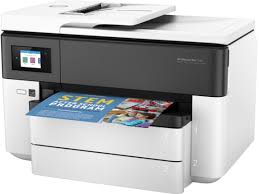
Looking for the HP OfficeJet Pro 7730 driver? This page lists HP’s official software for the whole HP OfficeJet Pro 7730 Wide Format All-in-One Printer series. For Windows 11; Windows 10, 8.1, 8, 7 (32-bit and 64-bit), the package most people need is the HP OfficeJet Pro 7730 Wide Format All-in-One Print and Scan Driver and Accessories. For a Mac, HP lists Install HP Easy Start.
HP OfficeJet Pro 7730
Recommended downloads
Windows 11; Windows 10, 8.1, 8, 7 (32-bit and 64-bit): HP OfficeJet Pro 7730 Wide Format All-in-One Print and Scan Driver and AccessoriesVersion 44.11.2778 · Released Sep 02, 2022 · 159.5 MB
HP lists its Universal Print Driver for this series on Windows 11; Windows 10, 8.1, 7 (32-bit and 64-bit). Get it from our HP Universal Print Driver page.
Linux
HP lists Linux support for this series through its HPLIP project, outside the regular download list: HP’s Linux printing page (HPLIP).
Installing the OfficeJet Pro 7730 Wide Format All-in-One driver
The newest firmware HP lists for the OfficeJet Pro 7730 Wide Format All-in-One is version 003.2615B, released Jun 04, 2026. HP’s notes for it: Security fixes and bug enhancements.
Keep the printer and the computer switched on until the update has finished.
Specifications that matter for setup
Connections
1 USB 2.0 with compatibility with USB 3.0 devices; 1 Ethernet; 1 Wireless 802.11b/g/n; 2 RJ-11 modem ports
Wi-Fi
Yes, built-in WiFi 802.11 b/g/n
Mobile printing
Chrome OS; HP app; Google Cloud Print™; Wi-Fi® Direct Printing; Mopria™ certified
Print languages
HP PCL3 GUI
Recommended monthly volume
250 to 1,500
Two-sided printing
Automatic (A4/Letter)
Paper handling and hardware details
Values below are HP’s published figures for the OfficeJet Pro 7730 Wide Format All-in-One; they help you check that this page matches your printer before you download anything.
Paper input tray
250-sheet input tray, 250-sheet plain paper tray
Output tray
75-sheet output tray
Media types
Plain Paper, HP Photo Papers, HP Matte Brochure or Professional Paper, HP Matte Presentation Paper, HP Glossy Brochure or Professional Paper, Other Matte Inkjet Papers, Other Glossy Inkjet Papers
Print quality (black)
Black: Up to 1200 x 1200 rendered dpi Color: Up to 4800 by 1200 optimized dpi on HP Advance Photo Paper 1200 by 1200 dpi input
Print quality (color)
Up to 4800 by 1200 optimized dpi on HP Advance Photo Paper 1200 by 1200 dpi input
Control panel
2.65" LCD (color) with IR touchscreen function
Warranty
One-year limited hardware warranty, 24-hour, 7 days a week Web support