hpdrivers.net is an independent website and is not affiliated with, endorsed by, or sponsored by HP Inc. Download links point to HP's official servers (ftp.hp.com). Learn more

HP ENVY Pro 6400 Drivers (ENVY Pro 6400 All-in-One Series)

Last checked against HP’s download list: November 4, 2026 · Checked by H&G

Looking for the HP ENVY Pro 6400 driver? This page lists HP’s official software for the whole HP ENVY Pro 6400 All-in-One Printer series. HP lists some packages for specific models in the series, so check that the package title includes your model. For Windows 7 (32-bit and 64-bit), the package most people need is the HP Easy Start Printer Setup Software (Internet connection required for driver installation). For Windows 11, HP lists the HP Easy Start Printer Setup Software (Internet connection required for driver installation). For a Mac, HP lists Install HP app to complete setup and support.
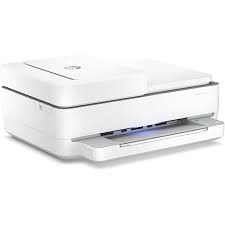
HP ENVY Pro 6455 printer
HP ENVY Pro 6455 (one model of this series)

Recommended downloads

Windows 7 (32-bit and 64-bit): HP Easy Start Printer Setup Software (Internet connection required for driver installation)Version 17.6.15 · Released Oct 14, 2026 · 26.5 MB · HP rating: Recommended
Download
Windows 11; Windows 10 (32-bit and 64-bit): HP Easy Start Printer Setup Software (Internet connection required for driver installation)Version 17.6.15 · Released Oct 14, 2026 · 26.5 MB
Download
macOS 26, 15, 14, 13, 12, 11: Install HP app to complete setup and supportReleased Aug 29, 2025 · HP rating: Recommended
Download

Files download directly from HP’s official servers. hpdrivers.net does not host or modify them.

Models covered by this page

HP’s download list for this series names these models. It covers the whole ENVY Pro 6400 All-in-One range, including model variants HP does not list by name:

  • HP ENVY Pro 6455
  • HP ENVY Pro 6452
  • HP ENVY Pro 6420
  • HP ENVY Pro 6422
  • HP ENVY Pro 6430
  • HP ENVY Pro 6458
  • HP ENVY Pro 6432
  • HP ENVY Pro 6475 All-In-One

All downloads for the ENVY Pro 6400 All-in-One

Windows

PackageWindowsVersionReleasedSize
HP ENVY Pro 6400 All-in-One Printer series Firmware Update
File detailsFile: ENP6400_2628B.exe
11
10, 7 (32-bit and 64-bit)
001.2628BSep 15, 202648.4 MBDownload

macOS

PackagemacOSVersionReleasedSize
HP ENVY Pro 6400 All-in-One Printer series Firmware Update
File detailsFile: ENP6400_2628B.dmg
26, 15, 14, 13, 12, 11, 10.13, 10.12001.2628BSep 15, 202651.1 MBDownload

Other HP software listed for this series

SoftwareSystemsVersion
HP Universal Scan – Full Feature Software and DriverWindows 11
Windows 10, 8.1, 7 (32-bit and 64-bit)
63.8.6459Download
HP Universal Scan – Basic Feature Software and DriverWindows 11
Windows 10, 8.1, 7 (32-bit and 64-bit)
63.8.6459Download
HP Universal Scan – Basic Feature Software and Driver (ARM 64)Windows 1163.8.6459Download
HP Universal Scan – Full Feature Software and Driver (ARM 64)Windows 1163.8.6459Download
HP Easy Start Printer Setup Software (Internet connection required for driver installation)Windows 11
Windows 10, 7 (32-bit and 64-bit)
17.6.15Download
ReadIRIS Advanced OCRWindows 11
Windows 10 (32-bit and 64-bit)
17.4.211Download
ReadIRIS Advanced PDFWindows 11
Windows 10 (64-bit)
27.0.577.2Download
Install HP app to complete setup and supportWindows 11
Windows 10 (64-bit)
–Download
HP Easy Start Printer Setup Software – Offline Use OnlyWindows 11
Windows 10, 7 (32-bit and 64-bit)
51.3.4843Download
Install HP Smart app to complete setup and supportWindows 10 (32-bit)–Download
Install HP app to complete setup and supportmacOS 26, 15, 14, 13, 12, 11–Download

Linux

HP lists Linux support for this series through its HPLIP project, outside the regular download list: HP’s Linux printing page (HPLIP).

Installing the ENVY Pro 6400 All-in-One driver

HP Easy Start needs an internet connection; it downloads the right software for your exact model during setup. For step-by-step instructions, see our guide to installing an HP printer driver.

Firmware update 001.2628B

The newest firmware HP lists for the ENVY Pro 6400 All-in-One is version 001.2628B, released Sep 15, 2026. HP’s notes for it: Customer experience improvements Key product improvements and bug fixes.

  • Keep the printer and the computer switched on until the update has finished.

Specifications that matter for setup

Connections1 Hi-Speed USB 2.0; 1 Wi-Fi 802.11ac (dual band)
Wi-FiYes, built-in Wi-Fi 802.11b/g/n
Mobile printingApple AirPrint™; Chrome OS; HP app; Mopria-certified
Print languagesHP PCL 3 GUI
FunctionsPrint, copy, scan, wireless, send mobile fax
Recommended monthly volume100 to 400
Two-sided printingAutomatic (standard)
ScannerFlatbed, ADF
Scan resolutionUp to 1200 dpi
Document feederStandard, 35 Sheets
Scan file formatsRAW, JPG, PDF
Ways to scanMobile, HP Scan Software, HP Smart

Ink supplies HP lists for the ENVY Pro 6400 All-in-One

HP’s specifications name these replacement supplies for the ENVY Pro 6400 All-in-One:

  • HP 67 Black Original Ink Cartridge (~120 pages

Paper handling and hardware details

Values below are HP’s published figures for the ENVY Pro 6400 All-in-One; they help you check that this page matches your printer before you download anything.

Paper input trayUp to 100 sheets input tray
Output tray25-sheet output tray
Paper sizesLetter, 4 x 6 in, 5 x 7 in, 8 x 10 in, No. 10 envelopes
Media typesPlain Paper; HP Photo Papers; HP Matte Brochure or Professional Paper; HP Matte Presentation Paper; HP Glossy Brochure or Professional Paper; Other Photo Inkjet Papers; Other Matte Inkjet Papers
Paper weightLetter: 16 to 24 lb; HP envelopes: 20 to 24 lb; HP cards: up to 53 lb; HP 4 x 6 inch photo paper: up to 80 lb
Print quality (black)Black: Up to 1200 x 1200 rendered dpi (when printing from a computer) Color: Up to 4800 x 1200 optimized dpi color (when printing from a computer on selected HP
Processor800 MHz
Power use0.10 Watts (Off) , 4.0 Watts (Ready) , 1.70 Watts (Sleep)
Size (W x D x H)17.02 x 14.21 x 6.8 in
Weight6.16 kg 13.58 lb
USB cableNo, please purchase (USB) cable separately
WarrantyOne-year limited hardware warranty; 24-hour, 7 days a week support

HP ENVY 6000 Drivers (ENVY 6000 All-in-One Series)

Last checked against HP’s download list: November 3, 2026 · Checked by H&G

Looking for the HP ENVY 6000 driver? This page lists HP’s official software for the whole HP ENVY 6000 All-in-One Printer series. HP lists some packages for specific models in the series, so check that the package title includes your model. For Windows 7 (64-bit), the package most people need is the HP Easy Start Printer Setup Software (Internet connection required for driver installation). For Windows 11, HP lists the HP Easy Start Printer Setup Software (Internet connection required for driver installation).

Recommended downloads

Windows 7 (64-bit): HP Easy Start Printer Setup Software (Internet connection required for driver installation)Version 17.6.15 · Released Oct 14, 2026 · 26.5 MB · HP rating: Recommended

Download

Windows 11, Windows 10 (64-bit): HP Easy Start Printer Setup Software (Internet connection required for driver installation)Version 17.6.15 · Released Oct 14, 2026 · 26.5 MB

Download

Files download directly from HP’s official servers. hpdrivers.net does not host or modify them.


Models covered by this page

HP’s download list for this series names these models. It covers the whole ENVY 6000 All-in-One range, including model variants HP does not list by name:

  • HP ENVY 6020
  • HP ENVY 6055 All-In-One
  • HP ENVY 6022
  • HP ENVY 6052 All-In-One
  • HP ENVY 6030 All-In-One
  • HP ENVY 6032 All-In-One
  • HP ENVY 6010
  • HP ENVY 6075 All-In-One

All downloads for the ENVY 6000 All-in-One

Windows

Package Windows Version Released Size
HP ENVY 6000 All-in-One Printer series Firmware Update

File details

File: EN6000_2628B.exe

11, 10, 7 001.2628B Sep 15, 2026 48.4 MB Download

macOS

Package macOS Version Released Size
HP ENVY 6000 All-in-One Printer series Firmware Update

File details

File: EN6000_2628B.dmg

26, 15, 13 001.2628B Sep 15, 2026 51.1 MB Download

Other HP software listed for this series

Software Systems Version
HP Universal Scan – Full Feature Software and Driver Windows 11, Windows 10, Windows 7 63.8.6459 Download
HP Universal Scan – Basic Feature Software and Driver Windows 11, Windows 10, Windows 7 63.8.6459 Download
HP Universal Scan – Basic Feature Software and Driver (ARM 64) Windows 11 63.8.6459 Download
HP Universal Scan – Full Feature Software and Driver (ARM 64) Windows 11 63.8.6459 Download
HP Easy Start Printer Setup Software (Internet connection required for driver installation) Windows 11, Windows 10, Windows 7 17.6.15 Download
ReadIRIS Advanced OCR Windows 11, Windows 10 17.4.211 Download
ReadIRIS Advanced PDF Windows 11, Windows 10 27.0.577.2 Download
HP Easy Start Printer Setup Software – Offline Use Only Windows 11, Windows 10, Windows 7 51.3.4843 Download

Linux

HP lists Linux support for this series through its HPLIP project, outside the regular download list: HP’s Linux printing page (HPLIP).

Installing the ENVY 6000 All-in-One driver

HP Easy Start needs an internet connection; it downloads the right software for your exact model during setup. For step-by-step instructions, see our guide to installing an HP printer driver.

Firmware update 001.2628B

The newest firmware HP lists for the ENVY 6000 All-in-One is version 001.2628B, released Sep 15, 2026. HP’s notes for it: Customer experience improvements Key product improvements and bug fixes.

  • Keep the printer and the computer switched on until the update has finished.

Specifications that matter for setup

Connections 1 Hi-Speed USB 2.0; 1 Wi-Fi 802.11ac (dual band)
Wi-Fi Yes, built-in Wi-Fi 802.11b/g/n
Mobile printing Apple AirPrint™; Chrome OS; HP app; Mopria-certified
Print languages HP PCL 3 GUI
Functions Print, Copy, Scan, Photo
Recommended monthly volume 100 to 400
Two-sided printing Automatic (standard)
Scanner Flatbed
Scan resolution Up to 1200 dpi
Scan file formats RAW, JPG, PDF
Ways to scan Mobile, HP Scan Software, HP Smart

Ink supplies HP lists for the ENVY 6000 All-in-One

HP’s specifications name these replacement supplies for the ENVY 6000 All-in-One:

  • HP 67 Black Original Ink Cartridge (~120 pages

Paper handling and hardware details

Values below are HP’s published figures for the ENVY 6000 All-in-One; they help you check that this page matches your printer before you download anything.

Paper input tray Up to 100 sheets input tray
Output tray 25-sheet output tray
Paper sizes Letter, 4 x 6 in, 5 x 7 in, 8 x 10 in, No. 10 envelopes
Media types Plain Paper; HP Photo Papers; HP Matte Brochure or Professional Paper; HP Matte Presentation Paper; HP Glossy Brochure or Professional Paper; Other Photo Inkjet Papers; Other Matte Inkjet Papers
Paper weight Letter: 16 to 24 lb; HP envelopes: 20 to 24 lb; HP cards: up to 53 lb; HP 4 x 6 inch photo paper: up to 80 lb
Print quality (black) Black: Up to 1200 x 1200 rendered dpi (when printing from a computer) Color: Up to 4800 x 1200 optimized dpi color (when printing from a computer on selected HP
Processor 800 MHz
Power use 0.10 Watts (Off) , 4.0 Watts (Ready) , 1.70 Watts (Sleep)
Size (W x D x H) 17.02 x 14.21 x 5.2 in
Weight 5.22 kg 11.51 lb
USB cable No, please purchase (USB) cable separately
Warranty One-year limited hardware warranty; 24-hour, 7 days a week support

Hp Replacing Ink Cartridges

HP DeskJet, ENVY 5000 Printers – Replacing Ink Cartridges – Drivers – Firmware

This document is for HP DeskJet Ink Advantage 5075, 5076, 5078, 5085, 5088 and ENVY 5010, 5012, 5014, 5020, 5030, 5032, 5034, 5052, and 5055 All-in-One printers.

This document contains steps for replacing the ink cartridges.

Replace the ink cartridges

  • Turn on the printer.
  • Load plain white paper into the input tray.
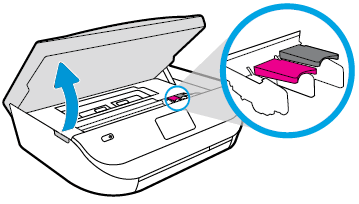
  • Gently grasp the handles on either side of the printer, and then raise the ink cartridge access door until it locks into place. The carriage moves slightly to the left.

Opening the ink cartridge access door

Opening the ink cartridge access door
  • Wait until the carriage is idle and silent before you continue
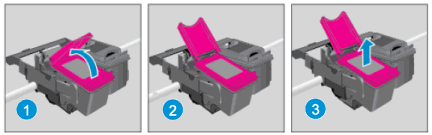
  • Lift up the lid on the ink cartridge slot, and then pull up on the ink cartridge to remove it from the slot.

Removing the ink cartridge

1.Lift the lid. 2.Gently push the lid back. 3.Pull up on the ink cartridge
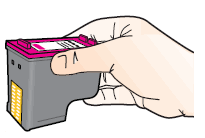
  • Remove the new ink cartridge from its package. Be careful to only touch the black plastic on the ink cartridge.
Holding the ink cartridge by its sides
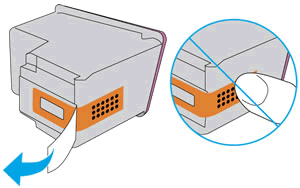
  • Remove the plastic tape from the ink cartridge.

NOTE : Do not touch the copper-colored contacts or the ink nozzles. Do not replace the protective tape on the contacts. Handling these parts can result in clogs, ink failure, and bad electrical connections.

Removing the plastic tape
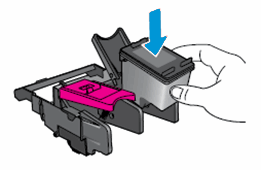
  • With the nozzles toward the printer, insert the ink cartridge into its slot until it snaps into place.

Note:Install the color ink cartridge on the left and the black ink cartridge on the right.

Inserting the ink cartridge
  • Close the lid on the ink cartridge slot to secure the ink cartridge into place.
  • Repeat these steps to install the other ink cartridge, if necessary.
  • Close the ink cartridge access door.

After you install new ink cartridges, the printer automatically prints an alignment page.

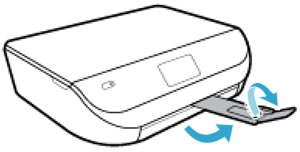
  • Pull out the output tray, and then lift the output tray extender.
Pulling out the output tray and lifting the output tray extender
  • Wait for the alignment page to fully eject from the printer.
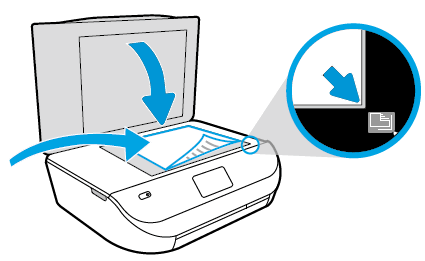
  • After the alignment page prints, lift the scanner lid, place the alignment page with the print side down on the scanner glass. Position it according to the engraved guides around the glass.
Placing the alignment page on the scanner glass
  • Close the scanner lid, and then touch OK on the printer control panel. The printer aligns the ink cartridges.
  • After the printer aligns the ink cartridges, touch OK on the control panel.

Download HP ENVY 5000 All-in-One Print and Scan Driver and Accessories

Fix and enhancements:

Updated end user license agreement and data collection statement. Updated localization string for Korean language.

Relase Details

Version: 44.11.2778
Release date: Sep 1, 2022
File name: Full_Webpack-44.11.2778-EN5000_Full_Webpack.exe

Fix and enhancements:

Printer setup over BLE (Bluetooth) experience improvement. Security improvements.

Operating Systems

Microsoft Windows 10 (32-bit), Microsoft Windows 10 (64-bit), Microsoft Windows 8.1 (32-bit), Microsoft Windows 8.1 (64-bit), Microsoft Windows 8 (32-bit), Microsoft Windows 8 (64-bit), Microsoft Windows 7 (32-bit), Microsoft Windows 7 (64-bit), Microsoft Windows Vista (32-bit), Microsoft Windows XP (32-bit)

Download

File Size: 133.91 MB

HP DeskJet Ink Advantage 5000 All-in-One Printer series Firmware Update

This software tool will help you update your printer to the latest firmware. Please refer to Fixes and enhancements for more detail about the firmware update.

Version: 003.2421A
Release date: Jul 9, 2024
File name: DJ5000_2421A.exe

Fix and enhancements:

Printer setup over BLE (Bluetooth) experience improvement. Security improvements.

Operating Systems

Microsoft Windows 10 (32-bit), Microsoft Windows 10 (64-bit), Microsoft Windows 8.1 (32-bit), Microsoft Windows 8.1 (64-bit), Microsoft Windows 8 (32-bit), Microsoft Windows 8 (64-bit), Microsoft Windows 7 (32-bit), Microsoft Windows 7 (64-bit), Microsoft Windows Vista (32-bit), Microsoft Windows XP (32-bit)

Download

File Size: 42.21 MB