
hpdrivers.net is an independent website and is not affiliated with, endorsed by, or sponsored by HP Inc. Download links point to HP's official servers (ftp.hp.com). Read the full disclaimer

HP LaserJet Managed E60055 Drivers (E60055 Series)

Last checked against HP’s download list: November 1, 2026 · Checked by H&G

Looking for the HP LaserJet Managed E60055 driver? This page lists HP’s official software for the whole HP LaserJet Managed E60055 series. For Windows 11, Windows 10 (64-bit) and Windows 7 (64-bit), the package most people need is the HP LaserJet Managed E60055/E60065/E60075 Printer Full Software Solution. For a Mac, HP lists Install HP Easy Start.
Advertisement
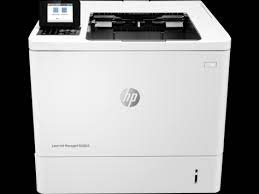
HP LaserJet Managed E60055 printer
HP LaserJet Managed E60055

Recommended downloads

Windows 11, Windows 10 (64-bit), Windows 7 (64-bit): HP LaserJet Managed E60055/E60065/E60075 Printer Full Software SolutionVersion 43.5.2519 · Released Nov 23, 2021 · 158.8 MB · HP rating: Recommended

Download

macOS 26, macOS 15: Install HP Easy StartVersion 2.16.7.260722 · Released Aug 14, 2026 · 6.3 MB

Download

Files download directly from HP’s official servers. hpdrivers.net does not host or modify them.

Advertisement

Which Windows package should you choose?

HP publishes 4 kinds of Windows package for the LaserJet Managed E60055:

  • Driver files (no installer) (v43.5.2519, Nov 23, 2021): bare driver files for Windows’ Add Printer wizard.
  • Full software solution (v43.5.2519, Nov 23, 2021, 158.8 MB): driver plus HP’s setup wizard and tools.
  • HP Universal Print Driver (v8.2.0.26778, Sep 26, 2026): HP’s shared driver for many models, also listed for this series.
  • Firmware update (v2510156_069212, Aug 29, 2026): updates the printer itself, not your PC.

All downloads for the LaserJet Managed E60055

Windows

Package / Windows
Version
Released
Size
HP LaserJet Managed E60055/E60065/E60075 PCL-6 V4 Printer Driver (no installer)

Windows: 11, 10
File details

File: V4_DriveronlyWebpack-43.5.2519-LJE60055-E60075_V4_DriveronlyWebpack.exe

43.5.2519
Nov 23, 2021
9.6 MB
HP LaserJet Managed E60055/E60065/E60075 Printer Full Software Solution

Windows: 11, 10, 7
File details

File: Full_Webpack-43.5.2519-LJE60055-E60075_Full_Webpack.exe

43.5.2519
Nov 23, 2021
158.8 MB
HP LaserJet Managed E60055/E60065/E60075 PCL 6 Printer Driver (no installer)

Windows: 11, 10, 7
File details

File: V3_DriveronlyWebpack-43.5.2519-LJE60055-E60075_V3_DriveronlyWebpack.exe

43.5.2519
Nov 23, 2021
13.7 MB
FutureSmart Bundle Version 5.10.0.7 – HP LaserJet Managed E60055/65/75 Series Printer FIRMWARE

Windows: 11, 10, 7
File details

File: E60055_65_75_fs5.10.0.7_fw_2510156_069212.zip

2510156_069212
Aug 29, 2026
104.0 MB
FutureSmart Bundle Version 4.12.0.1 – HP LaserJet Managed E60055/65/75 Series Printer FIRMWARE

Windows: 11, 10, 7
File details

File: E60055_65_75_fs4.12.0.1_fw_2411226_066578.zip

2411226_066578
Feb 02, 2023
100.3 MB

macOS

Package / macOS
Version
Released
Size
FutureSmart Bundle Version 5.10.0.7 – HP LaserJet Managed E60055/65/75 Series Printer FIRMWARE

macOS: 26, 15, 13
File details

File: E60055_65_75_fs5.10.0.7_fw_2510156_069212.zip

2510156_069212
Aug 29, 2026
104.0 MB
FutureSmart Bundle Version 4.12.0.1 – HP LaserJet Managed E60055/65/75 Series Printer FIRMWARE

macOS: 26, 15, 13
File details

File: E60055_65_75_fs4.12.0.1_fw_2411226_066578.zip

2411226_066578
Feb 02, 2023
100.3 MB

Other HP software listed for this series

Software / Systems
Version
Size
HP Easy Start Printer Setup Software (Internet connection required for driver installation)
Systems: Windows 11, Windows 10, Windows 7
17.6.15
26.5 MB
HP Easy Admin
Systems: macOS 26, macOS 15, macOS 13
2.16.0.251010
4.9 MB
Install HP Easy Start
Systems: macOS 26, macOS 15
2.16.7.260722
6.3 MB

HP Universal Print Driver

HP lists its Universal Print Driver for this series on Windows 7, Windows 11 and Windows 10. Get it from our HP Universal Print Driver page.

Linux

HP lists Linux support for this series through its HPLIP project, outside the regular download list: HP’s Linux printing page (HPLIP).

Installing the LaserJet Managed E60055 driver

The driver files without an installer are added through Windows’ Add Printer wizard (Have Disk). For step-by-step instructions, see our guide to installing an HP printer driver.

Firmware update 2411226_066578

The newest firmware HP lists for the LaserJet Managed E60055 is version 2411226_066578, released Feb 02, 2023.

  • Keep the printer and the computer switched on until the update has finished.

Specifications that matter for setup

Connections
1 Hi-Speed Device USB 2.0; 2 Hi-Speed USB 2.0 Host; 1 Gigabit/Fast Ethernet 10/100/1000 Base-TX network; Hardware Integration Pocket
Wi-Fi
Optional, enabled with purchase of HP Jetdirect 2900nw Print Server J8031A or HP Jetdirect 3000w NFC/Wireless Accessory J8030A
Mobile printing
HP ePrint; Apple AirPrint™; Google Cloud Print™
Print languages
HP PCL 6, HP PCL 5 (HP PCL 5 driver available from the Web only), HP postscript level 3 emulation, native PDF printing (v 1.7), Apple AirPrint™
Print speed (black)
Normal: Up to 55 ppm
Recommended monthly volume
5000 to 30,000
Two-sided printing
Automatic (standard)

Common setup problems

  • You’d rather not install software on a Mac. HP’s specifications list AirPrint support, so macOS can usually add the printer from System Settings without extra software.

Leave a Comment