
hpdrivers.net is an independent website and is not affiliated with, endorsed by, or sponsored by HP Inc. Download links point to HP's official servers (ftp.hp.com). Learn more

HP Officejet Pro 8600 Plus Driver

HP Officejet Pro 8600 Plus e-All-in-One Printer – N911g Driver for Windows 11/10/8/8.1/7/Vista/Xp 64bit/32bit – Technical Information and Product Review

Download HP Officejet Pro 8600 Plus/Premium e-All-in-One Printer series – N911a-n Full Feature Software and Driver

HP Officejet Pro 8600 Plus e-All-in-One Printer - N911g
HP Officejet Pro 8600 Plus e-All-in-One Printer – N911g

Technical Information and Product Review for HP Officejet Pro 8600 Plus Printer

HP Officejet Pro 8600 is a compact all-in-one printer. In professional mode, you can print up to 20 pages per minute. However, in general office mode, you can print 35 pages per minute. But these data may vary depending on page density and the configuration of your computer.

Let’s talk a little about the print quality of the HP Officejet Pro 8600 printer. You can print up to 1200 x 600 dpi on black pages. Color print quality is slightly better. You can print up to 4800 x 1200 optimized dpi on HP’s advanced photo paper.

Recommended monthly page volume is between 250 and 1250 pages. It also has a 10.9cm touch screen CGD Color Graphic Display. Moreover, a 360Mhz processor is used in this printer. It also has a 250-sheet input tray. Moreover, the output tray has a capacity of 150 sheets.

Highlights of the HP Officejet Pro 8600 printer; Supports automatic double-sided printing. It also supports borderless printing. Moreover, it has HP ePrint capability. It has an external memory card slot (Secure Digital (SD), Memory Stick Duo). It also has 128 MB internal memory.

HP Officejet Pro 8600 Plus e-All-in-One Display Shipper – N911g

Details

The full solution software includes everything you need to install and use your HP printer. This collection of software includes the complete set of drivers, installer and optional software.

Version: 28.1.1312_1
Release date: May 18, 2022
File name: Full_Webpack-1312_1-OJ8600_Full_Webpack.exe

Compatibility

Microsoft Windows 11, Microsoft Windows 10 (32-bit) (64-bit), Microsoft Windows 8 (32-bit) (64-bit), Microsoft Windows Vista(32-bit)(64-bit), Microsoft Windows 8.1 (32-bit) (64-bit), Microsoft Windows 7 (32-bit) (64-bit), Microsoft Windows XP

Download

File Size : 81.35Mb

Fix and enhancements: Repackaged without Optical Character Recognition (OCR) Functionality.

Installation instructions

Firstly, do not connect the USB cable until prompted by the installer. After that, If you are connecting to a network, make sure the network cable is connected before running the installer. Moreover, close any software programs running on your computer. After that, turn on the printer and click on the Download button on this page. Than, click the downloaded file. In this way, the files will be extracted and the installation process will automatically start. Than, follow the on-screen instructions to proceed with and complete the installation. Additionally, to install at a later date, select Save on step 4 and select a location on your hard disk. similarly, when ready to install, locate and double-click the file. This will automatically extract and start the installation process. Finally, follow the on-screen instructions to proceed with the installation.

All in all, the HP Officejet Pro 8600 printer is suitable for your home and small business. We can say that it is a price performance product. It became one of HP’s best-selling printers. There are some criticisms, but overall I find it successful.

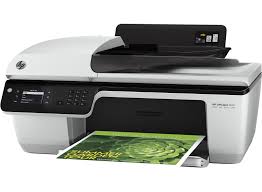
HP Officejet 2621 All-in-One Printer Driver Download

Find HP Officejet 2621 All-in-One driver downloads, package details and supported operating systems for

HP Officejet 2621 All-in-One Printer

HP Officejet 2621 All-in-One Printer printer

HP Officejet 2621 All-in-One Printer Driver for Windows 11/10/8/7 64bit/32bit

Specifications

Product number
5385223
Recommended monthly page volume
150 to 400
Paper handling input, standard
60-sheet input tray
Print quality black (best)
Black: Up to 600 x 600 rendered dpi Color: Up to 4800 x 1200 optimised dpi colour (when printing from a computer on selected HP photo papers and 1200 input dpi)
Functions
Print, copy, scan, fax
Duty cycle (monthly, letter)
Up to 1000 pages
Connectivity, standard
1 Hi-Speed USB 2.0

HP Officejet 2621 All-in-One driver download for Windows

DescriptionVersionRelease dateFile sizeDownload

Recommended software

HP Officejet 2620 All-in-One Printer series Full Feature Software and Drivers Recommended
32.4.118
Dec 6, 2021
110.5 MB
See full detailsWindows 11; Windows 10, 7 (64-bit)
Type:
Driver-Product Installation Software
Version:
32.4.118
Operating systems:
Windows 11; Windows 10, 7 (64-bit)
Release date:
Dec 6, 2021
File name:
Full_Webpack-118-OJ2620_Full_Webpack.exe
(110.5 MB)

Package notes

Description:

The full solution software includes everything you need to install and use your HP printer. This collection of software includes the complete set of drivers, installer and optional software.

Alternative packages

HP Officejet 2620 All-in-One Printer series Basic Driver
32.4.118
Dec 6, 2021
38.2 MB
See full detailsWindows 11; Windows 10, 7 (64-bit)
Type:
Driver-Product Installation Software
Version:
32.4.118
Operating systems:
Windows 11; Windows 10, 7 (64-bit)
Release date:
Dec 6, 2021
File name:
Basic_Webpack_x64-118-OJ2620_Basicx64_Webpack.exe
(38.2 MB)

Package notes

Description:

This basic feature software solution is a driver-only software solution intended for customers who only want a basic driver to use with their HP printer.

Firmware and utilities

HP Officejet 2620 All-in-One Printer series Firmware Update
1830A
Aug 9, 2018
7.7 MB
See full detailsWindows 10, 7 (64-bit)
Type:
Firmware
Version:
1830A
Operating systems:
Windows 10, 7 (64-bit)
Release date:
Aug 9, 2018
File name:
OJ2620_R1830A.exe
(7.7 MB)

Package notes

Description:

This software tool will help you update your printer to the latest firmware. Please refer to Enhancements/Fixes for more detail about the firmware update.

HP Officejet 2621 All-in-One driver download for macOS

DescriptionVersionRelease dateFile sizeDownload

Recommended software

Install HP Easy Start
2.16.7.260722
Aug 13, 2026
6.3 MB
See full detailsmacOS 15, 26
Type:
Driver
Version:
2.16.7.260722
Operating systems:
macOS 15, 26
Release date:
Aug 13, 2026
File name:
HP_Easy_Start.app.zip
(6.3 MB)

Package notes

Description:

HP Easy Start is the new way to set up your HP printer and prepare your Mac for printing. HP Easy Start will locate and install the latest software for your printer and then guide you through printer setup.

HP Officejet 2621 All-in-One Linux Support

DescriptionVersionRelease dateFile sizeDownload

Recommended software

HP Printers – Driver Support for Linux OS
N/A
Nov 7, 2016
N/A
See full detailsLinux
Type:
Driver-Product Installation Software
Version:
N/A
Operating systems:
Linux
Release date:
Nov 7, 2016
File name:
HP support instructions
(N/A)

Package notes

Description:

For Linux downloads, HP recommends another website. If you need to download Linux drivers, you will be directed to a website that is outside HP Customer Support.

HP Officejet 2621 All-in-One installation and support

Use these resources after choosing the package that matches your operating system.

Driver assistance

Installation instructions

Common setup problems

Official resources

Package versions are listed in the download sections above. Check the operating-system list before downloading.

HP Officejet 2620 Driver

HP Officejet 2620 All-in-One Printer Driver Download

Find compatible drivers, software, package details, and operating system support for the HP Officejet 2620 All-in-One.

HP Officejet 2620 All-in-One Printer printer

HP Officejet 2620 All-in-One Printer Driver for Windows 11/10/8/7/Vista/Xp 64bit/32bit

Specifications

Recommended monthly page volume
150 to 400
Paper handling input, standard
60-sheet input tray
Print quality black (best)
Black: Up to 600 x 600 rendered dpi Color: Up to 4800 x 1200 optimised dpi colour (when printing from a computer on selected HP photo papers and 1200 input dpi)
Functions
Print, copy, scan, fax
Duty cycle (monthly, letter)
Up to 1000 pages
Connectivity, standard
1 Hi-Speed USB 2.0
Source verification: The model and driver information on this page was reviewed against archived HP source records on .

You can compare the MD5 value in a package's details with the downloaded file and the recorded archive value. A match checks file consistency only; it does not by itself guarantee security or current HP support.

HP Officejet 2620 All-in-One driver download for Windows

DescriptionVersionRelease dateFile sizeDownload

Recommended software

HP Officejet 2620 All-in-One Printer series Full Feature Software and Drivers Recommended
32.4.118
Dec 6, 2021
110.5 MB
See full detailsWindows 11; Windows 10, 7 (64-bit)
Type:
Driver-Product Installation Software
Version:
32.4.118
Operating systems:
Windows 11; Windows 10, 7 (64-bit)
Release date:
Dec 6, 2021
File name:
Full_Webpack-118-OJ2620_Full_Webpack.exe
(110.5 MB)
MD5:
2c22d4b956833721b715787897d163b9
Description:

The full solution software includes everything you need to install and use your HP printer. This collection of software includes the complete set of drivers, installer and optional software.

Alternative packages

HP Officejet 2620 All-in-One Printer series Basic Driver
32.4.118
Dec 6, 2021
38.2 MB
See full detailsWindows 11; Windows 10, 7 (64-bit)
Type:
Driver-Product Installation Software
Version:
32.4.118
Operating systems:
Windows 11; Windows 10, 7 (64-bit)
Release date:
Dec 6, 2021
File name:
Basic_Webpack_x64-118-OJ2620_Basicx64_Webpack.exe
(38.2 MB)
MD5:
067afb70c38ddcfbcfebdd0b0c609b8f
Description:

This basic feature software solution is a driver-only software solution intended for customers who only want a basic driver to use with their HP printer.

Firmware and utilities

HP Officejet 2620 All-in-One Printer series Firmware Update
1830A
Aug 9, 2018
7.7 MB
See full detailsWindows 10, 7 (64-bit)
Type:
Firmware
Version:
1830A
Operating systems:
Windows 10, 7 (64-bit)
Release date:
Aug 9, 2018
File name:
OJ2620_R1830A.exe
(7.7 MB)
MD5:
a73da9527f35fad239909848dc0a391f
Description:

This software tool will help you update your printer to the latest firmware. Please refer to Enhancements/Fixes for more detail about the firmware update.

HP Officejet 2620 All-in-One driver download for macOS

DescriptionVersionRelease dateFile sizeDownload

Recommended software

Install HP Easy Start
2.16.7.260722
Aug 13, 2026
6.3 MB
See full detailsmacOS 15, 26
Type:
Driver
Version:
2.16.7.260722
Operating systems:
macOS 15, 26
Release date:
Aug 13, 2026
File name:
HP_Easy_Start.app.zip
(6.3 MB)
MD5:
19c1a5f786f5f93f9f778ad71ee444a3
Description:

HP Easy Start is the new way to set up your HP printer and prepare your Mac for printing. HP Easy Start will locate and install the latest software for your printer and then guide you through printer setup.

HP Officejet 2620 All-in-One Linux Support

DescriptionVersionRelease dateFile sizeDownload

Recommended software

HP Printers – Driver Support for Linux OS
N/A
Nov 7, 2016
N/A
See full detailsLinux
Type:
Driver-Product Installation Software
Version:
N/A
Operating systems:
Linux
Release date:
Nov 7, 2016
File name:
HP support instructions
(N/A)
Description:

For Linux downloads, HP recommends another website. If you need to download Linux drivers, you will be directed to a website that is outside HP Customer Support.

HP Officejet 2620 All-in-One installation and support

Use these resources after choosing the package that matches your operating system.

Driver assistance

Installation instructions

Common setup problems

Official resources

Package versions are listed in the download sections above. Check the operating-system list before downloading.