
Find HP M42523n driver downloads, package details and supported operating systems for
HP LaserJet MFP M42523n Printer
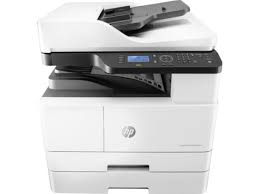
Tray 1: 100 sheet, Tray 2: 250 sheet.
Specifications
- Product number
- 31072304
- Recommended monthly page volume
- 2000 to 5000 [5] HP recommends that the number of pages per month of imaged output be within the stated range for optimum device performance, based on factors including supplies replacement intervals and device life over an extended warranty period.
- Paper handling input, standard
- Tray 1: 100 sheet, Tray 2: 250 sheet
- Print quality black (best)
- Black: Up to 1200 x 1200 dpi Color:
- Functions
- Print, Copy, Scan
- Connectivity, standard
- Hi-Speed USB 2.0 Device, Ethernet 10/100 Base TX
HP M42523n driver download for Windows
Recommended software
See full detailsWindows 11; Windows 10, 7 (64-bit)
- Type:
- Driver-Product Installation Software
- Version:
- 1.06
- Operating systems:
- Windows 11; Windows 10, 7 (64-bit)
- Release date:
- May 30, 2023
- File name:
- HP_LaserJet_MFP_M42523-M42625_Print_Scan_Drivers_1.06.exe
(29.3 MB)
Package notes
The driver installer file automatically installs the print and scan driver for your printer.
Alternative packages
See full detailsWindows 11; Windows 10, 7 (64-bit)
- Type:
- Driver-Product Installation Software
- Version:
- 1.06
- Operating systems:
- Windows 11; Windows 10, 7 (64-bit)
- Release date:
- May 30, 2023
- File name:
- HP_LaserJet_MFP_M42523-M42625_Full_Software_and_Drivers_1.06.exe
(60.5 MB)
Package notes
The full solution software includes everything you need to install your HP printer.
Setup options
See full detailsWindows 11; Windows 10, 7 (64-bit)
- Type:
- Driver-Product Installation Software
- Version:
- 1.06
- Operating systems:
- Windows 11; Windows 10, 7 (64-bit)
- Release date:
- May 30, 2023
- File name:
- HP_LaserJet_MFP_M42523-M42625_Driver.exe
(9.8 MB)
Package notes
This solution provides only the print driver without an installer. To install the print driver use the Add Printer Wizard.
Firmware and utilities
See full detailsWindows 11; Windows 10, 7 (64-bit)
- Type:
- Firmware
- Version:
- V3.82.01.21
- Operating systems:
- Windows 11; Windows 10, 7 (64-bit)
- Release date:
- Mar 29, 2026
- File name:
- M440_V3.82.01.21_DS.zip
(51.8 MB)
Package notes
HP recommends downloading and reviewing the Release Note file before installing the firmware file
More firmware and utilities
See full detailsWindows 10 (64-bit)
- Type:
- Utility
- Version:
- 1.0.0.0
- Operating systems:
- Windows 10 (64-bit)
- Release date:
- Oct 20, 2021
- File name:
- HPSHAppsRegistration.Setup.exe
(1.3 MB)
Package notes
HP System Health Apps Registration connects eligible HP printers to HP Device Health web service. HP Device Health is built upon HP's trusted Smart Device Services (SDS) platform, a cloud-based technology that accelerates the resolution of a device problem (e.g. paper jam, fuser malfunction).
HP M42523n Linux Support
Recommended software
See full detailsLinux
- Type:
- Driver-Product Installation Software
- Version:
- V1.00.39.15:00.23
- Operating systems:
- Linux
- Release date:
- Apr 15, 2021
- File name:
- ULDLINUX_HewlettPackard_V1.00.39.15_00.23.zip
(9.7 MB)
Package notes
This is a driver-only software solution intended for users who want print and scan driver to use with their HP device.
M42523n at a glance
HP’s user guide for the M42523n (edition December 2019) lists the printer under product number 7ZB25A. It has USB 2.0, wired Ethernet, Tray 2 and a multi-purpose tray, and it can accept an optional second tray and a document feeder.
The M42523n does not print on both sides by itself. Duplex printing means turning the pages over yourself, and HP lists that manual mode for Windows and Linux only. HP’s own shortcut for this printer is www.hp.com/support/ljM42523MFP. A newer HP generation with the same feature table, the M42623dn, carries different part numbers; its page is HP LaserJet MFP M42623dn.
Toner and imaging drum for the M42523n
Order W1334A for the standard-capacity black toner or W1334X for the high-capacity one. The imaging drum is CF257A. These W1334 codes belong to the M42523 generation; the later M42623 uses W1336 codes instead, so do not assume a cartridge from the newer generation will be listed for yours. HP recommends genuine toner only and advises buying supplies in the country where the printer was sold.
Scanning from the control panel
Pressing Scan on the printer lets you send a page to four kinds of destination: a computer that has HP’s scan software and the Scan To feature set up, an email address, an FTP server or an SMB network folder. The Scan To button only works once the HP Scan software is installed on the PC, which is part of the full software package.
- File format: multi-page PDF, single-page PDF, multi-page TIFF, single-page TIFF or JPEG. JPEG is not offered when the colour mode is mono.
- Colour mode: colour at 24 bits per pixel, grey at 8 bits, or mono at 1 bit.
- Two-sided originals: one side, both sides, or both sides rotated.
- Other settings: darkness, resolution, original size and original type.
HP adds that the best resolution you can reach depends on the computer’s speed, free disk space, memory and the size of the image, so very high resolutions may not be possible on a small PC.
Network settings and the embedded web server
On the Ethernet models the network menu sits under Menu on the control panel. It offers TCP/IP for IPv4 and IPv6, the Ethernet speed, and a Protocol Management group with HTTP, WINS, SNMP, UPnP and mDNS switches. A Network Configuration option prints out the current connection details, and Clear Settings returns everything to the defaults. Several of these changes only take effect after you switch the printer off and on again, which HP notes next to each option.
Because the printer is on the network it also has an embedded web server. Type the printer’s IP address into a browser on the same network and you can read and change many of the same settings from your desk. If you are not sure about a protocol option, HP’s advice is to leave it alone or ask the network administrator.
Maintenance parts and their average life
HP’s guide lists the parts that wear out on this printer and the page counts after which they should be replaced. The warranty does not cover replacing them once the stated yield has been reached, and the figures depend on the operating system, application, connection, paper and job complexity.
| Part | Average yield |
|---|---|
| Transfer roller | about 100,000 pages |
| Fuser unit | about 100,000 pages |
| Pick-up roller (Tray 1, Tray 2, Tray 3) | about 100,000 pages each |
| Friction pad (Tray 1, Tray 2, Tray 3) | about 50,000 pages each |
| Document feeder roller | about 100,000 pages |
| Document feeder rubber pad | about 50,000 pages |
HP M42523n installation and support
Use these resources after choosing the package that matches your operating system.
Driver assistance
Installation instructions
Common setup problems
Official resources
Package versions are listed in the download sections above. Check the operating-system list before downloading.