
Find HP M42623dn driver downloads, package details and supported operating systems for
HP LaserJet MFP M42623dn Printer
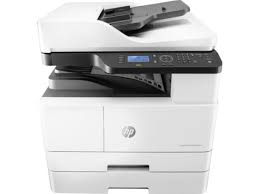
Tray 1: 100 sheet, Tray 2: 250 sheet.
Specifications
- Product number
- 31072335
- Recommended monthly page volume
- 2000 to 5000 [5] HP recommends that the number of pages per month of imaged output be within the stated range for optimum device performance, based on factors including supplies replacement intervals and device life over an extended warranty period.
- Paper handling input, standard
- Tray 1: 100 sheet, Tray 2: 250 sheet
- Print quality black (best)
- Black: Up to 1200 x 1200 dpi Color:
- Functions
- Print, Copy, Scan
- Connectivity, standard
- Hi-Speed USB 2.0 Device, Ethernet 10/100 Base TX
HP M42623dn driver download for Windows
Recommended software
See full detailsWindows 11; Windows 10, 7 (64-bit)
- Type:
- Driver-Product Installation Software
- Version:
- 1.06
- Operating systems:
- Windows 11; Windows 10, 7 (64-bit)
- Release date:
- May 30, 2023
- File name:
- HP_LaserJet_MFP_M42523-M42625_Print_Scan_Drivers_1.06.exe
(29.3 MB)
Package notes
The driver installer file automatically installs the print and scan driver for your printer.
Alternative packages
See full detailsWindows 11; Windows 10, 7 (64-bit)
- Type:
- Driver-Product Installation Software
- Version:
- 1.06
- Operating systems:
- Windows 11; Windows 10, 7 (64-bit)
- Release date:
- May 30, 2023
- File name:
- HP_LaserJet_MFP_M42523-M42625_Full_Software_and_Drivers_1.06.exe
(60.5 MB)
Package notes
The full solution software includes everything you need to install your HP printer.
Setup options
See full detailsWindows 11; Windows 10, 7 (64-bit)
- Type:
- Driver-Product Installation Software
- Version:
- 1.06
- Operating systems:
- Windows 11; Windows 10, 7 (64-bit)
- Release date:
- May 30, 2023
- File name:
- HP_LaserJet_MFP_M42523-M42625_Driver.exe
(9.8 MB)
Package notes
This solution provides only the print driver without an installer. To install the print driver use the Add Printer Wizard.
Firmware and utilities
See full detailsWindows 11; Windows 10, 7 (64-bit)
- Type:
- Firmware
- Version:
- V3.82.01.21
- Operating systems:
- Windows 11; Windows 10, 7 (64-bit)
- Release date:
- Mar 29, 2026
- File name:
- M440_V3.82.01.21_DS.zip
(51.8 MB)
Package notes
HP recommends downloading and reviewing the Release Note file before installing the firmware file
More firmware and utilities
See full detailsWindows 10 (64-bit)
- Type:
- Utility
- Version:
- 1.0.0.0
- Operating systems:
- Windows 10 (64-bit)
- Release date:
- Oct 20, 2021
- File name:
- HPSHAppsRegistration.Setup.exe
(1.3 MB)
Package notes
HP System Health Apps Registration connects eligible HP printers to HP Device Health web service. HP Device Health is built upon HP's trusted Smart Device Services (SDS) platform, a cloud-based technology that accelerates the resolution of a device problem (e.g. paper jam, fuser malfunction).
HP M42623dn Linux Support
Recommended software
See full detailsLinux
- Type:
- Driver-Product Installation Software
- Version:
- V1.00.39.15:00.23
- Operating systems:
- Linux
- Release date:
- Apr 15, 2021
- File name:
- ULDLINUX_HewlettPackard_V1.00.39.15_00.23.zip
(9.7 MB)
Package notes
This is a driver-only software solution intended for users who want print and scan driver to use with their HP device.
M42623dn at a glance
HP lists the M42623dn under product number 8AF50A. According to HP’s user guide (edition February 2020) it has Hi-Speed USB 2.0, a 10/100 Ethernet port, a paper cassette (Tray 2) and a multi-purpose Tray 1, and it can be extended with an optional second cassette (Tray 3) and an optional automatic document feeder.
The “d” in the name is the feature you will feel in daily use: the M42623dn prints on both sides automatically. Printers without the “d” need the pages turned over by hand, and HP notes that manual duplex is offered from Windows and Linux only. HP also points out that some models and options are not sold in every country, so check the model label on your printer before you pick a package.
HP keeps a support shortcut for this printer at www.hp.com/support/ljM42623MFP. Drivers, firmware and utilities for it are published on those HP pages. An earlier HP generation with the same feature table, the M42523n, carries different product numbers and toner codes; it has its own page, HP LaserJet MFP M42523n.
Toner and imaging drum for the M42623dn
HP’s guide names three consumables for these printers: a standard-capacity black toner cartridge, W1336A; a high-capacity black toner cartridge, W1336X; and a replacement imaging drum, CF257A. The toner codes differ from those of the older M42523 generation, while the drum code is the same, so match the toner to the model printed on your own printer.
Two warnings in the guide are worth repeating. First, buy supplies in the same country or region as the printer, because the toner configuration differs by region and a cartridge bought elsewhere may not be accepted. Second, HP does not recommend refilled or remanufactured toner and says that repairs caused by non-genuine toner are not covered by the warranty.
When the toner runs low the status light blinks red. HP suggests taking the cartridge out and redistributing the toner inside it, which can improve print quality for a short while. White streaks or faint areas may remain even after that, and then the cartridge should be replaced.
Paper trays, sizes and the document feeder
This is an A3-class multifunction printer, and HP’s media table reflects that. Besides Letter, Legal, A4 and Executive, the table lists A3 (297 x 420 mm), 11 x 17 inches (279 x 432 mm), B4, B5, 8K and 16K sheets. Tray 2 and the optional Tray 3 each hold 250 sheets of 80 g/m² paper, while the multi-purpose Tray 1 holds 100 sheets and is the tray for special material such as postcards and note cards, including custom sizes down to 125 x 101.6 mm.
- Tray 2 and Tray 3: 250 sheets of 80 g/m² paper, paper weight 60 to 110 g/m².
- Multi-purpose Tray 1: 100 sheets of 80 g/m² paper, paper weight 60 to 163 g/m².
- Document feeder (optional): up to 100 sheets of 80 g/m² originals per job.
For copying and scanning, HP says not to load originals smaller than 125 x 101.6 mm or larger than 297 x 914 mm. After loading paper, tell the printer what you put in. On the control panel choose Menu, then System Setup, then Paper Setup, and set the paper size and type for that tray. The guide also asks you to press down the feed plate of Tray 1 or Tray 2 whenever you reload, which avoids most feed jams. Automatic duplex printing is not supported for heavy, bond or card stock paper types.
Reading the status light on the M42623dn
The status light on the control panel tells you what the printer wants. Green means ready; it blinks while the printer receives or prints data. Red blinking means a minor problem that clears by itself once you fix it, or that toner is getting low. Solid red means a bigger stop: an open cover, an empty tray, a paper jam, a toner cartridge or imaging unit that has nearly reached its estimated life, or a major error shown on the display. A white power light means the printer is in power save mode. If the same error keeps returning, the guide’s advice is to read the message on the display and then contact a service representative.
HP M42623dn installation and support
Use these resources after choosing the package that matches your operating system.
Driver assistance
Installation instructions
Common setup problems
Official resources
Package versions are listed in the download sections above. Check the operating-system list before downloading.